Table of Contents

Support teams rarely have all the context they need in one place. When an enterprise customer reports a critical issue in Slack, their account details may be in Salesforce or HubSpot, their recent support conversations in ClearFeed, engineering updates in Jira, and notes from the latest customer call in Gong.
We recently introduced ClearFeed Remote (MCP) Server to make it easier to work across these systems. It allows tools like Claude to access relevant ClearFeed data and combine it with context from your CRM, engineering, and collaboration tools. This means teams can prepare for customer calls, investigate issues, review support performance, and coordinate follow-up work without manually searching through multiple applications.
In this guide, we’ll explain how the ClearFeed Remote MCP Server works and look at five practical ways support teams can use it with Claude.
How ClearFeed’s Remote MCP Server Works
Some MCP setups require teams to run a server locally, install packages, manage API keys, and maintain additional infrastructure. ClearFeed’s MCP server is hosted in the cloud, so there is no local setup to maintain. The setup is simple:
1. A hosted MCP endpoint
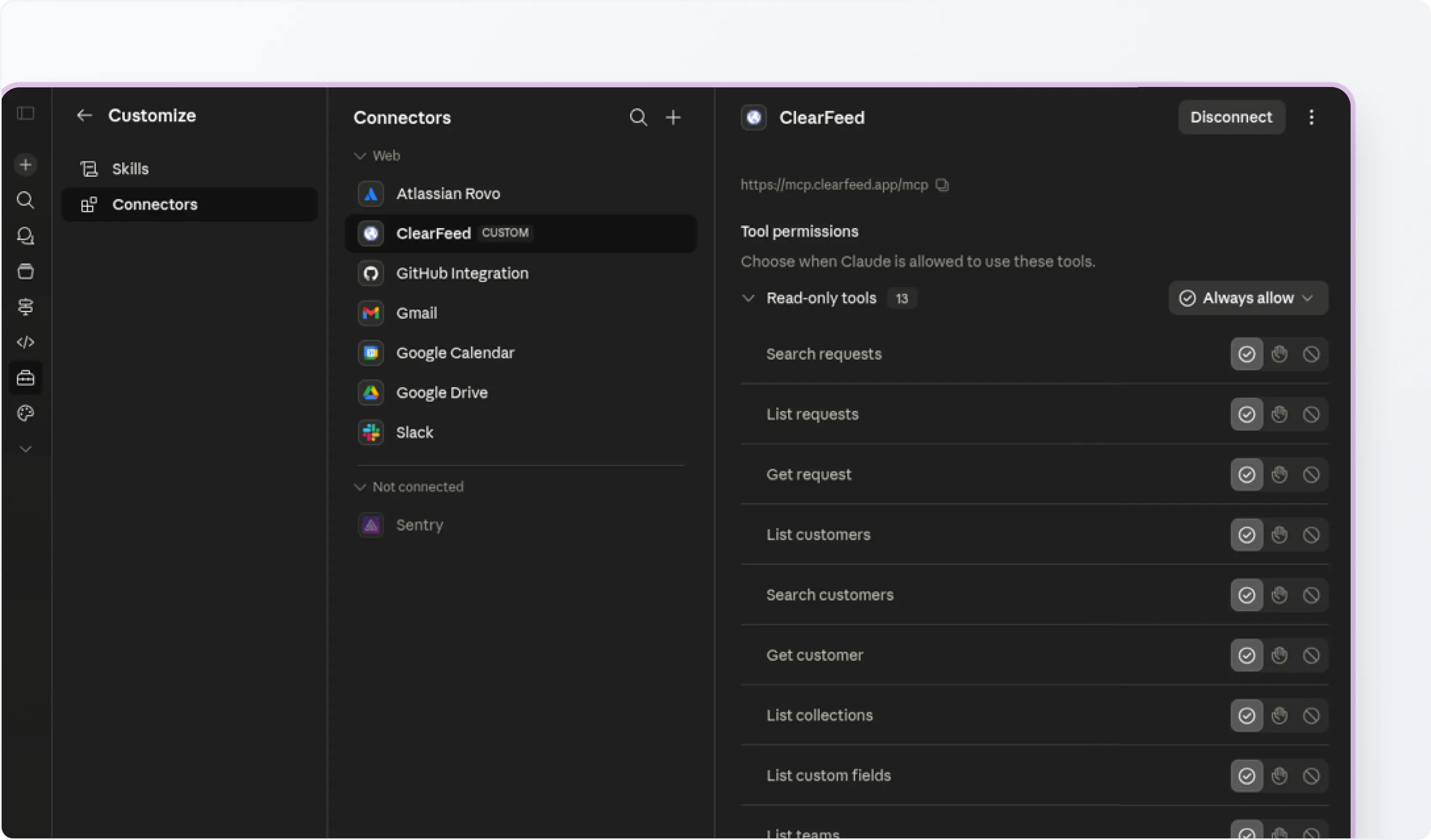
Claude connects to ClearFeed through a hosted MCP endpoint:

This endpoint tells Claude which ClearFeed tools are available, such as searching requests, checking request details, reviewing SLAs, pulling metrics, or working with support insights.
2. OAuth-based sign-in
Teams do not need to copy and paste shared API keys. Each user signs in securely with their own ClearFeed account using OAuth.
3. User-level permissions
Claude’s access follows the permissions of the signed-in ClearFeed user. If a user does not have permission to view or perform an action inside ClearFeed, they will not be able to perform that action through Claude either.
This makes the setup easier to manage for teams. Admins do not need to host infrastructure or distribute tokens, and users can work with ClearFeed context inside Claude while staying within their existing access controls.
Practical Workflows You Can Run With Claude + ClearFeed MCP
Here are five examples of how support and customer-facing teams can use ClearFeed’s Remote MCP Server in their day-to-day work.
1. Running Cross-Quarter Performance Audits
Pulling weekly CSVs or building manual BI dashboards to look at team performance is an operational bottleneck. With MCP, you can directly ask Claude to compute complex velocity and satisfaction data over custom timelines.
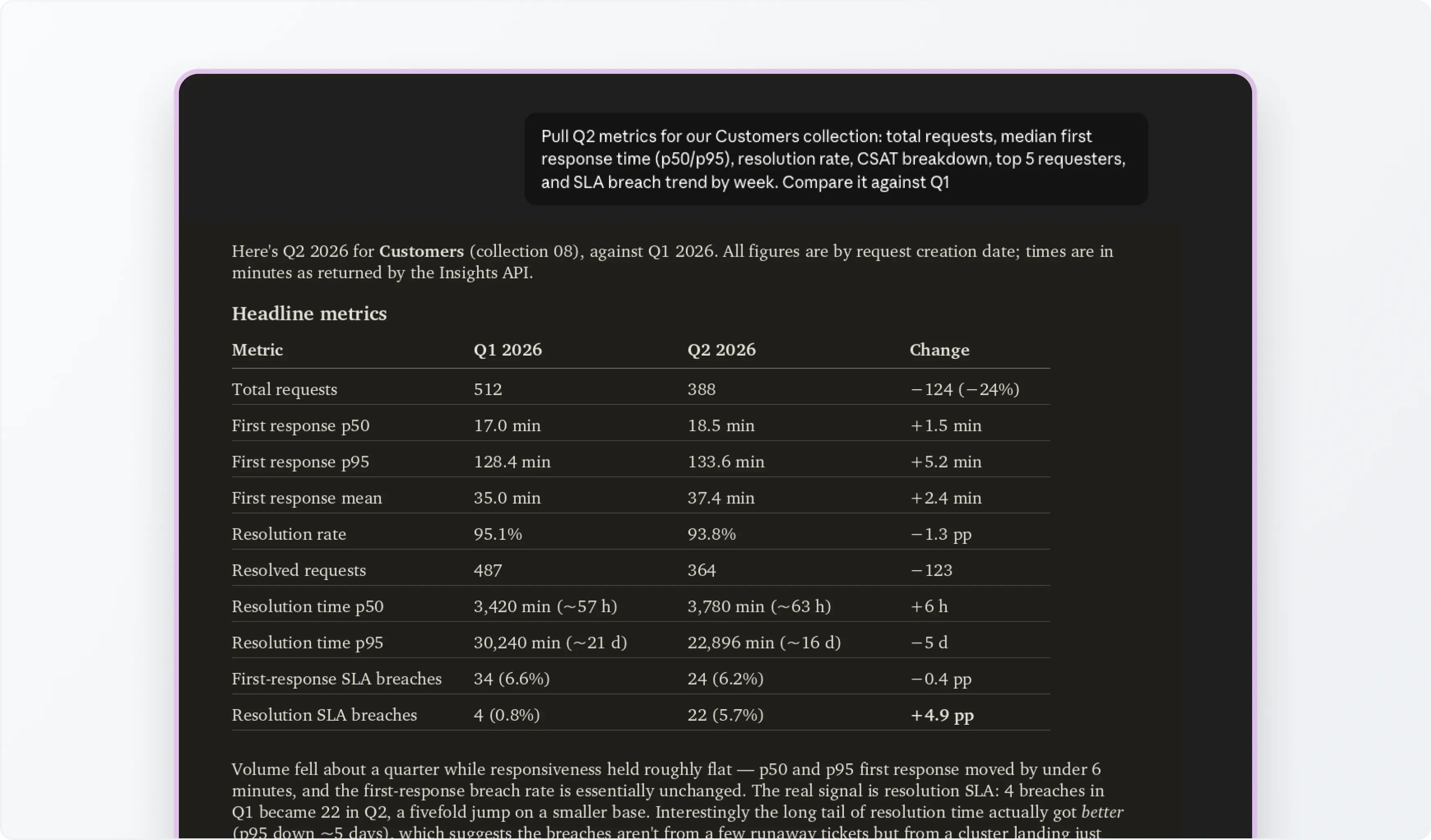
Example Prompt: "Pull Q2 metrics for our Enterprise collection: total requests, median first response time (p50/p95), resolution rate, CSAT breakdown, top 5 requesters, and SLA breach trend by week. Compare it against Q1."
Claude can retrieve the relevant ClearFeed data for both periods, calculate the requested metrics, and present the results in a table. This can help support leaders quickly understand whether response times, customer satisfaction, or SLA performance improved during the quarter.
2. Prepare for Customer Meetings
Before a renewal call or executive review, account teams often need to understand both the customer's commercial importance and their recent support experience.
That information is usually spread across a CRM and support tools. By connecting Claude to ClearFeed and a CRM such as HubSpot or Salesforce, teams can bring this context together before the meeting.
Example Prompt: "I have a call with Acme Corp. Look up their account tier and ARR in HubSpot. Then, show me every request they filed in ClearFeed in the last 90 days - open and closed - with response times and CSAT scores. Flag any SLA breaches."
Claude can pull the account details from the CRM and combine them with the customer’s recent ClearFeed request history. The account team can then review unresolved issues, poor CSAT responses, recurring questions, or SLA breaches before speaking with the customer.
3. Review Queue Distribution and Team Capacity
It can be difficult to tell whether support work is distributed evenly across a team. Request counts alone may not tell the full story. One person may have fewer requests but handle more complex issues, while another may resolve a larger number of straightforward questions. ClearFeed MCP gives managers a quicker way to review assignment volume and resolution times side by side.
Example Prompt: "Show me request count and average resolution time per assignee for the last 30 days in the Support collection. Who's overloaded and who has capacity?"
Claude can review assignment and resolution data from ClearFeed and summarise the differences across the team. The result can serve as a starting point for adjusting rotations, redistributing open requests, or reviewing cases where resolution times are consistently longer.

4. Coordinate P1 Incident Response
When a critical API service goes down, and 500 errors start flooding your Slack customer channels, every minute counts. Instead of manually provisioning channels, copying logs, and messaging affected clients, you can use Claude to automate the chaos engineering overhead.
Example Prompt: "We have a P1 incident - API is returning 500s. Find all ClearFeed requests from the last hour mentioning 'error', '500', or 'down'. Create a dedicated Slack channel #incident-20260629-api, post a summary of all affected requests there, and invite the on-call engineering team."
Claude can search recent ClearFeed requests for the relevant terms, compile a list of affected conversations, and use the connected Slack tools to create an incident channel. This gives support and engineering teams a shared place to review the impact and coordinate their response.
Teams should still review the results, particularly when customer communications or incident severity decisions are involved.
5. Find Gaps in Your Knowledge Base
Support teams answer useful product and troubleshooting questions every day, but those answers do not always make their way into the company’s documentation. As a result, the same questions continue to appear in Slack, email, and other support channels.
ClearFeed MCP can help teams review recent requests, identify recurring topics, and compare them with content in documentation tools such as Confluence, Notion, Google Drive, or SharePoint.
Example Prompt: "Analyze all ClearFeed requests from the last month where the AI agent gave a negative-feedback response or couldn't deflect. Group them by topic. For each topic, check if there's a Confluence page covering it. If not, draft a knowledge base article outline and create a Jira ticket for the docs team to write it."
Claude can identify repeated questions, check whether documentation already exists, and flag missing coverage for the documentation team to follow up. Over time, this can help reduce repeat questions and make useful support knowledge easier for customers and internal teams to find.
Wrapping Up
ClearFeed’s Remote MCP Server enables support teams to work with ClearFeed data in Claude while maintaining their existing permissions and access controls. The most useful workflows often involve combining ClearFeed with other systems your team already uses, such as your CRM, Slack, Jira, or documentation platform.
To learn more about ClearFeed’s Remote MCP Server or try it for your organization, reach out to us on Slack, email support@clearfeed.ai, or book a demo here.