September 22, 2026

Introducing Trending Queries in ClearFeed: Turn Support Conversations Into Actionable Insights

WRITTEN BY
Shipra Sharma
Introducing Trending Queries in ClearFeed: Turn Support Conversations Into Actionable Insights

Support ticketing data is one of the richest sources of customer information a team has and often one of the least used. Customers tell you where they’re getting stuck, which features are confusing, what keeps breaking, and what they need help with. But these signals are spread across hundreds or thousands of individual support conversations.

Finding recurring patterns usually means manually reviewing requests, relying on agents to flag issues, or exporting ticket data for further analysis. To close this gap, we’re excited to launch Trending Queries in ClearFeed Insights, a new way for support teams to automatically identify the questions customers are asking most often  and understand how those questions are changing over time.

What this means for support teams:

  • See what customers ask most: Identify the recurring queries generating the highest number of support requests.
  • Spot emerging issues: Find topics that are beginning to appear more frequently before they turn into larger support problems.
  • Understand what’s changing: See which queries are trending up, trending down, or appearing for the first time compared with the previous period.
  • Turn conversations into action: Use recurring queries to improve documentation, product experience, onboarding, and AI-powered support.

Let's get into how it works.

‍

How Trending Queries Works

Each Trending Query is an automatically generated FAQ: a question and answer backed by related support requests. ClearFeed extracts useful knowledge from conversations, brings together questions with the same intent, and drafts an answer based on the guidance your team has already provided.

1. Turn Support Conversations Into Useful Knowledge

Support conversations contain a lot of noise: greetings, follow-ups, debugging details, clarifications, and other information that may not be useful outside that individual interaction.

Trending Queries analyzes these conversations to extract the meaningful questions and answers within them, creating structured knowledge that can be used to identify recurring patterns.

Turn Support Conversations Into Useful Knowledge

‍

2. Group Similar Questions Into Recurring Queries

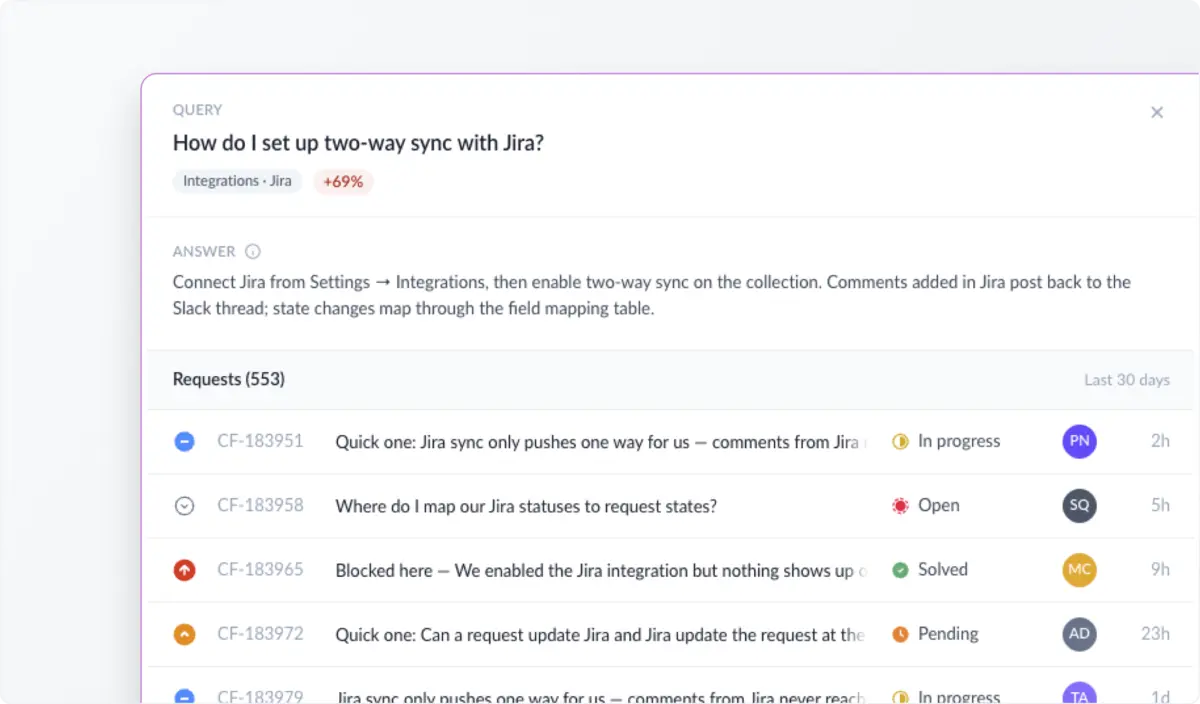
Customers rarely phrase the same question in exactly the same way. One customer might ask, “How do I set up two-way sync with Jira?” while another asks, “Can Jira updates sync back into ClearFeed?” 

Instead of treating these as unrelated requests, ClearFeed combines semantic clustering with LLM-based grouping to bring questions with the same underlying intent together. Each group becomes a recurring query and retains links to the support requests behind it.
Group Similar Questions Into Recurring Queries

‍

3. Generate Answers From Your Team’s Resolutions

For every recurring query, ClearFeed drafts an answer using the guidance and resolutions found in the linked conversations. The result reads like a support article: the title captures the shared question, while the answer summarizes how your team has addressed it.

Teams can open any query to review the generated answer and inspect up to ten of the most recent supporting requests, along with the total number of matching requests. This makes it easy to validate the answer and understand the conversations behind the trend.

‍

4. Keep Queries Updated as New Requests Come In

Trending Queries is not a one-time analysis of historical data. As new requests arrive, ClearFeed checks whether they belong to an existing query or represent something new.

  • Matching questions are linked to existing queries.
  • Existing answers remain unchanged when new conversations support the same guidance.
  • Answers are updated when new conversations add useful information or replace outdated guidance.
  • New queries are created when incoming questions are not covered by an existing query.

This keeps the report aligned with the questions customers are asking and the answers your team is providing over time.

Keep Queries Updated as New Requests Come In

‍

5. See What’s Changing, Not Just What’s Popular

The most frequent questions tell you what drives support volume. The comparison view adds another signal: what changed recently.

  • Trending up: Queries with more linked requests than in the immediately preceding period. A sudden increase may point to a product change, documentation gap, new bug, or growing feature adoption.
  • Trending down: Queries with fewer linked requests than in the preceding period. This can help teams assess whether a product fix, documentation update, or onboarding improvement is reducing demand.
  • New: Queries whose earliest linked request under the active filters falls within the selected period. These are especially useful after launches, migrations, pricing changes, or workflow updates.
  • Reappeared: Older queries that have requests in the current period but none in the immediately preceding period.

Teams can view the last 7, 30, or 90 days and compare each range with the period of the same length immediately before it. The report shows the current and previous request counts, along with the absolute and percentage change. Highlights surface up to three queries each for Trending Up, New, and Trending Down.
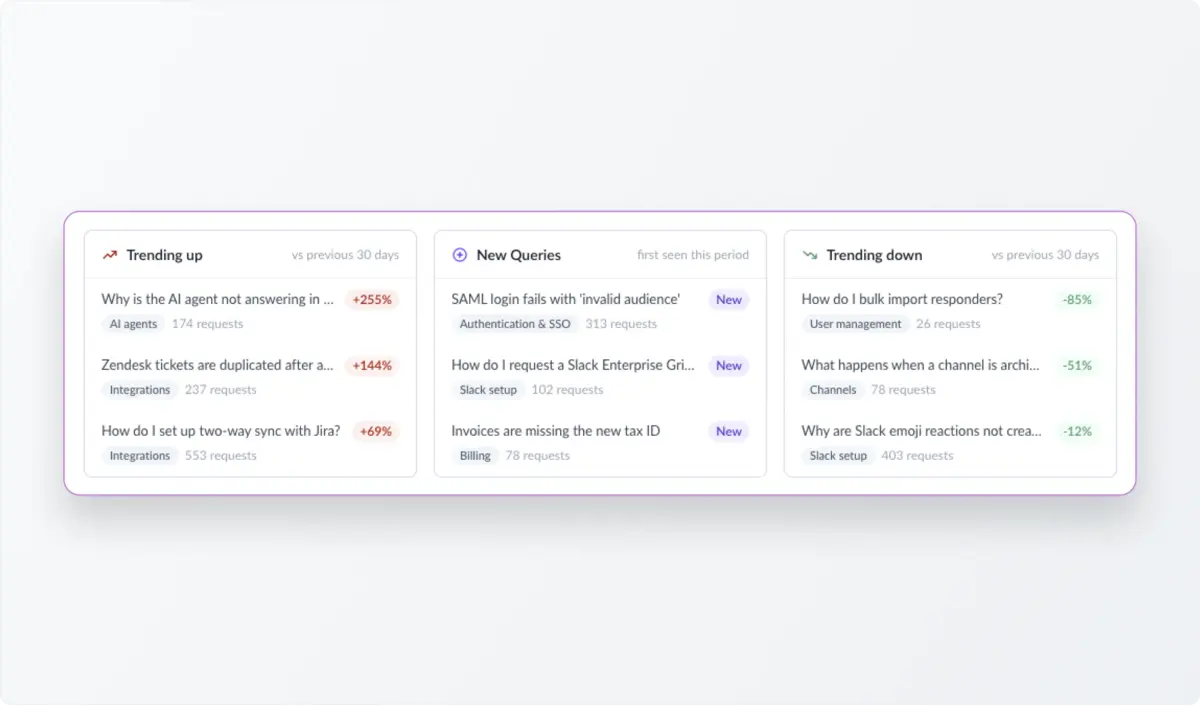
See What’s Changing, Not Just What’s Popular

‍

6. Explore the Questions That Matter to Your Team

Trending Queries can be explored across all processed support data or narrowed to a specific time period. Teams can filter by Collection to focus on a particular support queue, customer segment, or workflow. Collection filters apply to both the query table and the trend highlights, including the counts used for comparisons.

You can also search by keyword to investigate a particular product area or issue without going through individual requests. The table is ordered by request count for the selected period, making it easy to identify the questions consuming the most support capacity and the strongest candidates for self-service or automation.
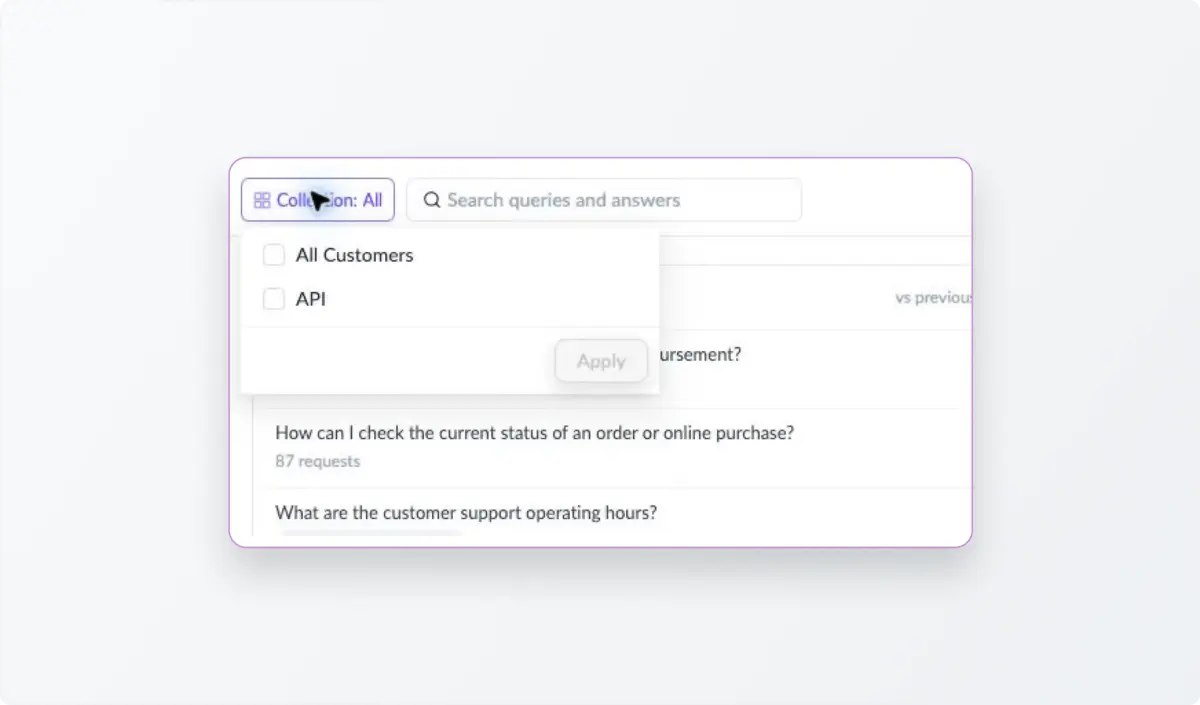
Search and Explore Queries Across Your Support Data

‍

7. Customize How Queries Are Generated

Every support operation is different. Account-level instructions let teams tailor how ClearFeed extracts, groups, and drafts queries. These instructions apply both when ClearFeed generates the initial set of queries and when it processes subsequent updates.

Customization What it controls
Helpdesk context Background about your product, audience, and support team.
Exclusion rules Which conversations should be excluded, such as spam, sales discussions, greetings, or ticket-specific updates without reusable guidance.
Grouping rules When related questions should be combined or kept separate.
Drafting rules The style, and length of generated answers.

‍

Wrapping Up 

Support analytics have traditionally been good at telling teams how many requests they receive and how quickly they resolve them. Trending Queries adds another layer: what customers are actually asking and how those questions are changing over time.

By turning unstructured support conversations into recurring, evidence-backed queries, ClearFeed helps teams identify their biggest support drivers, spot emerging issues, improve documentation, uncover opportunities for automation, and bring the voice of the customer into product decisions.

Trending Queries is live now on the Insights page. If you'd like a walkthrough, reach out to us on Slack or book a product walkthrough with the Support team.

Support ticketing data is one of the richest sources of customer information a team has and often one of the least used. Customers tell you where they’re getting stuck, which features are confusing, what keeps breaking, and what they need help with. But these signals are spread across hundreds or thousands of individual support conversations.

Finding recurring patterns usually means manually reviewing requests, relying on agents to flag issues, or exporting ticket data for further analysis. To close this gap, we’re excited to launch Trending Queries in ClearFeed Insights, a new way for support teams to automatically identify the questions customers are asking most often  and understand how those questions are changing over time.

What this means for support teams:

  • See what customers ask most: Identify the recurring queries generating the highest number of support requests.
  • Spot emerging issues: Find topics that are beginning to appear more frequently before they turn into larger support problems.
  • Understand what’s changing: See which queries are trending up, trending down, or appearing for the first time compared with the previous period.
  • Turn conversations into action: Use recurring queries to improve documentation, product experience, onboarding, and AI-powered support.

Let's get into how it works.

‍

How Trending Queries Works

Each Trending Query is an automatically generated FAQ: a question and answer backed by related support requests. ClearFeed extracts useful knowledge from conversations, brings together questions with the same intent, and drafts an answer based on the guidance your team has already provided.

1. Turn Support Conversations Into Useful Knowledge

Support conversations contain a lot of noise: greetings, follow-ups, debugging details, clarifications, and other information that may not be useful outside that individual interaction.

Trending Queries analyzes these conversations to extract the meaningful questions and answers within them, creating structured knowledge that can be used to identify recurring patterns.

Turn Support Conversations Into Useful Knowledge

‍

2. Group Similar Questions Into Recurring Queries

Customers rarely phrase the same question in exactly the same way. One customer might ask, “How do I set up two-way sync with Jira?” while another asks, “Can Jira updates sync back into ClearFeed?” 

Instead of treating these as unrelated requests, ClearFeed combines semantic clustering with LLM-based grouping to bring questions with the same underlying intent together. Each group becomes a recurring query and retains links to the support requests behind it.

Group Similar Questions Into Recurring Queries

‍

3. Generate Answers From Your Team’s Resolutions

For every recurring query, ClearFeed drafts an answer using the guidance and resolutions found in the linked conversations. The result reads like a support article: the title captures the shared question, while the answer summarizes how your team has addressed it.

Teams can open any query to review the generated answer and inspect up to ten of the most recent supporting requests, along with the total number of matching requests. This makes it easy to validate the answer and understand the conversations behind the trend.

‍

4. Keep Queries Updated as New Requests Come In

Trending Queries is not a one-time analysis of historical data. As new requests arrive, ClearFeed checks whether they belong to an existing query or represent something new.

  • Matching questions are linked to existing queries.
  • Existing answers remain unchanged when new conversations support the same guidance.
  • Answers are updated when new conversations add useful information or replace outdated guidance.
  • New queries are created when incoming questions are not covered by an existing query.

This keeps the report aligned with the questions customers are asking and the answers your team is providing over time.

Keep Queries Updated as New Requests Come In

‍

5. See What’s Changing, Not Just What’s Popular

The most frequent questions tell you what drives support volume. The comparison view adds another signal: what changed recently.

  • Trending up: Queries with more linked requests than in the immediately preceding period. A sudden increase may point to a product change, documentation gap, new bug, or growing feature adoption.
  • Trending down: Queries with fewer linked requests than in the preceding period. This can help teams assess whether a product fix, documentation update, or onboarding improvement is reducing demand.
  • New: Queries whose earliest linked request under the active filters falls within the selected period. These are especially useful after launches, migrations, pricing changes, or workflow updates.
  • Reappeared: Older queries that have requests in the current period but none in the immediately preceding period.

Teams can view the last 7, 30, or 90 days and compare each range with the period of the same length immediately before it. The report shows the current and previous request counts, along with the absolute and percentage change. Highlights surface up to three queries each for Trending Up, New, and Trending Down.

See What’s Changing, Not Just What’s Popular

‍

6. Explore the Questions That Matter to Your Team

Trending Queries can be explored across all processed support data or narrowed to a specific time period. Teams can filter by Collection to focus on a particular support queue, customer segment, or workflow. Collection filters apply to both the query table and the trend highlights, including the counts used for comparisons.

You can also search by keyword to investigate a particular product area or issue without going through individual requests. The table is ordered by request count for the selected period, making it easy to identify the questions consuming the most support capacity and the strongest candidates for self-service or automation.

Search and Explore Queries Across Your Support Data

‍

7. Customize How Queries Are Generated

Every support operation is different. Account-level instructions let teams tailor how ClearFeed extracts, groups, and drafts queries. These instructions apply both when ClearFeed generates the initial set of queries and when it processes subsequent updates.

Customization What it controls
Helpdesk context Background about your product, audience, and support team.
Exclusion rules Which conversations should be excluded, such as spam, sales discussions, greetings, or ticket-specific updates without reusable guidance.
Grouping rules When related questions should be combined or kept separate.
Drafting rules The style, and length of generated answers.

‍

Wrapping Up 

Support analytics have traditionally been good at telling teams how many requests they receive and how quickly they resolve them. Trending Queries adds another layer: what customers are actually asking and how those questions are changing over time.

By turning unstructured support conversations into recurring, evidence-backed queries, ClearFeed helps teams identify their biggest support drivers, spot emerging issues, improve documentation, uncover opportunities for automation, and bring the voice of the customer into product decisions.

Trending Queries is live now on the Insights page. If you'd like a walkthrough, reach out to us on Slack or book a product walkthrough with the Support team.

Related Blogs

See all Blog Posts
TOC heading
Text LinkText Link Active
Get a Free consultation with a Support Expert
Learn how fast growing companies like Teleport, Chronosphere and Acryl Data have scaled Support processes with ClearFeed
Thank you for contacting us. Our team will reach out to you shortly.
Oops! Something went wrong while submitting the form.