Table of Contents

Slack (and MS Teams) based customer support has become the default channel for many modern teams. This is especially true for technology companies and B2B product firms.
Pylon is one of the popular tools in this space. It works well with enterprise chat tools like Slack and Microsoft Teams. But Pylon isn’t the right fit for every team. Its pricing can be high, and the product includes many advanced features that some teams don’t need. Because of this, many companies start looking for simpler or more affordable alternatives.
In this guide, we cover some of the best alternatives to Pylon.
TL;DR
Pylon is powerful for B2B Slack support but loses teams on price, feature bloat, weak ticketing integrations, and agents having to leave Slack to manage tickets. This guide covers the best alternatives, grouped by use case.
The gist
- Pylon's main friction points: seat-based pricing that scales poorly, AI minimum spend of ~$500, no self-serve trial (demo required), and a non-Slack-native agent workflow.
- The guide splits alternatives into two buckets: standalone platforms for earlier-stage companies (under 500 employees, Series C or earlier) and Slack integration layers for mature orgs that already have a legacy helpdesk and can't replace it.
- For standalone: ClearFeed ($24/agent/month or $40/month usage-based) is the closest Slack-native alternative with omnichannel support, deep ticketing integrations, and AI. Thena ($29/user/month) is relevant but flagged as potentially being sunset. Intercom ($29/seat/month) is the pick when in-app chat and email matter as much as Slack.
- For integration layers: ClearFeed connects bidirectionally with Zendesk, Salesforce, Jira, Intercom, HubSpot, ClickUp, and Linear. Atlassian Assist is the right fit if you're already on JSM Premium ($51/agent/month). Linear Asks fits eng-adjacent internal workflows but agents have to work from Linear, not Slack.
Worth knowing: Front gets an honorable mention for teams with heavy email and mixed-channel workflows where shared inbox is the primary interface.
What Users Say About Pylon
Pylon is a powerful platform with strong integrations. The interface is clean and modern. It handles customer conversations well, and the browser app feels polished.
The platform also offers advanced features you won’t find in many support tools. These include account intelligence and CRM-style context around customer interactions.
Still, it doesn’t work for everyone.
- Pricing is one common concern. Pylon uses seat-based licenses, which can get expensive as teams grow. AI features also come with a relatively high entry point, with a minimum cost of about $500.
- The product is also feature-heavy. That can slow onboarding, especially for teams that want a tool they can start using right away. You can’t simply sign up and try the product. New users must schedule a demo first.
- Agent workflows can also create friction. Pylon is not fully Slack-native. Teams that manage support inside Slack often need to switch into the Pylon app to manage tickets.
- Another limitation is ticketing integrations. Pylon is less focused on helpdesk integrations than it used to be. That can be a problem for teams that rely on existing ticketing systems.
Pylon can still be a great option for teams that want a more advanced, CRM-style support platform. But if you want something simpler, more collaborative, or more native to the tools your team already uses, several alternatives are worth exploring.
This guide walks through the main Pylon alternatives and compares them.
How To Evaluate the Best Pylon Alternative?
When trying out a new Pylon alternative, focus on these areas:
- Start with workflow fit. Choose a platform that matches where your support work happens. If your team works primarily in Slack, a Slack-native tool may be the best fit. If email is your main channel, a helpdesk that emulates the email experience may be the better choice. The tool should fit your workflow, not force your team to change it.
- Evaluate Channel Integrations. Most companies considering Pylon are looking for a Support tool that can work with Slack and other channels like MS Teams & Discord, as well as traditional channels like Email and Live Chat. Check what integrations are important for your use case.
- Evaluate AI capabilities. We live in the age of AI. AI is critical to real-time alerts, categorizing issues, resolving customer queries, composing smart replies and more. A strong alternative must offer fantastic AI capabilities at an affordable price.
- Check integrations with your stack. Support teams work across multiple systems, so your platform should integrate with Slack, email, CRMs, issue trackers, and help desks. Strong integrations reduce context switching and prevent teams from copying information across tools.
- Assess reporting and visibility. As your team grows, you need more than an inbox. Look for reporting on response times, resolution trends, workload, and performance. Visibility becomes more important as volume increases and collaboration expands. The ability to export data and sync it easily with external tools is vital.
- Match pricing to your team’s shape. A tool can impress in a demo, yet still be prohibitive at scale. AI is essential for today’s workflow products — but many vendors gate it behind pricey tiers.
Pylon Alternatives at a Glance
The Best Pylon Alternative (Grouped by Use Case)
Best Standalone Support Platform Alternatives for Pylon
This group includes stand-alone support platforms that are often a better fit for earlier-stage companies, typically those with fewer than 500 employees and at Series C or earlier. Most of these teams handle support primarily via Slack or Microsoft Teams, and some also work via email and live chat.
1. ClearFeed External Helpdesk
ClearFeed is a Slack-first customer support and service desk platform. Teams use it to manage customer and internal requests across Slack Connect, Microsoft Teams, email, live/web chat, and a support portal. It helps you move at the speed of Slack without losing track of customer messages.
ClearFeed also serves as your system of record. It brings all conversations and channels into one place, so nothing slips through the cracks. It integrates with Zendesk, Freshdesk, Intercom, Salesforce, HubSpot, and task tools like Jira, ClickUp, Linear, and GitHub.
Key Features
- Brilliant Slack-Native Experience: Agents can manage status, update assignees, view ticket fields, and get AI assistance directly inside Slack through triage channels. Supports manual and automated ticketing, as well as private tickets via DM.
- Omnichannel Support: Manage requests from Slack, email, web chat, and Microsoft Teams, especially useful when Slack is not your only customer touchpoint.
- Proactive AI Alerts: AI monitors every message, understands the state of each conversation, and triggers alerts based on configurable timers.
- Extensive Integrations: Connect with CRMs like HubSpot and Salesforce, ticketing tools like Zendesk and Freshdesk, task systems like Jira, ClickUp, Linear, GitHub, and Asana, and external systems via webhooks.
- Automated Channel Management: Manage hundreds of channels with automated welcome messages, channel monitoring, broadcasts, and analytics for Slack channel activity.
- AI Agents and Connected Knowledge Sources: Two conversation modes — Virtual Agent (public replies) and Agent Assistant (private drafts) — grounded in Knowledge Sources like Confluence, Notion, Google Drive, Coda, ReadMe, Intercom, Zendesk, Freshdesk, GitHub, and past ClearFeed tickets. AI Agents can also take actions in Jira, Zendesk, HubSpot, Okta, JumpCloud, Asset Panda, BambooHR, and Kandji.
Pros
- Great fit for Slack-native support teams that want to stay in Slack while adding more structure and accountability
- Flexible pricing options with both agent-based and usage-based plans, depending on team size and support volume
- Broad integration coverage across the tools that support teams already rely on
- AI Agents available as an affordable add-on, even on the Starter plan
Cons
- ClearFeed may not be the right fit for companies that do not use Slack as a primary support channel.
- The in-app chat widget is still less mature than that offered by more established vendors like Intercom.
- Email workflows are lighter than in email-first platforms. Some shared mailbox use cases, advanced filtering, and update notification flows may require workarounds.
Pricing
- Agent-based pricing: Starter starts at $24 per agent/month for teams with 1–15 agents, while Professional starts at $49 per agent/month for teams with 1–15 agents.
- Usage-based pricing: Starter begins at $40/month for 10 channels and 100 tickets, while Professional starts at $80/month for 10 channels and 100 tickets. Pricing then scales based on the number of channels and tickets.
- AI Pack: Included on Professional and Enterprise plans. Available as a $20/month add-on on Starter and Integrations plans for 100 GPT requests, then $2 per 10 additional requests. Starter customers can request a one-time AI Pack trial (typically 14 days).
2. Thena
Thena is an AI-powered customer support platform purpose-built for B2B teams. It integrates with modern communication tools such as Slack and Microsoft Teams to streamline customer interactions and support operations for rapidly growing teams.
Key Features
- Multi-channel support: Slack, email, web chat, MS Teams
- Good Browser application for managing conversations
- Custom workflows, cascading forms, and SLAs
- Comprehensive analytics and reporting
- Integrations: Zendesk, Salesforce, HubSpot, Jira
- Robust API support
Pros
- Smart case and ticket management
- Seamless Slack & MS Teams integration
- AI-driven automation
- Helpful analytics
Cons
- Service is reportedly being sunset
- API and integration challenges
- Limited automation/customization in base plans
- Advanced features behind higher plans
Pricing
- Starter: $29/user/month; up to 5 users and 1,000 tickets/month
- Standard: $79/user/month; AI web chat and APIs
- Enterprise: $119/user/month; MS Teams integration, enterprise security features
Related Read: Best Thena alternatives in 2026
3. Intercom
Intercom is a strong Pylon alternative for teams whose support motion extends well beyond Slack. If customer conversations come in through in-app chat, email, and web forms just as much as or more than through Slack, Intercom offers a much more unified omnichannel experience than Slack-native tools. It has also made major improvements to its Slack integration, making it one of the better Slack experiences among legacy helpdesk platforms.
Key Features
- Fin AI Agent that answers customer questions across chat, email, and messenger channels and only bills when it successfully resolves a query.
- Brings conversations from live chat, email, social channels, and Slack into one place.
- Offers one of the strongest browser-based chat experiences in the market.
- Helps teams build a support knowledge base so customers can find answers independently.
- Connects with hundreds of tools, including CRM, analytics, and other business systems.
Pros
- Powerful Fin AI Agent for automated customer query resolution
- Unified platform for support, marketing, and customer engagement
- Strong mobile and in-app support experience
Cons
- Complex pricing with potentially high commitments
- Chat-first product, with email as a secondary workflow
- Agents cannot work natively from Slack
- No broader Slack sync with CRM or project management tools
Pricing
- Essential: $29/seat/month; Shared inbox, basic messenger, public help center, Fin AI at $0.99/resolution
- Advanced: $85/seat/month; Multiple inboxes, advanced workflows, integrations, multilingual help center
- Expert: $132/seat/month; Workload management, SLAs, multiple help centers, advanced security, SSO, custom roles
Honorable Mention: Front
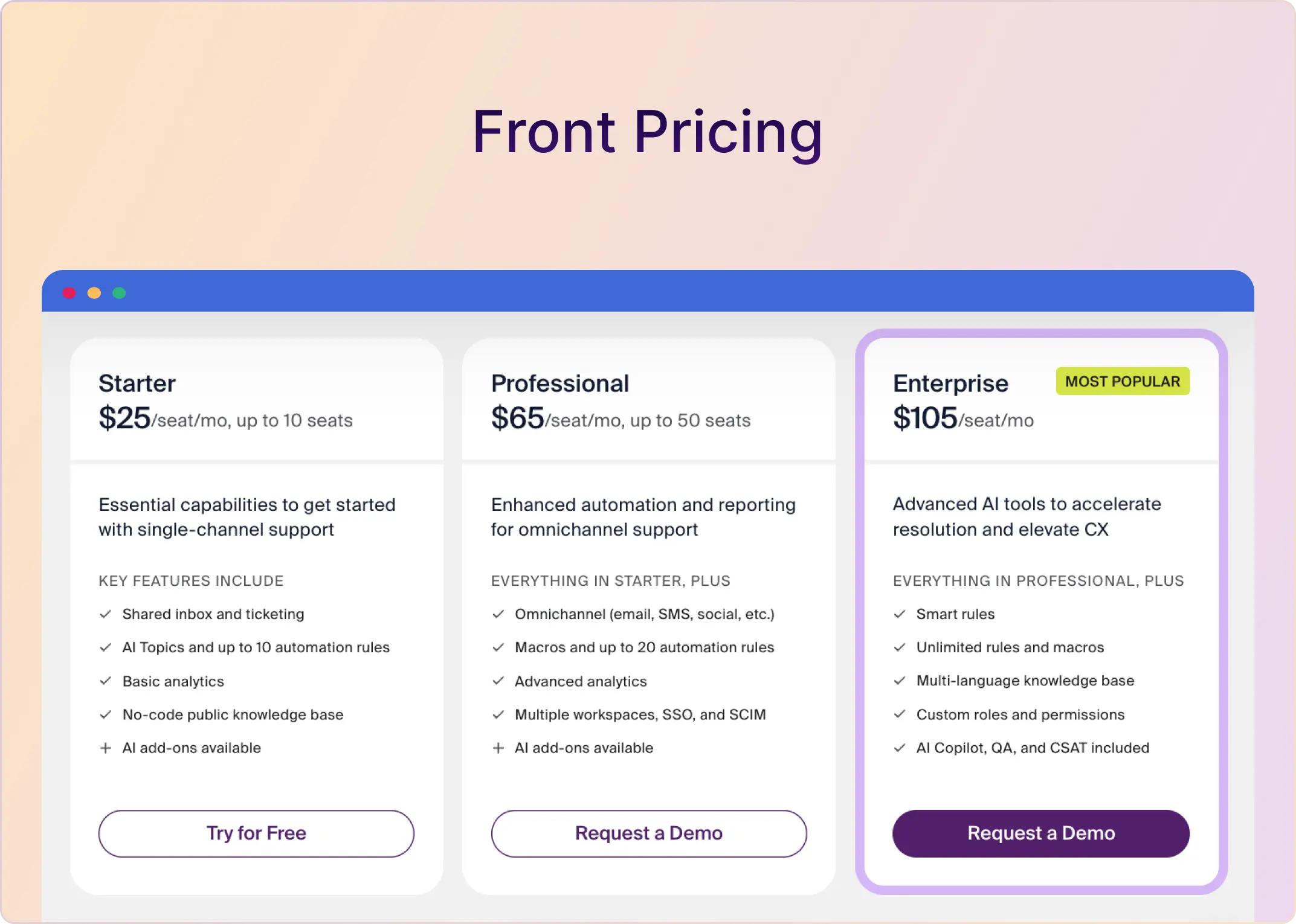
Front takes a different approach to customer communication than most tools on this list by centering the shared inbox. Like Pylon, it is built for external-facing conversations. But unlike many legacy helpdesk platforms, Front offers a stronger integration with Slack. If your team handles a mix of email threads, Slack conversations, SMS, and social messages, it is a solid option.
Best Slack Integration Alternatives for Pylon
Many companies already have an established enterprise ticketing system that they cannot easily replace. This category highlights the best solutions for managing Slack- and Microsoft Teams-based support alongside a legacy helpdesk such as Zendesk, Salesforce, Intercom, HubSpot, ClickUp, or Freshdesk.
The companies looking for these solutions are usually more mature organizations, often with 500+ employees, and typically late-stage or public. They increasingly use Slack and Microsoft Teams to support premium customers, even while their core support team continues to operate from a legacy helpdesk.
In these organizations, teams such as Technical Services and Customer Success often manage customer conversations in Slack or Teams, while Support remains anchored in the existing ticketing platform.
Below, we’ve listed some of the top options in this category, along with the legacy helpdesk systems they integrate well with.
1. ClearFeed Integrations (for Zendesk, Salesforce, ClickUp, Linear, Jira, HubSpot)
ClearFeed can work either as a standalone support platform or alongside an existing enterprise helpdesk. It offers key ticketing integrations with Zendesk, Salesforce Service Cloud, Intercom, Freshdesk, HubSpot, ClickUp, Linear, Jira, and Jira Service Management.
Key Features
- Slack-native ticketing and triage. ClearFeed lets teams centralize requests from many Slack channels into triage views, work from Slack, and choose whether messages become tickets automatically, via emoji, forms, or manual review. It also supports both private and customer-facing replies within the same workflow.
- Bi-directional integrations. Two-way sync with Zendesk, Jira and Jira Service Management, Linear, Intercom, Salesforce, Freshdesk, HubSpot, and ClickUp keeps Slack conversations, ticket comments, and internal notes aligned across systems.
- AI for support workflows. It can pull from Zendesk Help Center, Notion, Confluence, Google Drive, and historical tickets to answer questions, suggest private replies, auto-categorize, summarize threads, and even detect sentiment in certain workflows.
- Flexible request capture. Useful where customers do not thread well or where teams want control: ClearFeed can merge or group related Slack messages, support selective ticketing, and use forms/custom fields for structured intake.
- Analytics, SLA tracking, and CSAT. Response-time reporting, SLA alerts, dashboards, Kanban-style views, exports, and post-resolution feedback often appear as reasons buyers consider it over lighter Slack tools.
- Portal, widget, and email support. Beyond Slack channels, ClearFeed is also used for embedded web chat, customer portals, and email-to-Slack support flows.
Pros
- Best fit for Slack-first teams
- Better operational depth than “just a Slack layer”
- Works well with existing systems instead of forcing a rip-and-replace
- Flexible enough for both customer-facing and internal support
- AI is more practical than just a chatbot story
- Pricing has multiple shapes
Cons
- Not the strongest choice if you need broad non-Slack coverage first
- Email/shared inbox depth is not as strong as Front-style setups
- Some advanced asks still depend on workarounds or roadmap
- Branding/white-labeling may require higher tiers
2. Atlassian Assist (for Jira Service Management)
Atlassian Assist is a Slack-native ticketing tool built to work directly with Jira Service Management. If your customer support team already operates in JSM and wants to offer customers a Slack-native way to submit support requests, Assist is designed specifically for that use case.
Key Features
- Two-way Slack and JSM sync for raising, managing, and reporting on requests
- Private agent channels plus public request channels for structured support workflows
- Premium virtual service agent for automated request detection and replies in Slack
- Teams integration to convert messages into JSM work items and act on them from Teams
Pros
- Deep integration with Atlassian tools such as Jira and Confluence
- Strong workflow automation and customization for complex support processes
- Comprehensive support platform capabilities across incidents, problems, changes, and service requests
- Large app ecosystem that extends functionality and supports broader use cases
Cons
- JSM-only approach with no support for other helpdesks
- Setup requires time and admin expertise
- Advanced reporting often needs paid add-ons
- Seat-based pricing can be costly at scale
Pricing
Included with JSM Premium starting at $51/agent/month. Not available on Free or Standard plans, which makes the entry point fairly expensive unless your team is already on Premium.
Related Read: Explore how ClearFeed compares to Atlassian Assist
3. Linear Asks (for Linear)
Linear Asks is Linear’s intake layer for turning Slack requests, such as bugs, IT issues, internal questions, and feature ideas, into actionable issues, without requiring everyone to learn a new tool. Requests can be submitted through Slack or email and then routed to a team’s Triage queue in Linear for review, prioritization, and assignment.
Key Features
- Slack and email intake, even for users without a Linear account
- Custom Slack forms with templates and required fields
- Emoji triggers to create Asks from Slack messages
- Two-way sync between Linear issues and Slack threads
- Private Asks for sensitive requests via DMs and the Asks bot
Pros
- Excellent keyboard shortcuts for power users
- Minimal, thoughtfully designed interface
- Exceptionally fast and responsive
- Great integrations with developer tools
Cons
- Agents must work from Linear, not Slack
- Lacks some core support metrics like first response time and SLA tracking
- Seat-based pricing is expensive, with private channels gated to Enterprise
Pricing
- Plus: $16 per user/month and includes triage, a customer portal, analytics, and priority support.
- Enterprise: Custom pricing, with access to Linear Asks available on this plan.
Best Pylon Alternative for Slack-First Support Teams
Which Pylon alternative is best for you depends on how your team handles support. If most questions come in via email, you want a traditional help desk. If you're in Slack or Microsoft Teams all day, you need something built for that.
You're choosing based on: where conversations happen, workflow complexity, automation needs, integrations, reporting, and whether the tool scales as your support operation matures.
Pick what fits how you already work. If you handle support in Slack or Teams and want better triage, clearer ownership, and stronger integrations, look at ClearFeed alongside the others here. Start a free ClearFeed trial and test it in your real workflow before you commit.