September 30, 2026

6 Best Slack–ClickUp Integrations in 2026

WRITTEN BY
Happy Das
6 Best Slack–ClickUp Integrations in 2026

Creating a ClickUp task from Slack takes a few clicks. The mess usually begins afterward.

A customer adds a screenshot in Slack. Engineering asks a question in ClickUp. The answer lands back in Slack, unseen by the assignee. Three days later, someone has to piece together two incomplete conversations.

The right integration depends on how much needs to travel. ClickUp's native app handles quick task creation and alerts. A sync tool moves replies both ways. An automation platform connects Slack and ClickUp to a larger process.

We reviewed six options based on what happens after task creation, setup effort, private-channel support, and cost at scale.

‍

How We Evaluated Slack–ClickUp Integrations

The phrase “Slack–ClickUp integration” can mean a shortcut, a sync, or a full request system. We asked five practical questions:

  • Can users create tasks from messages, threads, forms, or emoji reactions?
  • Do replies, comments, and status changes move in both directions?
  • Can users update important task fields, including in private channels?
  • Is it ready to use, or does someone need to build and maintain it?
  • How does the price grow: by seats, items, tasks, credits, or tickets?

‍

TL;DR

Tool Best for Main strength Starting price*
ClickUp for Slack Occasional task creation and ClickUp alerts Native task creation, task previews, edits, and notifications Included with ClickUp
ClearFeed Agencies and SaaS support teams routing Slack requests into ClickUp Ready-made two-way reply and status sync, with SLA tracking that survives an engineering escalation $49/month for 250 tickets
Unito No-code, two-way syncing between work tools Configurable Flows that keep supported Slack and ClickUp fields aligned Priced by connected tools, items in sync, and features
Zapier A few straightforward, trigger-based automations Flexible Zaps for reactions, messages, task creation, and updates Free; Professional from $19.99/month
Make Custom workflows with branching and data transformation A visual builder with more control over multi-step logic Free; Core from $9/month for 10,000 credits
Workato Large companies with an integration team Governed workflows across several systems Pro from $75/month for 2,500 credits

‍

6 Best Slack–ClickUp Integrations

1. ClickUp for Slack

Start here if your needs are light. ClickUp's Slack integration is included with every plan and handles the common jobs well. Use /clickup new or the message menu to create a task, set its main fields, and share a preview that the channel can read or update.

The catch: this is task access, not conversation sync. ClickUp posts alerts and sends selected messages to tasks, but it won't align every later Slack reply with every ClickUp comment. That is fine for occasional handoffs. In a busy queue, the gaps add up.

Activity alerts are useful when a channel simply needs visibility. Pick the relevant ClickUp location, choose the events, and let Slack announce new tasks, comments, attachments, status changes, or assignee changes.

Key features

  • Create a task with /clickup new or from a Slack message action.
  • Set important task fields during creation and edit supported fields from the Slack preview.
  • Add a selected Slack message to a task and expand ClickUp links into previews.
  • Post activity alerts for selected ClickUp locations.
  • Use ClickUp Automations to respond to Slack messages or reactions on eligible plans.

Pros

  • It is the simplest place for a ClickUp customer to start. There is no second product to buy or teach the team.
  • It handles occasional handoffs quickly: turn a useful Slack message into a task, fill in the important fields, and move on.
  • Previews and alerts provide a Slack channel with enough context to track progress without having to open every task.

Cons

  • Slack replies and ClickUp comments don't stay in sync. Someone must copy important follow-ups, or the two conversations will drift apart.
  • ClickUp guests and limited members can't use the integration, so occasional requesters may be unable to create or update tasks themselves.
  • One ClickUp Workspace connects to one Slack workspace at a time. That becomes awkward if your company runs several Slack workspaces.
  • Slack-triggered ClickUp Automations require the Business plan or above. Free Forever and Unlimited users don't get the one-click reaction workflow.

Pricing

The Slack integration is included in ClickUp.

  • Free Forever: $0
  • Unlimited: $7/user/month
  • Business: $12/user/month
  • Enterprise: Custom pricing

‍

2. ClearFeed

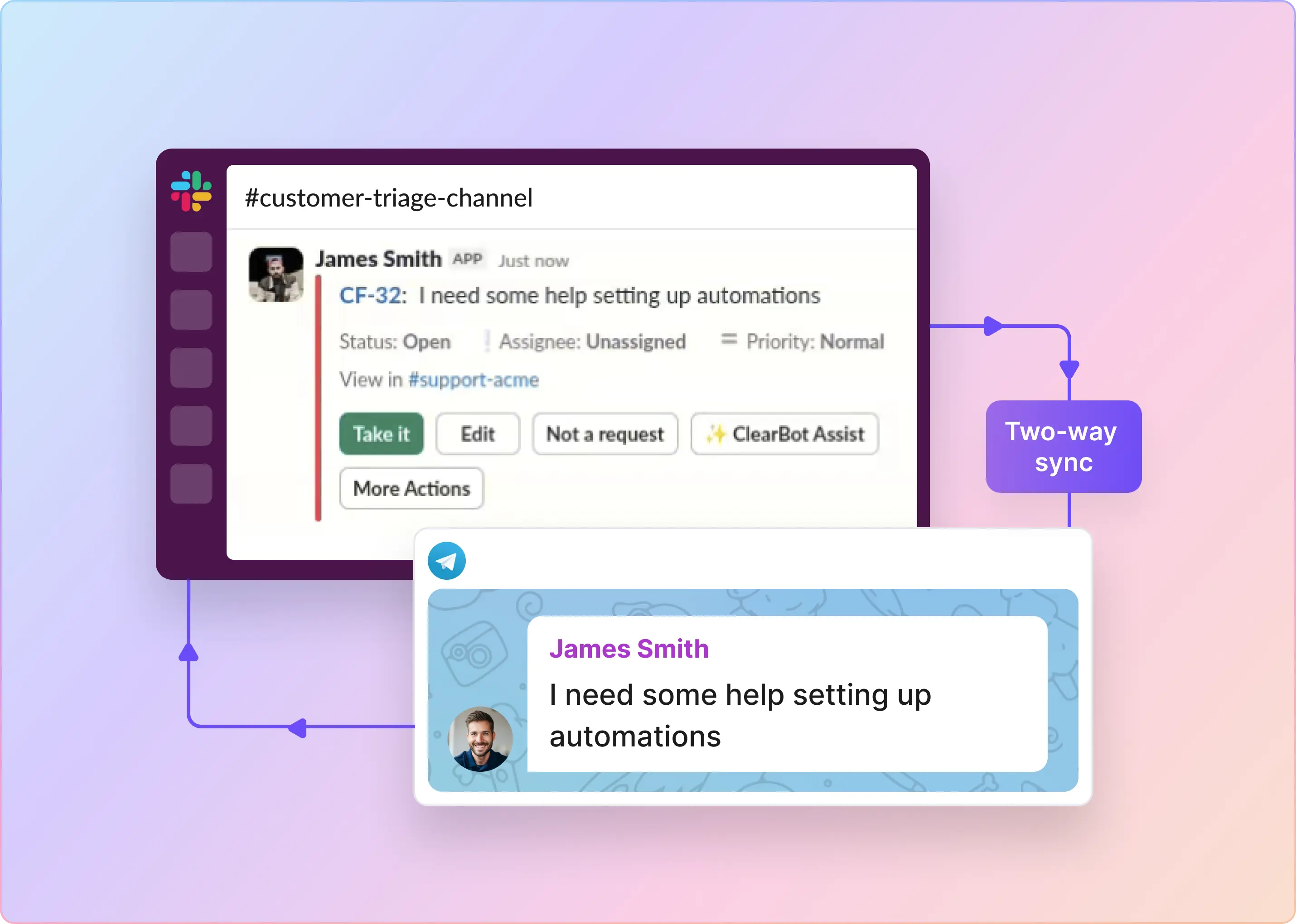
ClearFeed is built for a familiar split: requesters talk in Slack, while the team doing the work lives in ClickUp. Someone adds an emoji or completes a form, ClearFeed creates the task, and replies travel between the Slack thread and ClickUp comments.

You can keep ClickUp as the main ticket system or create tasks only when work needs a specialist. That helps when dozens of questions arrive in Slack but only a few need engineering. In task-management mode, SLA timers stay on the customer request in Slack even after engineering work moves to ClickUp — the customer response clock keeps running while ClickUp handles the fix.

Long threads get special treatment, too. Long Slack threads become one-line ClickUp titles automatically, so the assignee sees the problem rather than a wall of chat history.

Key features

  • Create tasks automatically, from an emoji reaction, or through a Slack form.
  • Sync replies between the original Slack thread and the ClickUp task in both directions.
  • Choose two-way, one-way, or no message sync, and copy attachments into new tasks.
  • Show task details and update supported fields from Slack.
  • Use emoji reactions to assign a ClickUp issue, move it to In Progress, or mark it as done. This works without upgrading your ClickUp plan, while ClickUp’s native Slack integration limits reaction-based automations to its Business plan.
  • Turn ClickUp Lists into Slack forms. You can also use AI to summarize a long thread before creating a task from it.
  • Connect each Slack channel to a specific ClickUp List. Agencies can keep each client’s channel and work queue together without setting up custom automations.
  • Let employees create tickets privately through a DM or with cf-file. This is useful for confidential HR or IT requests that shouldn’t appear in a public channel.

Pros

  • Each group can stay in its preferred tool, so nobody has to copy every useful reply by hand.
  • Forms, task creation, updates, and two-way replies arrive as one workflow rather than several automations you must maintain.
  • Pricing is based on ticket volume, not the number of Slack requesters. That can suit a large company where many people submit only an occasional request.
  • Keep engineering's ClickUp discussion invisible to customers. Sync can be set one-way (Slack → ClickUp only), globally or per-ticket, so internal ClickUp comments never leak into a customer-facing Slack thread.

Cons

  • The Integrations Edition covers internal Slack channels. If you work with customers through Slack Connect, you’ll need the separately priced External Helpdesk edition, which includes SLAs and analytics.
  • Each ClickUp account can connect to only one ClearFeed account through OAuth at a time. Companies with multiple ClickUp Workspaces may need separate ClearFeed accounts.
  • By default, the Slack confirmation card shows only the ticket’s status, title, and link. You can still update the assignee, priority, due date, and custom fields from Slack using Edit Ticket, but those details won’t appear on the card.
  • ClearFeed works best when a request starts in Slack. Sending an existing ClickUp task to Slack requires additional setup with webhooks from Slack Workflow Builder and the ClickUp API.

Pricing

ClearFeed's Integrations Edition is priced by monthly ticket volume.

Monthly ticket allowance Starter Professional
250 $49/month $89/month
500 $79/month $129/month
1,000 $109/month $189/month
2,500 $169/month $289/month

‍

3. Unito

Unito is the bridge-builder here. A Flow links Slack messages to ClickUp tasks: the message becomes the description, replies become comments, and supported changes flow in the direction you choose.

ClickUp offers rich fields, including assignee, due date, priority, status, tags, attachments, and custom fields. Slack offers fewer. The result is a capable sync, not a full copy of ClickUp inside Slack.

The setup lives or dies by field mapping. Decide what a Slack message should become, which changes should travel back, and whether existing messages belong in the Flow before switching it on.

Key features

  • Create ClickUp tasks from Slack messages or Slack messages from ClickUp tasks.
  • Sync supported fields in one direction or both and map replies to comments.
  • Sync historical messages and existing tasks within documented limits.
  • Map ClickUp status, priority, assignee, description, tags, due date, and supported custom fields.

Pros

  • Two-way sync is the product's primary function, not a workaround cobbled together from unrelated automations.
  • It can bring existing work into the Flow, rather than handling only events that occur after setup.
  • You can use the same platform to connect ClickUp to other project management, CRM, or service tools.

Cons

  • Slack sync works only in public channels. That rules out many HR, IT, finance, and customer-support conversations.
  • Slack reactions and filters aren't supported. You can't use an emoji as a “send this to ClickUp” button, and the Flow may pull every message from the channel.
  • Slack changes can take five minutes or more to reach ClickUp—noticeable during an urgent discussion.
  • Each Flow syncs only the 500 most recent top-level Slack messages, so a busy channel may lose older context.

Pricing

Unito prices by connected tools, items in sync, and required features. Basic and Pro prices are shown in the app; Enterprise requires a sales conversation. Both sides count: 100 ClickUp tasks synced to Slack count as 200 items.

‍

4. Zapier

If you can describe the workflow as “when this happens, do that,” Zapier feels natural. A reaction creates a task; a task change notifies a channel; a saved message goes to the right List. Filters decide what moves forward.

Zapier shines at small, precise automations. Making one Slack thread and one ClickUp task behave like a permanent pair requires several Zaps, stored IDs, loop protection, and failure handling. You can build it, but you own it.

That distinction matters. One Zap that creates a task is an afternoon project. A two-way system that syncs every comment is a small integration product, even if no traditional code is involved.

Key features

  • Create ClickUp tasks from reactions, saved messages, channel messages, and other triggers.
  • Send Slack channel or direct messages when ClickUp tasks are created or changed.
  • Add filters, paths, formatting, webhooks, delays, code, and data tables.
  • Find and update an existing task instead of creating a duplicate.
  • Bring thousands of other supported apps into the same workflow.

Pros

  • Simple rules are quick to build, test, and explain to the rest of the team.
  • Filters stop every Slack message from becoming a task, and private-channel triggers work when the connected account has access.
  • Existing Zapier customers can manage this workflow beside their other automations.

Cons

  • There is no ready-made link between a Slack thread and a ClickUp task. You must design and store that relationship.
  • Dependable two-way sync needs several steps, loop protection, and someone to investigate failures. The no-code builder can still produce a technical system.
  • Every successful external step uses the shared task allowance. Reply-by-reply sync burns through tasks faster than a simple one-way workflow.
  • Professional includes one user. Shared connections and collaborative management require the Team plan.

Pricing

Zapier has a free tier. Professional starts at $19.99 per month with multi-step Zaps, premium apps, webhooks, and one seat. Team starts at $69 per month with 25 users and shared connections. Enterprise pricing is custom.

‍

5. Make

Make puts the plumbing on a canvas. A Slack reaction can start a visual path that checks the channel, finds the right ClickUp List, cleans up the message, creates the task, and posts a confirmation. Different channel? Add a branch.

The visual path helps with complex automation, but it doesn't remove the building work. Your team still owns the thread-to-task link, retries, permissions, and loop prevention.

Compared with Zapier, Make exposes more of that machinery on screen. Builders gain control over branching and data changes; casual users inherit a diagram that may need an expert when it breaks.

Key features

  • Watch ClickUp task, List, Folder, and Space events.
  • Create and update tasks, tags, dependencies, checklists, and other records.
  • Read Slack messages, view reactions, post replies, and route messages to different branches.
  • Use webhooks or API modules when the standard connector falls short.

Pros

  • The visual builder makes branching logic and data movement easier to inspect.
  • It gives you more control when the workflow needs to transform data or coordinate multiple systems.
  • The low entry price makes a modest pilot easy to justify.

Cons

  • Make supplies building blocks, not a finished conversation sync. You must design and maintain the thread-to-task link.
  • One user action can require several steps, and each step may consume a credit. Costs rise quickly when every reply and update is synced.
  • Someone must own failed runs, permission changes, duplicate tasks, and connector changes.
  • A large scenario can be difficult for anyone other than its builder to repair.

Pricing

At the 10,000-credit level, Make's pricing page currently lists:

  • Free: $0, with up to 1,000 credits per month and a 15-minute minimum schedule interval
  • Core: $9 per month
  • Pro: $16 per month
  • Teams: $29 per month
  • Enterprise: Custom pricing

‍

6. Workato

Workato makes sense when this isn't really just a Slack–ClickUp connection. A request might collect employee data, pass an approval, create a task, and update a database. Workato calls these workflows recipes; Workbot adds buttons, menus, and forms in Slack.

This is enterprise territory. Governance and monitoring come with more setup: a ClickUp admin creates custom credentials, while an integration team designs permissions, retry logic, and failure handling.

If your company already runs Workato, that overhead may be normal. If this is your first and only recipe, the platform will probably feel like hiring a control tower to direct one flight.

Key features

  • Use Slack events, messages, thread-aware posts, and interactive Workbot controls.
  • Create, search, and update supported ClickUp records.
  • Combine Slack and ClickUp with databases, identity systems, HR tools, CRMs, and APIs.
  • Add governance, lifecycle controls, monitoring, and custom connectors by edition.

Pros

  • It can carry a request across multiple departments and systems, not just Slack and ClickUp.
  • Workbot gives Slack users a richer interface with buttons, menus, and forms.
  • Governance and monitoring support controlled development, testing, and deployment at enterprise scale.

Cons

  • Workato isn't a ready-made Slack–ClickUp sync. An integration team must design and maintain the workflow.
  • Connecting ClickUp requires custom credentials from a Workspace owner or admin.
  • A production recipe needs a technical owner who can monitor and update it.
  • The price and setup effort are hard to justify if Slack–ClickUp is your only use case.

Pricing

Workato's self-service Pro pricing starts at $75 per month for 2,500 recurring credits. Other listed tiers include $100 for 3,500 credits and $275 for 10,000 credits. Unused monthly Pro credits do not roll over. Enterprise contracts combine a platform edition fee with usage pricing.

‍

Which Slack–ClickUp Integration Should You Choose?

Still deciding? Use the workflow itself as the tie-breaker.

Choose ClickUp's native Slack integration if you want the simplest option and don't need every reply to sync. It is included with ClickUp and covers task creation, previews, edits, and alerts.

Choose ClearFeed when requests start in Slack, and the conversation needs to stay connected as the work moves into ClickUp. It works well for support, IT, operations, and engineering escalation teams that don’t expect requesters to use ClickUp. Agencies can pair each client’s Slack channel with its own ClickUp List, while SaaS teams can keep SLA timers running as engineering works on the issue in ClickUp.

Choose Unito if you want configurable two-way sync without building a collection of Zaps. Just remember that its Slack connector is limited to public channels.

Choose Zapier if a few “when this happens, do that” rules solve the problem. It is especially sensible when your company already pays for Zapier.

Choose Make if you need visual branches, data transformations, and more control over a custom workflow—and someone on the team is comfortable owning it.

Choose Workato if Slack and ClickUp are part of a larger, governed enterprise process involving multiple systems and departments.

If ClearFeed matches your workflow, start a 14-day trial or book a demo. Use a real request for the test: create the task, reply on both sides, change its status, and check whether the full story stays together. That tells you more than any feature checklist.
Creating a ClickUp task from Slack takes a few clicks. The mess usually begins afterward.

A customer adds a screenshot in Slack. Engineering asks a question in ClickUp. The answer lands back in Slack, unseen by the assignee. Three days later, someone has to piece together two incomplete conversations.

The right integration depends on how much needs to travel. ClickUp's native app handles quick task creation and alerts. A sync tool moves replies both ways. An automation platform connects Slack and ClickUp to a larger process.

We reviewed six options based on what happens after task creation, setup effort, private-channel support, and cost at scale.

‍

How We Evaluated Slack–ClickUp Integrations

The phrase “Slack–ClickUp integration” can mean a shortcut, a sync, or a full request system. We asked five practical questions:

  • Can users create tasks from messages, threads, forms, or emoji reactions?
  • Do replies, comments, and status changes move in both directions?
  • Can users update important task fields, including in private channels?
  • Is it ready to use, or does someone need to build and maintain it?
  • How does the price grow: by seats, items, tasks, credits, or tickets?

‍

TL;DR

Tool Best for Main strength Starting price*
ClickUp for Slack Occasional task creation and ClickUp alerts Native task creation, task previews, edits, and notifications Included with ClickUp
ClearFeed Agencies and SaaS support teams routing Slack requests into ClickUp Ready-made two-way reply and status sync, with SLA tracking that survives an engineering escalation $49/month for 250 tickets
Unito No-code, two-way syncing between work tools Configurable Flows that keep supported Slack and ClickUp fields aligned Priced by connected tools, items in sync, and features
Zapier A few straightforward, trigger-based automations Flexible Zaps for reactions, messages, task creation, and updates Free; Professional from $19.99/month
Make Custom workflows with branching and data transformation A visual builder with more control over multi-step logic Free; Core from $9/month for 10,000 credits
Workato Large companies with an integration team Governed workflows across several systems Pro from $75/month for 2,500 credits

‍

6 Best Slack–ClickUp Integrations

1. ClickUp for Slack

Start here if your needs are light. ClickUp's Slack integration is included with every plan and handles the common jobs well. Use /clickup new or the message menu to create a task, set its main fields, and share a preview that the channel can read or update.

The catch: this is task access, not conversation sync. ClickUp posts alerts and sends selected messages to tasks, but it won't align every later Slack reply with every ClickUp comment. That is fine for occasional handoffs. In a busy queue, the gaps add up.

Activity alerts are useful when a channel simply needs visibility. Pick the relevant ClickUp location, choose the events, and let Slack announce new tasks, comments, attachments, status changes, or assignee changes.

Key features

  • Create a task with /clickup new or from a Slack message action.
  • Set important task fields during creation and edit supported fields from the Slack preview.
  • Add a selected Slack message to a task and expand ClickUp links into previews.
  • Post activity alerts for selected ClickUp locations.
  • Use ClickUp Automations to respond to Slack messages or reactions on eligible plans.

Pros

  • It is the simplest place for a ClickUp customer to start. There is no second product to buy or teach the team.
  • It handles occasional handoffs quickly: turn a useful Slack message into a task, fill in the important fields, and move on.
  • Previews and alerts provide a Slack channel with enough context to track progress without having to open every task.

Cons

  • Slack replies and ClickUp comments don't stay in sync. Someone must copy important follow-ups, or the two conversations will drift apart.
  • ClickUp guests and limited members can't use the integration, so occasional requesters may be unable to create or update tasks themselves.
  • One ClickUp Workspace connects to one Slack workspace at a time. That becomes awkward if your company runs several Slack workspaces.
  • Slack-triggered ClickUp Automations require the Business plan or above. Free Forever and Unlimited users don't get the one-click reaction workflow.

Pricing

The Slack integration is included in ClickUp.

  • Free Forever: $0
  • Unlimited: $7/user/month
  • Business: $12/user/month
  • Enterprise: Custom pricing

‍

2. ClearFeed

ClearFeed is built for a familiar split: requesters talk in Slack, while the team doing the work lives in ClickUp. Someone adds an emoji or completes a form, ClearFeed creates the task, and replies travel between the Slack thread and ClickUp comments.

You can keep ClickUp as the main ticket system or create tasks only when work needs a specialist. That helps when dozens of questions arrive in Slack but only a few need engineering. In task-management mode, SLA timers stay on the customer request in Slack even after engineering work moves to ClickUp — the customer response clock keeps running while ClickUp handles the fix.

Long threads get special treatment, too. Long Slack threads become one-line ClickUp titles automatically, so the assignee sees the problem rather than a wall of chat history.

Key features

  • Create tasks automatically, from an emoji reaction, or through a Slack form.
  • Sync replies between the original Slack thread and the ClickUp task in both directions.
  • Choose two-way, one-way, or no message sync, and copy attachments into new tasks.
  • Show task details and update supported fields from Slack.
  • Use emoji reactions to assign a ClickUp issue, move it to In Progress, or mark it as done. This works without upgrading your ClickUp plan, while ClickUp’s native Slack integration limits reaction-based automations to its Business plan.
  • Turn ClickUp Lists into Slack forms. You can also use AI to summarize a long thread before creating a task from it.
  • Connect each Slack channel to a specific ClickUp List. Agencies can keep each client’s channel and work queue together without setting up custom automations.
  • Let employees create tickets privately through a DM or with cf-file. This is useful for confidential HR or IT requests that shouldn’t appear in a public channel.

Pros

  • Each group can stay in its preferred tool, so nobody has to copy every useful reply by hand.
  • Forms, task creation, updates, and two-way replies arrive as one workflow rather than several automations you must maintain.
  • Pricing is based on ticket volume, not the number of Slack requesters. That can suit a large company where many people submit only an occasional request.
  • Keep engineering's ClickUp discussion invisible to customers. Sync can be set one-way (Slack → ClickUp only), globally or per-ticket, so internal ClickUp comments never leak into a customer-facing Slack thread.

Cons

  • The Integrations Edition covers internal Slack channels. If you work with customers through Slack Connect, you’ll need the separately priced External Helpdesk edition, which includes SLAs and analytics.
  • Each ClickUp account can connect to only one ClearFeed account through OAuth at a time. Companies with multiple ClickUp Workspaces may need separate ClearFeed accounts.
  • By default, the Slack confirmation card shows only the ticket’s status, title, and link. You can still update the assignee, priority, due date, and custom fields from Slack using Edit Ticket, but those details won’t appear on the card.
  • ClearFeed works best when a request starts in Slack. Sending an existing ClickUp task to Slack requires additional setup with webhooks from Slack Workflow Builder and the ClickUp API.

Pricing

ClearFeed's Integrations Edition is priced by monthly ticket volume.

Monthly ticket allowance Starter Professional
250 $49/month $89/month
500 $79/month $129/month
1,000 $109/month $189/month
2,500 $169/month $289/month

‍

3. Unito

Unito is the bridge-builder here. A Flow links Slack messages to ClickUp tasks: the message becomes the description, replies become comments, and supported changes flow in the direction you choose.

ClickUp offers rich fields, including assignee, due date, priority, status, tags, attachments, and custom fields. Slack offers fewer. The result is a capable sync, not a full copy of ClickUp inside Slack.

The setup lives or dies by field mapping. Decide what a Slack message should become, which changes should travel back, and whether existing messages belong in the Flow before switching it on.

Key features

  • Create ClickUp tasks from Slack messages or Slack messages from ClickUp tasks.
  • Sync supported fields in one direction or both and map replies to comments.
  • Sync historical messages and existing tasks within documented limits.
  • Map ClickUp status, priority, assignee, description, tags, due date, and supported custom fields.

Pros

  • Two-way sync is the product's primary function, not a workaround cobbled together from unrelated automations.
  • It can bring existing work into the Flow, rather than handling only events that occur after setup.
  • You can use the same platform to connect ClickUp to other project management, CRM, or service tools.

Cons

  • Slack sync works only in public channels. That rules out many HR, IT, finance, and customer-support conversations.
  • Slack reactions and filters aren't supported. You can't use an emoji as a “send this to ClickUp” button, and the Flow may pull every message from the channel.
  • Slack changes can take five minutes or more to reach ClickUp—noticeable during an urgent discussion.
  • Each Flow syncs only the 500 most recent top-level Slack messages, so a busy channel may lose older context.

Pricing

Unito prices by connected tools, items in sync, and required features. Basic and Pro prices are shown in the app; Enterprise requires a sales conversation. Both sides count: 100 ClickUp tasks synced to Slack count as 200 items.

‍

4. Zapier

If you can describe the workflow as “when this happens, do that,” Zapier feels natural. A reaction creates a task; a task change notifies a channel; a saved message goes to the right List. Filters decide what moves forward.

Zapier shines at small, precise automations. Making one Slack thread and one ClickUp task behave like a permanent pair requires several Zaps, stored IDs, loop protection, and failure handling. You can build it, but you own it.

That distinction matters. One Zap that creates a task is an afternoon project. A two-way system that syncs every comment is a small integration product, even if no traditional code is involved.

Key features

  • Create ClickUp tasks from reactions, saved messages, channel messages, and other triggers.
  • Send Slack channel or direct messages when ClickUp tasks are created or changed.
  • Add filters, paths, formatting, webhooks, delays, code, and data tables.
  • Find and update an existing task instead of creating a duplicate.
  • Bring thousands of other supported apps into the same workflow.

Pros

  • Simple rules are quick to build, test, and explain to the rest of the team.
  • Filters stop every Slack message from becoming a task, and private-channel triggers work when the connected account has access.
  • Existing Zapier customers can manage this workflow beside their other automations.

Cons

  • There is no ready-made link between a Slack thread and a ClickUp task. You must design and store that relationship.
  • Dependable two-way sync needs several steps, loop protection, and someone to investigate failures. The no-code builder can still produce a technical system.
  • Every successful external step uses the shared task allowance. Reply-by-reply sync burns through tasks faster than a simple one-way workflow.
  • Professional includes one user. Shared connections and collaborative management require the Team plan.

Pricing

Zapier has a free tier. Professional starts at $19.99 per month with multi-step Zaps, premium apps, webhooks, and one seat. Team starts at $69 per month with 25 users and shared connections. Enterprise pricing is custom.

‍

5. Make

Make puts the plumbing on a canvas. A Slack reaction can start a visual path that checks the channel, finds the right ClickUp List, cleans up the message, creates the task, and posts a confirmation. Different channel? Add a branch.

The visual path helps with complex automation, but it doesn't remove the building work. Your team still owns the thread-to-task link, retries, permissions, and loop prevention.

Compared with Zapier, Make exposes more of that machinery on screen. Builders gain control over branching and data changes; casual users inherit a diagram that may need an expert when it breaks.

Key features

  • Watch ClickUp task, List, Folder, and Space events.
  • Create and update tasks, tags, dependencies, checklists, and other records.
  • Read Slack messages, view reactions, post replies, and route messages to different branches.
  • Use webhooks or API modules when the standard connector falls short.

Pros

  • The visual builder makes branching logic and data movement easier to inspect.
  • It gives you more control when the workflow needs to transform data or coordinate multiple systems.
  • The low entry price makes a modest pilot easy to justify.

Cons

  • Make supplies building blocks, not a finished conversation sync. You must design and maintain the thread-to-task link.
  • One user action can require several steps, and each step may consume a credit. Costs rise quickly when every reply and update is synced.
  • Someone must own failed runs, permission changes, duplicate tasks, and connector changes.
  • A large scenario can be difficult for anyone other than its builder to repair.

Pricing

At the 10,000-credit level, Make's pricing page currently lists:

  • Free: $0, with up to 1,000 credits per month and a 15-minute minimum schedule interval
  • Core: $9 per month
  • Pro: $16 per month
  • Teams: $29 per month
  • Enterprise: Custom pricing

‍

6. Workato

Workato makes sense when this isn't really just a Slack–ClickUp connection. A request might collect employee data, pass an approval, create a task, and update a database. Workato calls these workflows recipes; Workbot adds buttons, menus, and forms in Slack.

This is enterprise territory. Governance and monitoring come with more setup: a ClickUp admin creates custom credentials, while an integration team designs permissions, retry logic, and failure handling.

If your company already runs Workato, that overhead may be normal. If this is your first and only recipe, the platform will probably feel like hiring a control tower to direct one flight.

Key features

  • Use Slack events, messages, thread-aware posts, and interactive Workbot controls.
  • Create, search, and update supported ClickUp records.
  • Combine Slack and ClickUp with databases, identity systems, HR tools, CRMs, and APIs.
  • Add governance, lifecycle controls, monitoring, and custom connectors by edition.

Pros

  • It can carry a request across multiple departments and systems, not just Slack and ClickUp.
  • Workbot gives Slack users a richer interface with buttons, menus, and forms.
  • Governance and monitoring support controlled development, testing, and deployment at enterprise scale.

Cons

  • Workato isn't a ready-made Slack–ClickUp sync. An integration team must design and maintain the workflow.
  • Connecting ClickUp requires custom credentials from a Workspace owner or admin.
  • A production recipe needs a technical owner who can monitor and update it.
  • The price and setup effort are hard to justify if Slack–ClickUp is your only use case.

Pricing

Workato's self-service Pro pricing starts at $75 per month for 2,500 recurring credits. Other listed tiers include $100 for 3,500 credits and $275 for 10,000 credits. Unused monthly Pro credits do not roll over. Enterprise contracts combine a platform edition fee with usage pricing.

‍

Which Slack–ClickUp Integration Should You Choose?

Still deciding? Use the workflow itself as the tie-breaker.

Choose ClickUp's native Slack integration if you want the simplest option and don't need every reply to sync. It is included with ClickUp and covers task creation, previews, edits, and alerts.

Choose ClearFeed when requests start in Slack, and the conversation needs to stay connected as the work moves into ClickUp. It works well for support, IT, operations, and engineering escalation teams that don’t expect requesters to use ClickUp. Agencies can pair each client’s Slack channel with its own ClickUp List, while SaaS teams can keep SLA timers running as engineering works on the issue in ClickUp.

Choose Unito if you want configurable two-way sync without building a collection of Zaps. Just remember that its Slack connector is limited to public channels.

Choose Zapier if a few “when this happens, do that” rules solve the problem. It is especially sensible when your company already pays for Zapier.

Choose Make if you need visual branches, data transformations, and more control over a custom workflow—and someone on the team is comfortable owning it.

Choose Workato if Slack and ClickUp are part of a larger, governed enterprise process involving multiple systems and departments.

If ClearFeed matches your workflow, start a 14-day trial or book a demo. Use a real request for the test: create the task, reply on both sides, change its status, and check whether the full story stays together. That tells you more than any feature checklist.
Related Blogs

See all Blog Posts
TOC heading
Text LinkText Link Active
Get a Free consultation with a Support Expert
Learn how fast growing companies like Teleport, Chronosphere and Acryl Data have scaled Support processes with ClearFeed
Thank you for contacting us. Our team will reach out to you shortly.
Oops! Something went wrong while submitting the form.