September 28, 2026

Slack–Guru Integration: 5 Ways To Share Knowledge and Manage Requests in 2026

WRITTEN BY
Happy Das
Slack–Guru Integration: 5 Ways To Share Knowledge and Manage Requests in 2026

Guru’s native Slack app is the best starting point for teams that want to find answers and save useful conversations as knowledge. Choose an automation platform when you need a specific event to trigger an action, such as posting a Slack notification when a Guru Card changes. Choose ClearFeed when those answers need to sit inside a support process with ticket ownership and follow-up.

This guide compares five options: Guru’s native Slack app, ClearFeed, Zapier, Integrately, and Zoho Flow. Each connects Slack and Guru differently, so the right choice depends on what you want the connection to accomplish.

‍

Best Slack–Guru integration at a Glance

Method Best for Concrete workflow Starting price and main trade-off
Guru’s native Slack app Finding, sharing, and capturing knowledge Ask a question, share a Card, or save a useful thread as a draft Custom Guru quote; native activity feeds do not notify on Card edits
ClearFeed Support teams that need answers plus ticket management Guru-backed answer → ticket for a human when needed Helpdesk Starter $24/agent/month plus AI Pack from $20/month; Professional $49/agent/month includes AI Pack and SLA features
Zapier Custom workflows with several actions Guru Card updated → filter → notify Slack Professional from $19.99/month billed annually, with 750 tasks/month; you build and maintain the workflow
Integrately Straightforward notifications and message-to-Card capture New Guru Card → Slack message Starter $19.99/month billed annually, with 2,000 tasks/month; filters and data changes also consume tasks
Zoho Flow Guru notifications within an existing Zoho Flow setup Card added, updated, or verified → Slack notification Standard from $25/month billed annually, with 5,000 tasks/month; its listed Guru action is limited to fetching a Card

‍

How We Evaluated a Slack-Guru Integration

The right integration depends on what your team needs to happen after information reaches Slack. Evaluate each option against these requirements:

  • Knowledge access: Can people search for Cards, ask questions, and share relevant answers in Slack?
  • Knowledge capture: Can useful Slack explanations be converted into Guru Cards, and who reviews them before publication?
  • Event automation: Can the integration distinguish newly published Cards from edits and trigger the action you need?
  • Support handling: If an answer does not resolve the issue, can someone own the request and track it through resolution?
  • Access and freshness: Which knowledge can the integration read, who can see its responses, and when do source changes become available?
  • Setup and cost: Are you configuring an existing feature or building a workflow that your team must maintain?

‍

5 Best Slack-Guru Integration Methods in 2026

1. Guru’s Native Slack App

Start here if your goal is to make existing knowledge easier to use. For example, a support agent can find a troubleshooting Card during a conversation, while an operations lead can save a useful explanation for future reference.

Key Features

  • Search and share Cards: Use /guru to search, narrow results by Collection or Tag, privately preview a Card, and post it to the conversation.
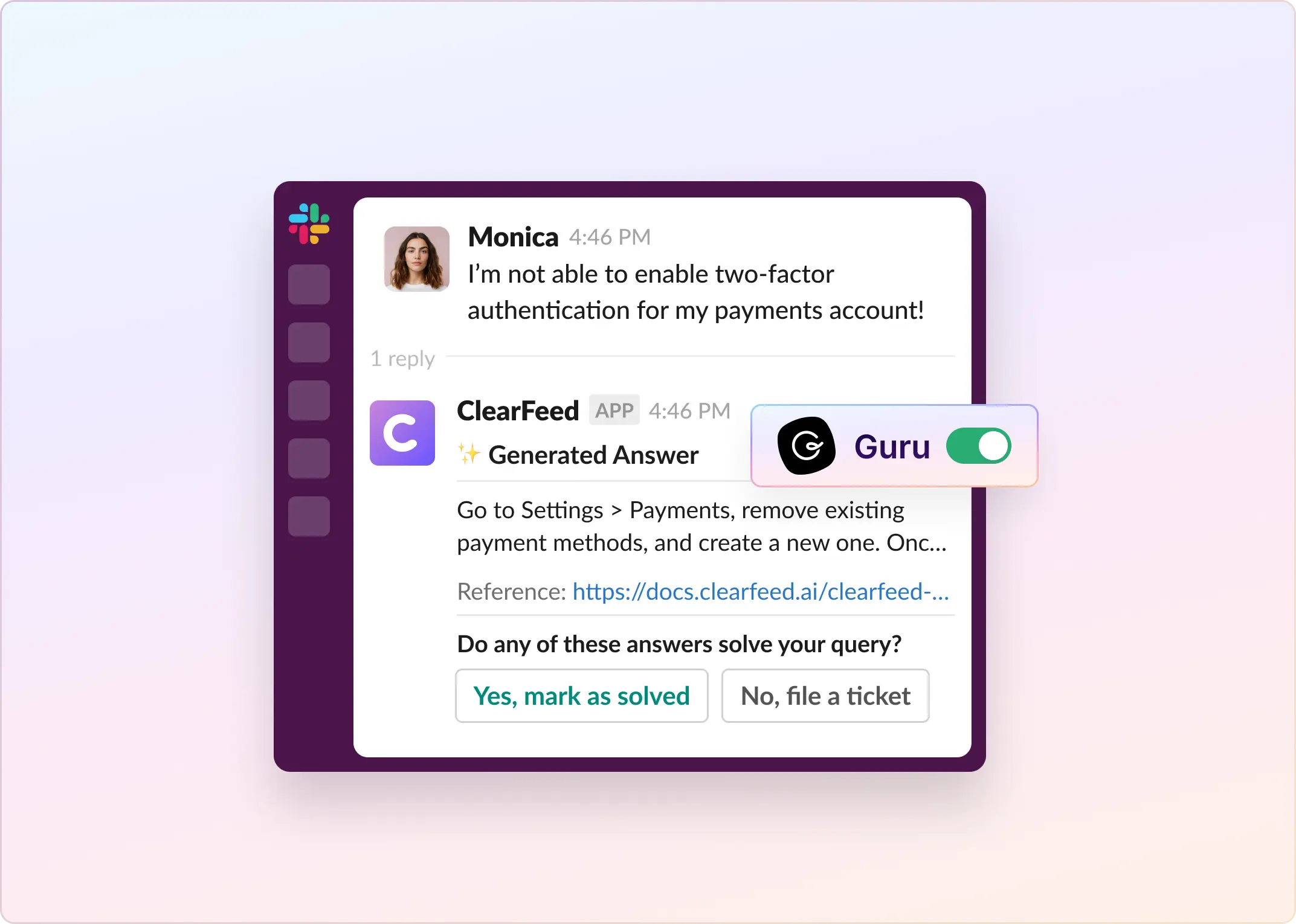
  • Ask a Knowledge Agent: Use @guru for a sourced answer in a connected channel. Admins configure channel behavior and the agent’s knowledge sources.
  • Capture messages or threads: Create a Card, review its content, save a draft or publish it, and set a verifier. You can also append information to an existing Card.
  • Announce new knowledge: Activity feeds post when new Cards or folders are added to the selected Collection, or new Cards are added to a selected folder.

Pros

  • Search and capture in one workspace: Employees can retrieve knowledge and turn useful conversations into maintained documentation without leaving Slack.
  • Drafting and verification options: Teams can review informal explanations before publishing and assign responsibility for keeping Cards up to date.
  • No custom workflow for routine interactions: Search and capture do not require a separate trigger-and-action automation.
  • Answers from multiple sources: Knowledge Agents can use connected sources such as Google Drive, SharePoint, Confluence, Notion, and Guru Cards.

Cons

  • Edits do not trigger activity feeds. Use an automation connector if the team needs to be notified of changes to existing Cards.
  • Capture has access and attachment limits. Card creation requires a Collection Owner or a relevant custom role. Images and files attached to Slack messages are not imported automatically.
  • Channel visibility matters. Suggested answers can be visible to everyone in the channel, including people without Guru accounts. Configure sources for that audience; permission-aware retrieval does not mean every posted message is private.

The native knowledge workflow also leaves it to you to establish how unresolved requests are assigned and followed up. A good answer can finish a question; an access problem may still need a support owner.

Pricing

Guru offers a custom package based on organizational scale, knowledge complexity, and AI maturity. It does not have a standard dollar rate or a separate Slack app fee.

Choose it when: Your main problem is finding and maintaining knowledge, and you already have a process for work that needs human action.

‍

2. ClearFeed

ClearFeed connects Guru knowledge to the support workflow surrounding a request. An employee asking how to configure a VPN may only need an answer. An employee reporting that the instructions failed may need investigation, assignment, and follow-up.

ClearFeed is best suited to the second case: using Guru as a knowledge source inside a broader service workflow.

Key Features

  • Use selected Guru knowledge: Connect Guru and choose which Collections ClearFeed can index.
  • Combine multiple knowledge sources: Answer from Guru alongside sources such as Notion, Zendesk knowledge bases, and public documentation, with controls for source priority and scope.
  • Control AI participation: The Virtual Agent can reply directly to requesters, while the Agent Assistant generates private drafts for responders to review.
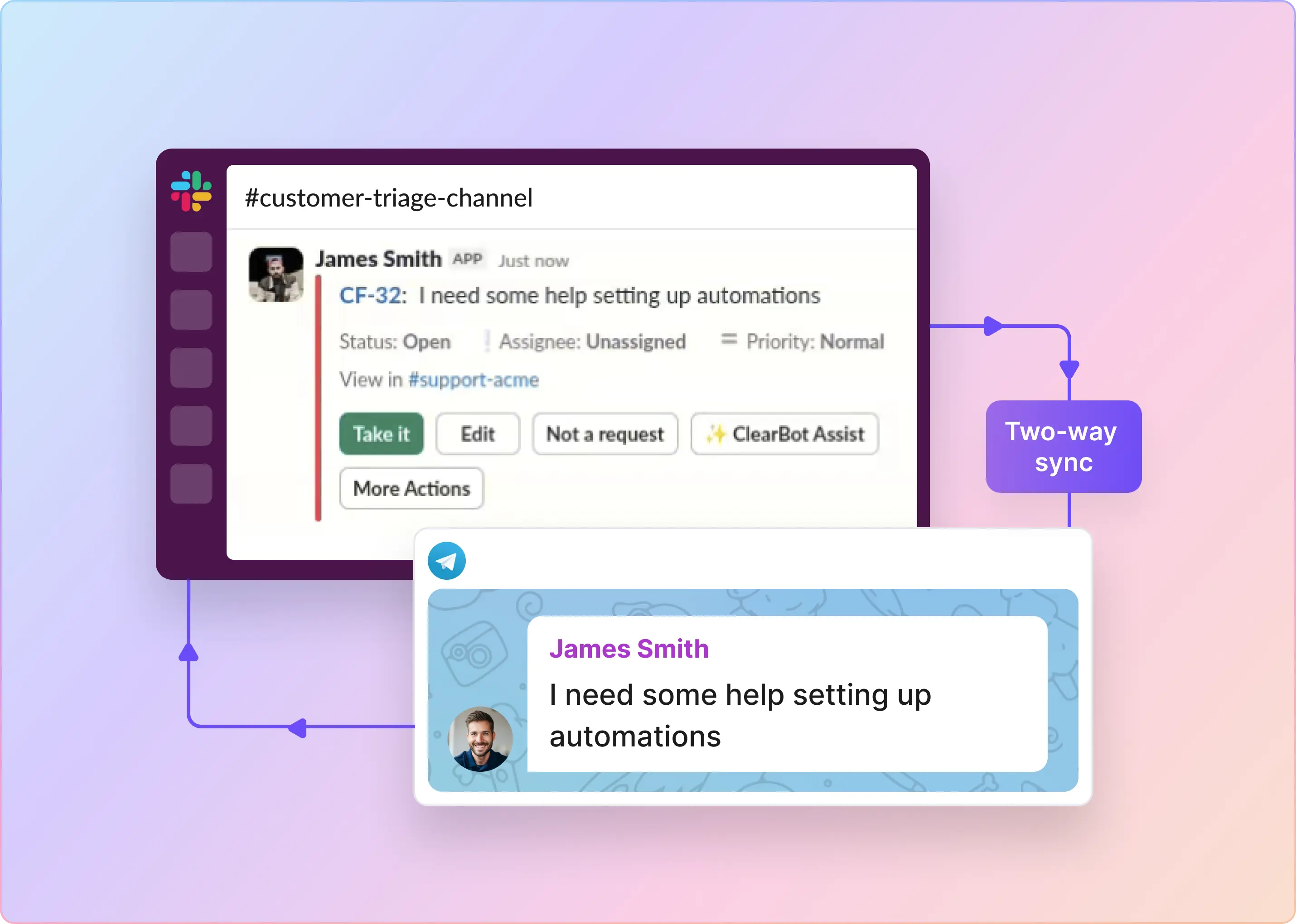
  • Continue from answer to resolution: Create and manage tickets from Triage Channels, assign work, escalate requests, and collaborate until resolution.
  • Measure and improve support: Track SLA performance, deflection, escalation, feedback, and other service metrics. DocAssist can also identify documentation gaps from recurring support requests.

Pros

  • Adds a support workflow around Guru knowledge: Requests can move from AI answer to assignment, escalation, human handling, and resolution, rather than ending with a knowledge response.
  • Supports measurable deflection: Teams can distinguish answered, unanswered, deflected, escalated, positive, and negative interactions and export the results for analysis.
  • Extends beyond Slack: The same service model can support Microsoft Teams, email, and web chat.
  • Handles knowledge gaps more gracefully: When documentation is insufficient, the workflow can continue with a human rather than treating the AI response as the endpoint.

Cons

  • Adds another platform: ClearFeed is over-scoped if the requirement is limited to simple Guru notifications or event automation.
  • Introduces additional AI usage costs: AI capacity depends on the plan and credit consumption.
  • Less flexible for generic automation: ClearFeed is optimized for service workflows, not arbitrary cross-app event automation like Zapier.

Pricing

For agent-based Helpdesk plans, Starter is $24 per agent per month. Its AI Pack starts at $20 per month and includes 100 credits. Professional is $49 per agent per month, includes AI Pack, provides 50 credits per agent, and adds SLA capabilities.

Additional usage is listed at $2 per 10 credits, with credit consumption varying by AI workload.

For five responders, Starter plus the base AI Pack is $140 per month. Professional is $245 per month and includes 250 credits. These examples exclude Guru, Slack, taxes, additional usage, and applicable discounts.

Choose it when: The recurring problem is unresolved support work as well as knowledge access. For simple Card announcements, an automation connector is a lighter setup.

‍

3. Zapier

Zapier is useful when the requirement is specific: “When someone edits a Card in this Collection, notify the support channel.” Each Zap combines a trigger with configured actions.

Key Features

  • React to Guru events: Trigger workflows when Cards are created or updated. Card Updated is listed as an instant trigger; delivery behavior depends on the selected event.
  • Create and retrieve Cards: Use Guru actions to create or find Cards within a configured Slack workflow.
  • Manage existing knowledge: Perform operations such as Card verification and archiving.
  • Retrieve answers and sources: Ask a Question submits a question to Guru and returns an answer; Search With Sources is also available.

Pros

  • Supports workflows beyond notifications: Combine knowledge retrieval or Guru actions with other steps in the same automation.
  • Provides a starting point for custom Q&A: The question-answering action lets you incorporate Guru answers into a workflow you design.
  • Filters irrelevant alerts: Narrow which events reach Slack so the team receives updates that matter.

Cons

  • A question-answering action is not a finished Slack assistant. You still design message routing, thread context, and failure handling.
  • Request tracking requires a design. You can connect a ticketing system or store state, but the connector alone does not establish ownership and resolution rules.
  • Capture needs a review gate. Avoid turning every message into a published Card. A dedicated channel for approved knowledge is a more controlled starting point.

Also treat the connected account as the workflow’s access boundary. A Slack notification can expose whatever text you map into it; a Card link is often more appropriate than copying an entire internal document.

Pricing

Zapier offers a free plan with 100 tasks/month. Professional starts at $19.99/month billed annually for 750 tasks/month, including multi-step workflows and premium apps.

Triggers and polling checks do not consume tasks. Built-in Filter, Formatter, and Paths steps are also excluded; successful app actions generally count. A workflow sending 500 Slack notifications therefore uses 500 tasks if it performs one billable action per event. Adding a second billable action to every run raises that estimate to 1,000 tasks, exceeding the entry allowance. 

Choose it when: The workflow needs Guru actions or custom steps beyond a basic alert, especially if someone already maintains your Zaps.

‍

4. Integrately

Integrately offers ready-made workflows for sending Slack messages when Guru Cards are created and for creating Guru Cards from Slack messages. That gives a small operations team a concrete starting point.

Key Features

  • React to knowledge changes: The integration page lists instant Guru events for Card creation, updates, archiving, verification, and comments, among others.
  • Send Slack notifications: Use templates to announce new Guru Cards or comments in Slack.
  • Capture Slack messages as Cards: Use message-to-Card templates to collect approved material from Slack.

Pros

  • Less workflow design for common tasks: Supplied templates provide a starting point for notifications and knowledge capture.
  • More capacity for simple notifications at the entry price: Starter’s 2,000-task allowance provides more room than Zapier’s entry-level Professional allowance at the same advertised annual-plan monthly rate, when each run sends only a message.

Cons

  • A template still needs configuration. Account authorization, destination selection, field mapping, and testing remain necessary.
  • Card creation does not establish content quality. Decide who approves the source message and checks the resulting Card.
  • More complex routing changes both cost and plan requirements. Starter excludes if/else branching and AutoRetry; Professional includes them.

For a Guru Q&A workflow, Zapier is the better-documented starting point in this comparison because it explicitly offers an "Ask a Question" action.

Pricing

Free includes 100 tasks and five single-step automations. Beyond Starter, Professional costs $39/month billed annually for 10,000 tasks.

Integrately counts successful actions, condition checks, searches, and data modifications as tasks, including supported inline operations. Triggers are free. For 500 events, one Slack action uses 500 tasks; adding one success condition and one data modification to each run brings the total to 1,500 tasks. Both fit Starter’s allowance, assuming no other usage.

Choose it when: A supplied notification or capture template meets your requirements, and its task accounting fits the workflow you actually plan to run.

‍

5. Zoho Flow

Zoho Flow’s Guru connector is narrower than the other automation options here. The documented events are Card added, Card updated, and Card verified. Its listed Guru action is Fetch card, which retrieves an existing Card by title.

Key Features

  • Announce new Cards: A prebuilt flow sends a Slack notification when a new Guru Card appears.
  • Track changes and verification: Build flows around Card updated and Card verified events.
  • Choose a Slack destination: Send messages to public channels, private channels, or individual users. 

Pros

  • Fits an existing Zoho Flow setup: Teams that already administer automations there can manage Guru notifications in the same platform.
  • Covers key knowledge updates: Keep a team informed when knowledge is added, changed, or verified.

Cons

  • No Create Card action. Its built-in connector does not provide a Slack-message-to-Guru-Card capture flow.
  • No listed Guru question-answering action. Fetching a Card by title is not equivalent to answering a natural-language question.

Custom functions or API calls would be a separate implementation, beyond the built-in connector compared here. Choose Zapier or Integrately for message-to-Card capture instead.

Pricing

Plan Monthly equivalent, billed annually Tasks/month Polling interval
Free $0 100 15 minutes
Standard From $25 5,000 15 minutes
Professional From $41 10,000 5 minutes

The free plan allows 5 flows; paid plans allow unlimited flows. Professional also adds premium apps and automatic reruns. Polling intervals apply to polling triggers, not every event. The public Guru connector page does not establish its trigger delivery mode or app-tier entitlement, so test those in the trial before purchasing Standard specifically for Guru.

A successful action counts as a task. A simple 500-event, one-message-per-event flow therefore uses 500 tasks before any additional actions—within Standard’s task allowance.

Choose it when: Guru notifications are enough, and Zoho Flow is already part of your automation setup.

‍

Can You Use More Than One Method?

Yes. These methods address different jobs. A sensible combination could be Guru’s native app for search and capture, plus a Zapier workflow for important Card edits. A support team could use ClearFeed for request handling while keeping Guru’s native capture flow for maintaining its knowledge base.

Give each workflow a clear purpose. If two bots automatically respond in the same channel, the team may receive duplicate or conflicting responses. Start with one automatic answering method per channel and add only the workflows that fill a specific gap.

‍

Choose the Workflow Before Choosing the Tool

Use Guru’s native app to find, share, and capture knowledge. Choose Zapier when you need more Guru actions and custom steps, Integrately when a straightforward template fits your needs, or Zoho Flow when notifications belong in an existing Zoho setup.

Choose ClearFeed when a good answer is only the first step and someone still needs to own the request through resolution. If that describes your team, explore ClearFeed’s Helpdesk options and test one support channel with a focused set of Guru Collections.
Guru’s native Slack app is the best starting point for teams that want to find answers and save useful conversations as knowledge. Choose an automation platform when you need a specific event to trigger an action, such as posting a Slack notification when a Guru Card changes. Choose ClearFeed when those answers need to sit inside a support process with ticket ownership and follow-up.

This guide compares five options: Guru’s native Slack app, ClearFeed, Zapier, Integrately, and Zoho Flow. Each connects Slack and Guru differently, so the right choice depends on what you want the connection to accomplish.

‍

Best Slack–Guru integration at a Glance

Method Best for Concrete workflow Starting price and main trade-off
Guru’s native Slack app Finding, sharing, and capturing knowledge Ask a question, share a Card, or save a useful thread as a draft Custom Guru quote; native activity feeds do not notify on Card edits
ClearFeed Support teams that need answers plus ticket management Guru-backed answer → ticket for a human when needed Helpdesk Starter $24/agent/month plus AI Pack from $20/month; Professional $49/agent/month includes AI Pack and SLA features
Zapier Custom workflows with several actions Guru Card updated → filter → notify Slack Professional from $19.99/month billed annually, with 750 tasks/month; you build and maintain the workflow
Integrately Straightforward notifications and message-to-Card capture New Guru Card → Slack message Starter $19.99/month billed annually, with 2,000 tasks/month; filters and data changes also consume tasks
Zoho Flow Guru notifications within an existing Zoho Flow setup Card added, updated, or verified → Slack notification Standard from $25/month billed annually, with 5,000 tasks/month; its listed Guru action is limited to fetching a Card

‍

How We Evaluated a Slack-Guru Integration

The right integration depends on what your team needs to happen after information reaches Slack. Evaluate each option against these requirements:

  • Knowledge access: Can people search for Cards, ask questions, and share relevant answers in Slack?
  • Knowledge capture: Can useful Slack explanations be converted into Guru Cards, and who reviews them before publication?
  • Event automation: Can the integration distinguish newly published Cards from edits and trigger the action you need?
  • Support handling: If an answer does not resolve the issue, can someone own the request and track it through resolution?
  • Access and freshness: Which knowledge can the integration read, who can see its responses, and when do source changes become available?
  • Setup and cost: Are you configuring an existing feature or building a workflow that your team must maintain?

‍

5 Best Slack-Guru Integration Methods in 2026

1. Guru’s Native Slack App

Start here if your goal is to make existing knowledge easier to use. For example, a support agent can find a troubleshooting Card during a conversation, while an operations lead can save a useful explanation for future reference.

Key Features

  • Search and share Cards: Use /guru to search, narrow results by Collection or Tag, privately preview a Card, and post it to the conversation.
  • Ask a Knowledge Agent: Use @guru for a sourced answer in a connected channel. Admins configure channel behavior and the agent’s knowledge sources.
  • Capture messages or threads: Create a Card, review its content, save a draft or publish it, and set a verifier. You can also append information to an existing Card.
  • Announce new knowledge: Activity feeds post when new Cards or folders are added to the selected Collection, or new Cards are added to a selected folder.

Pros

  • Search and capture in one workspace: Employees can retrieve knowledge and turn useful conversations into maintained documentation without leaving Slack.
  • Drafting and verification options: Teams can review informal explanations before publishing and assign responsibility for keeping Cards up to date.
  • No custom workflow for routine interactions: Search and capture do not require a separate trigger-and-action automation.
  • Answers from multiple sources: Knowledge Agents can use connected sources such as Google Drive, SharePoint, Confluence, Notion, and Guru Cards.

Cons

  • Edits do not trigger activity feeds. Use an automation connector if the team needs to be notified of changes to existing Cards.
  • Capture has access and attachment limits. Card creation requires a Collection Owner or a relevant custom role. Images and files attached to Slack messages are not imported automatically.
  • Channel visibility matters. Suggested answers can be visible to everyone in the channel, including people without Guru accounts. Configure sources for that audience; permission-aware retrieval does not mean every posted message is private.

The native knowledge workflow also leaves it to you to establish how unresolved requests are assigned and followed up. A good answer can finish a question; an access problem may still need a support owner.

Pricing

Guru offers a custom package based on organizational scale, knowledge complexity, and AI maturity. It does not have a standard dollar rate or a separate Slack app fee.

Choose it when: Your main problem is finding and maintaining knowledge, and you already have a process for work that needs human action.

‍

2. ClearFeed

ClearFeed connects Guru knowledge to the support workflow surrounding a request. An employee asking how to configure a VPN may only need an answer. An employee reporting that the instructions failed may need investigation, assignment, and follow-up.

ClearFeed is best suited to the second case: using Guru as a knowledge source inside a broader service workflow.

Key Features

  • Use selected Guru knowledge: Connect Guru and choose which Collections ClearFeed can index.
  • Combine multiple knowledge sources: Answer from Guru alongside sources such as Notion, Zendesk knowledge bases, and public documentation, with controls for source priority and scope.
  • Control AI participation: The Virtual Agent can reply directly to requesters, while the Agent Assistant generates private drafts for responders to review.
  • Continue from answer to resolution: Create and manage tickets from Triage Channels, assign work, escalate requests, and collaborate until resolution.
  • Measure and improve support: Track SLA performance, deflection, escalation, feedback, and other service metrics. DocAssist can also identify documentation gaps from recurring support requests.

Pros

  • Adds a support workflow around Guru knowledge: Requests can move from AI answer to assignment, escalation, human handling, and resolution, rather than ending with a knowledge response.
  • Supports measurable deflection: Teams can distinguish answered, unanswered, deflected, escalated, positive, and negative interactions and export the results for analysis.
  • Extends beyond Slack: The same service model can support Microsoft Teams, email, and web chat.
  • Handles knowledge gaps more gracefully: When documentation is insufficient, the workflow can continue with a human rather than treating the AI response as the endpoint.

Cons

  • Adds another platform: ClearFeed is over-scoped if the requirement is limited to simple Guru notifications or event automation.
  • Introduces additional AI usage costs: AI capacity depends on the plan and credit consumption.
  • Less flexible for generic automation: ClearFeed is optimized for service workflows, not arbitrary cross-app event automation like Zapier.

Pricing

For agent-based Helpdesk plans, Starter is $24 per agent per month. Its AI Pack starts at $20 per month and includes 100 credits. Professional is $49 per agent per month, includes AI Pack, provides 50 credits per agent, and adds SLA capabilities.

Additional usage is listed at $2 per 10 credits, with credit consumption varying by AI workload.

For five responders, Starter plus the base AI Pack is $140 per month. Professional is $245 per month and includes 250 credits. These examples exclude Guru, Slack, taxes, additional usage, and applicable discounts.

Choose it when: The recurring problem is unresolved support work as well as knowledge access. For simple Card announcements, an automation connector is a lighter setup.

‍

3. Zapier

Zapier is useful when the requirement is specific: “When someone edits a Card in this Collection, notify the support channel.” Each Zap combines a trigger with configured actions.

Key Features

  • React to Guru events: Trigger workflows when Cards are created or updated. Card Updated is listed as an instant trigger; delivery behavior depends on the selected event.
  • Create and retrieve Cards: Use Guru actions to create or find Cards within a configured Slack workflow.
  • Manage existing knowledge: Perform operations such as Card verification and archiving.
  • Retrieve answers and sources: Ask a Question submits a question to Guru and returns an answer; Search With Sources is also available.

Pros

  • Supports workflows beyond notifications: Combine knowledge retrieval or Guru actions with other steps in the same automation.
  • Provides a starting point for custom Q&A: The question-answering action lets you incorporate Guru answers into a workflow you design.
  • Filters irrelevant alerts: Narrow which events reach Slack so the team receives updates that matter.

Cons

  • A question-answering action is not a finished Slack assistant. You still design message routing, thread context, and failure handling.
  • Request tracking requires a design. You can connect a ticketing system or store state, but the connector alone does not establish ownership and resolution rules.
  • Capture needs a review gate. Avoid turning every message into a published Card. A dedicated channel for approved knowledge is a more controlled starting point.

Also treat the connected account as the workflow’s access boundary. A Slack notification can expose whatever text you map into it; a Card link is often more appropriate than copying an entire internal document.

Pricing

Zapier offers a free plan with 100 tasks/month. Professional starts at $19.99/month billed annually for 750 tasks/month, including multi-step workflows and premium apps.

Triggers and polling checks do not consume tasks. Built-in Filter, Formatter, and Paths steps are also excluded; successful app actions generally count. A workflow sending 500 Slack notifications therefore uses 500 tasks if it performs one billable action per event. Adding a second billable action to every run raises that estimate to 1,000 tasks, exceeding the entry allowance. 

Choose it when: The workflow needs Guru actions or custom steps beyond a basic alert, especially if someone already maintains your Zaps.

‍

4. Integrately

Integrately offers ready-made workflows for sending Slack messages when Guru Cards are created and for creating Guru Cards from Slack messages. That gives a small operations team a concrete starting point.

Key Features

  • React to knowledge changes: The integration page lists instant Guru events for Card creation, updates, archiving, verification, and comments, among others.
  • Send Slack notifications: Use templates to announce new Guru Cards or comments in Slack.
  • Capture Slack messages as Cards: Use message-to-Card templates to collect approved material from Slack.

Pros

  • Less workflow design for common tasks: Supplied templates provide a starting point for notifications and knowledge capture.
  • More capacity for simple notifications at the entry price: Starter’s 2,000-task allowance provides more room than Zapier’s entry-level Professional allowance at the same advertised annual-plan monthly rate, when each run sends only a message.

Cons

  • A template still needs configuration. Account authorization, destination selection, field mapping, and testing remain necessary.
  • Card creation does not establish content quality. Decide who approves the source message and checks the resulting Card.
  • More complex routing changes both cost and plan requirements. Starter excludes if/else branching and AutoRetry; Professional includes them.

For a Guru Q&A workflow, Zapier is the better-documented starting point in this comparison because it explicitly offers an "Ask a Question" action.

Pricing

Free includes 100 tasks and five single-step automations. Beyond Starter, Professional costs $39/month billed annually for 10,000 tasks.

Integrately counts successful actions, condition checks, searches, and data modifications as tasks, including supported inline operations. Triggers are free. For 500 events, one Slack action uses 500 tasks; adding one success condition and one data modification to each run brings the total to 1,500 tasks. Both fit Starter’s allowance, assuming no other usage.

Choose it when: A supplied notification or capture template meets your requirements, and its task accounting fits the workflow you actually plan to run.

‍

5. Zoho Flow

Zoho Flow’s Guru connector is narrower than the other automation options here. The documented events are Card added, Card updated, and Card verified. Its listed Guru action is Fetch card, which retrieves an existing Card by title.

Key Features

  • Announce new Cards: A prebuilt flow sends a Slack notification when a new Guru Card appears.
  • Track changes and verification: Build flows around Card updated and Card verified events.
  • Choose a Slack destination: Send messages to public channels, private channels, or individual users. 

Pros

  • Fits an existing Zoho Flow setup: Teams that already administer automations there can manage Guru notifications in the same platform.
  • Covers key knowledge updates: Keep a team informed when knowledge is added, changed, or verified.

Cons

  • No Create Card action. Its built-in connector does not provide a Slack-message-to-Guru-Card capture flow.
  • No listed Guru question-answering action. Fetching a Card by title is not equivalent to answering a natural-language question.

Custom functions or API calls would be a separate implementation, beyond the built-in connector compared here. Choose Zapier or Integrately for message-to-Card capture instead.

Pricing

Plan Monthly equivalent, billed annually Tasks/month Polling interval
Free $0 100 15 minutes
Standard From $25 5,000 15 minutes
Professional From $41 10,000 5 minutes

The free plan allows 5 flows; paid plans allow unlimited flows. Professional also adds premium apps and automatic reruns. Polling intervals apply to polling triggers, not every event. The public Guru connector page does not establish its trigger delivery mode or app-tier entitlement, so test those in the trial before purchasing Standard specifically for Guru.

A successful action counts as a task. A simple 500-event, one-message-per-event flow therefore uses 500 tasks before any additional actions—within Standard’s task allowance.

Choose it when: Guru notifications are enough, and Zoho Flow is already part of your automation setup.

‍

Can You Use More Than One Method?

Yes. These methods address different jobs. A sensible combination could be Guru’s native app for search and capture, plus a Zapier workflow for important Card edits. A support team could use ClearFeed for request handling while keeping Guru’s native capture flow for maintaining its knowledge base.

Give each workflow a clear purpose. If two bots automatically respond in the same channel, the team may receive duplicate or conflicting responses. Start with one automatic answering method per channel and add only the workflows that fill a specific gap.

‍

Choose the Workflow Before Choosing the Tool

Use Guru’s native app to find, share, and capture knowledge. Choose Zapier when you need more Guru actions and custom steps, Integrately when a straightforward template fits your needs, or Zoho Flow when notifications belong in an existing Zoho setup.

Choose ClearFeed when a good answer is only the first step and someone still needs to own the request through resolution. If that describes your team, explore ClearFeed’s Helpdesk options and test one support channel with a focused set of Guru Collections.
Related Blogs

See all Blog Posts
TOC heading
Text LinkText Link Active
Get a Free consultation with a Support Expert
Learn how fast growing companies like Teleport, Chronosphere and Acryl Data have scaled Support processes with ClearFeed
Thank you for contacting us. Our team will reach out to you shortly.
Oops! Something went wrong while submitting the form.