Table of Contents

If you’re comparing Plain and Pylon, their feature lists may leave you with more questions than answers. Both help B2B teams manage support across channels, and both offer automation and AI assistance. Either could look like a good fit at first.
Your support setup gives you more to go on. Customers using shared Teams channels need different coverage than customers of a team building its own support portal. With AI, you’ll also need to decide how much responsibility to give it, from helping teammates investigate an issue to answering customers or taking approved actions.
Here’s how Plain and Pylon compare on channel coverage, external collaboration, AI, and self-service, with practical checks to help you choose and test either tool before committing.
How We Evaluated Plain and Pylon
We reviewed Plain’s and Pylon’s product pages, documentation, pricing, and published user feedback. The evaluation focuses on six questions:
- Can the platform capture requests from the channels that customers actually use?
- Can support keep ownership of a request as engineering and customer success pick up the handoffs?
- Can an AI act within defined permissions and escalation rules?
- Can customers find answers and move their request forward without needing another update?
- Can the platform connect the customer, product, and operational data your team already uses?
- Can you understand which plan you need and where extra cost comes from?
Plain vs. Pylon at a Glance
Where Plain and Pylon Overlap
Both tools address the coordination problem in B2B support by providing multichannel intake, structured conversations, assignment, customer context, automation, AI assistance, self-service, and developer access.
You can also link customer conversations to internal work. Plain's Slack Discussions and Pylon's Internal Threads let support teams collaborate on a request without turning the customer channel into a troubleshooting thread.
Where Plain and Pylon Diverge
- Product-connected support versus broader account operations: Plain's platform suits teams whose support closely tracks their product's data model and customer interface. Pylon's account intelligence suits teams that need a single platform to track customer relationships, risk, and follow-up tasks. It is a matter of emphasis; neither tool forces every buyer to work only one way.
- Custom customer interface versus packaged experiences: Plain lets you embed a portal into your product, while Pylon offers a chat widget, a branded knowledge base, and a unified login for its knowledge base and customer portal.
- Entry price versus total cost: Plain starts at $45/user/month; Pylon lists Professional at $89/seat on annual contracts. Compare AI usage, add-ons, and contract terms before budgeting.
1. Ticketing and Inbox UX: How Will Your Team Manage the Queue?
Plain Organizes Work Around Customer Threads
Plain’s support platform organizes customer requests into threads and lets you automate how your team handles them. You can create a thread and assign it a status, priority, ownership, labels, custom fields, and an event timeline. If you connect multiple channels and send messages from them, the replies go back through the original channel. When a customer contacts you on Slack, your team’s reply goes back to Slack. The same applies to email, chat, Teams, and Discord, so customers can keep the conversation where they started.
The Visual Workflow Builder (a no-code automation tool) supports triggers, branching conditions, actions, and delays. Without writing code, teams can route requests by product area, set priorities, and schedule follow-ups that stop when the customer replies.
Pylon Combines Issue Management With Customer Account Context
Pylon gives teams several ways to view and manage customer issues:
- Inbox view: a shared queue of incoming requests.
- List view: a spreadsheet-like view with filters and columns.
- Kanban view: a board where issues move across statuses, such as “To do,” “In progress,” and “Done.”
You can automatically route an issue to the right person or team using rules such as product area, customer account tier, region, language, skill, or custom fields. Pylon also lets you set separate response and resolution targets by account tier, priority, plan, or issue type, and then tracks whether tickets meet those targets.
For a thread-based process focused on your product, Plain is the closer fit. For issue management tied to account work, Pylon is.
2. AI Capabilities: Ari and Sidekick Versus Pylon’s Agents
Plain Separates Customer Responses From Internal Assistance
Plain has two AI agents with different roles: Ari can eventually talk to customers, while Sidekick helps your support team but cannot message customers on its own.
Plain’s AI support agent can read customer threads, draft replies, or, once enabled, send replies to customers. It answers from your help center and internal documentation and includes source citations so a human can verify where an answer came from.
Plain's Sidekick Agent is for your support team and is not meant to work directly for customers. It can investigate issues, pull context from connected tools such as Linear, Sentry, Notion, and Slack, triage threads, run reports, execute tasks, and handle scheduled work.
For example, a teammate could ask: “Have we seen this error before?” Sidekick can search connected systems, summarize prior incidents and fixes, and draft a response. However, the agent does not send that response automatically.
Pylon’s AI Agents Give Different Agents Defined Roles
In contrast, Pylon has more specialized AI agents and reusable workflows. It splits AI work into different agents rather than using one general-purpose assistant:
Like most AI tools, Pylon has a 'Reusable Skills' feature that allows you to save repeatable AI workflows in plain language. You can define the instructions for the agent to follow, what tools it should use, what decisions it should make, and more.
3. Slack and Microsoft Teams: Where Do Customers and Agents Work?
Plain Brings Collaboration Into the Customer Thread
Plain keeps customer conversations and internal discussions linked in one place. Your support agents can handle a request in Plain and privately bring in engineers, product managers, or other teammates through Slack, keeping the original context intact.
For example, if a customer reports a bug in a shared Slack Connect channel, Plain creates a support thread from that message. When your agent replies in Plain, the response appears back in that Slack channel.
Besides Slack and Microsoft Teams, Plain’s other main customer-support channels are email, Discord, website/in-app chat, in-app forms, and a headless/custom portal. All of them feed into the same thread-based support queue.
Pylon Supports Multiple Collaboration Patterns
Pylon has broader messaging-channel coverage than Plain, especially for Microsoft Teams and organizations using multiple Slack workspaces. In Slack, you can track customer conversations in public and private channels as well as Slack Connect channels.
Internal Threads are private internal discussions attached to a customer issue. They let support, engineering, or product teams collaborate without the customer seeing the conversation; messages can be discussed in Pylon or Slack and stay synced.
On Advanced or Enterprise, Pylon supports shared channels, channels in tenants where the customer is a guest user, external group chats, and Teams-to-Slack mirroring (meaning customer messages in a Teams channel appear in a linked Slack channel, and replies sent in Slack are forwarded back to Teams).
In addition to Slack and Microsoft Teams, Pylon also allows your customers to contact you via email, Discord, website/in-app chat, ticket forms, a customer portal, API-created tickets, phone (paid add-on), SMS, WhatsApp, Telegram, and Google Chat. It turns that request into a trackable issue (similar to a support ticket). All issues appear in a single queue or inbox, so agents don't need to monitor each app separately.
4. Knowledge Base and Self-Service: Can Customers Get Answers Without Opening a Ticket?
Plain Offers a Hosted Help Center or Your Own Portal UI
Plain has two ways to give customers a support portal: a ready-made Help Center and Plain's 'headless' API. The ready-made Help Center is a customer-facing website where people can read documentation and submit or track support requests. You can brand it, write help articles, and even convert a good support-thread answer into a draft help article.
Plain's headless portal supplies the support engine behind the scenes, while your engineering team builds the customer-facing screens. Simply put, it lets your support team deliver help inside the customer’s product instead of sending them to a separate support site.
Because the portal is built into the product, you can connect support requests to your own customer and product data. For example, when a user reports a billing issue, the portal could show their plan, recent invoices, or relevant account details to the support agent.
Pylon Turns Support Work Into Reusable Documentation
Pylon treats support work as raw material for documentation. When an agent resolves a ticket or explains a fix in Slack, Pylon can use AI to turn that conversation into a draft help article. The draft captures the problem, context, solution, and sources, but a human must review and approve it before it goes public.
It also identifies knowledge gaps: questions customers repeatedly ask that existing articles don't cover, or topics where the documentation is outdated. This gives the support team a prioritized list of articles to create or update. This requires Advanced or Enterprise.
Pylon also offers AI search with citations, letting you provide a direct, AI-generated answer and show which articles/sources it used. You can host the help center at an address such as help.yourcompany.com, so it looks like part of your company rather than a third-party tool.
5. Integrations, APIs, and Support Experience
Plain Is Built Around Its Own Support Platform
Plain is built for your engineering team to customize and automate. Anything your agents can do in the Plain interface can also be done programmatically: create threads, assign tickets, change statuses, add notes, and tag customers. It supports condition-triggered workflows, so routine queue management can happen without an agent monitoring it.
Customer Cards are the most tangible benefit for your team, as they show live data from your own systems in the ticket sidebar, such as plan tier, account value, recent errors, usage, and open invoices. A support agent can get context without switching between five tabs, which usually means faster and better-informed replies.
Plain also has an MCP server, so AI assistants like Claude can connect directly and work with real ticket data. That makes uses like “summarize this week’s top complaint themes” or “draft a reply using this customer’s history” possible without exporting anything. While Plain’s integrations offer high flexibility, most benefits require engineering time to set up. So if your support team has little access to engineers, much of this power will sit unused, and a tool with more built-in, no-code features might serve you better.
Pylon Connects Operational and Account Systems
Pylon focuses on connecting to the tools your company already uses. It has ready-made connections to the systems around support: your CRM (Salesforce, HubSpot), engineering tools (Jira, Linear), call recorders (Gong), data warehouses (Snowflake, BigQuery), and incident tools (PagerDuty, incident.io).
Your agents see the account owner, deal stage, and renewal date next to the ticket, and account managers can see their customers’ support activity. They can turn a bug report into a linked engineering ticket, and the agent is notified when it’s fixed, instead of having to chase developers. Pylon also extends integrations via APIs, webhooks, Custom Apps, iframe embeds, and MCP, meaning you’re not limited to the directory.
6. Reporting: Support Performance or Account Visibility?
Plain's reporting covers support workload and response performance. Its team-comparison feature includes first-reply and next-reply times, resolution times, assignments, and message volume. Its documentation also explains how tier-based reporting preserves the tier recorded at thread creation.
Plain’s reporting gives a B2B support manager a shared, evidence-based view of demand, speed, ownership, and SLA risk, so staffing, coaching, and customer-tier decisions are made from data rather than anecdotes. It helps you show overall support workload and performance, for example, volume trends, response times, resolution times, customer waiting time, SLA compliance, messages sent, and thread assignments.
Pylon describes reporting across support performance, AI agents, and accounts, with prebuilt dashboards and custom reporting. This complements its account-intelligence emphasis.
7. Pricing: How Plain and Pylon Approach the Bill
Plain's Published Plans
Plain’s pricing has two cost levers you must manage: paid member seats and a monthly AI-credit allowance. Your plan determines team capacity, visibility, and how much AI-assisted support you can run before you need to buy more credits.
Unlimited viewer seats enable your engineers, account managers, product managers, and leadership to view tickets and context at no additional cost. This makes it cheaper to involve other teams in support, which pairs well with Plain’s engineering-friendly design. However, AI credits are where the real cost decisions sit.
- Ari uses 100 credits per resolution. Foundation’s 1,000 credits cover about 10 AI resolutions a month, and Horizon’s 2,500 cover about 25. For most teams, that’s a trial amount, not a meaningful share of volume.
- Sidekick’s usage varies with effort, so it’s hard to predict how quickly it will draw down the same pool.
- Extra credits cost money, and that price isn’t listed here.
So treat “included AI” as a starter allowance. If AI resolution is part of your volume plan, the credit top-ups may cost more than the seats.
Pylon Publishes Seat Rates Plus Credits
As of October 26, 2026, Pylon lists these seat rates on annual contracts:
AI features use purchased credits, with a 5,000-credit minimum commitment. Confirm credit prices and the unspecified seat minimum with sales. Monthly billing is also available.
Account Intelligence adds $10/customer account/month; Phone adds $35/seat/month. SAML SSO adds $125/month on Advanced and is included on Enterprise.
Compare the Commercial Structure
ClearFeed: An Alternative to Plain and Pylon for Teams Managing Customer Support From Slack
ClearFeed is an AI-powered helpdesk and ticketing platform for customer support, internal IT, HR, and other service teams working in Slack and Microsoft Teams. Teams can use ClearFeed’s built-in ticketing or connect it to an existing helpdesk. For teams evaluating Plain and Pylon, its key appeal is managing customer conversations, internal collaboration, and support workflows directly from Slack.
- Manage support directly from Slack. Bring requests from multiple channels into Slack triage channels, where agents can reply, assign ownership, update tickets, and collaborate privately. Teams can also use the ClearFeed WebApp to manage their queues.
- Use built-in ticketing or keep your existing helpdesk. Manage tickets in ClearFeed or sync conversations bidirectionally with Zendesk, Intercom, Freshdesk, Salesforce Service Cloud, and HubSpot Service Hub. Create linked engineering tasks in tools such as Jira, Linear, and GitHub to coordinate escalations.
- Support customers and employees from a single platform. Manage customer requests in Slack Connect channels alongside separate workflows for IT, HR, Engineering, and other internal teams. Use forms to collect the right details and private ticketing for requests that should stay out of shared channels. With external private ticketing enabled, eligible customers can also raise requests through DMs to the ClearFeed app.
- Bring customer context into support workflows. Customer profiles bring together an account’s support history across channels. Sync Salesforce or HubSpot CRM fields to give agents account context and drive routing, prioritization, and SLAs based on attributes such as customer tier or ARR.
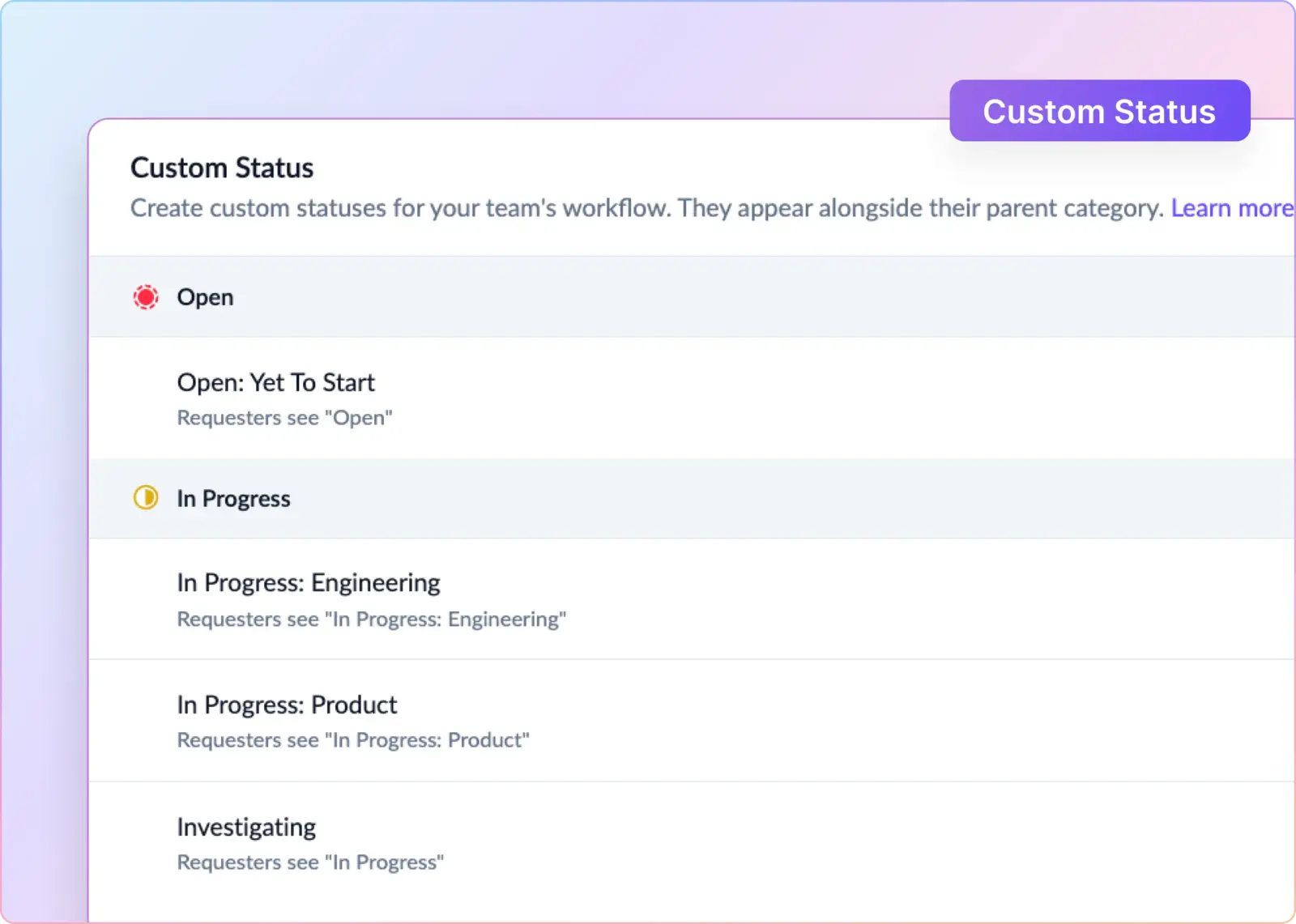
- Adapt ticket workflows to your team. Use custom statuses such as “Investigating” or “Waiting for Engineering,” automate assignments and follow-ups, and track response and resolution SLAs within business hours. Collect CSAT feedback to understand the requester’s experience.
- Use AI to answer questions and take action. Configure AI agents to answer from connected knowledge sources such as Confluence, Notion, and Google Drive, suggest replies to agents, and perform actions through connected tools. AI Fields can automatically populate request categories, urgency, and sentiment to support triage and reporting.
- Connect AI assistants to your support data. ClearFeed’s MCP server lets compatible assistants such as Claude and Cursor search requests, update tickets, and retrieve support metrics, making ClearFeed accessible within broader AI workflows.
- Turn support conversations into actionable insights. Track workload, response times, resolution times, and SLA performance. Trending Queries surfaces recurring questions and emerging issues, while the Insights Agent lets teams investigate support data using natural-language questions. Documentation tools help identify gaps in existing knowledge.
- Choose agent-based or usage-based pricing. Select a pricing model based on your team size and support workload. Starter offers an optional AI pack, while Professional includes an AI credit allowance. See ClearFeed’s pricing pages for current rates, feature availability, and additional AI credit charges.
Decide Whether It Fits
ClearFeed fits best when Slack is where support happens, or when you want Slack connected to an existing helpdesk. Plain suits technical teams that want an API-first platform to build their own support setup on. Pylon suits teams that need account health scoring through its Account Intelligence add-on, or WhatsApp, SMS, and optional Phone support. If Slack is your priority, start a 14-day trial and run a real customer escalation through the queue, from triage to the customer’s reply.