
October 9, 2026

6 Best Slack AI Alternatives for Internal Support Teams (2026 Guide)

WRITTEN BY
Happy Das
6 Best Slack AI Alternatives for Internal Support Teams (2026 Guide)

Slack AI alternatives now compete with a far more capable native product. In 2026, Slackbot expanded beyond summaries and search. It can retain context, run scheduled work, and coordinate actions across connected applications through an MCP client.

Internal support leaders therefore need to be clear about what another tool would add. The advantage might be shared agents, tighter knowledge controls, broader automation, a choice of models, or a structured support workflow. Those benefits still need to justify the added cost and administration. For companies that use both Slack and Microsoft Teams, the tool should also connect the two platforms without requiring responders to switch platforms.

This guide compares six options based on their strengths, ideal users, and support for employee service in Slack and Microsoft Teams.

‍

How We Evaluated Slack AI Alternatives

We evaluated each product against Slack AI first, then considered how well it serves internal support:

  1. Slack experience and collaboration: Is the agent personal or shared? Can teams use it in channels, threads, and DMs without breaking the flow of work?
  2. Knowledge and AI quality: Compare connected sources, citations, memory, model choice, answer controls, and methods for inspecting or improving responses.
  3. Actions and automation: Look at integrations, triggers, scheduled work, multi-step execution, APIs, and approval gates—not just whether the agent can call a single tool.
  4. Administration and security: Assess permissions, credential scopes, activity logs, spending controls, SSO, RBAC, and safeguards for consequential actions.
  5. Internal-support fit: When relevant, check knowledge governance, human handoff, request ownership, privacy, SLAs, and whether another helpdesk must hold the operational state.
  6. Pricing and implementation: Compare the additional cost beyond Slack, including seats, credits, higher-tier features, setup effort, maintenance, and overages.

‍

Best Slack AI Alternatives at a Glance

Tool Why choose it over Slack AI Main trade-off Starting price
ClearFeed AI Adds governed AI answers and accountable support workflows A specialized support product with additional setup and cost AI Agents from $50/month; Helpdesk from $24/agent/month or $40/month usage-based
Claude Tag Makes Claude a shared agent for collaborative, open-ended work Requires Claude Team or Enterprise plus usage funding Claude Team from $20/user/month annually, plus usage for channel work
Runbear AI Supports multiple role-specific agents, models, and connected actions Agents require configuration, tuning, and credit monitoring Team from $79/month annually
Chatbase Provides a no-code support agent with structured human handoff Narrower than a general workplace assistant; Helpdesk starts on Standard Free; Hobby from $32/month annually; Helpdesk on Standard from $120/month annually
Lindy Adds model choice, reusable routines, and approval-based execution Requires a separate per-user, credit-based subscription and workflow setup From $29.99/user/month
Viktor Focuses on autonomous execution and finished deliverables Broader system access and variable credit use require governance Free credits; Team $100/month

‍

6 Slack AI Alternatives for Internal Support Teams in 2026

1. ClearFeed

Category: Internal support system

ClearFeed is an internal support platform built specifically for Slack and Microsoft Teams. Its AI Agents provide governed answers and carry out connected actions in the channels employees already use. The Internal Helpdesk adds ticketing, ownership, forms, SLAs, private intake, and service metrics.

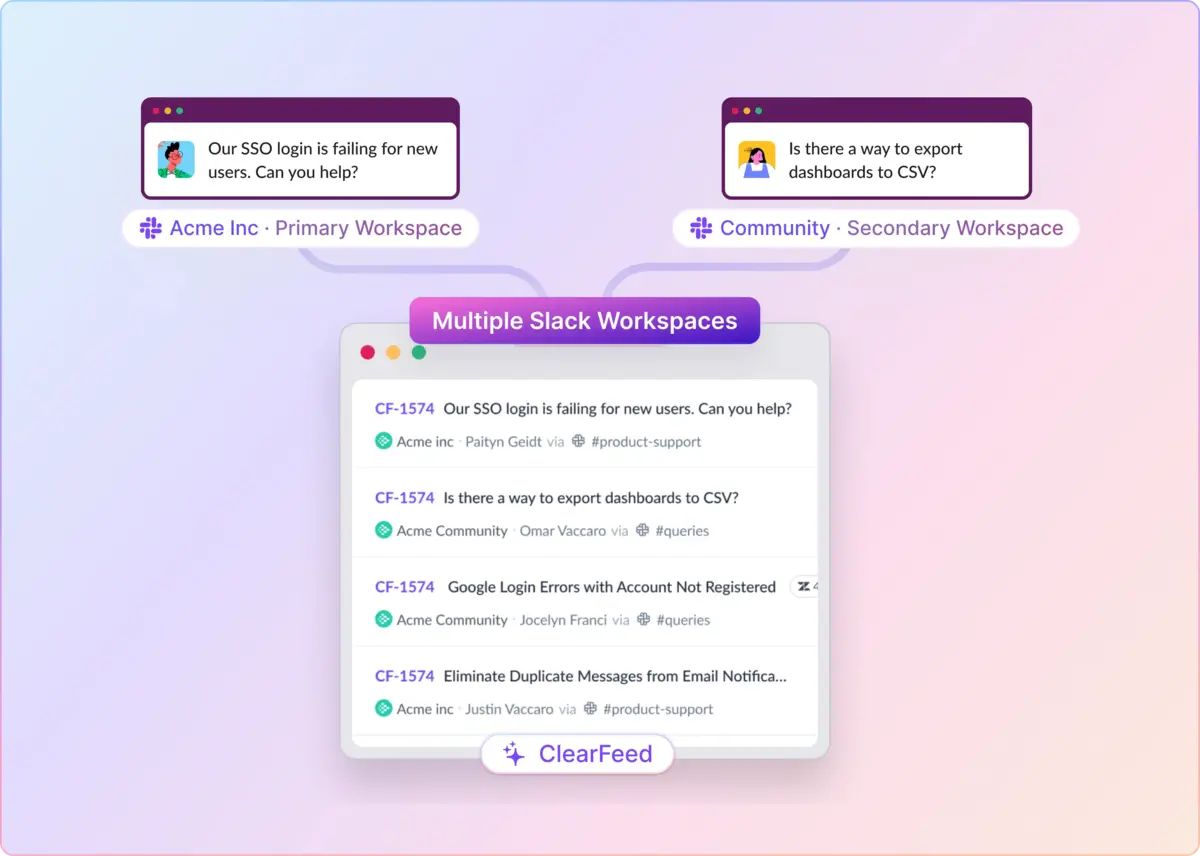
Requests from Microsoft Teams flow into the same Slack triage workflow, including those from Teams Connect shared channels and guest-access teams. Responders can manage them alongside Slack requests without changing tools.

ClearFeed goes further than Slack AI by turning employee conversations into tracked, measurable support work across both platforms. The trade-off is that teams must adopt a dedicated support platform.

Key features

  • Virtual Agent (public replies) and Agent Assistant (private drafts for responders) across Slack request channels and Microsoft Teams Collections
  • Interactive Agent Mode for multi-turn, tool-using conversations with seamless handoff to a human responder in Slack
  • Microsoft Teams support that covers native standard channels, shared channels (Teams Connect), and guest-access Teams — with emoji ticketing (🎫), threaded AI replies, and automatic ticketing via ClearFeed or Zendesk
  • Use Ask AI in the Slack Message Bar to get a private, on-demand answer from your Knowledge Sources without leaving the request channel or posting in the thread.
  • Emoji-triggered Virtual Agent responses in Slack, so employees or responders can invoke AI on any request message on demand
  • Governed knowledge with source prioritization, per-customer access conditions, citations, restricted queries, and fallback rules
  • Restricted Mode for HR and IT integrations (for example, BambooHR and Okta), so employees can only act on their own records
  • PII redaction with configurable delay and custom patterns to keep personally identifiable information out of stored messages and downstream AI processing
  • Answer Agents that read screenshots and images shared in a thread as part of the request context
  • Use AI Fields to automatically classify conversations, apply tags, and populate custom ticket fields. These fields can then drive routing, escalations, and reporting.
  • Automations that invoke AI Agents on ticket events (creation, status change, resolution) for classification, follow-ups, and DocAssist runs
  • Approval Workflows to keep consequential actions under human review before an AI Agent executes them
  • Ticket ownership, forms, SLAs, quick replies, and triage-channel workflows for a full internal helpdesk experience
  • Use ClearBot Assist in the triage channel to summarize threads, review the requester’s previous requests, and chat with an AI Agent. Agents can choose whether to post the response to the thread.
  • DocAssist to detect documentation gaps from resolved conversations and propose specific, location-tagged updates
  • Insights Agent (beta) to explore requests, queues, SLA breaches, and CSAT patterns in natural language
  • `/cf-query` natural-language search across requests inside Slack, plus Session Logs that separate Deflected and Escalated outcomes and capture user feedback for measurable AI performance
  • Per-agent model selection across OpenAI, Google Gemini, and Groq, plus bring-your-own-model on higher tiers
  • Integrations with ticketing (Jira, Zendesk, HubSpot), identity (Okta, JumpCloud), HR (BambooHR), and device management (Kandji, Asset Panda)

Pros

  • Extends Slack AI into accountable support: Unresolved questions become owned requests with routing, escalation, SLA tracking, and service metrics — inside Slack or Microsoft Teams.
  • Improves the employee experience without sacrificing control: Restricted Mode, per-collection knowledge access, Restricted Queries, PII redaction, and Interactive Agent Mode let employees self-serve HR, IT, and internal tools questions, while safeguards keep sensitive data scoped to the requester.
  • Preserves the channel experience: Employees ask for help where they already work; ClearFeed or a connected helpdesk maintains the operational record, and human responders take over cleanly when the AI cannot resolve a request.
  • Reaches employees on both Slack and Microsoft Teams: Standard channels, MS Teams shared channels (Teams Connect), and guest-access Teams all feed into the same Slack triage workflow, so hybrid workspaces don't split the support experience — or the AI-driven answers behind it.
  • Closes the loop on knowledge: DocAssist turns every resolved ticket into a candidate documentation update, so the AI’s answers get better as the team ships more work.
  • Automates the busywork around AI: Automations invoke AI Agents on ticket events for classification and follow-ups, AI Fields auto-populate structured request data, and Approval Workflows gate consequential actions — so responders spend time on judgment calls, not triage.

Cons

  • Narrower than Slack AI as a general assistant: ClearFeed is designed for support, not company-wide research, writing, coding, or personal productivity.
  • Adds another platform to administer: Knowledge, integrations, workflows, and parts of reporting are configured outside Slack.
  • **A few AI features are still Slack-first:** Teams Collections cover standard channels, shared channels, guest access, emoji ticketing, and automatic Virtual Agent responses, but Agent Assistant, emoji-triggered AI responses, bot mentions, and Interactive Agent Mode are only available in Slack for now.
  • Does not replace full ITSM depth: Teams needing native CMDB, change, problem, asset, or service-catalog management still need an ITSM system.

Pricing

ClearFeed Helpdesk starts at $24/agent/month on the Starter plan. A usage-based option starts at $40/month for teams with many occasional responders. The AI Pack costs $20/month on Starter and is included with Professional and Enterprise Helpdesk plans. For teams that only need AI Agents, the channel-based Professional plan starts at $50/month for 20 Slack channels and includes 250 credits per month.

‍

2. Claude Tag

Category: Shared general-purpose agent

Claude Tag turns Claude into a shared Slack agent for Team and Enterprise customers. Compared with Slack AI’s primarily personal experience, its main advantage is collaborative, open-ended work that continues across tools and over time. The trade-offs are a separate Claude subscription, usage-based billing, and beta-stage administration.

Key features

  • Shared @Claude agent in Slack channels, threads, and DMs
  • Channel context and memory across conversations
  • Connections to repositories, ticketing systems, data warehouses, and custom tools
  • Scheduled, long-running, and channel-monitoring tasks
  • Plugins, skills, and standing instructions for repeatable workflows
  • Admin-provisioned identities with channel-, workspace-, and organization-level access controls
  • Organization and channel spend limits with activity tracking

Pros

  • Makes agent work collaborative: Channel members can inspect, continue, and build on the same task instead of sharing output from private AI sessions.
  • Handles broader assignments: Claude can move from a Slack request into research, analysis, coding, data queries, or connected execution.
  • Supports work beyond a single interaction: Scheduled, monitored, and long-running tasks make it useful when Slack AI’s ad hoc assistance isn’t enough.

Cons

  • Adds a second AI subscription and usage bill: Teams need Claude Team or Enterprise and must fund shared channel activity separately.
  • Shared permissions require careful design: Channel-level tool access can be broader than the identity of the person making a request.
  • Does not manage the support lifecycle: Queues, forms, ownership, SLAs, and service reporting require a connected system.

Pricing

Claude Tag is available to Claude Team and Enterprise customers. Team Standard seats cost $20/user/month when billed annually or $25/user/month when billed monthly. Adding the Claude Tag to Slack does not incur an additional per-seat charge. Shared channel and thread activity is billed on a usage basis against an organization-funded balance, with spend limits available per billing period.

‍

3. Runbear AI

Category: Shared configurable agents

Runbear is a shared-agent platform for workplace chat. Compared with Slack AI’s single general assistant, it lets teams deploy several reusable, role-specific agents, each with its own knowledge, models, tools, and triggers. That flexibility comes with more building, tuning, and usage management.

Key features

  • Shared agents for Slack, Microsoft Teams, and Discord
  • Knowledge from documents, Slack history, and connected systems
  • 2,000+ connected tools plus custom MCP integrations
  • Conversational AI-assisted agent builder
  • Scheduled jobs and event-triggered automations
  • Message Insights for recurring and unresolved questions
  • Per-user OAuth authentication for supported tools
  • Automatic model routing and Business-tier BYOK

Pros

  • Supports specialized agents: HR, support, sales, and operations can use distinct instructions and connections rather than sharing a single general assistant.
  • Offers more agent-building flexibility: Model routing, a conversational builder, MCP, and broad integrations support workflows beyond Slack AI’s packaged connections.
  • Provides identity and tuning controls: Per-user OAuth and Message Insights help teams constrain actions and improve weak responses.

Cons

  • Requires more configuration than Slack AI: Each agent’s knowledge, instructions, permissions, tools, and review rules must be designed and maintained.
  • Usage can be harder to forecast: Multi-step work consumes more credits, while BYOK and some integrations require higher plans.
  • Keeps service state elsewhere: Support queues, ownership, forms, SLAs, and reporting need a connected system or custom workflow.

Pricing

Runbear Team costs $99/month, or $79/month when billed annually, and includes 20,000 monthly credits, five builders, and Slack, Microsoft Teams, Discord, and tool integrations. Business costs $399/month, or $3,190 annually, and includes 100,000 credits, 10 builders, BYOK, and additional CRM integrations such as HubSpot and Zendesk. Enterprise pricing is custom. Credits reflect workload rather than seats.

‍

4. Chatbase

Category: AI support and handoff layer

Chatbase is a no-code platform for knowledge-grounded support agents. Compared with Slack AI’s broad workplace assistance, it offers a more focused path from self-service answers to human support across Slack and other channels. Its narrower scope and higher-tier Helpdesk packaging are the main trade-offs for internal-support teams.

Key features

  • Knowledge from files, text, Q&A pairs, websites, sitemaps, Notion, and supported ticket sources
  • Slack channel and thread deployment
  • Multiple models from providers including OpenAI, Anthropic, Gemini, DeepSeek, Meta, Mistral, and others
  • AI Actions and Custom Actions for connected workflows and APIs
  • Human escalation to Chatbase Helpdesk or supported external helpdesks
  • Native Helpdesk with ticket inboxes, assignment, routing, teams, saved views, and scheduling

Pros

  • Provides a focused support experience: Maintained content can become a no-code Slack agent without configuring a general workplace assistant.
  • Adds structured human handoff: Unresolved conversations can be routed to Chatbase Helpdesk or supported external helpdesks.
  • Reuses the agent beyond Slack: The same knowledge and actions can be used across websites and other messaging channels.

Cons

  • Narrower than Slack AI for general work: Chatbase is optimized for support knowledge and handoff, not broad search, writing, summarization, or personal productivity.
  • Moves responders outside Slack: Assignment, routing, and ticket work happen in Chatbase’s web Helpdesk or another connected support system; native Slack ticket intake is not documented.
  • The complete workflow costs more: Helpdesk, API access, auto-retraining, and advanced integrations require the $120/month Standard plan, and ticket SLA management is not documented.

Pricing

Chatbase offers a free plan with 50 monthly message credits. Hobby costs $32/month when billed annually and includes 700 monthly credits, two members, integrations, and five AI Actions per agent.

Standard costs $120/month when billed annually and includes 4,000 monthly credits, three members, Chatbase Helpdesk, API access, auto-retraining, and advanced integrations. Pro costs $400/month annually, while Enterprise pricing is custom.

‍

5. Lindy

Category: General-purpose AI teammate

Lindy is a general-purpose AI teammate for Slack threads and mentions. Compared with Slack AI, it gives buyers explicit model choice, reusable routines, broad integrations, and configurable approval steps. The trade-offs are a separate per-user subscription and more workflow and permission design.

Key features

  • Slack-native teammate in threads and mentions
  • Persistent workspace context and scheduled or event-triggered routines
  • 40+ advertised built-in skills plus custom reusable skills
  • Thousands of integrations with MCP support
  • Model selection across major providers
  • Approval workflows and scoped permissions for connected actions

Pros

  • Offers more model and workflow options: Teams can combine different providers, skills, schedules, and integrations, rather than being limited to a single native AI stack.
  • Supports controlled execution: Approval steps can keep consequential actions under human review.
  • Extends beyond support: The same teammate can handle research, meetings, inboxes, operations, and recurring internal work.

Cons

  • Adds per-user and credit costs beyond Slack: Every Slack participant needs a seat after the trial, and heavier agent work consumes the shared pool faster.
  • Requires workflow and permission design: Teams must define the scope of connected accounts and determine where human approval is required.
  • Autonomous steps are less deterministic: Lindy documents AI Agent steps as more costly and potentially less reliable than standard actions, and support state must still reside elsewhere.

Pricing

Lindy Plus costs $29.99/user/month with 3,000 credits per user. Pro costs $99.99/user/month with 15,000 credits, and Max costs $199.99/user/month with 35,000 credits. Enterprise pricing is custom. Each paid seat contributes credits to a shared workspace pool. Anyone who uses Lindy requires a seat, including users who invoke it through Slack after their seven-day Slack trial.

‍

6. Viktor

Category: Autonomous AI employee

Viktor is a managed AI employee for Slack and Microsoft Teams. Compared with Slack AI, it is more explicitly built for delegated execution: it decides how to complete a plain-language assignment and returns the finished work. That autonomy requires broader system access, deliberate approval design, and active credit monitoring.

Key features

  • Slack and Microsoft Teams deployment
  • 3,200+ connected business tools
  • Cloud computer for code execution, browser automation, and multi-step work
  • Finished outputs including reports, spreadsheets, presentations, web apps, and code changes
  • Scheduled and recurring automations
  • Shared workspace memory and task learning from recorded workflows
  • Invited-channel access, scoped integrations, per-person controls, and approval gates for sensitive actions

Pros

  • Emphasizes completed outcomes: Viktor can run code, operate connected tools, and deliver artifacts rather than stopping at an answer or draft.
  • Covers a broad business stack: Its cloud computer and 3,200+ connections support work across support, operations, finance, sales, and engineering.
  • Uses a shared workspace model: Teams can make a single AI employee available to all participants without purchasing a separate seat for each participant.

Cons

  • Requires more governance than Slack’s native assistant: Code execution and connected-system actions demand careful scopes, permissions, and approval gates.
  • Costs can be harder to forecast: Complex projects and recurring automations consume the shared allowance faster than quick tasks.
  • Keeps request management elsewhere: Support queues, ticket ownership, forms, SLAs, and service metrics require a connected helpdesk.

Pricing

Viktor offers up to $100 in free credits with no credit card required, and paid usage is based on workspace rather than per seat. The current canonical pricing page lists the Team plan at $100/month, with 40,000 shared monthly credits that include rollover, on-demand top-ups, and optional automatic top-ups with a spending cap. Enterprise pricing is custom.

‍

Which Slack AI Alternative Should You Choose?

Choose an alternative based on the gap Slack AI leaves in your workflow. Claude Tag, Runbear, Lindy, and Viktor are options for teams that need shared access or more control over execution. Chatbase focuses on knowledge-based support with structured handoffs.

ClearFeed is designed for teams that need to turn Slack or Microsoft Teams conversations into tracked employee-support requests with owners, SLAs, and reporting. Restricted Mode helps protect HR and IT data, while Restricted Queries and PII redaction add controls for sensitive employee content. Interactive Agent Mode supports multi-step troubleshooting. AI Fields and Automations handle classification and routing, and DocAssist helps keep the knowledge base current.

If Slack AI already handles your searches, summaries, and occasional actions, you may not need another tool. ClearFeed is worth considering when you need a more accountable support workflow across Slack and Microsoft Teams. You can try it free for 14 days or book a demo to test it with your existing process.

Slack AI alternatives now compete with a far more capable native product. In 2026, Slackbot expanded beyond summaries and search. It can retain context, run scheduled work, and coordinate actions across connected applications through an MCP client.

Internal support leaders therefore need to be clear about what another tool would add. The advantage might be shared agents, tighter knowledge controls, broader automation, a choice of models, or a structured support workflow. Those benefits still need to justify the added cost and administration. For companies that use both Slack and Microsoft Teams, the tool should also connect the two platforms without requiring responders to switch platforms.

This guide compares six options based on their strengths, ideal users, and support for employee service in Slack and Microsoft Teams.

‍

How We Evaluated Slack AI Alternatives

We evaluated each product against Slack AI first, then considered how well it serves internal support:

  1. Slack experience and collaboration: Is the agent personal or shared? Can teams use it in channels, threads, and DMs without breaking the flow of work?
  2. Knowledge and AI quality: Compare connected sources, citations, memory, model choice, answer controls, and methods for inspecting or improving responses.
  3. Actions and automation: Look at integrations, triggers, scheduled work, multi-step execution, APIs, and approval gates—not just whether the agent can call a single tool.
  4. Administration and security: Assess permissions, credential scopes, activity logs, spending controls, SSO, RBAC, and safeguards for consequential actions.
  5. Internal-support fit: When relevant, check knowledge governance, human handoff, request ownership, privacy, SLAs, and whether another helpdesk must hold the operational state.
  6. Pricing and implementation: Compare the additional cost beyond Slack, including seats, credits, higher-tier features, setup effort, maintenance, and overages.

‍

Best Slack AI Alternatives at a Glance

Tool Why choose it over Slack AI Main trade-off Starting price
ClearFeed AI Adds governed AI answers and accountable support workflows A specialized support product with additional setup and cost AI Agents from $50/month; Helpdesk from $24/agent/month or $40/month usage-based
Claude Tag Makes Claude a shared agent for collaborative, open-ended work Requires Claude Team or Enterprise plus usage funding Claude Team from $20/user/month annually, plus usage for channel work
Runbear AI Supports multiple role-specific agents, models, and connected actions Agents require configuration, tuning, and credit monitoring Team from $79/month annually
Chatbase Provides a no-code support agent with structured human handoff Narrower than a general workplace assistant; Helpdesk starts on Standard Free; Hobby from $32/month annually; Helpdesk on Standard from $120/month annually
Lindy Adds model choice, reusable routines, and approval-based execution Requires a separate per-user, credit-based subscription and workflow setup From $29.99/user/month
Viktor Focuses on autonomous execution and finished deliverables Broader system access and variable credit use require governance Free credits; Team $100/month

‍

6 Slack AI Alternatives for Internal Support Teams in 2026

1. ClearFeed

Category: Internal support system

ClearFeed is an internal support platform built specifically for Slack and Microsoft Teams. Its AI Agents provide governed answers and carry out connected actions in the channels employees already use. The Internal Helpdesk adds ticketing, ownership, forms, SLAs, private intake, and service metrics.

Requests from Microsoft Teams flow into the same Slack triage workflow, including those from Teams Connect shared channels and guest-access teams. Responders can manage them alongside Slack requests without changing tools.

ClearFeed goes further than Slack AI by turning employee conversations into tracked, measurable support work across both platforms. The trade-off is that teams must adopt a dedicated support platform.

Key features

  • Virtual Agent (public replies) and Agent Assistant (private drafts for responders) across Slack request channels and Microsoft Teams Collections
  • Interactive Agent Mode for multi-turn, tool-using conversations with seamless handoff to a human responder in Slack
  • Microsoft Teams support that covers native standard channels, shared channels (Teams Connect), and guest-access Teams — with emoji ticketing (🎫), threaded AI replies, and automatic ticketing via ClearFeed or Zendesk
  • Use Ask AI in the Slack Message Bar to get a private, on-demand answer from your Knowledge Sources without leaving the request channel or posting in the thread.
  • Emoji-triggered Virtual Agent responses in Slack, so employees or responders can invoke AI on any request message on demand
  • Governed knowledge with source prioritization, per-customer access conditions, citations, restricted queries, and fallback rules
  • Restricted Mode for HR and IT integrations (for example, BambooHR and Okta), so employees can only act on their own records
  • PII redaction with configurable delay and custom patterns to keep personally identifiable information out of stored messages and downstream AI processing
  • Answer Agents that read screenshots and images shared in a thread as part of the request context
  • Use AI Fields to automatically classify conversations, apply tags, and populate custom ticket fields. These fields can then drive routing, escalations, and reporting.
  • Automations that invoke AI Agents on ticket events (creation, status change, resolution) for classification, follow-ups, and DocAssist runs
  • Approval Workflows to keep consequential actions under human review before an AI Agent executes them
  • Ticket ownership, forms, SLAs, quick replies, and triage-channel workflows for a full internal helpdesk experience
  • Use ClearBot Assist in the triage channel to summarize threads, review the requester’s previous requests, and chat with an AI Agent. Agents can choose whether to post the response to the thread.
  • DocAssist to detect documentation gaps from resolved conversations and propose specific, location-tagged updates
  • Insights Agent (beta) to explore requests, queues, SLA breaches, and CSAT patterns in natural language
  • `/cf-query` natural-language search across requests inside Slack, plus Session Logs that separate Deflected and Escalated outcomes and capture user feedback for measurable AI performance
  • Per-agent model selection across OpenAI, Google Gemini, and Groq, plus bring-your-own-model on higher tiers
  • Integrations with ticketing (Jira, Zendesk, HubSpot), identity (Okta, JumpCloud), HR (BambooHR), and device management (Kandji, Asset Panda)

Pros

  • Extends Slack AI into accountable support: Unresolved questions become owned requests with routing, escalation, SLA tracking, and service metrics — inside Slack or Microsoft Teams.
  • Improves the employee experience without sacrificing control: Restricted Mode, per-collection knowledge access, Restricted Queries, PII redaction, and Interactive Agent Mode let employees self-serve HR, IT, and internal tools questions, while safeguards keep sensitive data scoped to the requester.
  • Preserves the channel experience: Employees ask for help where they already work; ClearFeed or a connected helpdesk maintains the operational record, and human responders take over cleanly when the AI cannot resolve a request.
  • Reaches employees on both Slack and Microsoft Teams: Standard channels, MS Teams shared channels (Teams Connect), and guest-access Teams all feed into the same Slack triage workflow, so hybrid workspaces don't split the support experience — or the AI-driven answers behind it.
  • Closes the loop on knowledge: DocAssist turns every resolved ticket into a candidate documentation update, so the AI’s answers get better as the team ships more work.
  • Automates the busywork around AI: Automations invoke AI Agents on ticket events for classification and follow-ups, AI Fields auto-populate structured request data, and Approval Workflows gate consequential actions — so responders spend time on judgment calls, not triage.

Cons

  • Narrower than Slack AI as a general assistant: ClearFeed is designed for support, not company-wide research, writing, coding, or personal productivity.
  • Adds another platform to administer: Knowledge, integrations, workflows, and parts of reporting are configured outside Slack.
  • **A few AI features are still Slack-first:** Teams Collections cover standard channels, shared channels, guest access, emoji ticketing, and automatic Virtual Agent responses, but Agent Assistant, emoji-triggered AI responses, bot mentions, and Interactive Agent Mode are only available in Slack for now.
  • Does not replace full ITSM depth: Teams needing native CMDB, change, problem, asset, or service-catalog management still need an ITSM system.

Pricing

ClearFeed Helpdesk starts at $24/agent/month on the Starter plan. A usage-based option starts at $40/month for teams with many occasional responders. The AI Pack costs $20/month on Starter and is included with Professional and Enterprise Helpdesk plans. For teams that only need AI Agents, the channel-based Professional plan starts at $50/month for 20 Slack channels and includes 250 credits per month.

‍

2. Claude Tag

Category: Shared general-purpose agent

Claude Tag turns Claude into a shared Slack agent for Team and Enterprise customers. Compared with Slack AI’s primarily personal experience, its main advantage is collaborative, open-ended work that continues across tools and over time. The trade-offs are a separate Claude subscription, usage-based billing, and beta-stage administration.

Key features

  • Shared @Claude agent in Slack channels, threads, and DMs
  • Channel context and memory across conversations
  • Connections to repositories, ticketing systems, data warehouses, and custom tools
  • Scheduled, long-running, and channel-monitoring tasks
  • Plugins, skills, and standing instructions for repeatable workflows
  • Admin-provisioned identities with channel-, workspace-, and organization-level access controls
  • Organization and channel spend limits with activity tracking

Pros

  • Makes agent work collaborative: Channel members can inspect, continue, and build on the same task instead of sharing output from private AI sessions.
  • Handles broader assignments: Claude can move from a Slack request into research, analysis, coding, data queries, or connected execution.
  • Supports work beyond a single interaction: Scheduled, monitored, and long-running tasks make it useful when Slack AI’s ad hoc assistance isn’t enough.

Cons

  • Adds a second AI subscription and usage bill: Teams need Claude Team or Enterprise and must fund shared channel activity separately.
  • Shared permissions require careful design: Channel-level tool access can be broader than the identity of the person making a request.
  • Does not manage the support lifecycle: Queues, forms, ownership, SLAs, and service reporting require a connected system.

Pricing

Claude Tag is available to Claude Team and Enterprise customers. Team Standard seats cost $20/user/month when billed annually or $25/user/month when billed monthly. Adding the Claude Tag to Slack does not incur an additional per-seat charge. Shared channel and thread activity is billed on a usage basis against an organization-funded balance, with spend limits available per billing period.

‍

3. Runbear AI

Category: Shared configurable agents

Runbear is a shared-agent platform for workplace chat. Compared with Slack AI’s single general assistant, it lets teams deploy several reusable, role-specific agents, each with its own knowledge, models, tools, and triggers. That flexibility comes with more building, tuning, and usage management.

Key features

  • Shared agents for Slack, Microsoft Teams, and Discord
  • Knowledge from documents, Slack history, and connected systems
  • 2,000+ connected tools plus custom MCP integrations
  • Conversational AI-assisted agent builder
  • Scheduled jobs and event-triggered automations
  • Message Insights for recurring and unresolved questions
  • Per-user OAuth authentication for supported tools
  • Automatic model routing and Business-tier BYOK

Pros

  • Supports specialized agents: HR, support, sales, and operations can use distinct instructions and connections rather than sharing a single general assistant.
  • Offers more agent-building flexibility: Model routing, a conversational builder, MCP, and broad integrations support workflows beyond Slack AI’s packaged connections.
  • Provides identity and tuning controls: Per-user OAuth and Message Insights help teams constrain actions and improve weak responses.

Cons

  • Requires more configuration than Slack AI: Each agent’s knowledge, instructions, permissions, tools, and review rules must be designed and maintained.
  • Usage can be harder to forecast: Multi-step work consumes more credits, while BYOK and some integrations require higher plans.
  • Keeps service state elsewhere: Support queues, ownership, forms, SLAs, and reporting need a connected system or custom workflow.

Pricing

Runbear Team costs $99/month, or $79/month when billed annually, and includes 20,000 monthly credits, five builders, and Slack, Microsoft Teams, Discord, and tool integrations. Business costs $399/month, or $3,190 annually, and includes 100,000 credits, 10 builders, BYOK, and additional CRM integrations such as HubSpot and Zendesk. Enterprise pricing is custom. Credits reflect workload rather than seats.

‍

4. Chatbase

Category: AI support and handoff layer

Chatbase is a no-code platform for knowledge-grounded support agents. Compared with Slack AI’s broad workplace assistance, it offers a more focused path from self-service answers to human support across Slack and other channels. Its narrower scope and higher-tier Helpdesk packaging are the main trade-offs for internal-support teams.

Key features

  • Knowledge from files, text, Q&A pairs, websites, sitemaps, Notion, and supported ticket sources
  • Slack channel and thread deployment
  • Multiple models from providers including OpenAI, Anthropic, Gemini, DeepSeek, Meta, Mistral, and others
  • AI Actions and Custom Actions for connected workflows and APIs
  • Human escalation to Chatbase Helpdesk or supported external helpdesks
  • Native Helpdesk with ticket inboxes, assignment, routing, teams, saved views, and scheduling

Pros

  • Provides a focused support experience: Maintained content can become a no-code Slack agent without configuring a general workplace assistant.
  • Adds structured human handoff: Unresolved conversations can be routed to Chatbase Helpdesk or supported external helpdesks.
  • Reuses the agent beyond Slack: The same knowledge and actions can be used across websites and other messaging channels.

Cons

  • Narrower than Slack AI for general work: Chatbase is optimized for support knowledge and handoff, not broad search, writing, summarization, or personal productivity.
  • Moves responders outside Slack: Assignment, routing, and ticket work happen in Chatbase’s web Helpdesk or another connected support system; native Slack ticket intake is not documented.
  • The complete workflow costs more: Helpdesk, API access, auto-retraining, and advanced integrations require the $120/month Standard plan, and ticket SLA management is not documented.

Pricing

Chatbase offers a free plan with 50 monthly message credits. Hobby costs $32/month when billed annually and includes 700 monthly credits, two members, integrations, and five AI Actions per agent.

Standard costs $120/month when billed annually and includes 4,000 monthly credits, three members, Chatbase Helpdesk, API access, auto-retraining, and advanced integrations. Pro costs $400/month annually, while Enterprise pricing is custom.

‍

5. Lindy

Category: General-purpose AI teammate

Lindy is a general-purpose AI teammate for Slack threads and mentions. Compared with Slack AI, it gives buyers explicit model choice, reusable routines, broad integrations, and configurable approval steps. The trade-offs are a separate per-user subscription and more workflow and permission design.

Key features

  • Slack-native teammate in threads and mentions
  • Persistent workspace context and scheduled or event-triggered routines
  • 40+ advertised built-in skills plus custom reusable skills
  • Thousands of integrations with MCP support
  • Model selection across major providers
  • Approval workflows and scoped permissions for connected actions

Pros

  • Offers more model and workflow options: Teams can combine different providers, skills, schedules, and integrations, rather than being limited to a single native AI stack.
  • Supports controlled execution: Approval steps can keep consequential actions under human review.
  • Extends beyond support: The same teammate can handle research, meetings, inboxes, operations, and recurring internal work.

Cons

  • Adds per-user and credit costs beyond Slack: Every Slack participant needs a seat after the trial, and heavier agent work consumes the shared pool faster.
  • Requires workflow and permission design: Teams must define the scope of connected accounts and determine where human approval is required.
  • Autonomous steps are less deterministic: Lindy documents AI Agent steps as more costly and potentially less reliable than standard actions, and support state must still reside elsewhere.

Pricing

Lindy Plus costs $29.99/user/month with 3,000 credits per user. Pro costs $99.99/user/month with 15,000 credits, and Max costs $199.99/user/month with 35,000 credits. Enterprise pricing is custom. Each paid seat contributes credits to a shared workspace pool. Anyone who uses Lindy requires a seat, including users who invoke it through Slack after their seven-day Slack trial.

‍

6. Viktor

Category: Autonomous AI employee

Viktor is a managed AI employee for Slack and Microsoft Teams. Compared with Slack AI, it is more explicitly built for delegated execution: it decides how to complete a plain-language assignment and returns the finished work. That autonomy requires broader system access, deliberate approval design, and active credit monitoring.

Key features

  • Slack and Microsoft Teams deployment
  • 3,200+ connected business tools
  • Cloud computer for code execution, browser automation, and multi-step work
  • Finished outputs including reports, spreadsheets, presentations, web apps, and code changes
  • Scheduled and recurring automations
  • Shared workspace memory and task learning from recorded workflows
  • Invited-channel access, scoped integrations, per-person controls, and approval gates for sensitive actions

Pros

  • Emphasizes completed outcomes: Viktor can run code, operate connected tools, and deliver artifacts rather than stopping at an answer or draft.
  • Covers a broad business stack: Its cloud computer and 3,200+ connections support work across support, operations, finance, sales, and engineering.
  • Uses a shared workspace model: Teams can make a single AI employee available to all participants without purchasing a separate seat for each participant.

Cons

  • Requires more governance than Slack’s native assistant: Code execution and connected-system actions demand careful scopes, permissions, and approval gates.
  • Costs can be harder to forecast: Complex projects and recurring automations consume the shared allowance faster than quick tasks.
  • Keeps request management elsewhere: Support queues, ticket ownership, forms, SLAs, and service metrics require a connected helpdesk.

Pricing

Viktor offers up to $100 in free credits with no credit card required, and paid usage is based on workspace rather than per seat. The current canonical pricing page lists the Team plan at $100/month, with 40,000 shared monthly credits that include rollover, on-demand top-ups, and optional automatic top-ups with a spending cap. Enterprise pricing is custom.

‍

Which Slack AI Alternative Should You Choose?

Choose an alternative based on the gap Slack AI leaves in your workflow. Claude Tag, Runbear, Lindy, and Viktor are options for teams that need shared access or more control over execution. Chatbase focuses on knowledge-based support with structured handoffs.

ClearFeed is designed for teams that need to turn Slack or Microsoft Teams conversations into tracked employee-support requests with owners, SLAs, and reporting. Restricted Mode helps protect HR and IT data, while Restricted Queries and PII redaction add controls for sensitive employee content. Interactive Agent Mode supports multi-step troubleshooting. AI Fields and Automations handle classification and routing, and DocAssist helps keep the knowledge base current.

If Slack AI already handles your searches, summaries, and occasional actions, you may not need another tool. ClearFeed is worth considering when you need a more accountable support workflow across Slack and Microsoft Teams. You can try it free for 14 days or book a demo to test it with your existing process.
Related Blogs

See all Blog Posts
TOC heading
Text LinkText Link Active
Get a Free consultation with a Support Expert
Learn how fast growing companies like Teleport, Chronosphere and Acryl Data have scaled Support processes with ClearFeed
Thank you for contacting us. Our team will reach out to you shortly.
Oops! Something went wrong while submitting the form.