May 12, 2026

How to Manage Multiple Email Inboxes With One Shared Inbox Using ClearFeed

WRITTEN BY
Shipra Sharma
How to Manage Multiple Email Inboxes With One Shared Inbox Using ClearFeed

Most Support teams don't operate out of a single email address. There's support@ for general queries, billing@ for payment issues, onboarding@ for new customers, and the list grows as the company does. Each inbox is a separate place to monitor, a separate workflow to maintain, and a separate opportunity for something to slip through. 

To fix this gap, we’ve introduced multiple email inbox support in ClearFeed. Teams can now connect multiple incoming email addresses from multiple custom domains to a single ClearFeed account, route them to different Slack triage channels, and configure dedicated outgoing reply addresses for each one. What this means for you:

  • Connect as many email inboxes as you need - support@, ops@, billing@, and beyond
  • Route incoming emails into one or multiple queues based on your team's workflow
  • Respond from the right address - outgoing emails maintain the correct sender identity
  • Manage everything from one Mailboxes view - no switching between accounts or tools

In this post, we'll walk you through how to manage multiple support email inboxes in one place, and how ClearFeed's shared inbox makes that seamless for your team. 

‍

The Challenge: Multiple Inboxes, No Single View

When a team manages several email addresses, the instinct is to divide responsibility - one person or team watches billing@, another watches support@, and so on. At a small scale, this is workable. But as volume grows, the cracks start to show. 

Emails live in different places, ownership gets unclear, and teams end up relying on manual coordination to cover the gaps. Responses get delayed. Requests fall through. And there's no single view to understand what's actually happening across all your inboxes. The result is a fragmented support experience, for both your team and your customers:

  • Teams work in silos without visibility into each other's queues
  • Customers have to remember which email to write to
  • Requests get lost between inboxes
  • Reporting across channels becomes nearly impossible

We wanted to solve all of these issues and make it possible for teams to manage every support inbox from one place, without losing sight of what's happening across any of them.

‍

The Solution: Multi-Inbox Email Support in ClearFeed 

ClearFeed now brings all your support email addresses into one shared inbox - treating each address as a complete, independent inbox with its own incoming address, its own outgoing reply address, and its own queue. Here’s how it works: 

1. Each inbox has its own incoming and outgoing address 

When an agent replies to a ticket from billing@yourcompany.com, the response goes out from billing@yourcompany.com, authenticated via Google or Microsoft OAuth. The customer receives a reply that looks like it came directly from the inbox they wrote to, with no trace of forwarding or shared aliases in between.
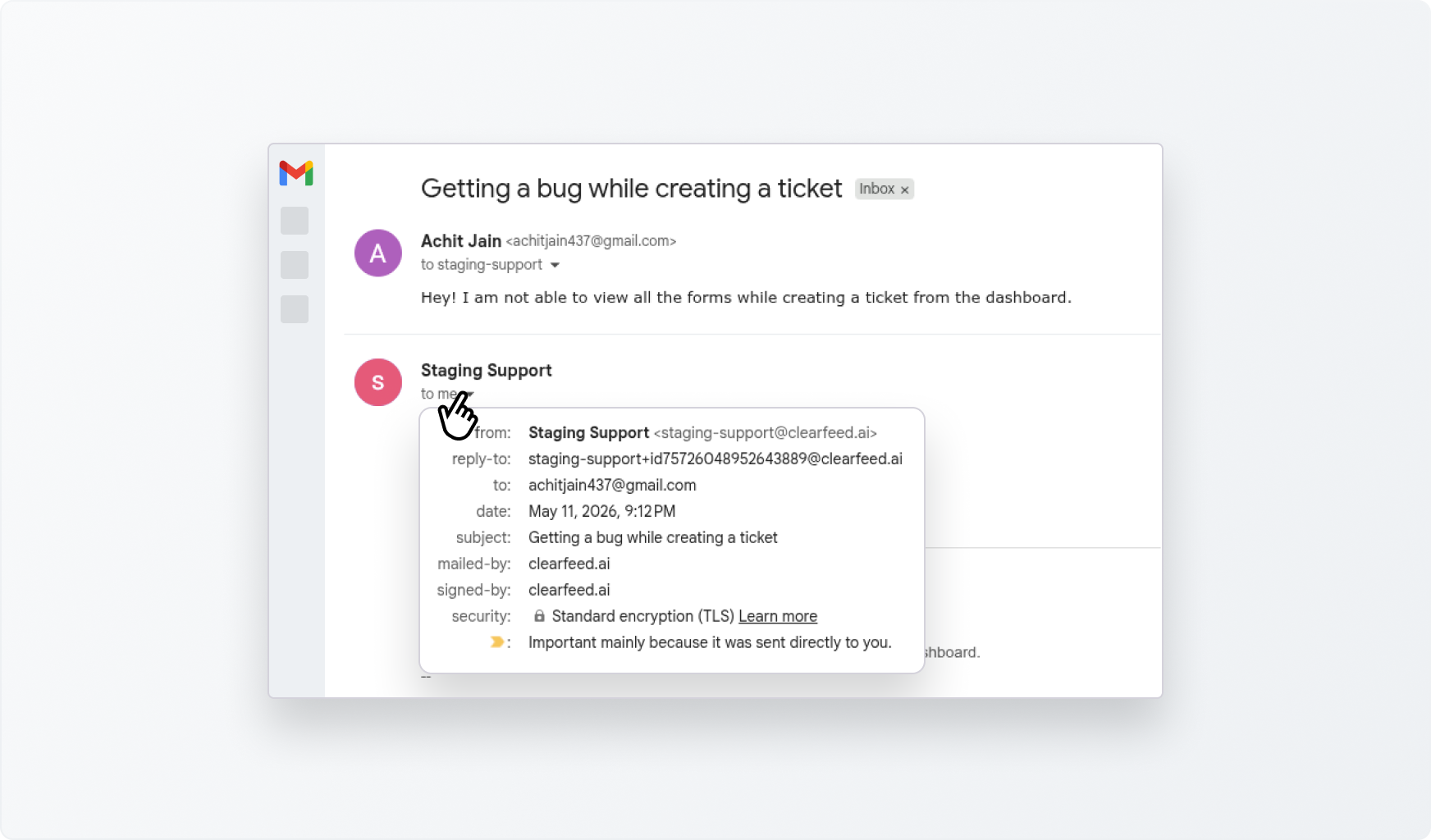
Each inbox has its own incoming and outgoing address

‍

2. You control how emails are routed 

Rather than sifting through endless email threads or constantly forwarding messages to loop in colleagues, your team can tag someone, have a quick internal discussion, and reply to the customer - all from within Slack. Each inbox is assigned to an Email Collection, which is associated with a Slack triage channel and a set of agents. 

You control how emails are routed

You can assign multiple inboxes to the same collection so one team handles everything in one channel, or create separate collections for different addresses, each with its own channel, agents, and SLAs. For example: billing@ can go to a finance-focused queue, enterprise@ to your senior support team, support@ to the general queue. The routing maps to how your team is structured, not the other way around.
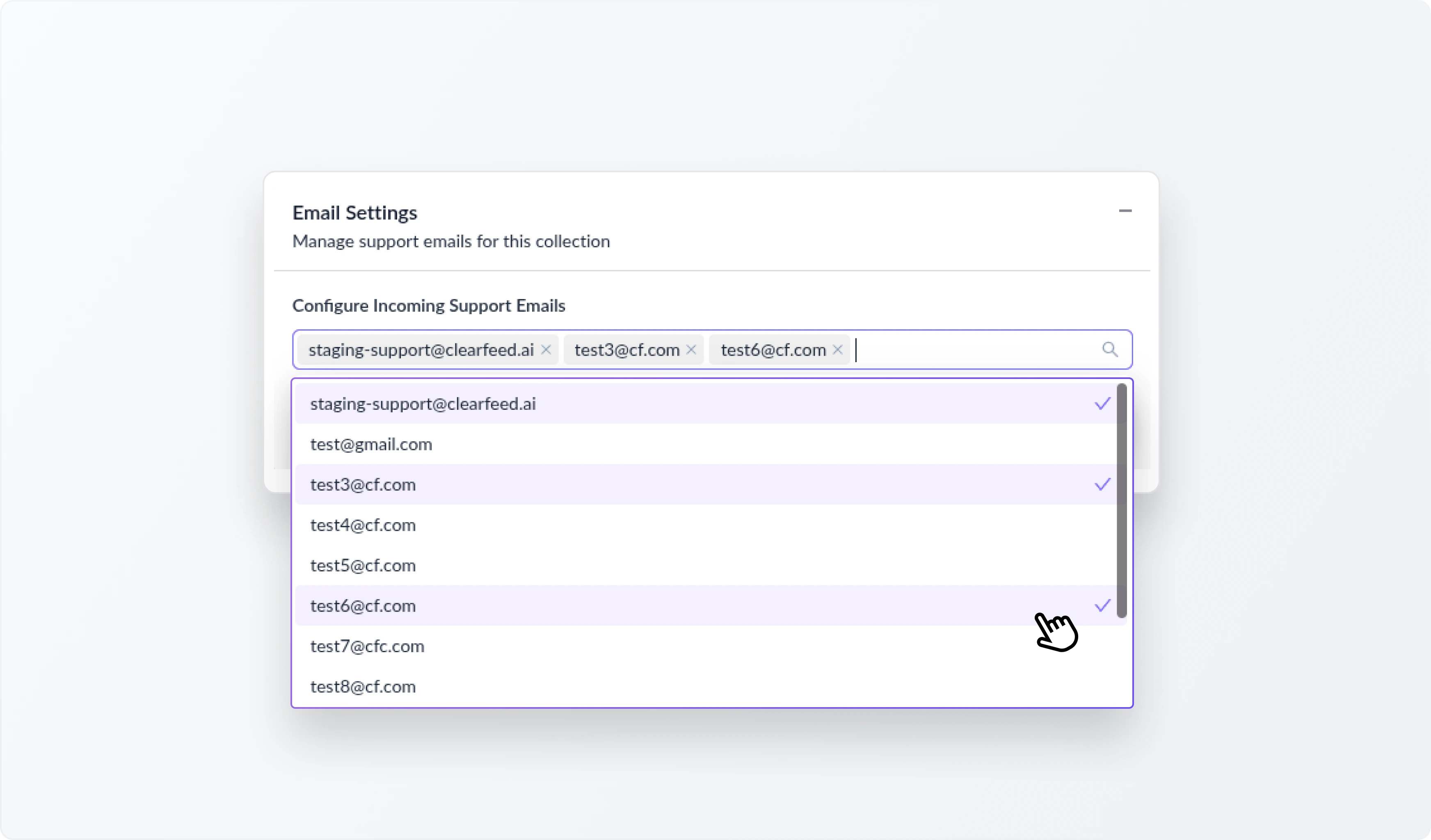
You control how emails are routed 

‍

3. All configured inboxes are managed from one place 

Every inbox paired with its outgoing address is visible in ClearFeed's Mailboxes view. Adding a new inbox, updating an outgoing address, or adjusting routing takes minutes without affecting anything else in your setup.
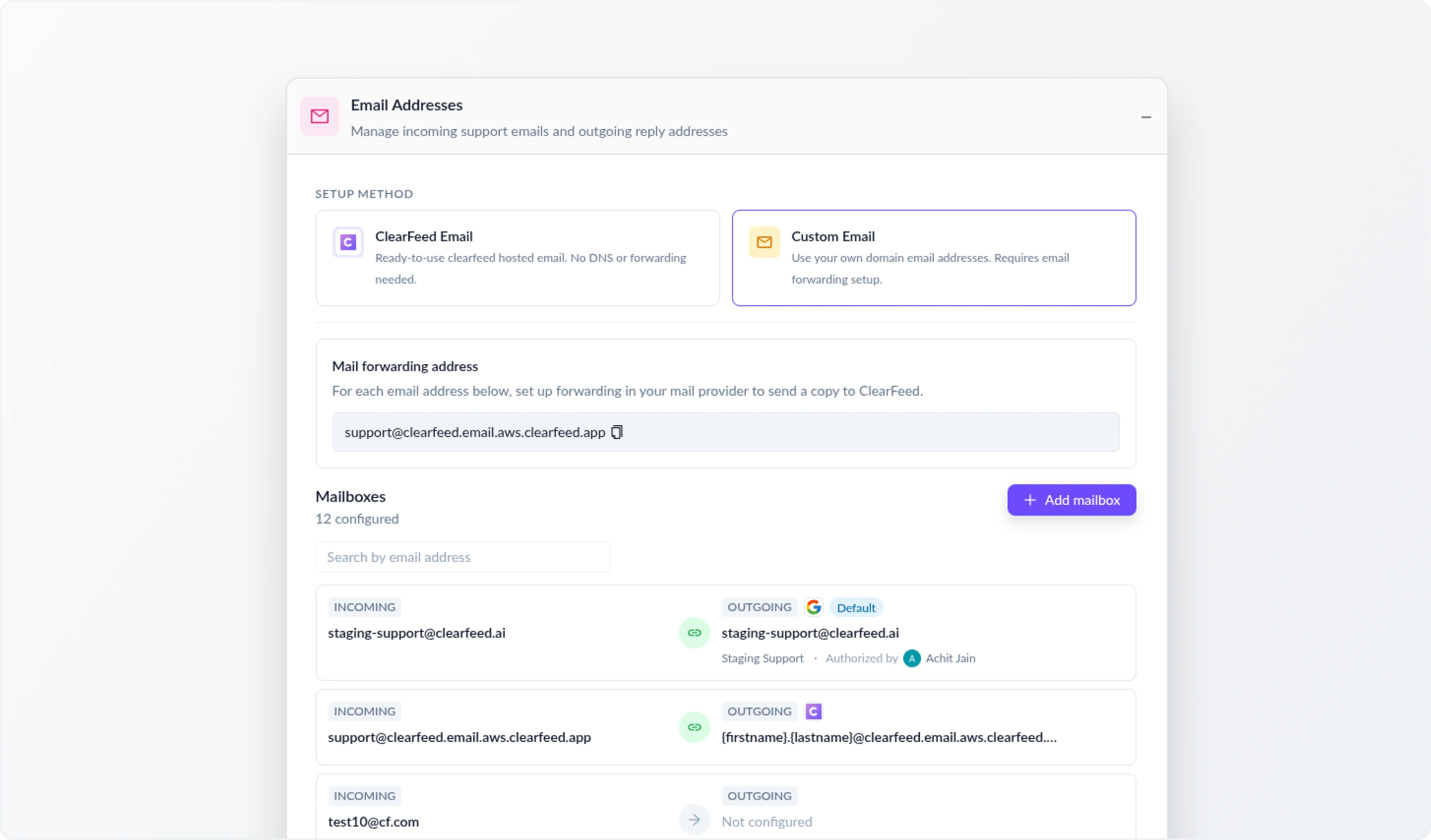
All configured inboxes are managed from one place 

‍

4. Ticketing works the same way regardless of which inbox 

Every email ticket gets the same treatment: agents can post private internal comments visible only to teammates, never to the customer - @mention colleagues to loop them in, track status, set SLA policies, and send automated notifications when a ticket is resolved. Reporting works across all your inboxes, giving you a single view of what's open, what's resolved, and how your team is performing.
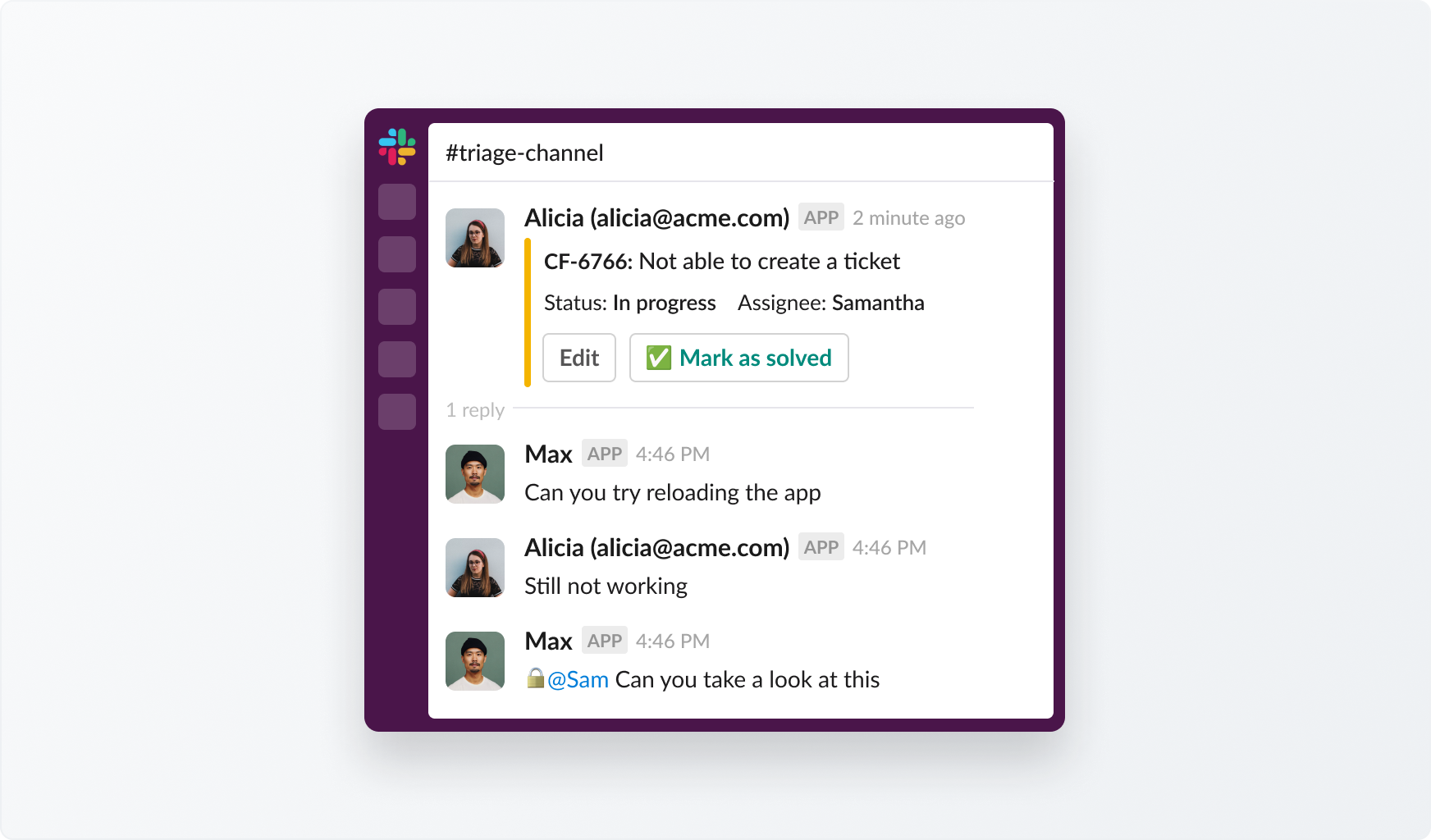
Ticketing works the same way regardless of which inbox 

‍

Wrapping Up

If your team manages more than one support email address, you've probably felt the friction of  jumping between inboxes, losing track of what's open, replies going out from the wrong address. Multi-inbox email in ClearFeed is built to remove that friction entirely. Every address your team manages, connected in one place, each one working exactly as your customers expect.

To learn more about the functionality, reach out to us at support@clearfeed.ai or book a walkthrough here.

Most Support teams don't operate out of a single email address. There's support@ for general queries, billing@ for payment issues, onboarding@ for new customers, and the list grows as the company does. Each inbox is a separate place to monitor, a separate workflow to maintain, and a separate opportunity for something to slip through. 

To fix this gap, we’ve introduced multiple email inbox support in ClearFeed. Teams can now connect multiple incoming email addresses from multiple custom domains to a single ClearFeed account, route them to different Slack triage channels, and configure dedicated outgoing reply addresses for each one. What this means for you:

  • Connect as many email inboxes as you need - support@, ops@, billing@, and beyond
  • Route incoming emails into one or multiple queues based on your team's workflow
  • Respond from the right address - outgoing emails maintain the correct sender identity
  • Manage everything from one Mailboxes view - no switching between accounts or tools

In this post, we'll walk you through how to manage multiple support email inboxes in one place, and how ClearFeed's shared inbox makes that seamless for your team. 

‍

The Challenge: Multiple Inboxes, No Single View

When a team manages several email addresses, the instinct is to divide responsibility - one person or team watches billing@, another watches support@, and so on. At a small scale, this is workable. But as volume grows, the cracks start to show. 

Emails live in different places, ownership gets unclear, and teams end up relying on manual coordination to cover the gaps. Responses get delayed. Requests fall through. And there's no single view to understand what's actually happening across all your inboxes. The result is a fragmented support experience, for both your team and your customers:

  • Teams work in silos without visibility into each other's queues
  • Customers have to remember which email to write to
  • Requests get lost between inboxes
  • Reporting across channels becomes nearly impossible

We wanted to solve all of these issues and make it possible for teams to manage every support inbox from one place, without losing sight of what's happening across any of them.

‍

The Solution: Multi-Inbox Email Support in ClearFeed 

ClearFeed now brings all your support email addresses into one shared inbox - treating each address as a complete, independent inbox with its own incoming address, its own outgoing reply address, and its own queue. Here’s how it works: 

1. Each inbox has its own incoming and outgoing address 

When an agent replies to a ticket from billing@yourcompany.com, the response goes out from billing@yourcompany.com, authenticated via Google or Microsoft OAuth. The customer receives a reply that looks like it came directly from the inbox they wrote to, with no trace of forwarding or shared aliases in between.

Each inbox has its own incoming and outgoing address

‍

2. You control how emails are routed 

Rather than sifting through endless email threads or constantly forwarding messages to loop in colleagues, your team can tag someone, have a quick internal discussion, and reply to the customer - all from within Slack. Each inbox is assigned to an Email Collection, which is associated with a Slack triage channel and a set of agents. 

You control how emails are routed

You can assign multiple inboxes to the same collection so one team handles everything in one channel, or create separate collections for different addresses, each with its own channel, agents, and SLAs. For example: billing@ can go to a finance-focused queue, enterprise@ to your senior support team, support@ to the general queue. The routing maps to how your team is structured, not the other way around.

You control how emails are routed 

‍

3. All configured inboxes are managed from one place 

Every inbox paired with its outgoing address is visible in ClearFeed's Mailboxes view. Adding a new inbox, updating an outgoing address, or adjusting routing takes minutes without affecting anything else in your setup.

All configured inboxes are managed from one place 

‍

4. Ticketing works the same way regardless of which inbox 

Every email ticket gets the same treatment: agents can post private internal comments visible only to teammates, never to the customer - @mention colleagues to loop them in, track status, set SLA policies, and send automated notifications when a ticket is resolved. Reporting works across all your inboxes, giving you a single view of what's open, what's resolved, and how your team is performing.

Ticketing works the same way regardless of which inbox 

‍

Wrapping Up

If your team manages more than one support email address, you've probably felt the friction of  jumping between inboxes, losing track of what's open, replies going out from the wrong address. Multi-inbox email in ClearFeed is built to remove that friction entirely. Every address your team manages, connected in one place, each one working exactly as your customers expect.

To learn more about the functionality, reach out to us at support@clearfeed.ai or book a walkthrough here.

Related Blogs

See all Blog Posts
TOC heading
Text LinkText Link Active
Get a Free consultation with a Support Expert
Learn how fast growing companies like Teleport, Chronosphere and Acryl Data have scaled Support processes with ClearFeed
Thank you for contacting us. Our team will reach out to you shortly.
Oops! Something went wrong while submitting the form.