August 20, 2026

Front Pricing: How Much Does It Really Cost in 2026?

WRITTEN BY
Happy Das
Front Pricing: How Much Does It Really Cost in 2026?

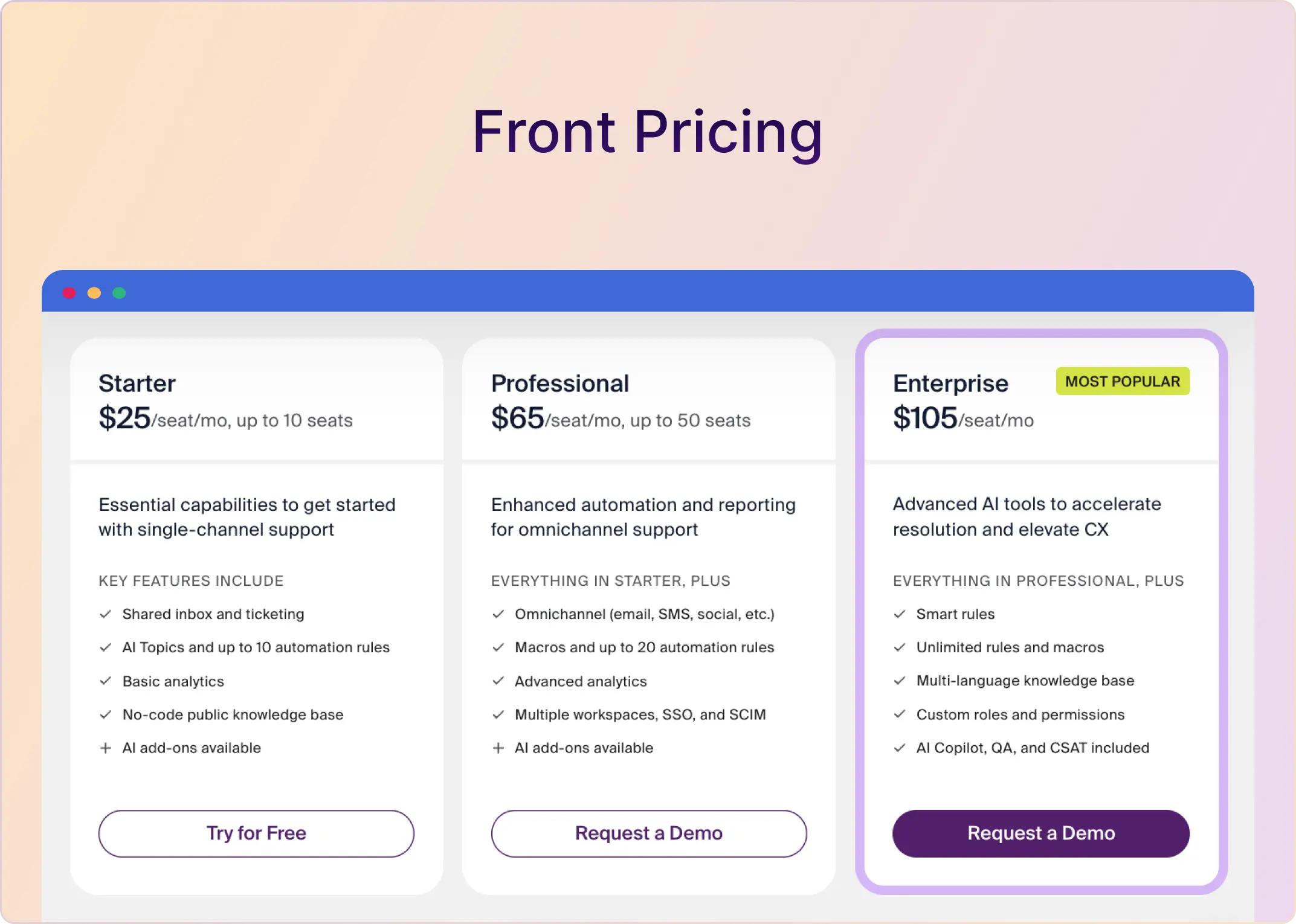
Front costs $25, $65, or $105/seat/month when billed annually. But those three numbers do not tell you what most support teams will actually pay.

The biggest pricing jump happens when you need more than one channel type. That moves you from the $25 Starter plan to the $65 Professional plan. Add Copilot and Front’s Smart QA + Smart CSAT bundle, and Professional reaches $110 per seat per month—$5 more than Enterprise’s published seat price.

This guide breaks down every Front plan, the costs beyond the base subscription, and realistic bills for team of different sizes. It also compares Front with ClearFeed for teams that need ticketing, assignments, SLAs, CSAT, reporting, and support across Slack, email, web chat, and Microsoft Teams.

‍

Front Pricing Plans at a Glance

Front plan Price per seat/month, billed annually Seat limit Best for Main constraint
Starter $25 Up to 10 Small teams using one channel type A second channel type or an 11th user requires Professional
Professional $65 Up to 50 Growing omnichannel teams Copilot, Smart QA, and Smart CSAT cost extra
Enterprise $105 Sales-defined Larger or more complex operations needing advanced AI and governance Minimum commitment and onboarding costs are not fully public

‍

How Front’s Pricing Model Works

Front primarily charges for paid teammate seats. The plan you choose determines your channel access, workflow limits, reporting, security controls, and which AI products are included.

Four variables usually determine the final bill:

  1. Paid seats: Each person with a full Front license adds the plan’s per-seat price.
  2. Channel types: Starter supports one channel type; Professional and Enterprise support multiple types.
  3. Seat-based AI: Copilot, Smart QA, and Smart CSAT are add-ons for the Starter and Professional plans.
  4. Usage and services: Autopilot outcomes, WhatsApp, extra API capacity, telephony, onboarding, and consulting can be billed separately from the subscription.

Front also offers guest accounts. Guests can comment on conversations without a paid license, but they cannot replace full users who need to work on conversations.

‍

What You Get and Outgrow on Each Front Plan

1. Front Starter: $25/Seat/Month

Best for: Teams of 10 or fewer that operate through a single channel type and do not need advanced reporting, SLAs, or SSO.

Starter is Front’s entry plan. It provides the shared-inbox and ticketing experience, but its low price depends on staying within two firm boundaries: no more than 10 paid users and only one channel type.

What Front Starter includes

  • Shared inboxes, ticketing, assignments, comments, shared drafts, and message templates
  • One channel type: email, Front Chat, or SMS
  • AI Topics and basic AI actions such as Compose, Translate, and Summarize
  • Up to 10 automation rules and one workspace
  • Basic analytics, and a basic public knowledge base
  • API access at 50 requests per minute
  • Guest accounts for colleagues who only need to comment

What Front Starter leaves out

  • Omnichannel support
  • SLA or time-goal workflows and advanced analytics
  • Multiple workspaces, SAML SSO, and SCIM
  • Custom roles and custom report dashboards
  • Copilot, Smart QA, and Smart CSAT unless purchased separately

The Starter upgrade cliff

Ten Starter seats cost $250/month. Adding an 11th user does not make the bill $275; it requires Professional for the organization:

  • 10 users on Starter: 10 Ă— $25 = $250/month
  • 11 users on Professional: 11 Ă— $65 = $715/month
  • Increase caused by crossing the seat limit: $465/month, or $5,580/year

The same jump can happen before the team reaches 11 users if it adds a second channel type. A five-person email team costs $125/month on the Starter plan. Add chat, and the base subscription on Professional becomes $325/month.

Takeaway: Choose Starter if the workflow is genuinely single-channel and likely to remain so. Skip it if chat, Slack, SMS, social, SLAs, SSO, or team growth is already on the 12-month roadmap.

‍

2. Front Professional: $65/Seat/Month

Best for: Support and operations teams with 11–50 users or multiple channel types.

Professional is the realistic starting point for many customer support teams. It removes Starter’s single-channel restriction and adds the operational features needed to run an established support function.

What Front Professional includes

Everything in Starter, plus:

  • Omnichannel support across email, SMS, social, chat, and supported third-party channels
  • Up to 20 automation rules and five workspaces
  • Macros, load balancing, and SLA/time-goal workflows
  • Advanced analytics, live dashboards, and report scheduling
  • A customizable knowledge base, SAML SSO, and SCIM
  • Higher API capacity of 100 requests/minute
  • Up to 30 connected channels per paid license

What still costs extra on Professional

  • Copilot: $20/seat/month
  • Smart QA: $20/seat/month
  • Smart CSAT: $10/seat/month
  • Smart QA + Smart CSAT bundle: $25/seat/month
  • Autopilot: usage-priced by conversation outcome
  • Native WhatsApp: Meta’s charges plus Front’s 20% admin fee
  • Higher API limits: $200 per additional 100 requests/minute each month
  • Professional services and, for qualifying contracts, mandatory onboarding

That means Professional can cost four different amounts before usage charges:

Professional configuration Effective price per seat/month
Base plan $65
With Copilot $85
With Smart QA + Smart CSAT bundle $90
With Copilot and Smart QA + Smart CSAT bundle $110

The final configuration costs $5 more per seat than Enterprise’s price. Enterprise still has a sales-defined minimum, so it will not automatically be the affordable contract for every team. 

Takeaway: Choose Professional if omnichannel support, SLAs, SSO, or advanced reporting matter and the team can stay within 20 rules and five workspaces. Ask for an Enterprise comparison if you need the complete AI stack, custom reporting, multilingual knowledge content, or more complex automation.

‍

3. Front Enterprise: $105/Seat/Month

Best for: Larger teams and complex operations that need advanced AI, governance, reporting, or automation.

Enterprise changes both the economics and the feature set. Copilot, Smart QA, and Smart CSAT are included, making its $105 seat price lower than Professional's $110, which bundles those three products.

What Front Enterprise includes

Everything in Professional, plus:

  • Copilot, Smart QA, and Smart CSAT
  • Smart Rules and unlimited standard rules and macros
  • Unlimited workspaces
  • Custom roles and permissions
  • Custom report dashboards and unlimited analytics retention
  • A customizable, multilingual knowledge base
  • Higher API capacity of 200 requests/minute
  • Up to 50 connected channels per paid license

What does Enterprise not necessarily include

  • Autopilot usage
  • Native WhatsApp charges
  • Telephony and third-party carrier fees
  • Extra API capacity beyond the included rate limit
  • Implementation, migration, training, or optimization services
  • Taxes and negotiated contract terms

Front does not publish Enterprise’s minimum seat commitment and states that contracts over $25,000 require an onboarding package. 

Takeaway: Choose Enterprise if the included AI and unlimited workflows offset the higher commitment, or if security, governance, reporting, and language requirements necessitate it. Request a complete quote before using $105 Ă— seats as the budget.

‍

Front Add-On Pricing and Other Cost Drivers

Labeling every line item as a hidden fee would be misleading because Front documents most charges clearly. The real issue is that these costs are easy to miss if you only compare the three headline seat prices.

Add-on or cost variable Price What it changes
Copilot $20/seat/month Raises Professional from $65 to $85 per seat
Smart QA $20/seat/month Adds automated quality evaluation
Smart CSAT $10/seat/month Adds inferred satisfaction scoring
Smart QA + Smart CSAT $25/seat/month Saves $5 versus purchasing both separately
Autopilot triage $0.05/conversation 1,000 triages cost $50
Autopilot handoff $0.39/conversation 1,000 handoffs cost $390
Autopilot resolution $0.89/conversation 1,000 resolutions cost $890
Native WhatsApp Meta charges + 20% Varies with region, message type, and volume
Additional API capacity $200/month per extra 100 requests/minute Matters for integration-heavy workflows
Professional services Custom quote Can increase the first-year implementation cost

‍

A Reusable Front Cost Formula

Use one formula for the quote instead of comparing seat prices in isolation:

Estimated first-year Front cost = base seats + seat-based AI + Autopilot usage + channel/API costs + recurring services + one-time implementation

Using Front’s current rates:

  • Base seats: 12 Ă— paid seats Ă— plan price
  • Seat-based AI: 12 Ă— billed AI seats Ă— selected AI add-on price
  • Autopilot: 12 Ă— [(monthly triages Ă— $0.05) + (monthly handoffs Ă— $0.39) + (monthly resolutions Ă— $0.89)]
  • Extra API capacity: 12 Ă— $200 Ă— additional blocks of 100 requests/minute
  • Other costs: WhatsApp, SMS, voice, onboarding, migration, training, taxes, and negotiated services

Keep one-time implementation costs separate from recurring costs. Otherwise, the first-year quote can make a product look permanently more expensive—or a low recurring price can hide a large upfront commitment.

1. AI Can Change the Plan Comparison

The lowest-priced way to buy Copilot, Smart QA, and Smart CSAT is not Professional plus each product separately. Front offers QA and CSAT as a $25 bundle, which makes the full Professional configuration $110/seat—not $115.

At 15 users:

  • Professional: 15 Ă— $65 = $975/month
  • Professional + Copilot: 15 Ă— $85 = $1,275/month
  • Professional + full seat-based AI bundle: 15 Ă— $110 = $1,650/month
  • Enterprise list-price arithmetic: 15 Ă— $105 = $1,575/month, subject to Front’s minimum

‍

2. Autopilot Creates a Second Cost Curve

Autopilot is not a fixed-price add-on. Front charges according to whether a conversation is triaged, handed to a human with work completed, or fully resolved.

For a month with 500 triages, 300 handoffs, and 200 resolutions:

(500 Ă— $0.05) + (300 Ă— $0.39) + (200 Ă— $0.89) = $320/month

A ten-user Professional team with Copilot would therefore cost $1,170 that month before WhatsApp, telephony, services, or taxes:

(10 Ă— $85) + $320 = $1,170

Do not model every automated conversation at $0.89. Use your expected mix of triages, handoffs, and resolutions.

‍

3. Channels and Infrastructure Can Add Variable Costs

Front does not have a separate fee for each standard shared inbox. It limits the total number of connected shared and personal channels according to the plan and paid licenses: 10/license on Starter, 30 on Professional, and 50 on Enterprise.

Native WhatsApp, third-party SMS or voice providers, extra API capacity, and custom integrations can still increase total cost. Ask vendors to quote the same channel volumes and regions before comparing subscriptions.

‍

What Front Costs at Different Team Sizes

Just a quick heads-up on the numbers below. The table shows Front’s list prices for annual billing. When I say “Full Professional AI,” I’m talking about the Professional plan with Copilot and the Smart QA and Smart CSAT bundle enabled for every user. It does not include Autopilot, WhatsApp, telephony, extra API capacity, services, taxes, or any discounts you might be eligible for.

Team size Starter Professional Professional + Copilot Full Professional AI Enterprise list-price math
5 users $125/mo
$1,500/yr
$325/mo
$3,900/yr
$425/mo
$5,100/yr
$550/mo
$6,600/yr
$525/mo
$6,300/yr*
10 users $250/mo
$3,000/yr
$650/mo
$7,800/yr
$850/mo
$10,200/yr
$1,100/mo
$13,200/yr
$1,050/mo
$12,600/yr*
20 users Not available $1,300/mo
$15,600/yr
$1,700/mo
$20,400/yr
$2,200/mo
$26,400/yr
$2,100/mo
$25,200/yr*
50 users Not available $3,250/mo
$39,000/yr
$4,250/mo
$51,000/yr
$5,500/mo
$66,000/yr
$5,250/mo
$63,000/yr*
100 users Not available Not available Not available Not available $10,500/mo
$126,000/yr*

Note: *Enterprise figures are users × $105, not Front’s quotes. The platform has a sales-defined license minimum.

‍

What Real Users Say About Front’s Value

What user feedback really tells us isn’t whether Front is too expensive or a steal for everyone. It points to the assumptions you should test before committing.

One commenter in an r/SaaS thread about Front alternatives shared that the tool can work well for smaller teams but starts to feel pricey as you add seats and layer on advanced features. Their bigger warning was about operations. Shared inboxes still require consistent assignment, tagging, and ownership habits, regardless of which software sits on top.

A six-year Front customer left a Trustpilot review saying they pay €12,000/year and questioned whether the product and support still justified that cost. Front replied publicly and acknowledged the feedback.

Neither experience is universal, and that’s the whole point. Model your expected seat count, run real workflows during the trial, and measure whether Front eliminates enough coordination work to earn its fully loaded price.

‍

Front Pricing vs. ClearFeed Pricing

What We’re Comparing

When we compare ClearFeed with Front, we’re talking about our helpdesk product. That’s the one with Slack-native tickets, assignments, forms, CSAT surveys, workload reports, automations, Slack triage, and a browser-based inbox. If you move to Professional, you also get SLA configuration and reports, advanced assignments, portals, Microsoft Teams intake, and audit logs.

Email and Slack Both Live in the Workflow

ClearFeed is Slack-first, not Slack-only. An incoming support email gets converted into a ClearFeed ticket and can be routed to a Slack triage channel. An agent can reply via Slack or our web app, and the requester receives the response via email. Starter also covers tickets from Slack channels, private Slack tickets, web chat, workload reports, CSAT surveys, and unlimited custom support email addresses.

The practical difference is where your support team spends their day. Front gathers connected conversations into the Front workspace. ClearFeed pulls requests from Slack, email, web chat, portal, API, and (on Professional) Microsoft Teams into a single help desk workflow. Agents can run that workflow from Slack triage or from the browser-based inbox, whichever feels more natural.

We offer two ways to pay for ClearFeed: by agent or by usage. Agent pricing is the easiest comparison with Front’s per-seat plans, but it is not always the right model for a Slack-based support team.

1. Agent-based pricing

  • Starter is $24/agent/month for 1–15 agents.
  • Professional is $49/agent/month for 1–15 agents.
  • Teams with more than 15 agents receive tailored pricing.
  • We offer a 15% discount for annual subscriptions.

Agent pricing tends to make more sense when a designated support, IT, HR, legal, or finance team handles a high volume of requests. Only users marked as agents can be assigned tickets or post public replies on this model.

2. Usage-based pricing

ClearFeed’s usage-based pricing lets collaborative support teams involve unlimited responders without paying for additional agent seats. For External Helpdesk, pricing scales with the higher of the number of active Slack channels or tracked requests. A request is simply a customer conversation tracked in ClearFeed—roughly equivalent to a Slack thread—whether or not it is converted into a ticket.

Monthly allowance Starter Professional
10 channels / 100 requests $40/month $80/month
60 channels / 600 requests $230/month $460/month
90 channels / 900 requests $320/month $640/month

‍

Front vs. ClearFeed Pricing Comparison

Pricing question Front ClearFeed
Starting price $25/seat/month, billed annually $24/agent/month, or $40/month by usage
Email, Slack, and web chat Starter permits one channel type; Professional supports multiple types Included together on Starter
SLA configuration and reporting Professional at $65/seat/month Professional at $49/agent/month or $80/month at the first usage tier
Microsoft Teams intake Doesn’t support as a customer support intake channel Included on Professional; requests route to Slack triage
Annual discount 24% off annual subscriptions 15% off annual subscriptions
Growth Starter supports up to 10 seats; Professional up to 50 Agent prices cover 1–15 agents; usage pricing scales with channels or requests
Automation limits Starter supports up to 10 automation rules; Professional supports up to 20 Unlimited automations on Starter and Professional
AI assistance Copilot costs $20/seat on Starter and Professional Core AI functions are included; Professional includes credits based on the selected billing model

‍

Example 1: Five Designated Support Agents

Assume five agents handle Slack, email, and web chat and need advanced assignments and SLA reporting. Those requirements map to Front Professional and ClearFeed Professional.

Front Professional:

  • Base subscription: 5 Ă— $65 = $325/month, or $3,900/year
  • With Copilot: 5 Ă— $85 = $425/month, or $5,100/year

ClearFeed Professional on agent pricing:

  • Monthly price: 5 Ă— $49 = $245/month
  • With our 15% annual discount: $208.25/month equivalent, or $2,499/year

After normalizing both subscriptions to annual billing, the difference in subscription costs is $1,401/year.

‍

Example 2: Five Collaborators, Eight Channels, and 80 Requests

Now, assume the same workload does not have five fixed agents. Different people step in depending on the customer or issue, but the team still needs Professional features such as SLAs.

  • Front Professional still uses 5 paid seats at $325/month (annual billing).
  • ClearFeed Professional falls into the usage-based tier: $80/month for up to 10 channels and 100 requests.
  • With our annual discount, that comes to $68/month, or $816/year.

The subscription difference in this scenario is $3,084/year.

These examples compare subscription prices, not identical products or AI outputs. Front may justify its price when the organization wants personal and shared inboxes, calendars, SMS, social channels, and support work inside the Front workspace. ClearFeed is a different fit: email and Slack can operate as parallel intake channels, while the team runs the shared queue from Slack triage or the web inbox.

‍

Is Front Worth the Price?

Front is worth considering when email is central to the business and the team will use its broader communication workspace—not only its basic shared inbox. Its personal inbox, calendar, guest collaboration, omnichannel communication, and mature workflow controls can replace fragmented processes for the right organization.

Its pricing is harder to justify when a team needs Professional only to add a second support channel, must license many occasional responders, or wants the full AI stack without an Enterprise commitment.

Consider ClearFeed If:

  • Agents want to run the help-desk workflow from Slack triage or a browser-based inbox.
  • Customers or employees contact the team via Slack, email, Discord, Telegram, web chat, portal, API, or Microsoft Teams.
  • You need native ClearFeed tickets, assignments, CSAT, workload reporting, and automations, not just a bridge to another ticketing system.
  • You want to choose between agent-based and usage-based pricing.
  • You want to keep an existing help desk or project-management tool connected while making Slack the collaboration layer.

So, if your support workflow revolves around Slack and you want flexible pricing, native ticketing, automation, reporting, and integrations with existing help-desk tools, ClearFeed may be the better fit. Start a 14-day free trial to see how ClearFeed can improve your support operations.
Front costs $25, $65, or $105/seat/month when billed annually. But those three numbers do not tell you what most support teams will actually pay.

The biggest pricing jump happens when you need more than one channel type. That moves you from the $25 Starter plan to the $65 Professional plan. Add Copilot and Front’s Smart QA + Smart CSAT bundle, and Professional reaches $110 per seat per month—$5 more than Enterprise’s published seat price.

This guide breaks down every Front plan, the costs beyond the base subscription, and realistic bills for team of different sizes. It also compares Front with ClearFeed for teams that need ticketing, assignments, SLAs, CSAT, reporting, and support across Slack, email, web chat, and Microsoft Teams.

‍

Front Pricing Plans at a Glance

Front plan Price per seat/month, billed annually Seat limit Best for Main constraint
Starter $25 Up to 10 Small teams using one channel type A second channel type or an 11th user requires Professional
Professional $65 Up to 50 Growing omnichannel teams Copilot, Smart QA, and Smart CSAT cost extra
Enterprise $105 Sales-defined Larger or more complex operations needing advanced AI and governance Minimum commitment and onboarding costs are not fully public

‍

How Front’s Pricing Model Works

Front primarily charges for paid teammate seats. The plan you choose determines your channel access, workflow limits, reporting, security controls, and which AI products are included.

Four variables usually determine the final bill:

  1. Paid seats: Each person with a full Front license adds the plan’s per-seat price.
  2. Channel types: Starter supports one channel type; Professional and Enterprise support multiple types.
  3. Seat-based AI: Copilot, Smart QA, and Smart CSAT are add-ons for the Starter and Professional plans.
  4. Usage and services: Autopilot outcomes, WhatsApp, extra API capacity, telephony, onboarding, and consulting can be billed separately from the subscription.

Front also offers guest accounts. Guests can comment on conversations without a paid license, but they cannot replace full users who need to work on conversations.

‍

What You Get and Outgrow on Each Front Plan

1. Front Starter: $25/Seat/Month

Best for: Teams of 10 or fewer that operate through a single channel type and do not need advanced reporting, SLAs, or SSO.

Starter is Front’s entry plan. It provides the shared-inbox and ticketing experience, but its low price depends on staying within two firm boundaries: no more than 10 paid users and only one channel type.

What Front Starter includes

  • Shared inboxes, ticketing, assignments, comments, shared drafts, and message templates
  • One channel type: email, Front Chat, or SMS
  • AI Topics and basic AI actions such as Compose, Translate, and Summarize
  • Up to 10 automation rules and one workspace
  • Basic analytics, and a basic public knowledge base
  • API access at 50 requests per minute
  • Guest accounts for colleagues who only need to comment

What Front Starter leaves out

  • Omnichannel support
  • SLA or time-goal workflows and advanced analytics
  • Multiple workspaces, SAML SSO, and SCIM
  • Custom roles and custom report dashboards
  • Copilot, Smart QA, and Smart CSAT unless purchased separately

The Starter upgrade cliff

Ten Starter seats cost $250/month. Adding an 11th user does not make the bill $275; it requires Professional for the organization:

  • 10 users on Starter: 10 Ă— $25 = $250/month
  • 11 users on Professional: 11 Ă— $65 = $715/month
  • Increase caused by crossing the seat limit: $465/month, or $5,580/year

The same jump can happen before the team reaches 11 users if it adds a second channel type. A five-person email team costs $125/month on the Starter plan. Add chat, and the base subscription on Professional becomes $325/month.

Takeaway: Choose Starter if the workflow is genuinely single-channel and likely to remain so. Skip it if chat, Slack, SMS, social, SLAs, SSO, or team growth is already on the 12-month roadmap.

‍

2. Front Professional: $65/Seat/Month

Best for: Support and operations teams with 11–50 users or multiple channel types.

Professional is the realistic starting point for many customer support teams. It removes Starter’s single-channel restriction and adds the operational features needed to run an established support function.

What Front Professional includes

Everything in Starter, plus:

  • Omnichannel support across email, SMS, social, chat, and supported third-party channels
  • Up to 20 automation rules and five workspaces
  • Macros, load balancing, and SLA/time-goal workflows
  • Advanced analytics, live dashboards, and report scheduling
  • A customizable knowledge base, SAML SSO, and SCIM
  • Higher API capacity of 100 requests/minute
  • Up to 30 connected channels per paid license

What still costs extra on Professional

  • Copilot: $20/seat/month
  • Smart QA: $20/seat/month
  • Smart CSAT: $10/seat/month
  • Smart QA + Smart CSAT bundle: $25/seat/month
  • Autopilot: usage-priced by conversation outcome
  • Native WhatsApp: Meta’s charges plus Front’s 20% admin fee
  • Higher API limits: $200 per additional 100 requests/minute each month
  • Professional services and, for qualifying contracts, mandatory onboarding

That means Professional can cost four different amounts before usage charges:

Professional configuration Effective price per seat/month
Base plan $65
With Copilot $85
With Smart QA + Smart CSAT bundle $90
With Copilot and Smart QA + Smart CSAT bundle $110

The final configuration costs $5 more per seat than Enterprise’s price. Enterprise still has a sales-defined minimum, so it will not automatically be the affordable contract for every team. 

Takeaway: Choose Professional if omnichannel support, SLAs, SSO, or advanced reporting matter and the team can stay within 20 rules and five workspaces. Ask for an Enterprise comparison if you need the complete AI stack, custom reporting, multilingual knowledge content, or more complex automation.

‍

3. Front Enterprise: $105/Seat/Month

Best for: Larger teams and complex operations that need advanced AI, governance, reporting, or automation.

Enterprise changes both the economics and the feature set. Copilot, Smart QA, and Smart CSAT are included, making its $105 seat price lower than Professional's $110, which bundles those three products.

What Front Enterprise includes

Everything in Professional, plus:

  • Copilot, Smart QA, and Smart CSAT
  • Smart Rules and unlimited standard rules and macros
  • Unlimited workspaces
  • Custom roles and permissions
  • Custom report dashboards and unlimited analytics retention
  • A customizable, multilingual knowledge base
  • Higher API capacity of 200 requests/minute
  • Up to 50 connected channels per paid license

What does Enterprise not necessarily include

  • Autopilot usage
  • Native WhatsApp charges
  • Telephony and third-party carrier fees
  • Extra API capacity beyond the included rate limit
  • Implementation, migration, training, or optimization services
  • Taxes and negotiated contract terms

Front does not publish Enterprise’s minimum seat commitment and states that contracts over $25,000 require an onboarding package. 

Takeaway: Choose Enterprise if the included AI and unlimited workflows offset the higher commitment, or if security, governance, reporting, and language requirements necessitate it. Request a complete quote before using $105 Ă— seats as the budget.

‍

Front Add-On Pricing and Other Cost Drivers

Labeling every line item as a hidden fee would be misleading because Front documents most charges clearly. The real issue is that these costs are easy to miss if you only compare the three headline seat prices.

Add-on or cost variable Price What it changes
Copilot $20/seat/month Raises Professional from $65 to $85 per seat
Smart QA $20/seat/month Adds automated quality evaluation
Smart CSAT $10/seat/month Adds inferred satisfaction scoring
Smart QA + Smart CSAT $25/seat/month Saves $5 versus purchasing both separately
Autopilot triage $0.05/conversation 1,000 triages cost $50
Autopilot handoff $0.39/conversation 1,000 handoffs cost $390
Autopilot resolution $0.89/conversation 1,000 resolutions cost $890
Native WhatsApp Meta charges + 20% Varies with region, message type, and volume
Additional API capacity $200/month per extra 100 requests/minute Matters for integration-heavy workflows
Professional services Custom quote Can increase the first-year implementation cost

‍

A Reusable Front Cost Formula

Use one formula for the quote instead of comparing seat prices in isolation:

Estimated first-year Front cost = base seats + seat-based AI + Autopilot usage + channel/API costs + recurring services + one-time implementation

Using Front’s current rates:

  • Base seats: 12 Ă— paid seats Ă— plan price
  • Seat-based AI: 12 Ă— billed AI seats Ă— selected AI add-on price
  • Autopilot: 12 Ă— [(monthly triages Ă— $0.05) + (monthly handoffs Ă— $0.39) + (monthly resolutions Ă— $0.89)]
  • Extra API capacity: 12 Ă— $200 Ă— additional blocks of 100 requests/minute
  • Other costs: WhatsApp, SMS, voice, onboarding, migration, training, taxes, and negotiated services

Keep one-time implementation costs separate from recurring costs. Otherwise, the first-year quote can make a product look permanently more expensive—or a low recurring price can hide a large upfront commitment.

1. AI Can Change the Plan Comparison

The lowest-priced way to buy Copilot, Smart QA, and Smart CSAT is not Professional plus each product separately. Front offers QA and CSAT as a $25 bundle, which makes the full Professional configuration $110/seat—not $115.

At 15 users:

  • Professional: 15 Ă— $65 = $975/month
  • Professional + Copilot: 15 Ă— $85 = $1,275/month
  • Professional + full seat-based AI bundle: 15 Ă— $110 = $1,650/month
  • Enterprise list-price arithmetic: 15 Ă— $105 = $1,575/month, subject to Front’s minimum

‍

2. Autopilot Creates a Second Cost Curve

Autopilot is not a fixed-price add-on. Front charges according to whether a conversation is triaged, handed to a human with work completed, or fully resolved.

For a month with 500 triages, 300 handoffs, and 200 resolutions:

(500 Ă— $0.05) + (300 Ă— $0.39) + (200 Ă— $0.89) = $320/month

A ten-user Professional team with Copilot would therefore cost $1,170 that month before WhatsApp, telephony, services, or taxes:

(10 Ă— $85) + $320 = $1,170

Do not model every automated conversation at $0.89. Use your expected mix of triages, handoffs, and resolutions.

‍

3. Channels and Infrastructure Can Add Variable Costs

Front does not have a separate fee for each standard shared inbox. It limits the total number of connected shared and personal channels according to the plan and paid licenses: 10/license on Starter, 30 on Professional, and 50 on Enterprise.

Native WhatsApp, third-party SMS or voice providers, extra API capacity, and custom integrations can still increase total cost. Ask vendors to quote the same channel volumes and regions before comparing subscriptions.

‍

What Front Costs at Different Team Sizes

Just a quick heads-up on the numbers below. The table shows Front’s list prices for annual billing. When I say “Full Professional AI,” I’m talking about the Professional plan with Copilot and the Smart QA and Smart CSAT bundle enabled for every user. It does not include Autopilot, WhatsApp, telephony, extra API capacity, services, taxes, or any discounts you might be eligible for.

Team size Starter Professional Professional + Copilot Full Professional AI Enterprise list-price math
5 users $125/mo
$1,500/yr
$325/mo
$3,900/yr
$425/mo
$5,100/yr
$550/mo
$6,600/yr
$525/mo
$6,300/yr*
10 users $250/mo
$3,000/yr
$650/mo
$7,800/yr
$850/mo
$10,200/yr
$1,100/mo
$13,200/yr
$1,050/mo
$12,600/yr*
20 users Not available $1,300/mo
$15,600/yr
$1,700/mo
$20,400/yr
$2,200/mo
$26,400/yr
$2,100/mo
$25,200/yr*
50 users Not available $3,250/mo
$39,000/yr
$4,250/mo
$51,000/yr
$5,500/mo
$66,000/yr
$5,250/mo
$63,000/yr*
100 users Not available Not available Not available Not available $10,500/mo
$126,000/yr*

Note: *Enterprise figures are users × $105, not Front’s quotes. The platform has a sales-defined license minimum.

‍

What Real Users Say About Front’s Value

What user feedback really tells us isn’t whether Front is too expensive or a steal for everyone. It points to the assumptions you should test before committing.

One commenter in an r/SaaS thread about Front alternatives shared that the tool can work well for smaller teams but starts to feel pricey as you add seats and layer on advanced features. Their bigger warning was about operations. Shared inboxes still require consistent assignment, tagging, and ownership habits, regardless of which software sits on top.

A six-year Front customer left a Trustpilot review saying they pay €12,000/year and questioned whether the product and support still justified that cost. Front replied publicly and acknowledged the feedback.

Neither experience is universal, and that’s the whole point. Model your expected seat count, run real workflows during the trial, and measure whether Front eliminates enough coordination work to earn its fully loaded price.

‍

Front Pricing vs. ClearFeed Pricing

What We’re Comparing

When we compare ClearFeed with Front, we’re talking about our helpdesk product. That’s the one with Slack-native tickets, assignments, forms, CSAT surveys, workload reports, automations, Slack triage, and a browser-based inbox. If you move to Professional, you also get SLA configuration and reports, advanced assignments, portals, Microsoft Teams intake, and audit logs.

Email and Slack Both Live in the Workflow

ClearFeed is Slack-first, not Slack-only. An incoming support email gets converted into a ClearFeed ticket and can be routed to a Slack triage channel. An agent can reply via Slack or our web app, and the requester receives the response via email. Starter also covers tickets from Slack channels, private Slack tickets, web chat, workload reports, CSAT surveys, and unlimited custom support email addresses.

The practical difference is where your support team spends their day. Front gathers connected conversations into the Front workspace. ClearFeed pulls requests from Slack, email, web chat, portal, API, and (on Professional) Microsoft Teams into a single help desk workflow. Agents can run that workflow from Slack triage or from the browser-based inbox, whichever feels more natural.

We offer two ways to pay for ClearFeed: by agent or by usage. Agent pricing is the easiest comparison with Front’s per-seat plans, but it is not always the right model for a Slack-based support team.

1. Agent-based pricing

  • Starter is $24/agent/month for 1–15 agents.
  • Professional is $49/agent/month for 1–15 agents.
  • Teams with more than 15 agents receive tailored pricing.
  • We offer a 15% discount for annual subscriptions.

Agent pricing tends to make more sense when a designated support, IT, HR, legal, or finance team handles a high volume of requests. Only users marked as agents can be assigned tickets or post public replies on this model.

2. Usage-based pricing

ClearFeed’s usage-based pricing lets collaborative support teams involve unlimited responders without paying for additional agent seats. For External Helpdesk, pricing scales with the higher of the number of active Slack channels or tracked requests. A request is simply a customer conversation tracked in ClearFeed—roughly equivalent to a Slack thread—whether or not it is converted into a ticket.

Monthly allowance Starter Professional
10 channels / 100 requests $40/month $80/month
60 channels / 600 requests $230/month $460/month
90 channels / 900 requests $320/month $640/month

‍

Front vs. ClearFeed Pricing Comparison

Pricing question Front ClearFeed
Starting price $25/seat/month, billed annually $24/agent/month, or $40/month by usage
Email, Slack, and web chat Starter permits one channel type; Professional supports multiple types Included together on Starter
SLA configuration and reporting Professional at $65/seat/month Professional at $49/agent/month or $80/month at the first usage tier
Microsoft Teams intake Doesn’t support as a customer support intake channel Included on Professional; requests route to Slack triage
Annual discount 24% off annual subscriptions 15% off annual subscriptions
Growth Starter supports up to 10 seats; Professional up to 50 Agent prices cover 1–15 agents; usage pricing scales with channels or requests
Automation limits Starter supports up to 10 automation rules; Professional supports up to 20 Unlimited automations on Starter and Professional
AI assistance Copilot costs $20/seat on Starter and Professional Core AI functions are included; Professional includes credits based on the selected billing model

‍

Example 1: Five Designated Support Agents

Assume five agents handle Slack, email, and web chat and need advanced assignments and SLA reporting. Those requirements map to Front Professional and ClearFeed Professional.

Front Professional:

  • Base subscription: 5 Ă— $65 = $325/month, or $3,900/year
  • With Copilot: 5 Ă— $85 = $425/month, or $5,100/year

ClearFeed Professional on agent pricing:

  • Monthly price: 5 Ă— $49 = $245/month
  • With our 15% annual discount: $208.25/month equivalent, or $2,499/year

After normalizing both subscriptions to annual billing, the difference in subscription costs is $1,401/year.

‍

Example 2: Five Collaborators, Eight Channels, and 80 Requests

Now, assume the same workload does not have five fixed agents. Different people step in depending on the customer or issue, but the team still needs Professional features such as SLAs.

  • Front Professional still uses 5 paid seats at $325/month (annual billing).
  • ClearFeed Professional falls into the usage-based tier: $80/month for up to 10 channels and 100 requests.
  • With our annual discount, that comes to $68/month, or $816/year.

The subscription difference in this scenario is $3,084/year.

These examples compare subscription prices, not identical products or AI outputs. Front may justify its price when the organization wants personal and shared inboxes, calendars, SMS, social channels, and support work inside the Front workspace. ClearFeed is a different fit: email and Slack can operate as parallel intake channels, while the team runs the shared queue from Slack triage or the web inbox.

‍

Is Front Worth the Price?

Front is worth considering when email is central to the business and the team will use its broader communication workspace—not only its basic shared inbox. Its personal inbox, calendar, guest collaboration, omnichannel communication, and mature workflow controls can replace fragmented processes for the right organization.

Its pricing is harder to justify when a team needs Professional only to add a second support channel, must license many occasional responders, or wants the full AI stack without an Enterprise commitment.

Consider ClearFeed If:

  • Agents want to run the help-desk workflow from Slack triage or a browser-based inbox.
  • Customers or employees contact the team via Slack, email, Discord, Telegram, web chat, portal, API, or Microsoft Teams.
  • You need native ClearFeed tickets, assignments, CSAT, workload reporting, and automations, not just a bridge to another ticketing system.
  • You want to choose between agent-based and usage-based pricing.
  • You want to keep an existing help desk or project-management tool connected while making Slack the collaboration layer.

So, if your support workflow revolves around Slack and you want flexible pricing, native ticketing, automation, reporting, and integrations with existing help-desk tools, ClearFeed may be the better fit. Start a 14-day free trial to see how ClearFeed can improve your support operations.
Related Blogs

See all Blog Posts
TOC heading
Text LinkText Link Active
Get a Free consultation with a Support Expert
Learn how fast growing companies like Teleport, Chronosphere and Acryl Data have scaled Support processes with ClearFeed
Thank you for contacting us. Our team will reach out to you shortly.
Oops! Something went wrong while submitting the form.