October 22, 2026

7 Best Tidio Alternatives in 2026

WRITTEN BY
Happy Das
7 Best Tidio Alternatives in 2026

The best Tidio alternative depends on why you're switching. Tidio's conversation limits and separate AI charges can make costs harder to predict. You may also need simpler live chat, better ticket assignment and reporting, or tighter connections between support and engineering. For B2B teams managing customer requests in shared Slack channels, tracking ownership and resolution adds another layer of complexity.

tawk.to suits teams that want free live chat, while Crisp offers workspace-based pricing. Intercom Fin focuses on AI support, and ClearFeed, which we build, is our pick for B2B teams managing customer requests in Slack. Featurebase, Freshchat, and LiveChat address other needs, including product feedback integration and staffed website chat.

This guide compares seven Tidio alternatives based on their workflows, features, limitations, and pricing as teams grow.

‍

The Best Tidio Alternatives at a Glance

Tool Best for Where support happens Starting price Main cost consideration
ClearFeed B2B support managed from Slack Customer channels, email, and web chat; team replies from Slack or the web app $24/agent/month on Starter Professional features and AI usage affect the total
Crisp Teams that want seats bundled into a workspace price Web chat, email, and connected messaging channels; Crisp inbox or Slack replies Free; Mini $45/workspace/month Higher plans unlock more channels and ticketing; AI uses credits
tawk.to Free live chat handled by people Website chat; tawk.to dashboard and apps Free core product AI and removing branding are optional paid additions
Intercom Fin AI support with an Intercom inbox or an existing helpdesk Connected support channels; people work in the relevant inbox Support outcomes from $0.99; Intercom seats from $29/month annually Seat fees and AI outcome charges can stack
Featurebase SaaS teams combining support and product feedback Web messenger, email, and Slack; Featurebase inbox Free; Growth $29/seat/month annually AI resolutions cost $0.49; Slack requires Professional
Freshchat Support across website, app, and social messaging Connected channels; Freshchat workspace Free for up to 10 agents; Growth $19/agent/month annually AI sessions and agent assistance are extra
LiveChat A staffed website chat team Website and connected messaging channels; LiveChat workspace Starter $19/person/month annually Team size and the required plan drive the bill

‍

How We Compared These Tidio Alternatives

We focused on five questions. Where we used customer reviews, we considered only those published in 2025 or later.

  1. How does the bill grow? We looked at included seats, conversation limits, AI charges, and features that require a higher plan. A starting price rarely predicts the final bill once conversation volume or AI usage grows.
  2. Does it fit where customers and agents work? Website chat, social messages, email, and shared Slack channels have different requirements. We checked both where customers can ask for help and where agents manage those requests.
  3. What can the AI actually do? Suggesting replies, answering customers independently, and taking actions in connected tools are different capabilities. We compared their scope, limits, and cost.
  4. What happens when a person needs to take over? We looked for conversation history, clear ownership, routing, and follow-up, including when support needs help from engineering.
  5. Can the team measure results and use its data? We considered reporting, integrations, and conversation exports so teams can track performance, connect support with other tools, and access their customer conversations.

‍

7 Best Tidio Alternatives for Customer Support Teams in 2026

1. ClearFeed

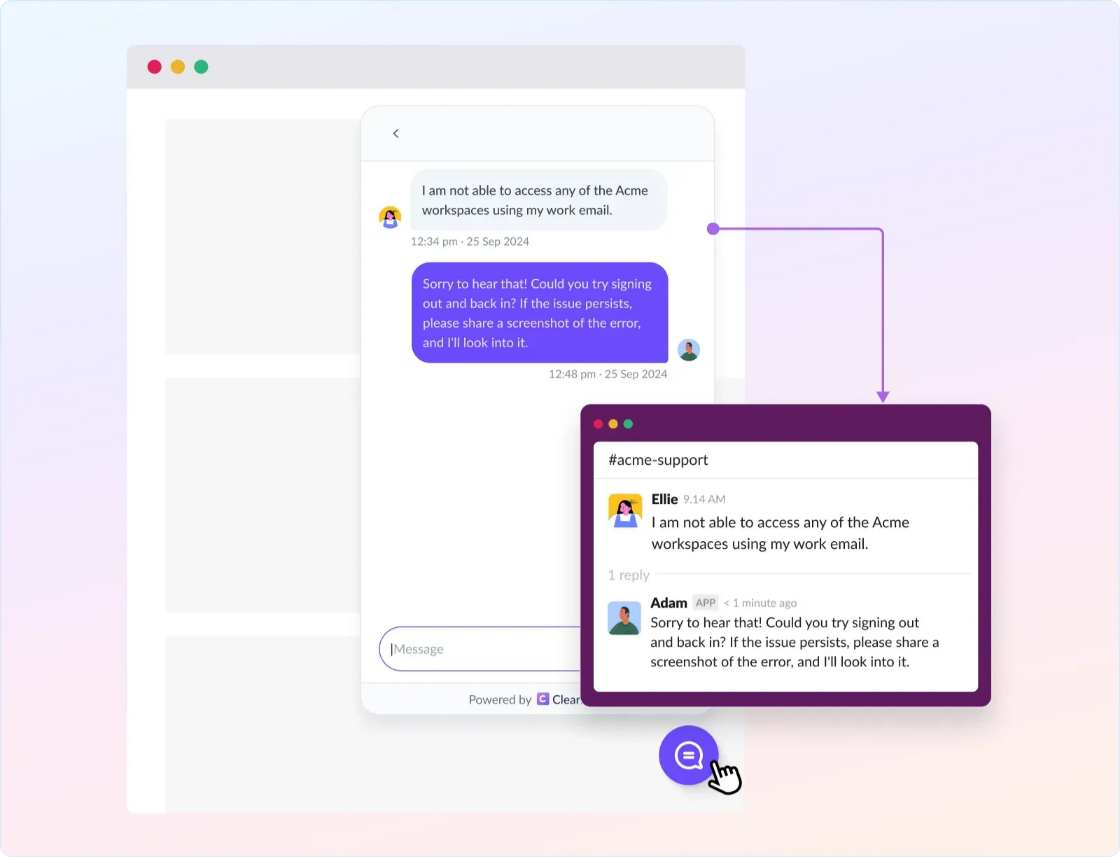
ClearFeed turns customer conversations into tracked requests and tickets. It is a useful Tidio alternative when support involves shared Slack channels between companies (Slack Connect) and your team needs to coordinate with engineers or customer success managers.

For the customer reporting a bug, the benefit is straightforward: the conversation can stay in its original channel while your team assigns an owner and follows up from a private Slack triage channel. Email and web-chat requests can also reach that support queue.
ClearFeed

Key features

  • Manage requests from customer Slack channels, email, and web chat.
  • Assign requests, update status, and collaborate in private support channels.
  • Connect conversations with tickets and engineering issues through supported two-way integrations.
  • Use AI to answer from selected knowledge sources and take configured actions in connected tools.
  • Track response commitments through service-level agreements, or SLAs, and reports on Professional.

Pros

  • Support agents, engineers, and customer success managers can collaborate where they already work.
  • Customer replies and internal discussions can stay connected without exposing private notes.
  • You can use ClearFeed ticketing or connect an existing ticketing system.

Cons

  • Microsoft Teams support and SLA reporting require Professional; Starter may not cover the complete workflow.
  • AI uses credits, so a long investigation can cost more than a short answer.
  • The workflow centers on Slack. A small team wanting only a free website widget has a simpler option in tawk.to.

Pricing

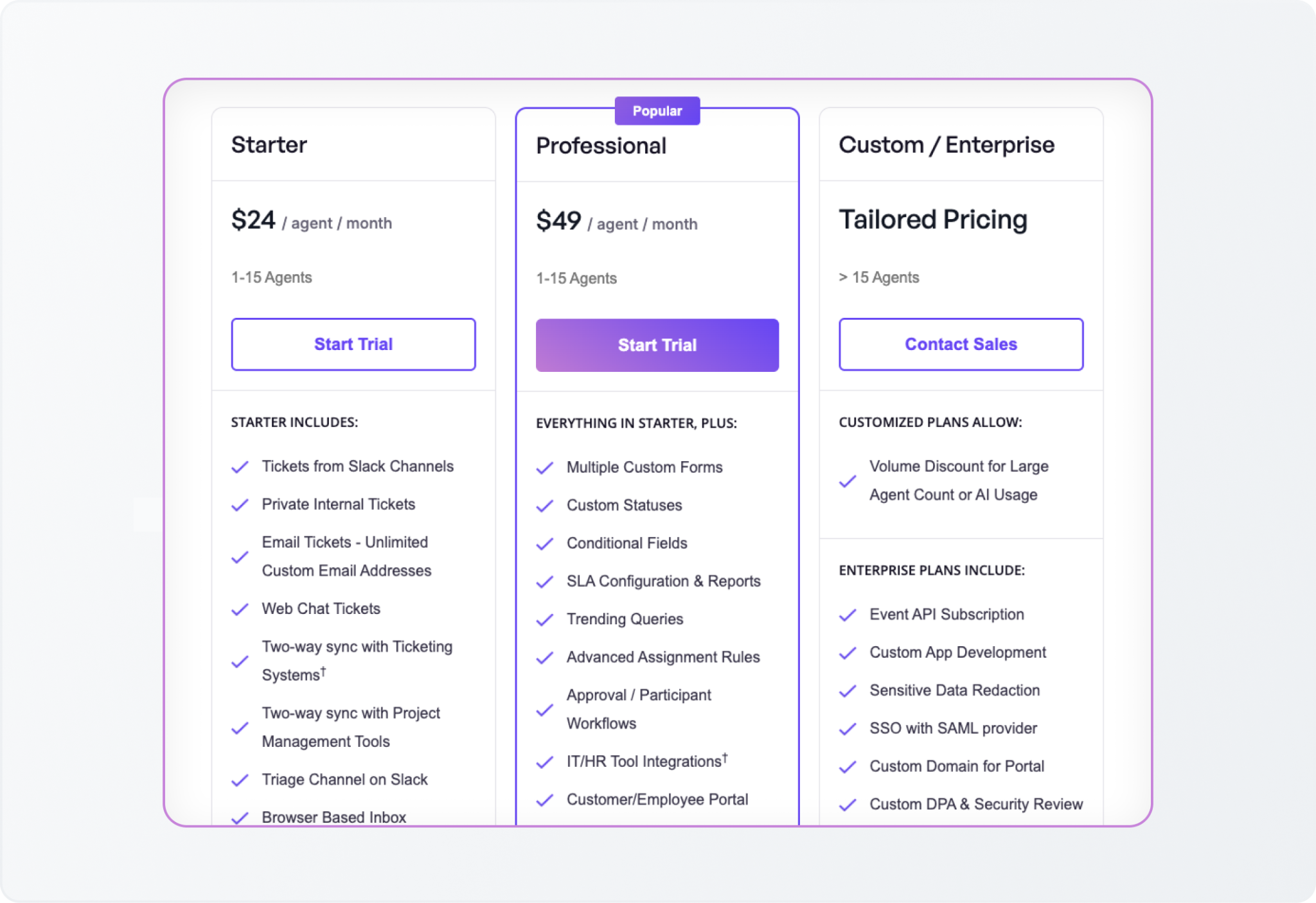
Monthly list prices are $24/agent for Starter and $49 for Professional, with a 15% annual discount. Starter's AI Pack starts at $20/account/month, including 100 credits; Professional includes the AI Pack. 
ClearFeed pricing

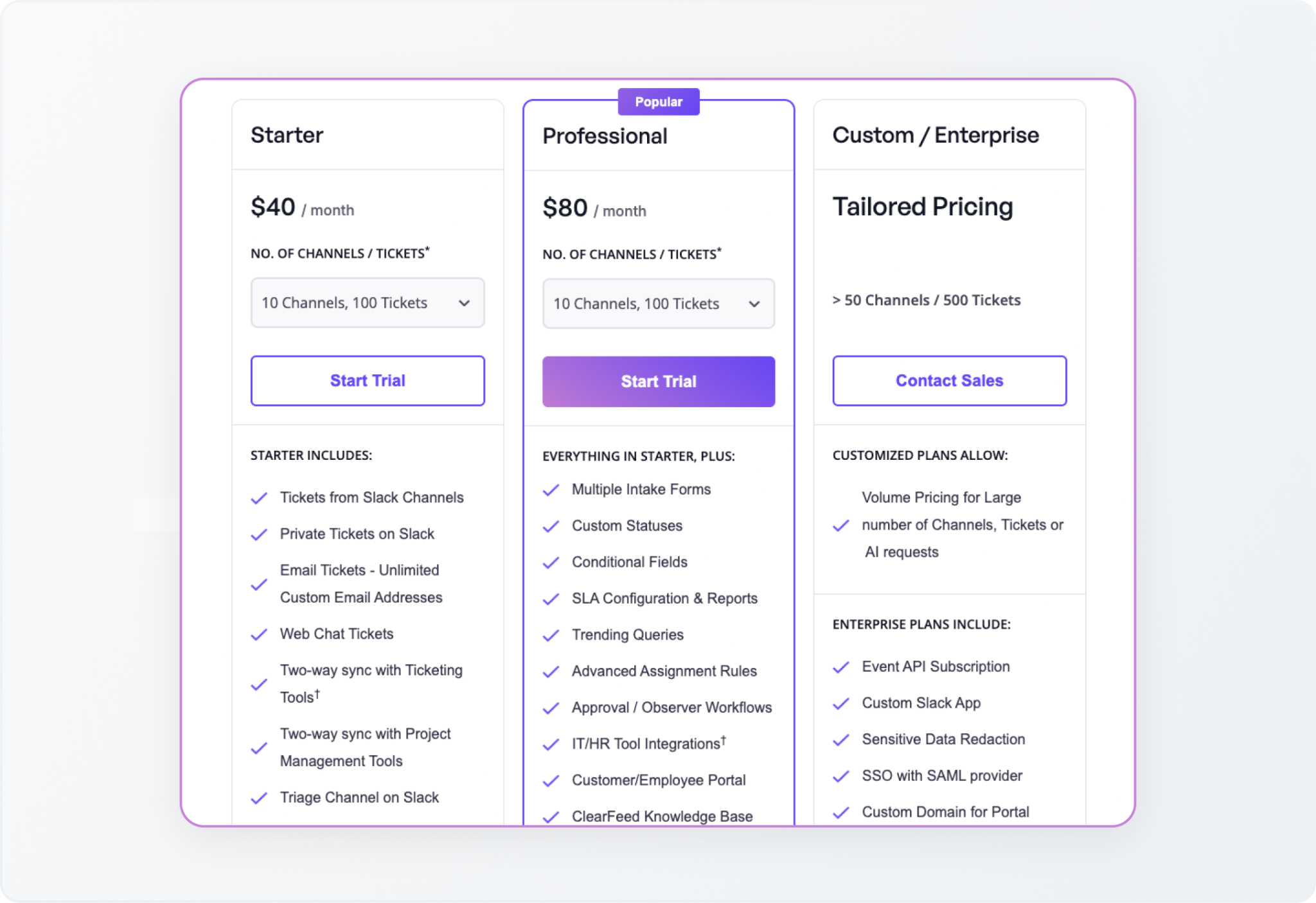
Usage-based pricing is also available, with external support billing based on the higher applicable channel or request usage. Five agents on Professional cost $245/month at monthly list prices, before any AI overages.
ClearFeed Usage-based pricing

‍

2. Crisp

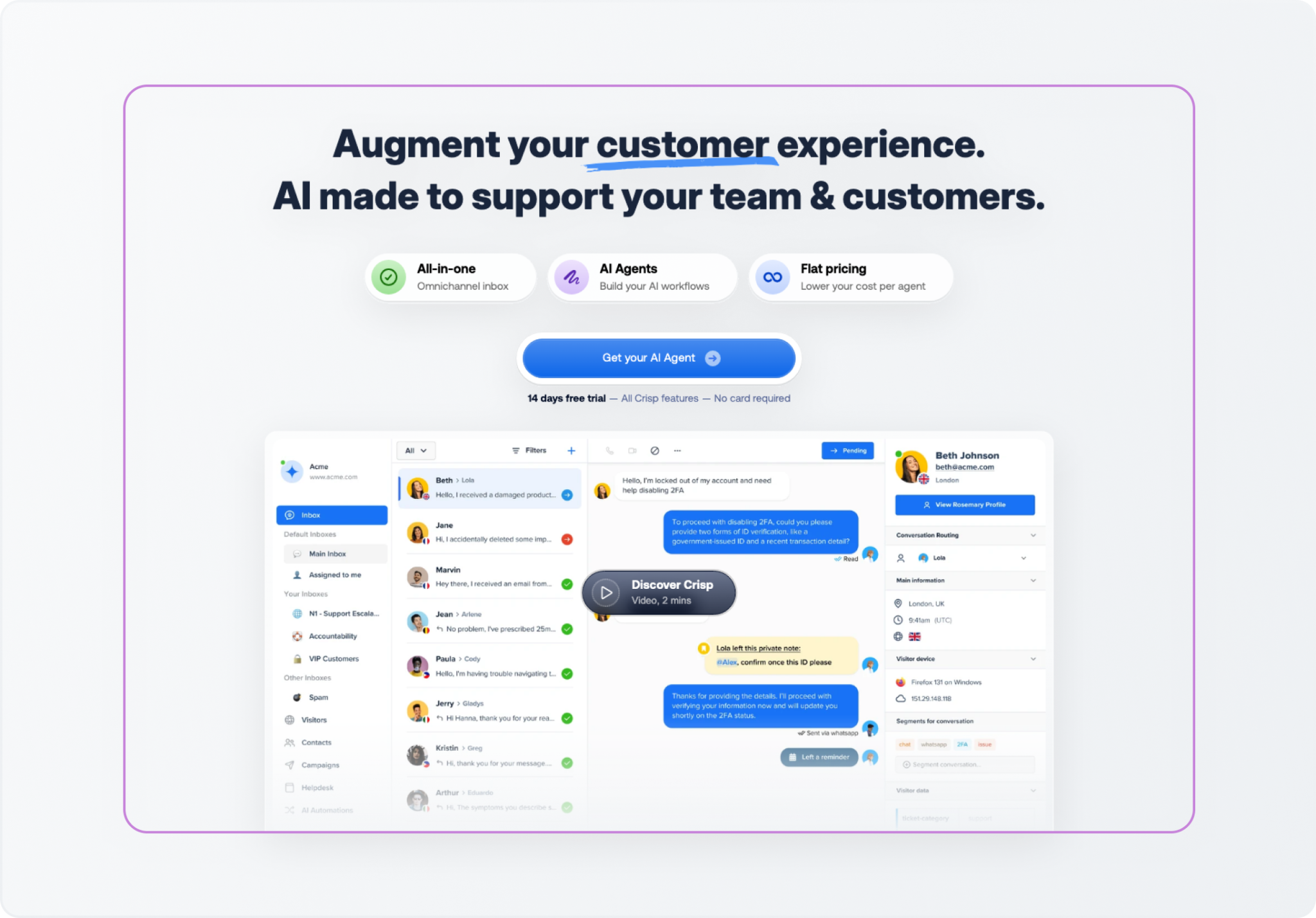
Crisp combines website chat, a shared inbox, customer records, and an AI agent named Hugo. It fits when a per-seat bill grows faster than your plan to add support headcount.

Your team can manage connected conversations in Crisp. Its Slack integration also lets agents receive messages and reply from Slack while Crisp stores the conversation history.
Crisp

Key features

  • Website chat and a collaborative email inbox.
  • More messaging channels, a knowledge base, routing, and workflow automation on Essentials.
  • An AI agent, Hugo, that uses connected information to answer customers, plus AI assistance for people handling conversations.
  • A customer ticket portal and removal of Crisp branding on Plus.

Pros

  • Included seats let several teammates help without an additional charge, as permitted by the plan.
  • The inbox, knowledge base, and automation can all share a single platform.
  • Slack replies can suit a team that wants to handle incoming website questions from its existing workspace.

Cons

  • Ticketing and removing branding push the subscription from Essentials at $95 to Plus at $295 per month.
  • A flat workspace subscription does not mean unlimited AI. Complex conversations consume more credits.
  • AI testing and training can also use credits.

Pricing

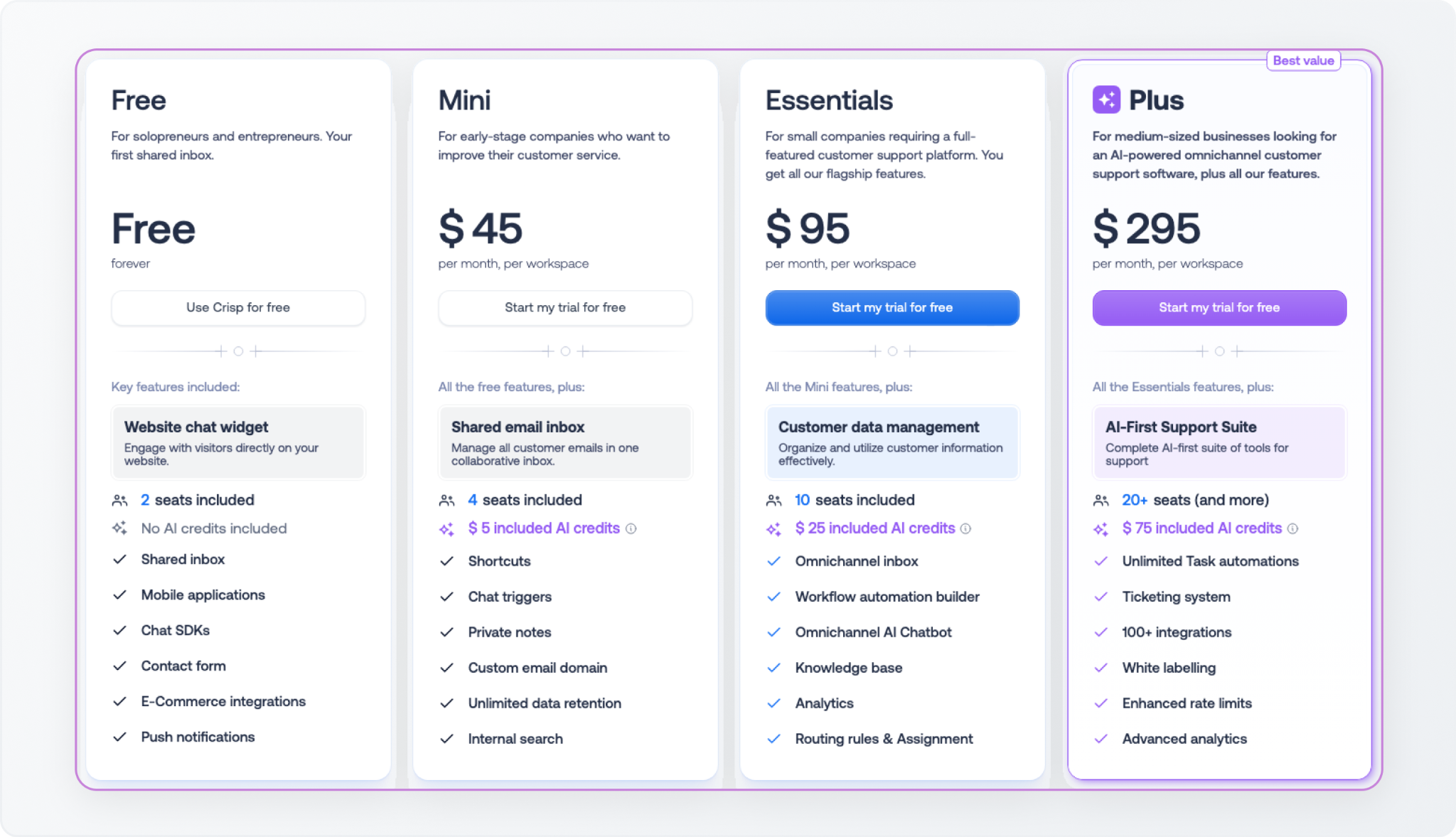
Plans cost Free for two seats, Mini at $45/month for four, Essentials at $95 for ten, and Plus at $295 for 20 or more, with additional Plus seats listed at $10 each. 

Paid plans include $5, $25, and $75 in monthly Hugo credits, respectively. Extra AI usage depends on processing volume and pay-as-you-go settings. A five-person team fits within the $95 Essentials subscription, before additional AI usage.
Crisp pricing

‍

3. tawk.to

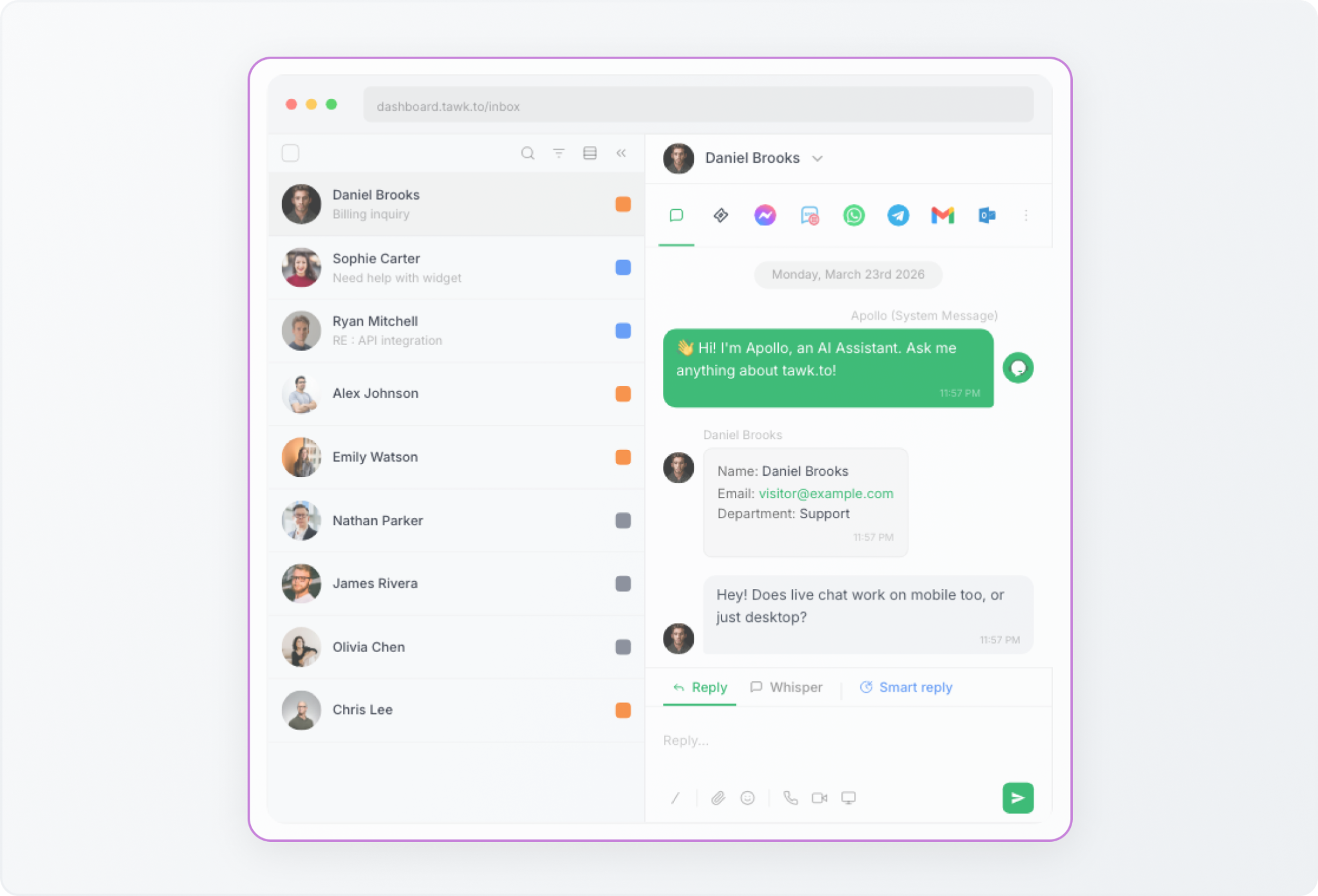
tawk.to offers a website chat product with unlimited agents and chat volume. It is the clearest budget option here if your main reason for leaving Tidio is the cost of conversations handled by people. 

The team still needs to cover incoming questions. Free software can reduce the subscription bill, but it does not provide staff to handle the queue.
tawk.to

Key features

  • Website chat with unlimited team members.
  • Visitor information, canned responses, departments, and chat transfers.
  • Desktop and mobile apps for responding away from the browser.
  • Optional AI Assist, with training sources and paid tiers for escalation and integrations.

Pros

  • You can add more people and handle more chats without increasing the core software bill.
  • It is a practical choice for testing live chat before committing to a paid platform.
  • A small free AI allowance lets you try automated responses on your own.

Cons

  • Removing branding and expanding AI usage add subscription costs.
  • The free AI tier has only 100 monthly message credits; human escalation is listed on Growth.
  • AI is charged through message credits. Multiple responses in a single conversation can consume multiple credits.

Pricing

Core live chat is free. Removing branding costs $29/month. AI Assist has a free Hobby tier, then Growth at $29/month, Business at $99, and Enterprise at $399. Growth includes 1,000 monthly message credits.

Growth AI plus removal of branding totals $58/month, before any extra usage or hired staffing. That is a more useful budget than assuming every part of the setup is free.

tawk.to pricing

‍

4. Intercom Fin

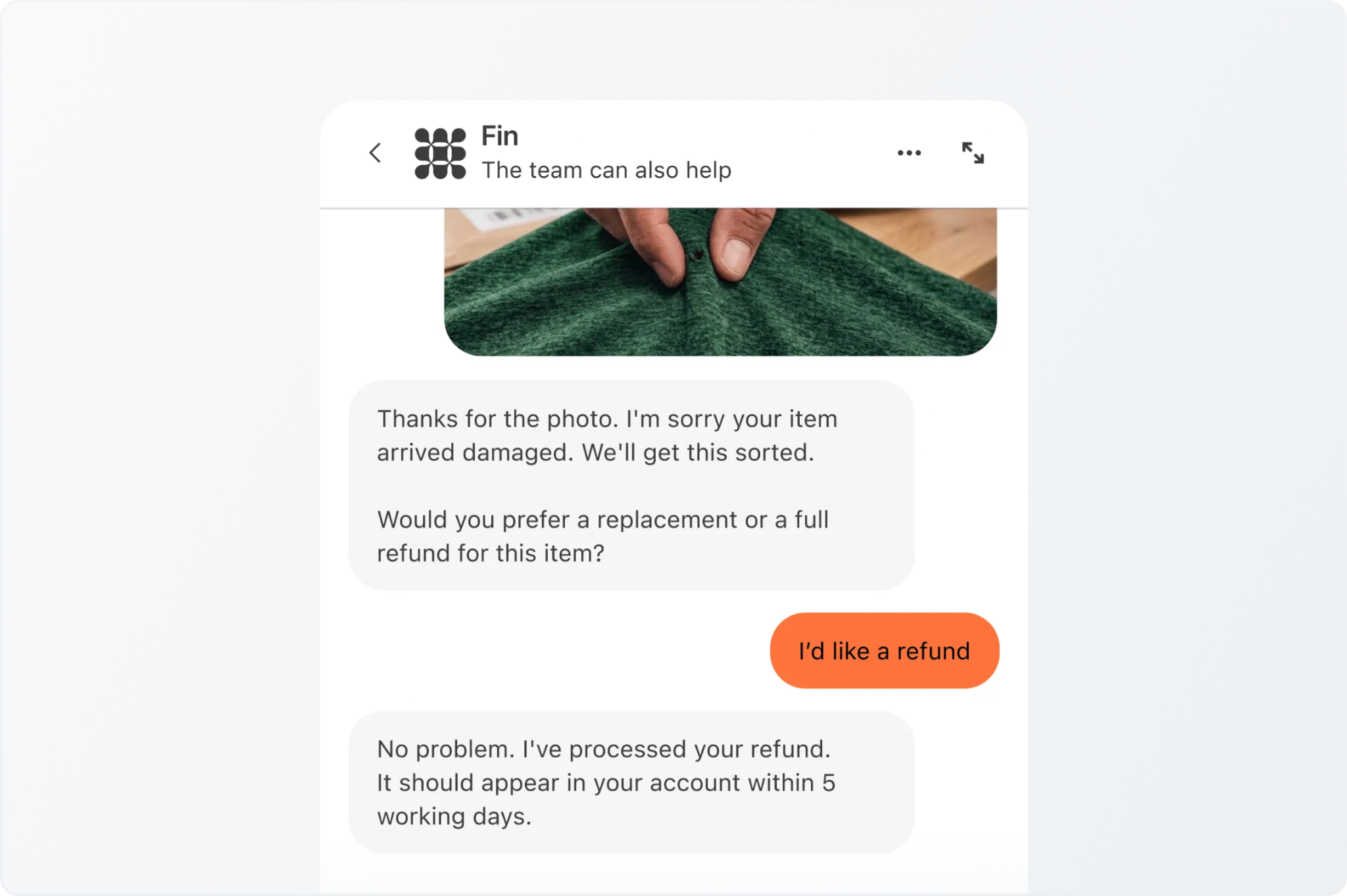
Fin answers from company information, runs configured procedures, and passes conversations to people when needed. The tradeoff is maintenance: your team keeps the knowledge sources current and defines which tasks Fin takes on.

You can use Fin with Intercom or deploy it on supported external helpdesks. The setup matters: Fin's Slack integration is supported with Intercom, but is not supported through Fin for other platforms.
Intercom Fin

Key features

  • Automated answers and configured actions in connected systems.
  • Customer support across channels including chat, email, and Slack, depending on deployment.
  • Rules for when the AI responds or hands over.
  • Usage reminders and limits to control spending.

Pros

  • Fin can add automation without requiring every buyer to replace their helpdesk.
  • Intercom combines the AI with a shared inbox, ticketing, and a public help center.
  • Configured procedures can handle requests that require more than a help article answer.

Cons

  • Using the full Intercom platform adds seat fees to AI charges.
  • A billable support result can include a configured procedure that hands work to a person.
  • An answer followed by customer silence may be considered an assumed resolution. Standard escalations are treated differently, so handoff design affects billing.

Pricing

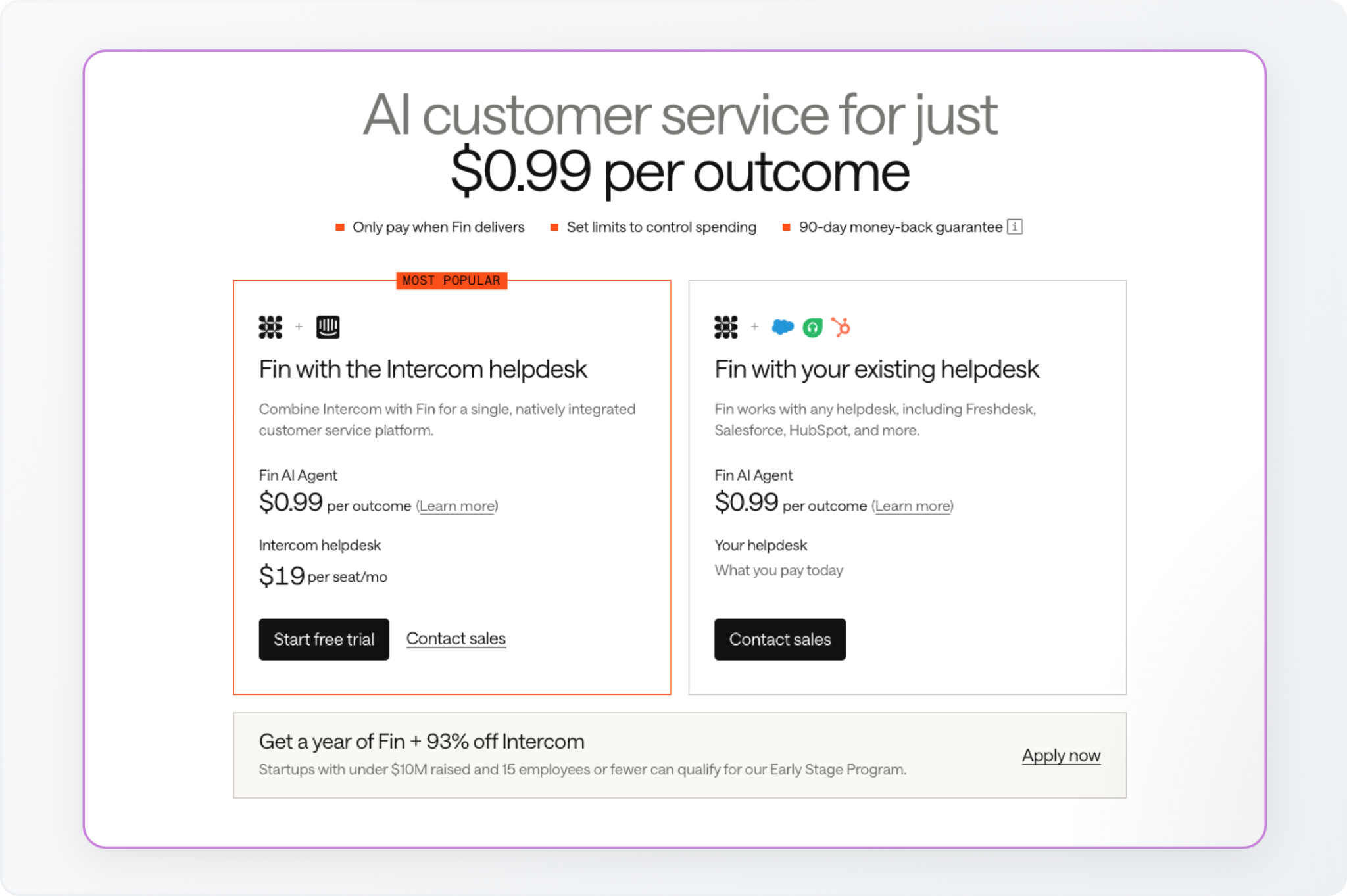
Fin's chat and email support outcomes cost $0.99 each. Annual Intercom prices start at $29/seat/month for Essential, $85 for Advanced, and $132 for Expert. Fin with another helpdesk has no Intercom seat requirement, though minimum outcome commitments apply. Optional agent assistance and some channels carry extra charges.

Five Essential seats plus 1,000 support outcomes total $1,135/month equivalent, excluding other charges. Fin bills at most once per conversation for an outcome, even when it handles several questions.
Intercom Fin pricing

‍

5. Featurebase

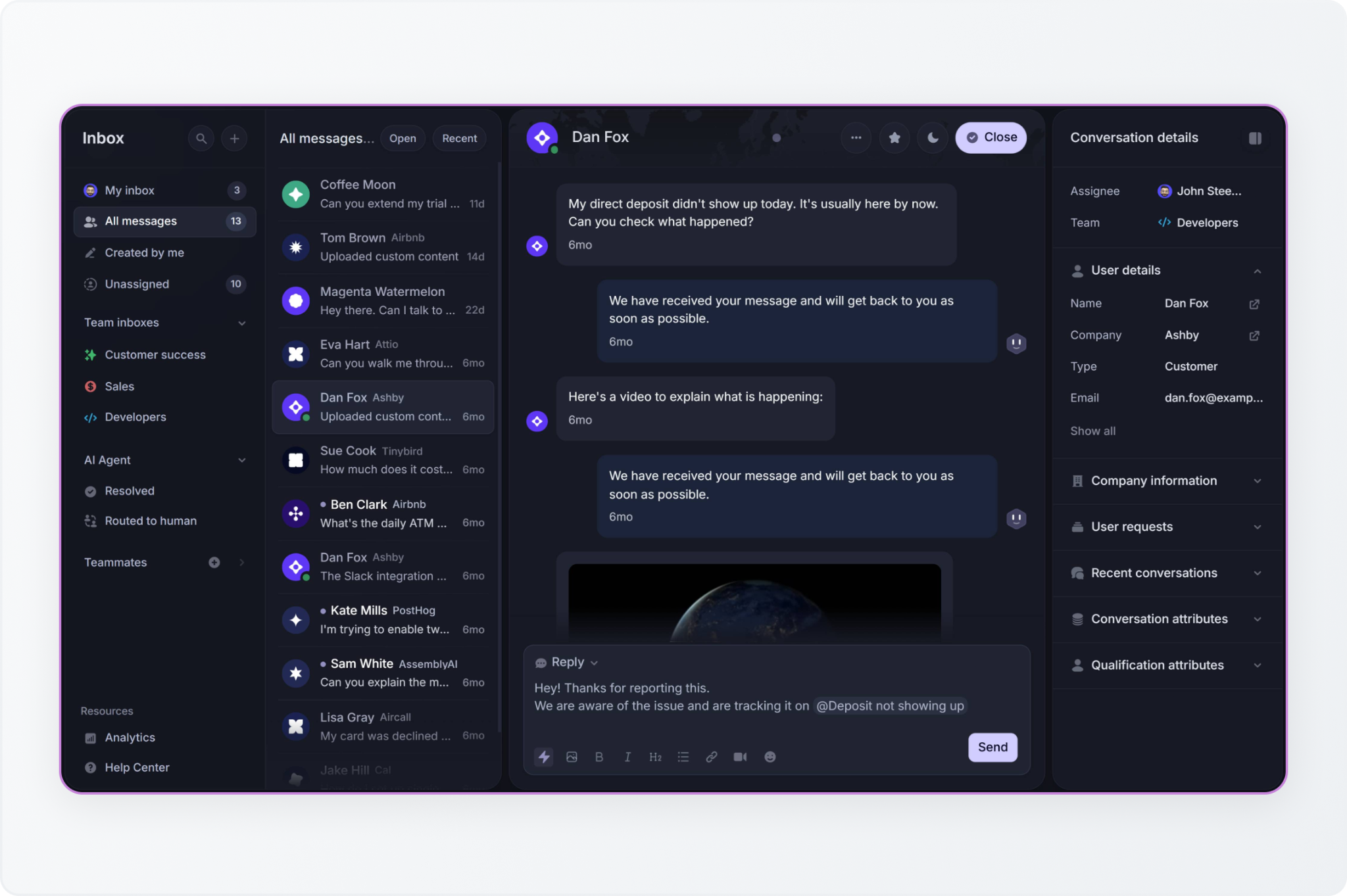
Featurebase combines a support inbox with feedback collection, roadmaps, a help center, and product updates. Its appeal is clearest when customer conversations regularly lead to requests that the product team needs to evaluate.

An agent can turn a conversation into a feedback post, with the customer, the thread, and the request linked in one place. That removes the copy-paste between a helpdesk and a separate product tracker.
Featurebase

Key features

  • Web messenger, email support, and a shared inbox.
  • Feedback posts, customer votes, roadmaps, and product updates.
  • An AI agent, Fibi, plus tools that help agents draft replies.
  • Slack support on Professional, including Fibi replies in eligible customer threads.

Pros

  • Support and product teams can work from linked conversations and feedback.
  • Customers can follow the progress of requests and receive updates when features ship.
  • The published price per AI resolution is $0.49, half of Fin's $0.99 support-outcome price, although the billing definitions differ.

Cons

  • Slack support, workflows, and SLA management require a Professional plan.
  • Paid seats and AI resolution charges stack as the team and automation volume grow.
  • Customer-specific Slack answers require the correct company association and channel access settings; enabling the integration alone is not enough to complete the setup.

Pricing

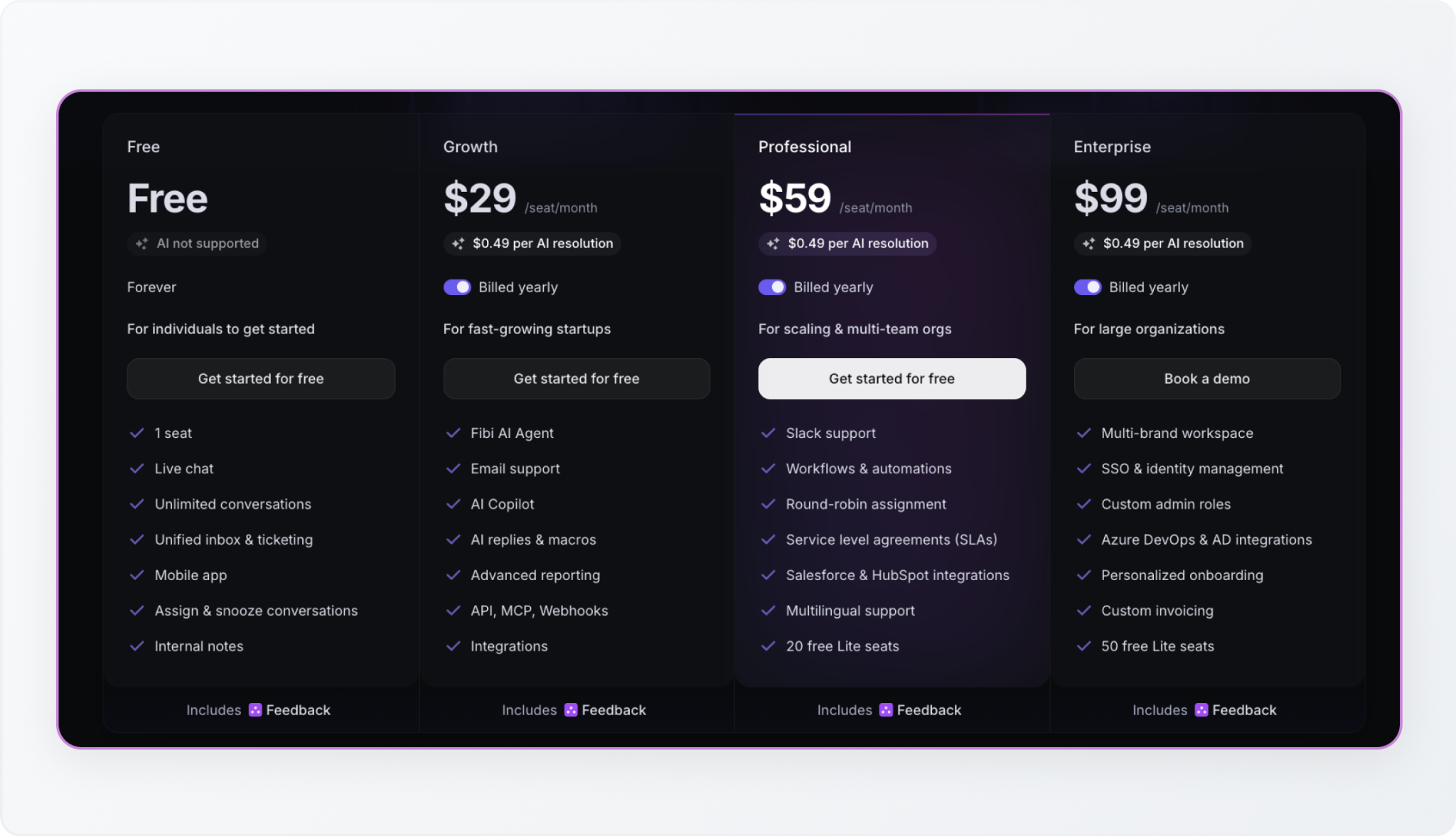
Featurebase has a free one-seat plan. Annual paid plans are Growth at $29/seat/month, Professional at $59/seat/month, and Enterprise at $99/seat/month, plus $0.49 per AI resolution. The free plan excludes AI.

Five Growth seats and 1,000 AI resolutions total $635/month equivalent. For the same usage on Professional, including Slack support, the figure is $785.
Featurebase pricing

‍

6. Freshchat

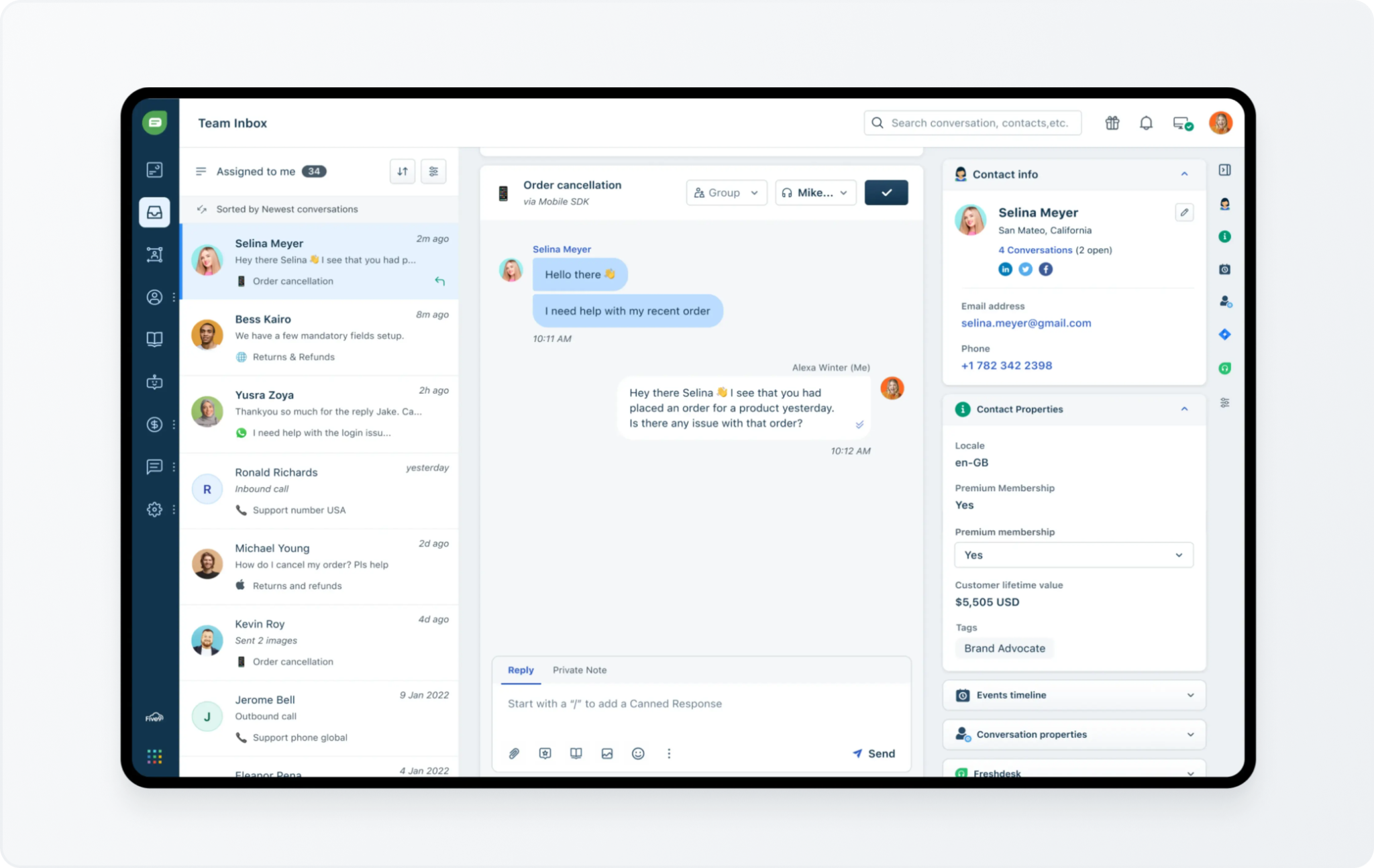
Freshchat brings customer conversations into one agent workspace. It can suit a team whose website chat is only one part of the support queue, particularly if the business already uses Freshworks.

It supports messaging across channels, including WhatsApp, Instagram, and Facebook Messenger, as well as website and in-app conversations.
Freshchat

Key features

  • Web and mobile chat, a shared inbox, and connected email.
  • Social messaging and reporting on Growth.
  • Intelligent routing, multilingual conversations, and multiple response-time policies on Pro.
  • Freddy AI Agent for automated conversations, with an optional AI Copilot that helps support agents.

Pros

  • The free tier accommodates up to ten agents.
  • Connected channels let agents work from one queue rather than separate messaging apps.
  • Pro adds routing and reporting for a more structured support operation.

Cons

  • AI sessions are an extra cost, and the 500 complimentary sessions are a one-time allowance for new paid accounts.
  • A session is a 24-hour interaction window, rather than a confirmed resolution. Previewing bots also consumes sessions.
  • When sessions run out, bots stop responding; the documented fallback depends on the widget type.
  • Freshworks positions advanced ticketing and knowledge bases as part of its broader Omni package, so a chat subscription may not cover the full helpdesk you need.

Pricing

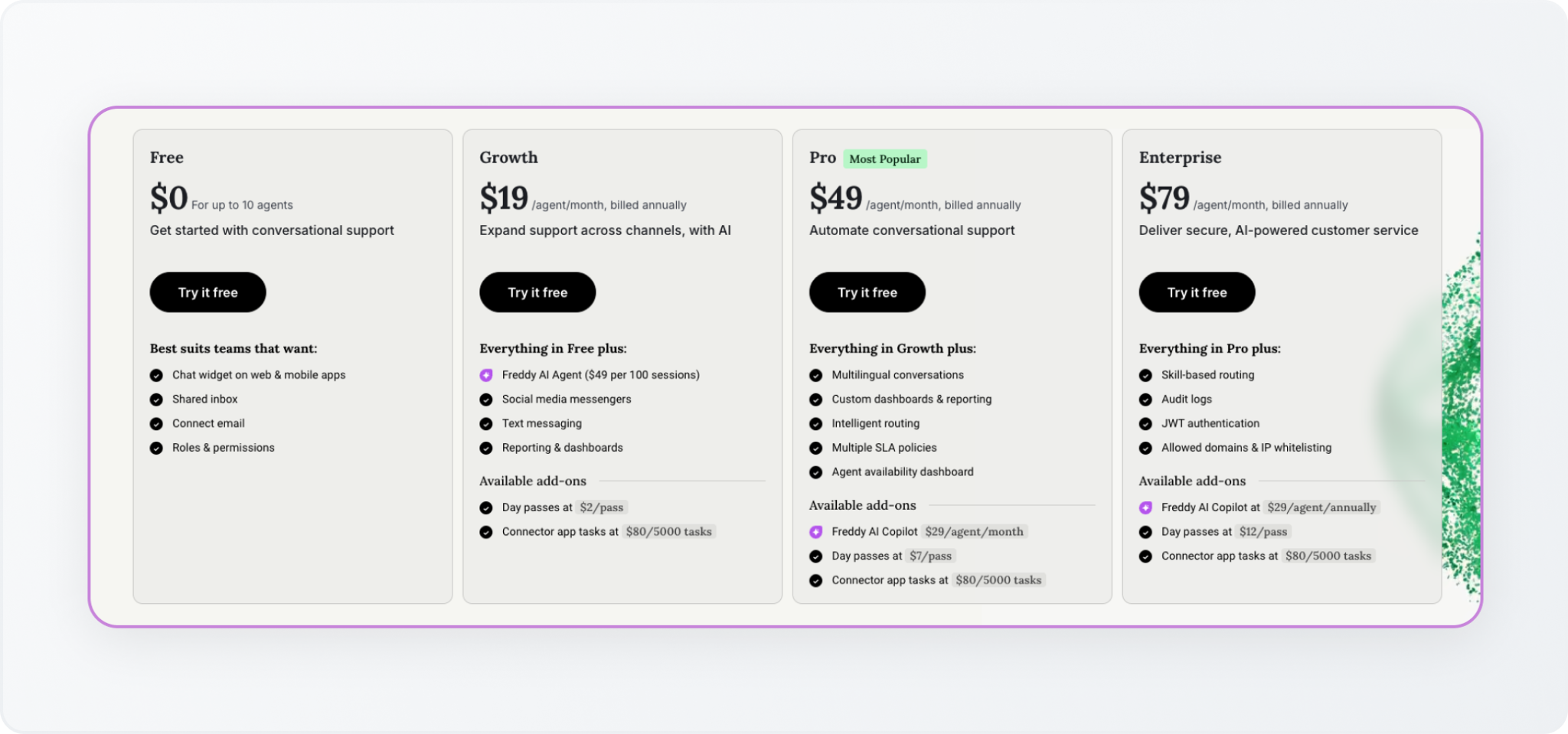
Freshchat is free for up to ten agents. Annual paid plans cost $19/agent/month for Growth, $49 for Pro, and $79 for Enterprise. Freddy AI Agent costs $49 per 100 sessions; Copilot is an additional $29/agent/month on eligible plans. After the one-time allowance, five Growth agents and 1,000 purchased sessions total $585/month, excluding other additions.
Freshchat pricing

‍

7. LiveChat

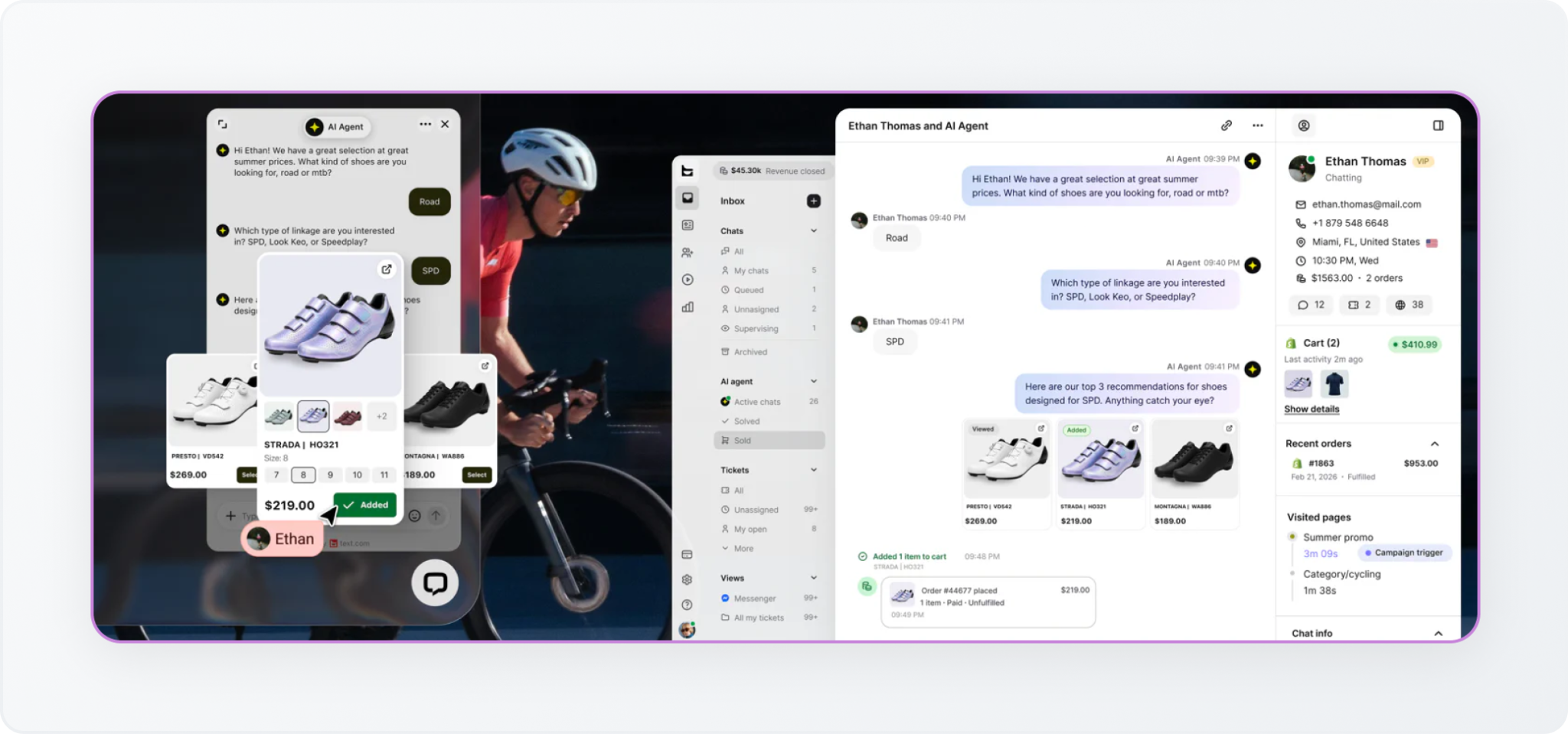
LiveChat offers a website chat widget, along with tools for routing, supervising, and reporting on conversations. A staffed chat team can use its supervisor views, routing rules, and chat-level reporting to manage the queue.

Its features include targeted messages, canned responses, chat transfers, and integrations with business tools.
LiveChat

Key features

  • Website chat, routing, and assignment.
  • Chat supervision, agent groups, conversation history, and reporting.
  • Scheduling and staffing prediction on Business.
  • AI assistance such as suggested responses and summaries. Autonomous AI that answers independently is offered through the company's Text platform.

Pros

  • It gives a staffed team dedicated tools for managing chat work.
  • Team adds unlimited history and full widget customization.
  • Business adds reporting and staffing tools for managers overseeing a larger operation.

Cons

  • Starter supports one user and limits chat history to 60 days; a multi-person team needs a higher tier.
  • Costs rise with the number of paid users.
  • Included AI assistance is different from autonomous AI. The vendor directs legacy LiveChat customers to move to Text for its AI Agent, which has its own allowances and resolution billing.

Pricing

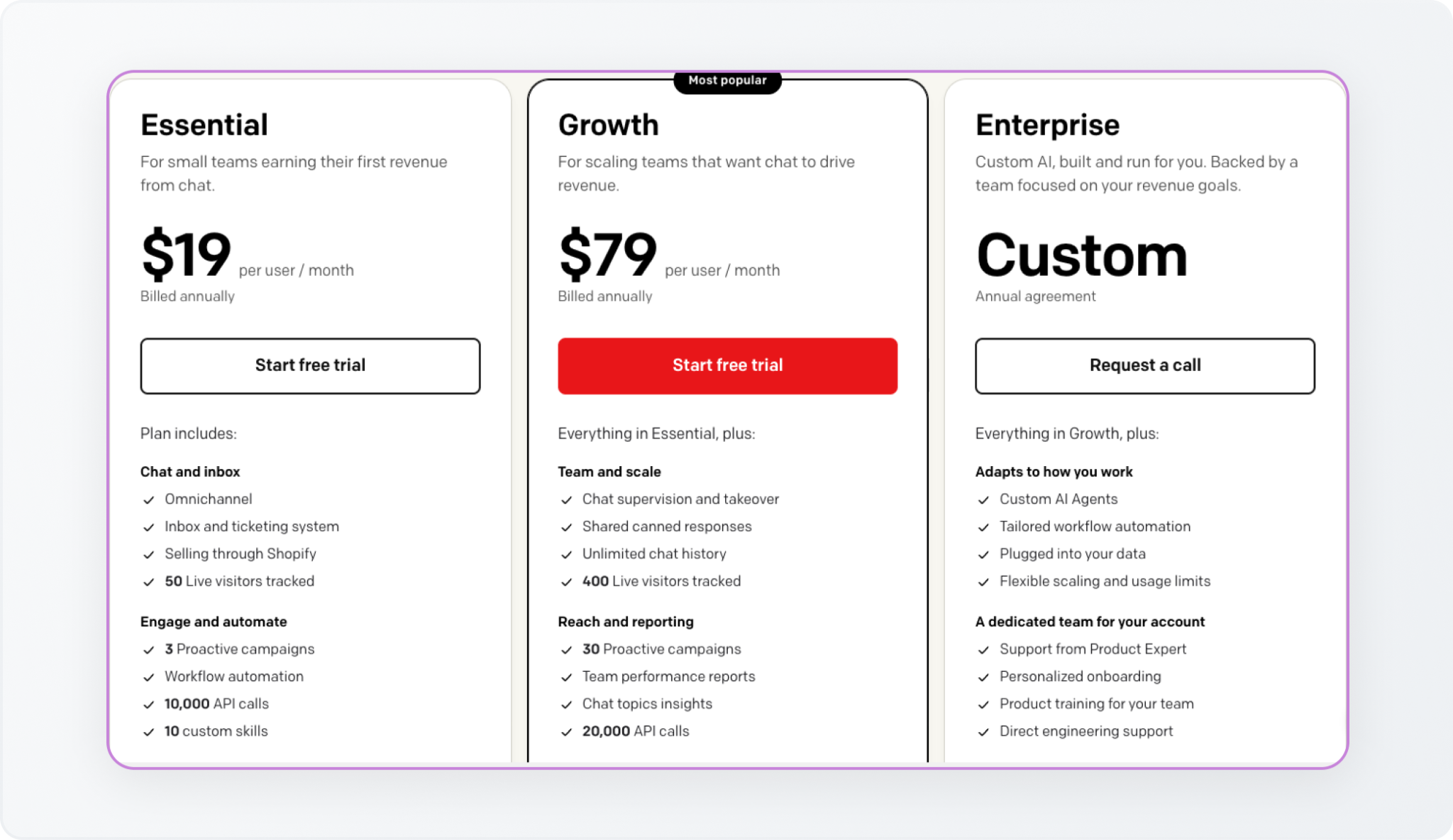
Annual prices are Starter at $19/person/month, Team at $49, and Business at $79. Enterprise pricing is by quote. There is a 14-day trial, with no permanent free plan shown.

Five people on Team cost $245/month equivalent. Ten on Business cost $790, before any broader AI or helpdesk package. Budget for the product configuration you will actually use, rather than assuming the entry plan includes autonomous support.
LiveChat pricing

‍

Which Tidio Alternative Should You Choose?

Start with the reason you want to switch. That keeps a long feature list from distracting you from the missing workflow.

Your main requirement Start your shortlist with
Free website chat with people answering tawk.to
Several support seats within a workspace subscription Crisp
Customer requests and engineering coordination managed from Slack ClearFeed
AI procedures alongside a support inbox or existing helpdesk Intercom Fin
Support connected to feedback, roadmaps, and product updates Featurebase
Website, app, and social messaging in one queue Freshchat
A dedicated workspace for a staffed website chat team LiveChat

For shared customer Slack channels, compare ClearFeed with the documented Slack workflows in Fin and Featurebase. Crisp's ability to let agents reply to incoming messages from Slack is another useful workflow, but it should be evaluated against the specific customer-channel intake you need. Channel names alone do not tell you how the request is created, assigned, or followed up.

Compare AI costs using the same set of requests. One thousand tawk.to message credits, Freshchat sessions, Featurebase resolutions, or Fin outcomes do not represent the same workload.

‍

Find the Right Tidio Alternative That Fits the Next Stage of Your Support

Return to the customer who reported the bug. Someone needs to own it, engineering needs the right context, and the customer needs the promised update. The best Tidio alternative is the one that makes that work easier at a predictable cost.

If your team handles those conversations in Slack, explore ClearFeed to see how customer threads, ticket ownership, AI answers, and engineering follow-up can work together.
The best Tidio alternative depends on why you're switching. Tidio's conversation limits and separate AI charges can make costs harder to predict. You may also need simpler live chat, better ticket assignment and reporting, or tighter connections between support and engineering. For B2B teams managing customer requests in shared Slack channels, tracking ownership and resolution adds another layer of complexity.

tawk.to suits teams that want free live chat, while Crisp offers workspace-based pricing. Intercom Fin focuses on AI support, and ClearFeed, which we build, is our pick for B2B teams managing customer requests in Slack. Featurebase, Freshchat, and LiveChat address other needs, including product feedback integration and staffed website chat.

This guide compares seven Tidio alternatives based on their workflows, features, limitations, and pricing as teams grow.

‍

The Best Tidio Alternatives at a Glance

Tool Best for Where support happens Starting price Main cost consideration
ClearFeed B2B support managed from Slack Customer channels, email, and web chat; team replies from Slack or the web app $24/agent/month on Starter Professional features and AI usage affect the total
Crisp Teams that want seats bundled into a workspace price Web chat, email, and connected messaging channels; Crisp inbox or Slack replies Free; Mini $45/workspace/month Higher plans unlock more channels and ticketing; AI uses credits
tawk.to Free live chat handled by people Website chat; tawk.to dashboard and apps Free core product AI and removing branding are optional paid additions
Intercom Fin AI support with an Intercom inbox or an existing helpdesk Connected support channels; people work in the relevant inbox Support outcomes from $0.99; Intercom seats from $29/month annually Seat fees and AI outcome charges can stack
Featurebase SaaS teams combining support and product feedback Web messenger, email, and Slack; Featurebase inbox Free; Growth $29/seat/month annually AI resolutions cost $0.49; Slack requires Professional
Freshchat Support across website, app, and social messaging Connected channels; Freshchat workspace Free for up to 10 agents; Growth $19/agent/month annually AI sessions and agent assistance are extra
LiveChat A staffed website chat team Website and connected messaging channels; LiveChat workspace Starter $19/person/month annually Team size and the required plan drive the bill

‍

How We Compared These Tidio Alternatives

We focused on five questions. Where we used customer reviews, we considered only those published in 2025 or later.

  1. How does the bill grow? We looked at included seats, conversation limits, AI charges, and features that require a higher plan. A starting price rarely predicts the final bill once conversation volume or AI usage grows.
  2. Does it fit where customers and agents work? Website chat, social messages, email, and shared Slack channels have different requirements. We checked both where customers can ask for help and where agents manage those requests.
  3. What can the AI actually do? Suggesting replies, answering customers independently, and taking actions in connected tools are different capabilities. We compared their scope, limits, and cost.
  4. What happens when a person needs to take over? We looked for conversation history, clear ownership, routing, and follow-up, including when support needs help from engineering.
  5. Can the team measure results and use its data? We considered reporting, integrations, and conversation exports so teams can track performance, connect support with other tools, and access their customer conversations.

‍

7 Best Tidio Alternatives for Customer Support Teams in 2026

1. ClearFeed

ClearFeed turns customer conversations into tracked requests and tickets. It is a useful Tidio alternative when support involves shared Slack channels between companies (Slack Connect) and your team needs to coordinate with engineers or customer success managers.

For the customer reporting a bug, the benefit is straightforward: the conversation can stay in its original channel while your team assigns an owner and follows up from a private Slack triage channel. Email and web-chat requests can also reach that support queue.

ClearFeed

Key features

  • Manage requests from customer Slack channels, email, and web chat.
  • Assign requests, update status, and collaborate in private support channels.
  • Connect conversations with tickets and engineering issues through supported two-way integrations.
  • Use AI to answer from selected knowledge sources and take configured actions in connected tools.
  • Track response commitments through service-level agreements, or SLAs, and reports on Professional.

Pros

  • Support agents, engineers, and customer success managers can collaborate where they already work.
  • Customer replies and internal discussions can stay connected without exposing private notes.
  • You can use ClearFeed ticketing or connect an existing ticketing system.

Cons

  • Microsoft Teams support and SLA reporting require Professional; Starter may not cover the complete workflow.
  • AI uses credits, so a long investigation can cost more than a short answer.
  • The workflow centers on Slack. A small team wanting only a free website widget has a simpler option in tawk.to.

Pricing

Monthly list prices are $24/agent for Starter and $49 for Professional, with a 15% annual discount. Starter's AI Pack starts at $20/account/month, including 100 credits; Professional includes the AI Pack. 

ClearFeed pricing

Usage-based pricing is also available, with external support billing based on the higher applicable channel or request usage. Five agents on Professional cost $245/month at monthly list prices, before any AI overages.

ClearFeed Usage-based pricing

‍

2. Crisp

Crisp combines website chat, a shared inbox, customer records, and an AI agent named Hugo. It fits when a per-seat bill grows faster than your plan to add support headcount.

Your team can manage connected conversations in Crisp. Its Slack integration also lets agents receive messages and reply from Slack while Crisp stores the conversation history.

Crisp

Key features

  • Website chat and a collaborative email inbox.
  • More messaging channels, a knowledge base, routing, and workflow automation on Essentials.
  • An AI agent, Hugo, that uses connected information to answer customers, plus AI assistance for people handling conversations.
  • A customer ticket portal and removal of Crisp branding on Plus.

Pros

  • Included seats let several teammates help without an additional charge, as permitted by the plan.
  • The inbox, knowledge base, and automation can all share a single platform.
  • Slack replies can suit a team that wants to handle incoming website questions from its existing workspace.

Cons

  • Ticketing and removing branding push the subscription from Essentials at $95 to Plus at $295 per month.
  • A flat workspace subscription does not mean unlimited AI. Complex conversations consume more credits.
  • AI testing and training can also use credits.

Pricing

Plans cost Free for two seats, Mini at $45/month for four, Essentials at $95 for ten, and Plus at $295 for 20 or more, with additional Plus seats listed at $10 each. 

Paid plans include $5, $25, and $75 in monthly Hugo credits, respectively. Extra AI usage depends on processing volume and pay-as-you-go settings. A five-person team fits within the $95 Essentials subscription, before additional AI usage.

Crisp pricing

‍

3. tawk.to

tawk.to offers a website chat product with unlimited agents and chat volume. It is the clearest budget option here if your main reason for leaving Tidio is the cost of conversations handled by people. 

The team still needs to cover incoming questions. Free software can reduce the subscription bill, but it does not provide staff to handle the queue.

tawk.to

Key features

  • Website chat with unlimited team members.
  • Visitor information, canned responses, departments, and chat transfers.
  • Desktop and mobile apps for responding away from the browser.
  • Optional AI Assist, with training sources and paid tiers for escalation and integrations.

Pros

  • You can add more people and handle more chats without increasing the core software bill.
  • It is a practical choice for testing live chat before committing to a paid platform.
  • A small free AI allowance lets you try automated responses on your own.

Cons

  • Removing branding and expanding AI usage add subscription costs.
  • The free AI tier has only 100 monthly message credits; human escalation is listed on Growth.
  • AI is charged through message credits. Multiple responses in a single conversation can consume multiple credits.

Pricing

Core live chat is free. Removing branding costs $29/month. AI Assist has a free Hobby tier, then Growth at $29/month, Business at $99, and Enterprise at $399. Growth includes 1,000 monthly message credits.

Growth AI plus removal of branding totals $58/month, before any extra usage or hired staffing. That is a more useful budget than assuming every part of the setup is free.

tawk.to pricing

‍

4. Intercom Fin

Fin answers from company information, runs configured procedures, and passes conversations to people when needed. The tradeoff is maintenance: your team keeps the knowledge sources current and defines which tasks Fin takes on.

You can use Fin with Intercom or deploy it on supported external helpdesks. The setup matters: Fin's Slack integration is supported with Intercom, but is not supported through Fin for other platforms.

Intercom Fin

Key features

  • Automated answers and configured actions in connected systems.
  • Customer support across channels including chat, email, and Slack, depending on deployment.
  • Rules for when the AI responds or hands over.
  • Usage reminders and limits to control spending.

Pros

  • Fin can add automation without requiring every buyer to replace their helpdesk.
  • Intercom combines the AI with a shared inbox, ticketing, and a public help center.
  • Configured procedures can handle requests that require more than a help article answer.

Cons

  • Using the full Intercom platform adds seat fees to AI charges.
  • A billable support result can include a configured procedure that hands work to a person.
  • An answer followed by customer silence may be considered an assumed resolution. Standard escalations are treated differently, so handoff design affects billing.

Pricing

Fin's chat and email support outcomes cost $0.99 each. Annual Intercom prices start at $29/seat/month for Essential, $85 for Advanced, and $132 for Expert. Fin with another helpdesk has no Intercom seat requirement, though minimum outcome commitments apply. Optional agent assistance and some channels carry extra charges.

Five Essential seats plus 1,000 support outcomes total $1,135/month equivalent, excluding other charges. Fin bills at most once per conversation for an outcome, even when it handles several questions.

Intercom Fin pricing

‍

5. Featurebase

Featurebase combines a support inbox with feedback collection, roadmaps, a help center, and product updates. Its appeal is clearest when customer conversations regularly lead to requests that the product team needs to evaluate.

An agent can turn a conversation into a feedback post, with the customer, the thread, and the request linked in one place. That removes the copy-paste between a helpdesk and a separate product tracker.

Featurebase

Key features

  • Web messenger, email support, and a shared inbox.
  • Feedback posts, customer votes, roadmaps, and product updates.
  • An AI agent, Fibi, plus tools that help agents draft replies.
  • Slack support on Professional, including Fibi replies in eligible customer threads.

Pros

  • Support and product teams can work from linked conversations and feedback.
  • Customers can follow the progress of requests and receive updates when features ship.
  • The published price per AI resolution is $0.49, half of Fin's $0.99 support-outcome price, although the billing definitions differ.

Cons

  • Slack support, workflows, and SLA management require a Professional plan.
  • Paid seats and AI resolution charges stack as the team and automation volume grow.
  • Customer-specific Slack answers require the correct company association and channel access settings; enabling the integration alone is not enough to complete the setup.

Pricing

Featurebase has a free one-seat plan. Annual paid plans are Growth at $29/seat/month, Professional at $59/seat/month, and Enterprise at $99/seat/month, plus $0.49 per AI resolution. The free plan excludes AI.

Five Growth seats and 1,000 AI resolutions total $635/month equivalent. For the same usage on Professional, including Slack support, the figure is $785.

Featurebase pricing

‍

6. Freshchat

Freshchat brings customer conversations into one agent workspace. It can suit a team whose website chat is only one part of the support queue, particularly if the business already uses Freshworks.

It supports messaging across channels, including WhatsApp, Instagram, and Facebook Messenger, as well as website and in-app conversations.

Freshchat

Key features

  • Web and mobile chat, a shared inbox, and connected email.
  • Social messaging and reporting on Growth.
  • Intelligent routing, multilingual conversations, and multiple response-time policies on Pro.
  • Freddy AI Agent for automated conversations, with an optional AI Copilot that helps support agents.

Pros

  • The free tier accommodates up to ten agents.
  • Connected channels let agents work from one queue rather than separate messaging apps.
  • Pro adds routing and reporting for a more structured support operation.

Cons

  • AI sessions are an extra cost, and the 500 complimentary sessions are a one-time allowance for new paid accounts.
  • A session is a 24-hour interaction window, rather than a confirmed resolution. Previewing bots also consumes sessions.
  • When sessions run out, bots stop responding; the documented fallback depends on the widget type.
  • Freshworks positions advanced ticketing and knowledge bases as part of its broader Omni package, so a chat subscription may not cover the full helpdesk you need.

Pricing

Freshchat is free for up to ten agents. Annual paid plans cost $19/agent/month for Growth, $49 for Pro, and $79 for Enterprise. Freddy AI Agent costs $49 per 100 sessions; Copilot is an additional $29/agent/month on eligible plans. After the one-time allowance, five Growth agents and 1,000 purchased sessions total $585/month, excluding other additions.

Freshchat pricing

‍

7. LiveChat

LiveChat offers a website chat widget, along with tools for routing, supervising, and reporting on conversations. A staffed chat team can use its supervisor views, routing rules, and chat-level reporting to manage the queue.

Its features include targeted messages, canned responses, chat transfers, and integrations with business tools.

LiveChat

Key features

  • Website chat, routing, and assignment.
  • Chat supervision, agent groups, conversation history, and reporting.
  • Scheduling and staffing prediction on Business.
  • AI assistance such as suggested responses and summaries. Autonomous AI that answers independently is offered through the company's Text platform.

Pros

  • It gives a staffed team dedicated tools for managing chat work.
  • Team adds unlimited history and full widget customization.
  • Business adds reporting and staffing tools for managers overseeing a larger operation.

Cons

  • Starter supports one user and limits chat history to 60 days; a multi-person team needs a higher tier.
  • Costs rise with the number of paid users.
  • Included AI assistance is different from autonomous AI. The vendor directs legacy LiveChat customers to move to Text for its AI Agent, which has its own allowances and resolution billing.

Pricing

Annual prices are Starter at $19/person/month, Team at $49, and Business at $79. Enterprise pricing is by quote. There is a 14-day trial, with no permanent free plan shown.

Five people on Team cost $245/month equivalent. Ten on Business cost $790, before any broader AI or helpdesk package. Budget for the product configuration you will actually use, rather than assuming the entry plan includes autonomous support.

LiveChat pricing

‍

Which Tidio Alternative Should You Choose?

Start with the reason you want to switch. That keeps a long feature list from distracting you from the missing workflow.

Your main requirement Start your shortlist with
Free website chat with people answering tawk.to
Several support seats within a workspace subscription Crisp
Customer requests and engineering coordination managed from Slack ClearFeed
AI procedures alongside a support inbox or existing helpdesk Intercom Fin
Support connected to feedback, roadmaps, and product updates Featurebase
Website, app, and social messaging in one queue Freshchat
A dedicated workspace for a staffed website chat team LiveChat

For shared customer Slack channels, compare ClearFeed with the documented Slack workflows in Fin and Featurebase. Crisp's ability to let agents reply to incoming messages from Slack is another useful workflow, but it should be evaluated against the specific customer-channel intake you need. Channel names alone do not tell you how the request is created, assigned, or followed up.

Compare AI costs using the same set of requests. One thousand tawk.to message credits, Freshchat sessions, Featurebase resolutions, or Fin outcomes do not represent the same workload.

‍

Find the Right Tidio Alternative That Fits the Next Stage of Your Support

Return to the customer who reported the bug. Someone needs to own it, engineering needs the right context, and the customer needs the promised update. The best Tidio alternative is the one that makes that work easier at a predictable cost.

If your team handles those conversations in Slack, explore ClearFeed to see how customer threads, ticket ownership, AI answers, and engineering follow-up can work together.
Related Blogs

See all Blog Posts
TOC heading
Text LinkText Link Active
Get a Free consultation with a Support Expert
Learn how fast growing companies like Teleport, Chronosphere and Acryl Data have scaled Support processes with ClearFeed
Thank you for contacting us. Our team will reach out to you shortly.
Oops! Something went wrong while submitting the form.