
November 24, 2026

Zendesk AI Pricing: What Does It Cost in 2026?

WRITTEN BY
Happy Das
UPDATED ON
November 24, 2026
Zendesk AI Pricing: What Does It Cost in 2026?

On November 10, 2026, Zendesk announced Zendesk Unlimited, an early-access offering for its Outcome AI Platform. It removes per-seat charges and uses an Outcome Budget for eligible customer issues and operational work.

Zendesk still sells seat-based Support and Suite plans. This guide explains how Zendesk’s AI usage affects those bills, what the $0.99 starting price covers in early access, and how ClearFeed bills for AI.

‍

Zendesk AI Pricing at a Glance

Cost line Published price or allowance AI allowance or billing terms
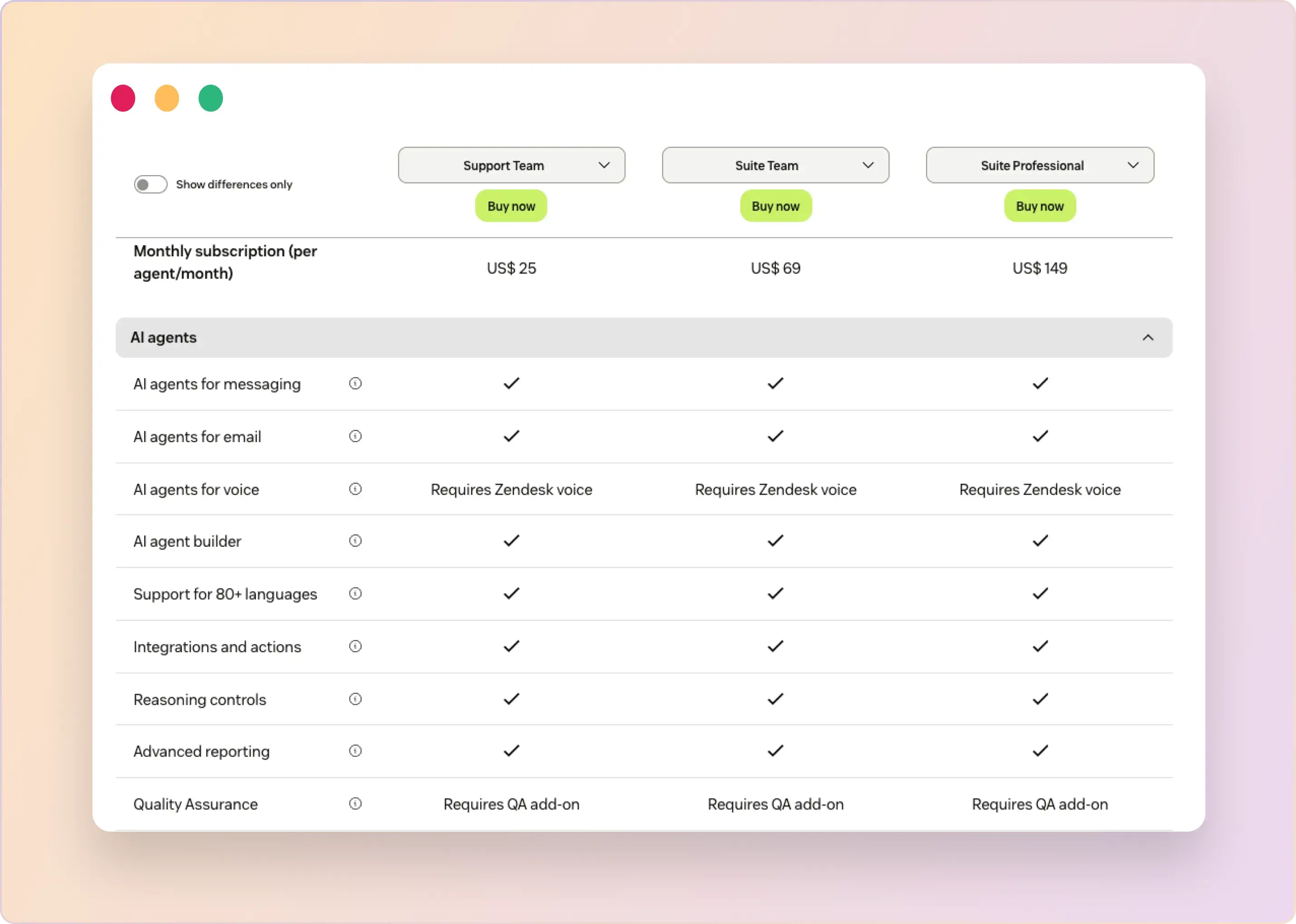
Support Team $19/agent/month annually; $25 monthly Dollar allowance: $2/seat/month
Older count-based model: 5 resolutions per seat/month
Suite Team $55/agent/month annually; $69 monthly Dollar allowance: $2/seat/month
Older count-based model: 5 resolutions per seat/month
Suite Professional $115/agent/month annually; $149 monthly Dollar allowance: $5/seat/month
Older count-based model: 10 resolutions per seat/month
Additional AI resolutions $1.50 committed or $2 pay-as-you-go on the public count-based price list On the dollar-allowance model, verify the applicable rate and overage terms in your quote.
Included allowance limits Dollar allowance: $5,000 annual cap. Unused monthly amounts expire. Older count-based model: 10,000 included resolutions per year at most.
Copilot $50/agent/month annually Separate agent-assistance add-on; not an AI-resolution allowance.
Outcome AI Platform Conversational outcomes start at $0.99 Separate early-access offering. Minimum spend or a platform fee applies, depending on the plan.

‍

How Is a Zendesk AI Bill Calculated?

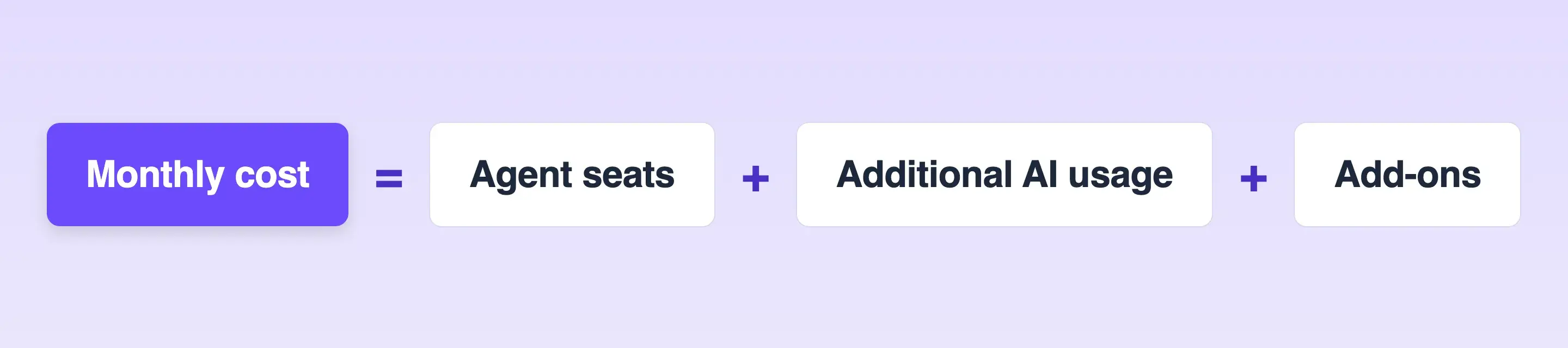
On a seat-based Support or Suite plan, your Zendesk bill starts with agent-seat costs. From there, add AI usage beyond the included allowance, plus Copilot or other add-ons.
How Is a Zendesk AI Bill Calculated

Zendesk says the tiered dollar-allowance model applies to customers using Zendesk AI who bought or renewed Suite after May 18, 2026. On this model, verified resolutions draw from a monthly dollar allowance. Accounts on the older model receive a set number of included resolutions.

‍

Example: 20 Suite Professional Agents

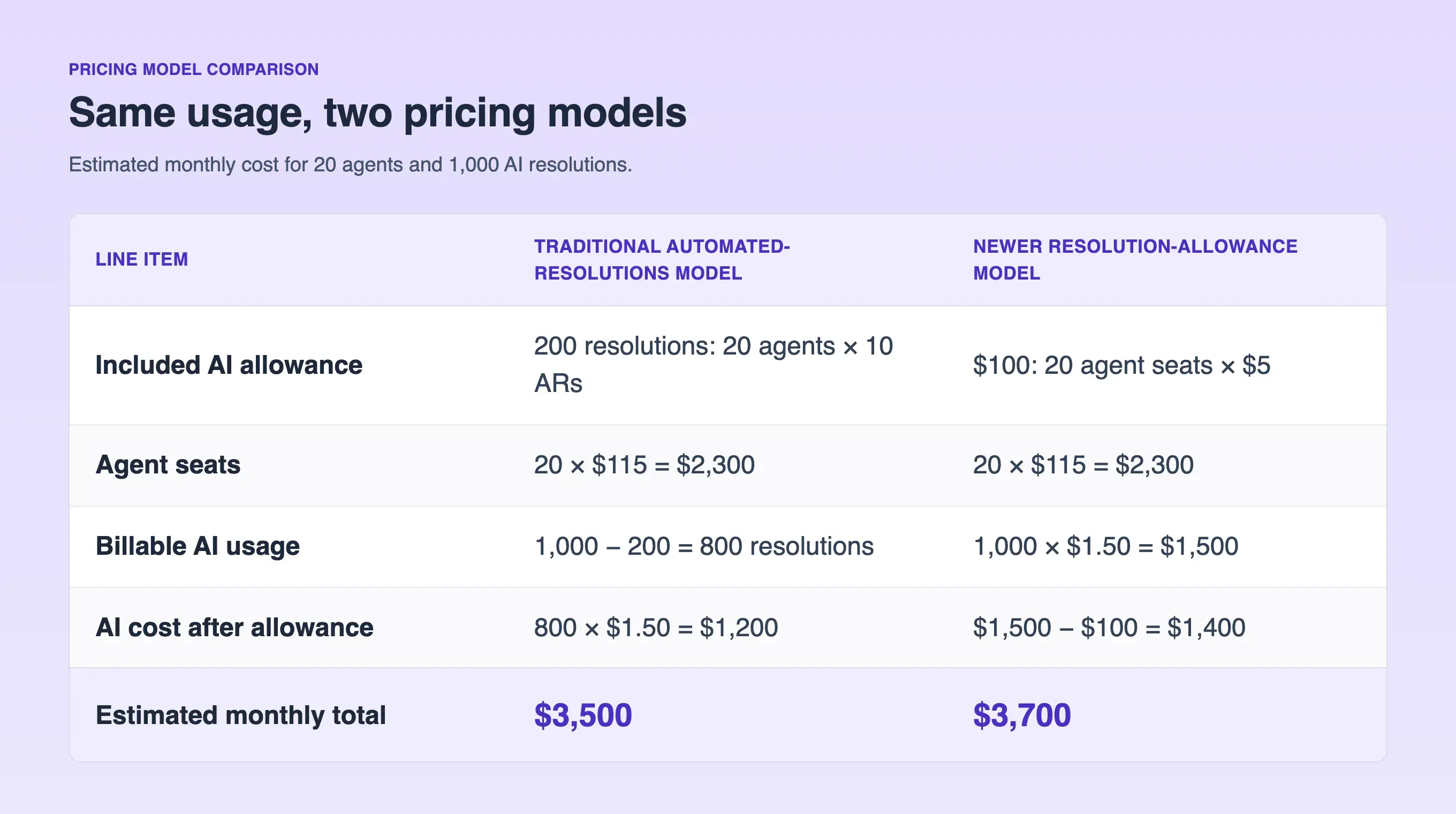
Assume 20 Suite Professional seats at $115/seat/month on annual billing and 1,000 AI resolutions that qualify for billing. The example uses the same $1.50 rate in both columns and assumes sufficient prepaid capacity. Confirm the applicable rate and commitment terms for your account.
Cost comparison table

At $1.50 each, the 200 resolutions included on the older model offset $300 of usage. The newer allowance offsets $100, so the estimated monthly cost is $200 higher.

‍

Why the Models Differ

On the older count-based model, Suite Professional’s included allocation is calculated at 10 resolutions per seat per month. For 20 seats on an annual subscription, that’s 2,400 included resolutions per year, or 200 per month on average.

On the newer model, Suite Professional includes $5 per paid agent seat per month. For 20 seats, the $100 monthly allowance offsets verified-resolution charges.

‍

Overage and Budgeting

On the dollar-allowance model, if usage exceeds the allowance, Zendesk’s default setting is Allow overage, which continues AI-agent service and bills pay-as-you-go resolutions monthly. Teams can instead choose Don’t allow overage, which pauses paid AI-agent functionality after the allowance is exhausted.

The estimates above exclude Copilot, other add-ons, taxes, and additional fees. The final bill may also vary based on prepaid capacity, overage rates, contract terms, and billing periods. Zendesk identifies the applicable model through its Admin Center dashboards: Automated resolutions indicates the traditional model, while Resolutions and Resolution allowance indicate the newer tiered/allowance model. These examples express annual subscription and prepaid costs as monthly equivalents.

‍

What Counts as a Billable Zendesk AI Resolution?

On the tiered dollar-allowance model, Zendesk classifies AI-agent conversations into three groups.

  1. Verified resolution. The AI answers a setup question, the customer doesn’t come back for more help, and Zendesk’s language-model review confirms it was a satisfactory resolution. This one uses your resolution allowance at the applicable rate.
  2. Contained resolution. The AI responds, and the customer doesn’t ask for more help, but the review can’t confirm a satisfactory resolution. Under the documented tier rules, this does not use the allowance.
  3. Assisted escalation. The AI collects details, and then a human agent resolves the request. Under the documented tier rules, this also does not use the allowance.

For example, say a customer asks how to add a teammate. The AI replies, and the customer stops responding. That silence alone doesn’t mean Zendesk will count the request as resolved. Zendesk’s AI also checks the conversation to decide whether the answer solved the problem.

A customer can come back about the same issue in a separate email or messaging conversation. Zendesk can count a second verified resolution if that conversation is evaluated separately and independently qualifies.

Under the current tiered rules, Zendesk evaluates email and messaging conversations 72 hours after the first message and voice conversations when the call ends.

‍

What Else Should You Budget For?

Copilot, Voice, Quality Review, and Setup

Zendesk’s AI agent answers customer questions. Copilot helps your support agents with their work, such as drafting replies and suggesting next steps.

The Copilot add-on costs $50/agent/month on annual billing. Licensing all 20 agents adds $1,000 a month. Some Copilot features are included in certain plans, so check what your team already has before adding it to your budget.

‍

Setting Up and Maintaining Your AI Agent

Budget for your team’s time, too. Beyond your Zendesk subscription and any AI usage charges, your team may need time to prepare help articles, test answers, and decide when the AI should hand a conversation to a person. After launch, someone will need to review its performance and keep its information up to date.

‍

AI-Powered Phone Support

If you want an AI agent to handle calls, ask Zendesk for a separate voice quote. Phone numbers, call minutes, and other voice products may add to the cost of resolving requests through AI.

‍

What Happens When the Allowance Runs Out?

Zendesk lets eligible accounts choose between two settings when the resolution allowance or automated-resolution limit is reached:

Setting What happens Financial effect
Maintain functionality and allow overage AI agents continue serving customers after the included or purchased allowance is exhausted. Additional usage is charged at the applicable pay-as-you-go overage rate.
Pause functionality and don’t allow overage Paid AI-agent functionality pauses until more allowance is available. More requests may go to human agents. Prevents additional AI-resolution overage charges and can increase human-agent workload.

‍

Questions To Ask Zendesk Before You Sign

Send your account representative a sample of your actual workload and ask for an itemized quote covering:

  1. Model and allowance: Is our account on a count-based or dollar-allowance model? What is included, capped, pooled, and excluded? How do included and purchased amounts interact?
  2. Billable events: Show us the classification and charge for a verified answer, failed verification, human handoff, reopened issue, and the same issue raised in another channel.
  3. Commitment: What is the minimum purchase, when does it expire, and can we add or adjust capacity during the term? What happens to unused amounts?
  4. Overage and invoices: What rate applies after the allowance runs out? Can we pause AI, set alerts, and see a sample invoice with usage and credits? How are midterm changes and existing overages handled?
  5. Add-ons and implementation: Which Copilot seats, voice charges, QA tools, onboarding, and support services are required for our use case? Are bundles available?
  6. Renewal and negotiation: What prices and usage terms apply at renewal? Can you quote lower and higher commitments, annual versus multi-year terms, and the cost of adding seats? Put any discount or price protection in the order form.

Compare offers using the same low, expected, and high workload. A larger discount is not useful if the minimum spend exceeds likely usage. 

‍

What About Zendesk's $0.99 Outcome Price?

Zendesk Unlimited is a separate early-access offering with unlimited seats. Conversational outcomes start at $0.99 and can include eligible work resolved by AI, a human agent, or both. The Outcome Budget can also cover operational work, such as a standalone AI workflow. The Essentials plan has a minimum spend. Higher plans charge a platform fee that includes some Outcome Budget.

Ask for the rate card and a model of your human-assisted and AI-resolved workload, including other billable usage. Compare complete contract costs, not $0.99 against $1.50 alone.

‍

Zendesk AI Pricing vs. ClearFeed AI Pricing: Head-to-Head Comparison

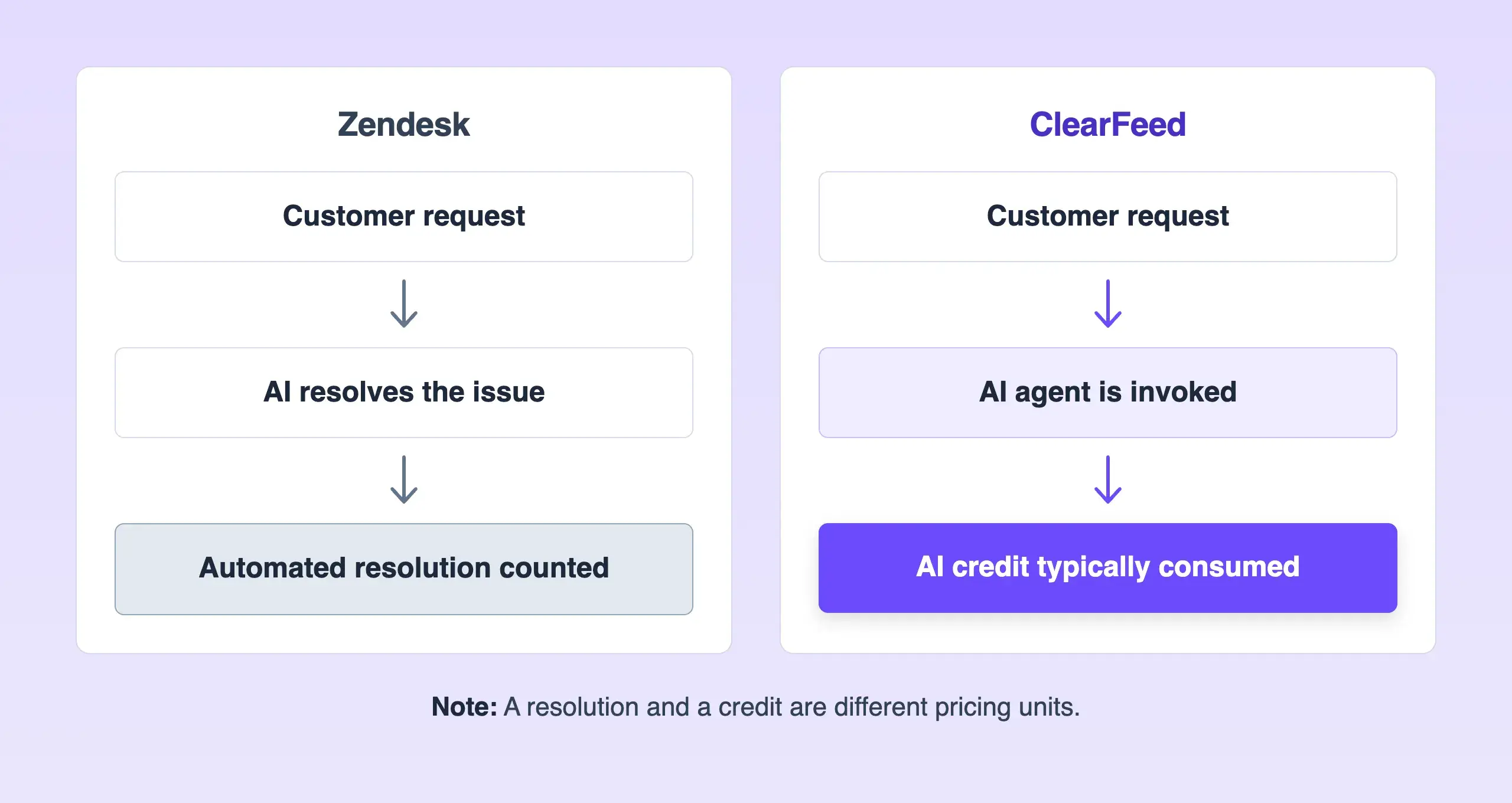
On seat-based Zendesk plans, automated resolutions are the unit for AI-agent usage. ClearFeed tracks AI usage in credits.

With Zendesk, an automated resolution generally means an issue resolved without human intervention. With ClearFeed, an AI agent invocation typically consumes one credit, including multiple responses within a chat session. Knowing which unit each platform uses will help you estimate costs based on your support volume and AI usage.
Zendesk AI Pricing vs. ClearFeed AI Pricing: Head-to-Head Comparison

‍

Zendesk AI vs. ClearFeed AI at a Glance

Pricing component Zendesk ClearFeed
Base subscription Support Team: $19; Suite Team: $55; Suite Professional: $115/agent/month, paid annually. Starter: $24; Professional: $49/agent/month, before a 15% annual subscription discount.
AI access AI agents are included, with an allowance that varies by plan. Starter offers an optional AI Pack from $20/month; Professional includes the AI Pack.
Included AI usage Dollar allowance: $2/seat/month on Team plans, $5 on Suite Professional. Older model: 5 resolutions/seat/month on Team plans, 10 on Suite Professional. Professional includes 50 credits per agent/month on agent-based pricing.
Additional usage Public count-based rates: $1.50 committed or $2 pay-as-you-go. Check tiered rates in your quote. $0.20 per credit for usage 1–500, $0.15 for 501–1,000, and $0.10 above 1,000. See ClearFeed AI Agent pricing.
Pricing unit Automated resolution. AI credit, typically consumed per AI-agent invocation.

‍

What Would Each Platform Cost per Month?

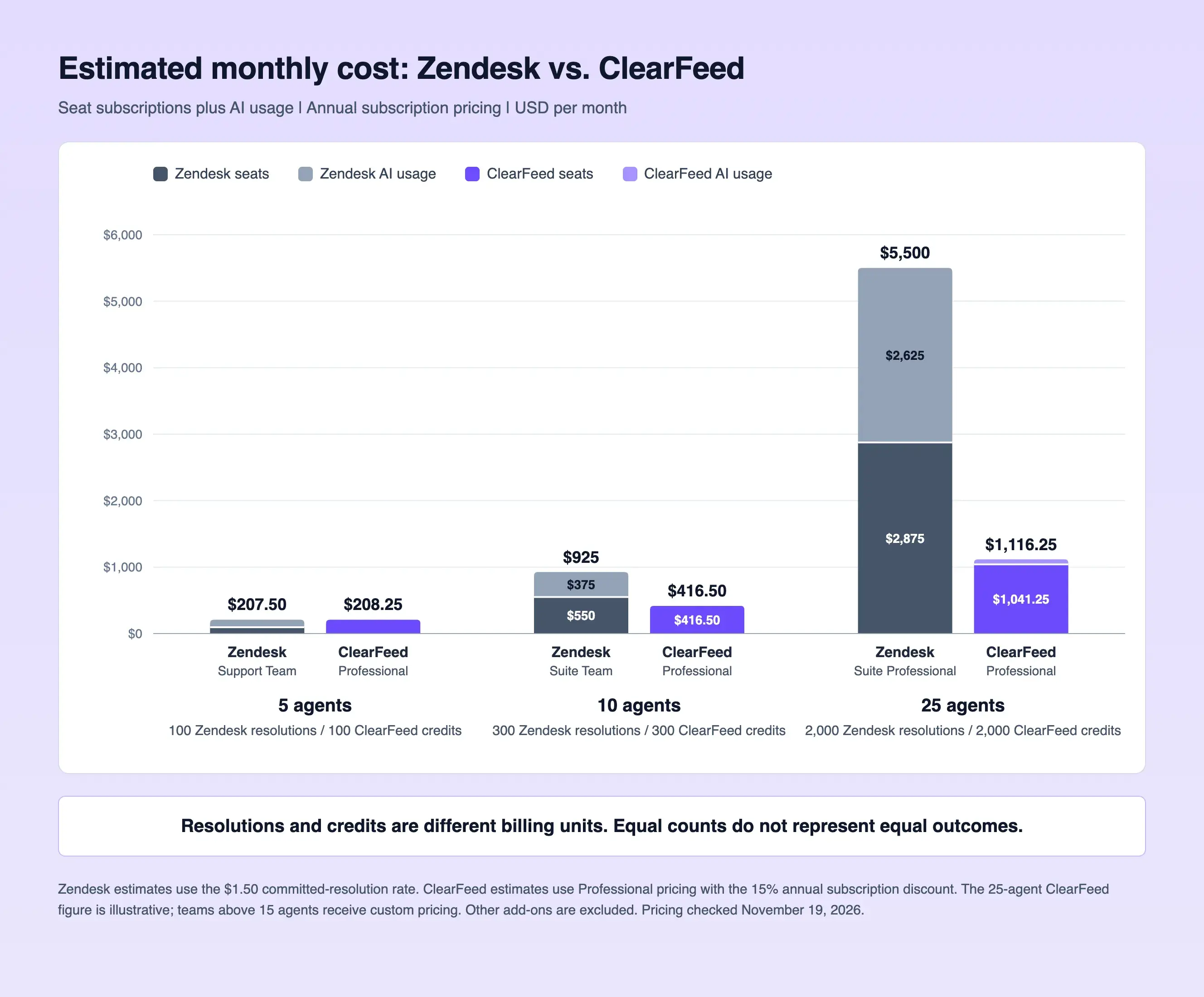
These are billing illustrations. Equal numbers of Zendesk resolutions and ClearFeed credits represent different usage. For a comparison based on the same support workload, start with the same incoming requests and estimate the billable resolutions or credits each platform would generate. The plans shown also differ in helpdesk features.

Figures are in USD per month and use annual subscription prices and steady monthly usage. Both Zendesk columns use an illustrative $1.50 per qualifying resolution and assume enough prepaid capacity. Confirm the rate for your account. ClearFeed Professional is $41.65/seat/month after the 15% annual discount on $49.

Team size Zendesk plan Resolutions / credits per month Zendesk older count-based Zendesk dollar allowance ClearFeed credits/month ClearFeed estimated total/month
5 agents Support Team 100 $207.50 $235 100 $208.25
10 agents Suite Team 300 $925 $980 300 $416.50
20 agents Suite Professional 1,000 $3,500 $3,700 1,000 $833
25 agents Suite Professional 2,000 $5,500 $5,750 2,000 $1,116.25
50 agents Suite Professional 5,000 $12,500 $13,000 5,000 $2,332.50

Here’s how the 25-agent example breaks down:

  • Zendesk Suite Professional on the dollar-allowance model. The 25 seats cost $2,875/month and include a $125 monthly resolution allowance. At $1.50 each, 2,000 resolutions cost $3,000. Applying the allowance leaves $2,875 in AI costs, for an estimated $5,750/month.
  • ClearFeed Professional: 25 seats cost $1,041.25/month and include 1,250 AI credits. At 2,000 credits, the 1,250 included credits already cover the first two pricing tiers. The remaining 750 cost $75 at $0.10 per credit, for a total of $1,116.25/month.

Zendesk documents a minimum advance purchase of 100 resolutions on the older count-based model. The five-agent row treats 75 additional resolutions as a monthly share of a larger prepaid commitment.

The table compares equal numbers of resolutions and credits to illustrate pricing. Because these are different billing units, they don’t show the cost to resolve the same number of requests. The plans also include different helpdesk features.

Our standard agent-based plans are listed for teams of 1–15 agents; larger teams receive custom pricing. The 20-, 25-, and 50-agent ClearFeed figures extend the list price for illustration and aren’t quotes. 
Monthly cost stacked bar chart

‍

How To Estimate Your AI Costs

For Zendesk, start with the billing model and rates in your quote. Estimate how many requests your AI agent will resolve and how much the included allowance covers. Then price the remaining usage at the applicable committed or pay-as-you-go rate.

For ClearFeed, start with the credits included in your plan and estimate how often your team expects to use AI agents. Then use your actual credit consumption and resolution rate to see how the plan fits your support volume.

Compare Costs on Your Own Workload

Before you sign, ask Zendesk to price a busy month using the billing model in your quote. Use that same mix of support requests to evaluate ClearFeed. Include the work that still goes to human agents so you can see what each monthly bill buys you.

Start your free ClearFeed trial and test the AI agent on the questions you see most often in Slack. Use the credit usage you observe to update your monthly estimate.

‍

Frequently Asked Questions

How Does Zendesk’s Outcome-Based AI Agent Pricing Actually Work?

Zendesk Unlimited is a separate early-access outcome-pricing offering announced on November 10, 2026. It drops per-seat charges and instead debits an Outcome Budget for eligible conversational and operational work, including issues resolved by an AI agent, a human agent, or both. Conversational outcomes start at $0.99, Essentials has a minimum spend, and higher tiers charge a platform fee that includes some Outcome Budget. It runs alongside seat-based Support and Suite plans, not instead of them. Get a rate card and workload model before comparing it to a per-seat quote.

‍

Is Zendesk AI Included in the Suite Plans?

Suite plans include AI agent access plus a monthly resolution allowance. On the dollar-allowance model, that’s $2/seat on Team, $5 on Growth and Professional, and $10 on Enterprise and Enterprise Plus, capped at $5,000 a year. Older count-based accounts get a set number of resolutions instead: 5/seat/month on Team and 10/seat/month on Professional. Copilot is a separate add-on at $50/agent/month on annual billing, though some plans include some Copilot features. Check your Admin Center to confirm which model you’re on.

‍

Is Zendesk AI Cheaper Than the Alternatives?

It depends on your workload and what each vendor counts. Zendesk bills in automated resolutions, or outcomes, on Unlimited. ClearFeed bills in AI credits, typically one per AI-agent invocation, including follow-up responses in the same session. One credit is not one resolution, so dollar-for-dollar rate comparisons can mislead. Estimate how many resolutions and credits the same workload would generate, then compare total monthly cost including seats, allowances, overage, and add-ons.

‍

How Does Zendesk Charge for AI Agents and Automated Resolutions?

Zendesk has two AI allowance models based on when you bought or renewed. The newer tiered model applies to Suite customers who bought or renewed after May 18, 2026. Each verified resolution draws from a monthly dollar allowance, and extra usage costs $1.50 committed or $2 pay-as-you-go. The older count-based model gives each seat a set number of monthly resolutions: 5 on Team and 10 on Professional. Extra capacity comes in blocks of 100 or more, capped at 10,000 included resolutions per year. Only verified resolutions consume the allowance; contained resolutions and assisted escalations do not. In Admin Center, “Automated resolutions” means the older model, and “Resolutions” or “Resolution allowance” means the newer one.

On November 10, 2026, Zendesk announced Zendesk Unlimited, an early-access offering for its Outcome AI Platform. It removes per-seat charges and uses an Outcome Budget for eligible customer issues and operational work.

Zendesk still sells seat-based Support and Suite plans. This guide explains how Zendesk’s AI usage affects those bills, what the $0.99 starting price covers in early access, and how ClearFeed bills for AI.

‍

Zendesk AI Pricing at a Glance

Cost line Published price or allowance AI allowance or billing terms
Support Team $19/agent/month annually; $25 monthly Dollar allowance: $2/seat/month
Older count-based model: 5 resolutions per seat/month
Suite Team $55/agent/month annually; $69 monthly Dollar allowance: $2/seat/month
Older count-based model: 5 resolutions per seat/month
Suite Professional $115/agent/month annually; $149 monthly Dollar allowance: $5/seat/month
Older count-based model: 10 resolutions per seat/month
Additional AI resolutions $1.50 committed or $2 pay-as-you-go on the public count-based price list On the dollar-allowance model, verify the applicable rate and overage terms in your quote.
Included allowance limits Dollar allowance: $5,000 annual cap. Unused monthly amounts expire. Older count-based model: 10,000 included resolutions per year at most.
Copilot $50/agent/month annually Separate agent-assistance add-on; not an AI-resolution allowance.
Outcome AI Platform Conversational outcomes start at $0.99 Separate early-access offering. Minimum spend or a platform fee applies, depending on the plan.

‍

How Is a Zendesk AI Bill Calculated?

On a seat-based Support or Suite plan, your Zendesk bill starts with agent-seat costs. From there, add AI usage beyond the included allowance, plus Copilot or other add-ons.

How Is a Zendesk AI Bill Calculated

Zendesk says the tiered dollar-allowance model applies to customers using Zendesk AI who bought or renewed Suite after May 18, 2026. On this model, verified resolutions draw from a monthly dollar allowance. Accounts on the older model receive a set number of included resolutions.

‍

Example: 20 Suite Professional Agents

Assume 20 Suite Professional seats at $115/seat/month on annual billing and 1,000 AI resolutions that qualify for billing. The example uses the same $1.50 rate in both columns and assumes sufficient prepaid capacity. Confirm the applicable rate and commitment terms for your account.

Cost comparison table

At $1.50 each, the 200 resolutions included on the older model offset $300 of usage. The newer allowance offsets $100, so the estimated monthly cost is $200 higher.

‍

Why the Models Differ

On the older count-based model, Suite Professional’s included allocation is calculated at 10 resolutions per seat per month. For 20 seats on an annual subscription, that’s 2,400 included resolutions per year, or 200 per month on average.

On the newer model, Suite Professional includes $5 per paid agent seat per month. For 20 seats, the $100 monthly allowance offsets verified-resolution charges.

‍

Overage and Budgeting

On the dollar-allowance model, if usage exceeds the allowance, Zendesk’s default setting is Allow overage, which continues AI-agent service and bills pay-as-you-go resolutions monthly. Teams can instead choose Don’t allow overage, which pauses paid AI-agent functionality after the allowance is exhausted.

The estimates above exclude Copilot, other add-ons, taxes, and additional fees. The final bill may also vary based on prepaid capacity, overage rates, contract terms, and billing periods. Zendesk identifies the applicable model through its Admin Center dashboards: Automated resolutions indicates the traditional model, while Resolutions and Resolution allowance indicate the newer tiered/allowance model. These examples express annual subscription and prepaid costs as monthly equivalents.

‍

What Counts as a Billable Zendesk AI Resolution?

On the tiered dollar-allowance model, Zendesk classifies AI-agent conversations into three groups.

  1. Verified resolution. The AI answers a setup question, the customer doesn’t come back for more help, and Zendesk’s language-model review confirms it was a satisfactory resolution. This one uses your resolution allowance at the applicable rate.
  2. Contained resolution. The AI responds, and the customer doesn’t ask for more help, but the review can’t confirm a satisfactory resolution. Under the documented tier rules, this does not use the allowance.
  3. Assisted escalation. The AI collects details, and then a human agent resolves the request. Under the documented tier rules, this also does not use the allowance.

For example, say a customer asks how to add a teammate. The AI replies, and the customer stops responding. That silence alone doesn’t mean Zendesk will count the request as resolved. Zendesk’s AI also checks the conversation to decide whether the answer solved the problem.

A customer can come back about the same issue in a separate email or messaging conversation. Zendesk can count a second verified resolution if that conversation is evaluated separately and independently qualifies.

Under the current tiered rules, Zendesk evaluates email and messaging conversations 72 hours after the first message and voice conversations when the call ends.

‍

What Else Should You Budget For?

Copilot, Voice, Quality Review, and Setup

Zendesk’s AI agent answers customer questions. Copilot helps your support agents with their work, such as drafting replies and suggesting next steps.

The Copilot add-on costs $50/agent/month on annual billing. Licensing all 20 agents adds $1,000 a month. Some Copilot features are included in certain plans, so check what your team already has before adding it to your budget.

‍

Setting Up and Maintaining Your AI Agent

Budget for your team’s time, too. Beyond your Zendesk subscription and any AI usage charges, your team may need time to prepare help articles, test answers, and decide when the AI should hand a conversation to a person. After launch, someone will need to review its performance and keep its information up to date.

‍

AI-Powered Phone Support

If you want an AI agent to handle calls, ask Zendesk for a separate voice quote. Phone numbers, call minutes, and other voice products may add to the cost of resolving requests through AI.

‍

What Happens When the Allowance Runs Out?

Zendesk lets eligible accounts choose between two settings when the resolution allowance or automated-resolution limit is reached:

Setting What happens Financial effect
Maintain functionality and allow overage AI agents continue serving customers after the included or purchased allowance is exhausted. Additional usage is charged at the applicable pay-as-you-go overage rate.
Pause functionality and don’t allow overage Paid AI-agent functionality pauses until more allowance is available. More requests may go to human agents. Prevents additional AI-resolution overage charges and can increase human-agent workload.

‍

Questions To Ask Zendesk Before You Sign

Send your account representative a sample of your actual workload and ask for an itemized quote covering:

  1. Model and allowance: Is our account on a count-based or dollar-allowance model? What is included, capped, pooled, and excluded? How do included and purchased amounts interact?
  2. Billable events: Show us the classification and charge for a verified answer, failed verification, human handoff, reopened issue, and the same issue raised in another channel.
  3. Commitment: What is the minimum purchase, when does it expire, and can we add or adjust capacity during the term? What happens to unused amounts?
  4. Overage and invoices: What rate applies after the allowance runs out? Can we pause AI, set alerts, and see a sample invoice with usage and credits? How are midterm changes and existing overages handled?
  5. Add-ons and implementation: Which Copilot seats, voice charges, QA tools, onboarding, and support services are required for our use case? Are bundles available?
  6. Renewal and negotiation: What prices and usage terms apply at renewal? Can you quote lower and higher commitments, annual versus multi-year terms, and the cost of adding seats? Put any discount or price protection in the order form.

Compare offers using the same low, expected, and high workload. A larger discount is not useful if the minimum spend exceeds likely usage. 

‍

What About Zendesk's $0.99 Outcome Price?

Zendesk Unlimited is a separate early-access offering with unlimited seats. Conversational outcomes start at $0.99 and can include eligible work resolved by AI, a human agent, or both. The Outcome Budget can also cover operational work, such as a standalone AI workflow. The Essentials plan has a minimum spend. Higher plans charge a platform fee that includes some Outcome Budget.

Ask for the rate card and a model of your human-assisted and AI-resolved workload, including other billable usage. Compare complete contract costs, not $0.99 against $1.50 alone.

‍

Zendesk AI Pricing vs. ClearFeed AI Pricing: Head-to-Head Comparison

On seat-based Zendesk plans, automated resolutions are the unit for AI-agent usage. ClearFeed tracks AI usage in credits.

With Zendesk, an automated resolution generally means an issue resolved without human intervention. With ClearFeed, an AI agent invocation typically consumes one credit, including multiple responses within a chat session. Knowing which unit each platform uses will help you estimate costs based on your support volume and AI usage.

Zendesk AI Pricing vs. ClearFeed AI Pricing: Head-to-Head Comparison

‍

Zendesk AI vs. ClearFeed AI at a Glance

Pricing component Zendesk ClearFeed
Base subscription Support Team: $19; Suite Team: $55; Suite Professional: $115/agent/month, paid annually. Starter: $24; Professional: $49/agent/month, before a 15% annual subscription discount.
AI access AI agents are included, with an allowance that varies by plan. Starter offers an optional AI Pack from $20/month; Professional includes the AI Pack.
Included AI usage Dollar allowance: $2/seat/month on Team plans, $5 on Suite Professional. Older model: 5 resolutions/seat/month on Team plans, 10 on Suite Professional. Professional includes 50 credits per agent/month on agent-based pricing.
Additional usage Public count-based rates: $1.50 committed or $2 pay-as-you-go. Check tiered rates in your quote. $0.20 per credit for usage 1–500, $0.15 for 501–1,000, and $0.10 above 1,000. See ClearFeed AI Agent pricing.
Pricing unit Automated resolution. AI credit, typically consumed per AI-agent invocation.

‍

What Would Each Platform Cost per Month?

These are billing illustrations. Equal numbers of Zendesk resolutions and ClearFeed credits represent different usage. For a comparison based on the same support workload, start with the same incoming requests and estimate the billable resolutions or credits each platform would generate. The plans shown also differ in helpdesk features.

Figures are in USD per month and use annual subscription prices and steady monthly usage. Both Zendesk columns use an illustrative $1.50 per qualifying resolution and assume enough prepaid capacity. Confirm the rate for your account. ClearFeed Professional is $41.65/seat/month after the 15% annual discount on $49.

Team size Zendesk plan Resolutions / credits per month Zendesk older count-based Zendesk dollar allowance ClearFeed credits/month ClearFeed estimated total/month
5 agents Support Team 100 $207.50 $235 100 $208.25
10 agents Suite Team 300 $925 $980 300 $416.50
20 agents Suite Professional 1,000 $3,500 $3,700 1,000 $833
25 agents Suite Professional 2,000 $5,500 $5,750 2,000 $1,116.25
50 agents Suite Professional 5,000 $12,500 $13,000 5,000 $2,332.50

Here’s how the 25-agent example breaks down:

  • Zendesk Suite Professional on the dollar-allowance model. The 25 seats cost $2,875/month and include a $125 monthly resolution allowance. At $1.50 each, 2,000 resolutions cost $3,000. Applying the allowance leaves $2,875 in AI costs, for an estimated $5,750/month.
  • ClearFeed Professional: 25 seats cost $1,041.25/month and include 1,250 AI credits. At 2,000 credits, the 1,250 included credits already cover the first two pricing tiers. The remaining 750 cost $75 at $0.10 per credit, for a total of $1,116.25/month.

Zendesk documents a minimum advance purchase of 100 resolutions on the older count-based model. The five-agent row treats 75 additional resolutions as a monthly share of a larger prepaid commitment.

The table compares equal numbers of resolutions and credits to illustrate pricing. Because these are different billing units, they don’t show the cost to resolve the same number of requests. The plans also include different helpdesk features.

Our standard agent-based plans are listed for teams of 1–15 agents; larger teams receive custom pricing. The 20-, 25-, and 50-agent ClearFeed figures extend the list price for illustration and aren’t quotes. 

Monthly cost stacked bar chart

‍

How To Estimate Your AI Costs

For Zendesk, start with the billing model and rates in your quote. Estimate how many requests your AI agent will resolve and how much the included allowance covers. Then price the remaining usage at the applicable committed or pay-as-you-go rate.

For ClearFeed, start with the credits included in your plan and estimate how often your team expects to use AI agents. Then use your actual credit consumption and resolution rate to see how the plan fits your support volume.

Compare Costs on Your Own Workload

Before you sign, ask Zendesk to price a busy month using the billing model in your quote. Use that same mix of support requests to evaluate ClearFeed. Include the work that still goes to human agents so you can see what each monthly bill buys you.

Start your free ClearFeed trial and test the AI agent on the questions you see most often in Slack. Use the credit usage you observe to update your monthly estimate.

‍

Frequently Asked Questions

How Does Zendesk’s Outcome-Based AI Agent Pricing Actually Work?

Zendesk Unlimited is a separate early-access outcome-pricing offering announced on November 10, 2026. It drops per-seat charges and instead debits an Outcome Budget for eligible conversational and operational work, including issues resolved by an AI agent, a human agent, or both. Conversational outcomes start at $0.99, Essentials has a minimum spend, and higher tiers charge a platform fee that includes some Outcome Budget. It runs alongside seat-based Support and Suite plans, not instead of them. Get a rate card and workload model before comparing it to a per-seat quote.

‍

Is Zendesk AI Included in the Suite Plans?

Suite plans include AI agent access plus a monthly resolution allowance. On the dollar-allowance model, that’s $2/seat on Team, $5 on Growth and Professional, and $10 on Enterprise and Enterprise Plus, capped at $5,000 a year. Older count-based accounts get a set number of resolutions instead: 5/seat/month on Team and 10/seat/month on Professional. Copilot is a separate add-on at $50/agent/month on annual billing, though some plans include some Copilot features. Check your Admin Center to confirm which model you’re on.

‍

Is Zendesk AI Cheaper Than the Alternatives?

It depends on your workload and what each vendor counts. Zendesk bills in automated resolutions, or outcomes, on Unlimited. ClearFeed bills in AI credits, typically one per AI-agent invocation, including follow-up responses in the same session. One credit is not one resolution, so dollar-for-dollar rate comparisons can mislead. Estimate how many resolutions and credits the same workload would generate, then compare total monthly cost including seats, allowances, overage, and add-ons.

‍

How Does Zendesk Charge for AI Agents and Automated Resolutions?

Zendesk has two AI allowance models based on when you bought or renewed. The newer tiered model applies to Suite customers who bought or renewed after May 18, 2026. Each verified resolution draws from a monthly dollar allowance, and extra usage costs $1.50 committed or $2 pay-as-you-go. The older count-based model gives each seat a set number of monthly resolutions: 5 on Team and 10 on Professional. Extra capacity comes in blocks of 100 or more, capped at 10,000 included resolutions per year. Only verified resolutions consume the allowance; contained resolutions and assisted escalations do not. In Admin Center, “Automated resolutions” means the older model, and “Resolutions” or “Resolution allowance” means the newer one.
Related Blogs

See all Blog Posts
TOC heading
Text LinkText Link Active
Get a Free consultation with a Support Expert
Learn how fast growing companies like Teleport, Chronosphere and Acryl Data have scaled Support processes with ClearFeed
Thank you for contacting us. Our team will reach out to you shortly.
Oops! Something went wrong while submitting the form.