Table of Contents

B2B customer support is moving into enterprise chat, especially Slack, Microsoft Teams, Discord, Telegram, and, in some cases, WhatsApp.
That shift matters because B2B support works differently from B2C support.
- In B2C, web chat, email, phone, SMS, and WhatsApp often matter most. Tickets are handled by the Support team; interdepartmental collaboration on customer tickets is limited, and the focus is on deflecting repetitive and simple questions. Support is reactive.
- In B2B, support issues are increasingly discussed through shared collaboration channels such as Slack and Teams. These issues are complex and require coordination across Support, Customer Success, Product, Engineering, and other stakeholders. Support is proactive.
Most support platforms still treat support work as just a ticket queue. They help teams respond faster, but they do not always show the full account context: who matters, what was promised, what is at risk, where the conversation started, and who owns the next move.
This guide evaluates B2B customer support platforms through that lens: not just ticket handling, but account-level workflows, stakeholder visibility, SLA tracking, CRM context, escalation management, and native support for enterprise chat tools like Slack, MS Teams, Discord, email, and other customer channels.
TL;DR
Choose a B2B support platform based on where customers communicate, how much account context agents need, and the scale of your operation.
The gist
- ClearFeed suits Slack- and Teams-centric B2B teams needing account context, AI automation, and Slack-native ticket handling.
- Zendesk fits large support operations with high ticket volumes, advanced routing, reporting, and broad channel coverage.
- Intercom works best for product-led SaaS companies offering embedded, in-app support.
- HubSpot and Salesforce suit teams already committed to their respective CRMs.
- Front provides lightweight, email-first collaboration for support teams with fewer than 10 agents.
Worth knowing: “Slack integration” often refers only to notifications. The guide recommends checking whether agents can actually triage and reply inside Slack. ClearFeed lacks phone and SMS support, while enterprise platforms can involve higher costs and lengthy implementation.
Quick Answer: Which B2B Support Platform Should You Use?
The best B2B customer support platform depends on your primary support channel and account management needs:
- ClearFeed – Best for Slack-Native B2B teams working in a cross-functional manner with customers in Slack & MS Teams with account context
- Zendesk – Best for high-volume enterprise-scale ticketing with complex routing
- Intercom – Best for high-volume product-led SaaS with embedded support
- Freshdesk – Best value for growing teams needing ticketing and account hierarchy
- HubSpot Service Hub – Entry-level ticketing system with tight integration with HubSpot CRM - best for teams who want to stay within HubSpot
- Salesforce Service Cloud – Best for enterprises that want a ticketing system tightly integrated with Salesforce CRM and that have contact-center operations
- Front – Best for small teams managing relationships via email
The Best B2B Support Platforms at a Glance
Popular Platforms that didn’t make the cut:
- HelpScout: While a popular platform for Email and web chat-based support, it just doesn’t have the Enterprise Chat integrations with Slack/Teams and other platforms that are critical to B2B Support today.
- Freshdesk: A popular support platform for smaller companies - but increasingly out of date in a world where supporting customers on Slack/Teams is essential. If you end up picking Freshdesk, consider using ClearFeed to connect it to Slack and Teams.
How We Evaluated These Platforms
We assessed each platform on seven criteria that matter most to B2B support teams:
- Enterprise chat integration: Does the platform integrate with Slack, Teams, Discord, and Telegram? Can it track conversations in these platforms seamlessly - or do customers need to log issues via a separate portal or email? This is the defining characteristic of modern B2B support.
- Account-centric organization: Is work organized around customer accounts/relationships, or around individual tickets? B2B issues rarely affect one contact—they affect the entire customer org.
- Cross-channel consolidation: Can the platform consolidate email, web chat, phone, enterprise chat, and other channels into a unified view? Does it maintain the full conversation history across channels?
- Stakeholder visibility: Can agents see which contacts matter (decision-maker, technical contact, buyer, executive), what was promised, and what's at risk before they reply?\
- SLA and escalation: Can you define and enforce SLAs? Can you escalate based on account risk, not just ticket age? Can you route issues to engineering when needed?
- Total cost of ownership at scale: What's the true cost when you account for seats, add-ons, integrations, and implementation?
- AI assistance: Does the platform offer AI-powered automation, auto-responses, intelligent routing, or knowledge-base integration? How mature are the AI capabilities?
- Slack-Native: Does the platform allow responders to reply to tickets from Slack itself? For B2B technology teams, this is becoming a key criterion, as they rely heavily on Slack for intra-company collaboration.
The 6 Best B2B Support Platforms for 2026
1. ClearFeed
ClearFeed is purpose-built for B2B SaaS support teams that use Slack as their primary support workspace and need both triage structure and visibility into account relationships.
Key Features
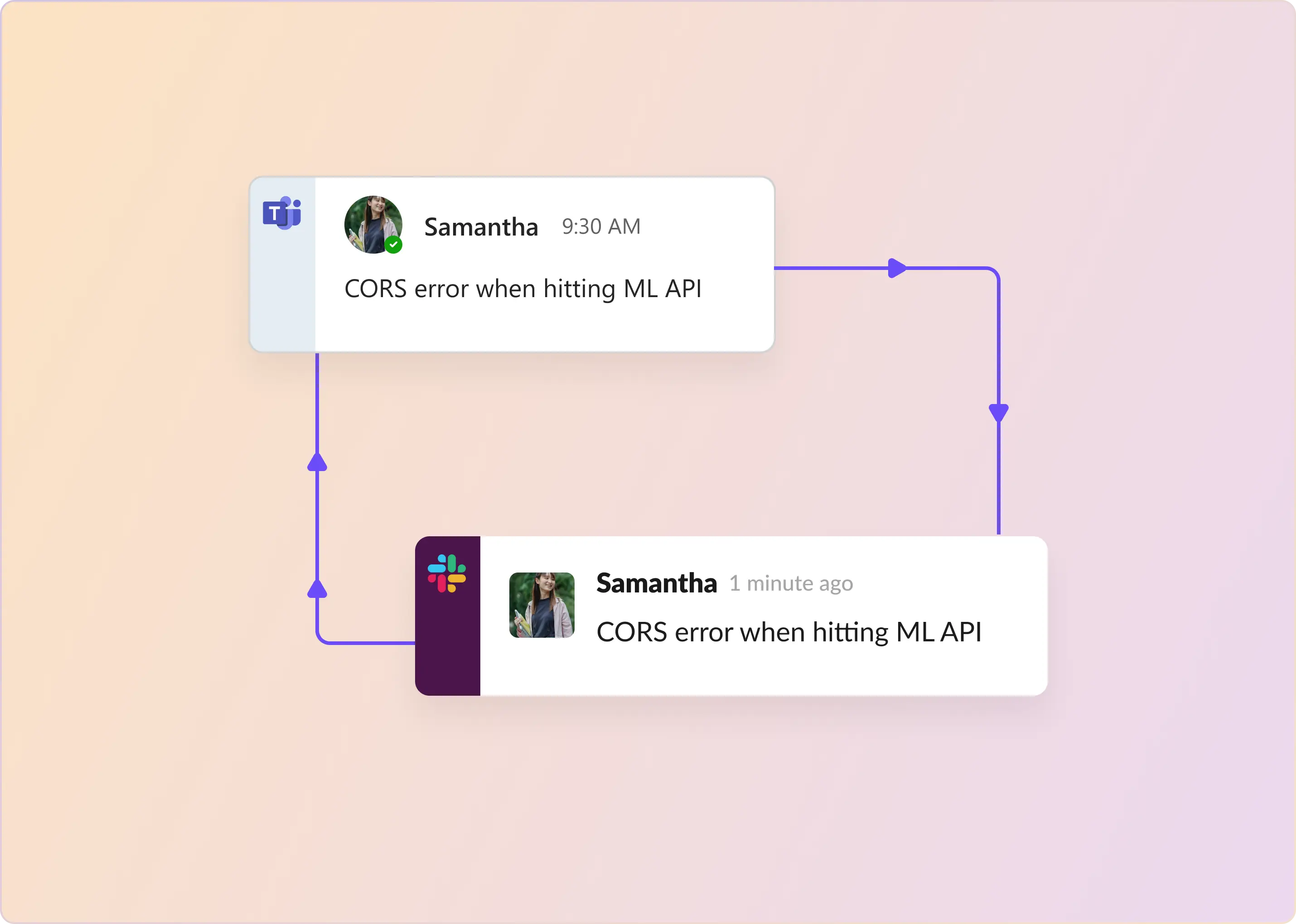
- Omnichannel consolidation: Slack, Email, Teams, Discord, Web Chat, and Customer Portal all feed into unified triage channels. Every incoming request appears natively in Slack with full customer and account context.
- Slack-native ticket management: What makes ClearFeed unique - Agents triage, discuss, and resolve customer requests directly in Slack. Replies automatically route back to the original channel (email, Teams, web chat, etc.) without agents leaving Slack—true Slack-native workflow, not just notifications.
- AI-powered automation: Answer Agents auto-respond to questions and provide agent assistance. Documentation Agents identify knowledge gaps; AI Automation pipelines classify tickets and take actions automatically.
- Knowledge base integration: Indexes existing knowledge in Documentation, Notion, Google Drive, Confluence, SharePoint, and Coda and makes them available to AI Agents.
- Bidirectional integrations: Syncs with project management and CRM platforms like Jira, ClickUp, Linear, Salesforce, HubSpot, and more.
- AI-powered SLA monitoring and escalation: Proactive breach alerts warn agents before SLAs expire. Real-time SLA dashboards visible in Slack. Automatic escalation to engineering or designated teams when needed, preserving full context.
Pros
- True Slack-native workflow. Agents resolve tickets directly in Slack—the tool they already use—across all channels without context switching.
- Fast deployment. 14-day free trial with minimal setup; weeks faster than Zendesk or Salesforce implementation.
- Account-centric organization. Collections are organized by customer account, not by ticket type, so agents see the full relationship context.
- AI agents reduce manual work. Auto-responses can handle 30-40% of tickets autonomously.
- Seamless escalation. Escalate to engineering with full context without leaving Slack and get updates back on tickets.
Limitations
- No phone or SMS support. Not ideal for email-first, phone-heavy, or chat-averse teams.
- No dedicated contact center features (IVR, ACD, or complex voice routing).
- Limited workload management - best suited for under 50 agents
Pricing
- Agent-based: $24/agent/month (Starter) – $49/agent/month (Professional) for 1-15 agents
- Usage-based: $40/month base (Starter) – $80/month (Professional) for variable request volume
- Enterprise packages: Custom as per business requirements
- AI Agents: Included in Professional or as an add-on pack in Starter editions
Choose ClearFeed if: Your team already works in Slack (especially with customers via Slack Connect and MS Teams), you need account-level context, affordable AI, and you want agents to triage and respond directly from Slack without switching between portals.
2. Zendesk
Zendesk is the market-leading B2B support platform for teams managing high volume with complex routing, escalation, and reporting needs.
Key Features
- Email, live chat, messaging, voice/phone, SMS, WhatsApp, and social media all feed into a unified agent workspace with consolidated customer context
- AI Agents trained on 20 billion tickets autonomously resolve up to 80% of tickets in messaging/email
- Connects with Confluence (24-hour auto-sync), Notion, Google Drive, SharePoint, Box, and 50+ external knowledge sources
- 500+ marketplace apps; webhooks and custom API integrations
- Live SLA dashboards with proactive breach alerts, business hours configuration, escalation workflows, and agent adherence tracking
- Real-time dashboards, Zendesk Explore with three tiers, custom dashboards, natural language queries, AI performance metrics, team performance tracking
- Create tickets, view comments, approvals, and side conversations from Slack
- Intelligent Triage automatically classifies sentiment (very positive to very negative) and routes accordingly
Pros
- Proactive alerts prevent breaches before they happen
- Real-time dashboards default for new customers
- Supports thousands of agents and millions of tickets
- Strong integrations with tools like Jira/Salesforce/Hubspot
- Rich APIs and application ecosystem fill out gaps in the native offering
- Slack notifications and Side-Conversations enable collaboration via Slack
Limitations
- Lack of bi-directional sync and forms support for Slack, MS Teams, and other chat platforms requires tools like ClearFeed to integrate Slack & Teams with Zendesk.
- Agents must respond from the Zendesk app, not in Slack
- Higher cost at scale; add-ons (AI, advanced analytics) are expensive
- Requires significant onboarding and configuration for B2B workflows
Pricing
- Support Team: $19/agent/month
- Suite Team: $55/agent/month
- Suite Professional: $115/agent/month
- Suite Enterprise: Custom pricing
Choose Zendesk if: You have 20+ agents, need enterprise-grade account management and reporting, can invest in implementation, prefer agents working from a ticketing app, and are prepared to invest in add-on tools to support customers on Slack/Teams, etc.
3. Intercom
Intercom is built for B2B SaaS companies that embed support directly in their product and want to scale from conversations to tickets.
Key Features
- Support conversations happen within your product
- Track company (account) data and conversation history
- Use as a conversation hub or escalate to tickets as volume grows
- Suggest answers before tickets are created
- Bi-directional sync with Slack to support customers on Slack
Pros
- Product-embedded messaging (if that's your channel)
- Company-level data collection (not just individual users)
- Smooth escalation from conversation to ticket
- Fin AI can deflect common questions at scale
- Great for product-led growth (PLG) B2B companies
- Best in terms of legacy helpdesks and Slack support
Limitations
- No support for MS Teams or Discord.
- Agents must work from the Intercom app and not Slack
- Not ideal for email-heavy support workflows
- Pricing scales with customer contact count (can get expensive at scale)
- Less depth for complex enterprise account management
Pricing
- Essential: $19/seat/month
- Advanced: $85/seat/month
- Expert: $132/seat/month
Choose Intercom if: Your product-embedded support is a differentiator, most customers are product-led or on the free tier, and you want to manage conversations before they become tickets. You have customers on Slack - but not on MS Teams.
4. HubSpot Service Hub
HubSpot Service Hub is built for B2B teams that use HubSpot CRM and want unified customer records across sales, marketing, and support.
Key Features
- All support interactions are tied to the company record (not individual tickets)
- Support agents can see open deals and contract details
- HubSpot's native Slack integration (Pro/Enterprise plans) allows ticket updates in Slack
- Sales reps see support interactions on deal records
Pros
- Unified customer records across sales, marketing, and support
- Company-record-based organization (naturally account-centric)
- Native Slack sync (better than Zendesk's)
- No separate CRM system to manage
- Good for deal-driven revenue organizations
Limitations
- Requires HubSpot investment; pricing scales with CRM spend
- Lacks true bi-directional sync with Slack and MS Teams
- Support ticketing features are less mature than those of Zendesk or Freshdesk
- Less useful if you don't already use HubSpot
Pricing
- Service Hub Starter: $7/seat/month
- Professional: $90/seat/month
- Enterprise: $150/seat/month
Choose HubSpot Service Hub if: Your team already uses HubSpot, deal velocity matters, and you want unified customer records without a separate support tool and can invest in a tool like ClearFeed to fill out Slack-HubSpot and Teams-HubSpot integrations.
5. Salesforce Service Cloud
Salesforce Service Cloud is for large enterprises running contact-center-scale B2B support with complex account hierarchies and regulatory requirements.
Key Features
- Model complex customer relationships (parent org, departments, sites)
- Track decision-makers, technical contacts, and stakeholders per account
- Provide self-service options and structured request intake
- Complex routing, approvals, and escalations
- SOC 2, HIPAA, and FedRAMP support for regulated industries
Pros
- Deep account and contact management for enterprise B2B
- Contact-center automation for large support teams
- Service catalog for self-service
- Tight CRM integration (if you use Salesforce CRM)
- Mature compliance and security controls
Limitations
- Very expensive; not practical for teams under 50 agents
- Implementation is 3–6 months and requires Salesforce admin expertise
- Agents primarily work in Salesforce, not Slack
- Steep learning curve for small teams
- While Salesforce CRM has excellent Slack integration, Service Cloud has poor integration (and non-existent with Teams)
Pricing
- Starter Suite: $25/user/month
- Pro Suite: $100/user/month
- Enterprise: $175/user/month
Choose Salesforce Service Cloud if: You have 50+ agents, already use Salesforce CRM, need contact-center automation, and operate in regulated industries, and are prepared to invest in add-on Slack-Service Cloud integration via vendors like ClearFeed.
6. Front
Front is the choice for small B2B teams (under 10) that manage relationships primarily via email and want a lightweight shared inbox without ticketing overhead.
Key Features
- All team members can see and reply to customer emails
- Prevent duplicate responses
- Collaborate without the customer seeing the conversation
- Canned responses for common requests
Pros
- Lightweight and fast to deploy
- Prevents duplicate customer responses
- Great for relationship-driven support
- Minimal configuration needed
- Ability to sync Slack threads or channels with Front
Limitations
- Email-first (Slack integration is secondary)
- Mailbox-centric - No account/company tracking
- Limited integrations, analytics, and reporting
- Best for teams under 10 agents
- Slack integration doesn’t allow agents to work from Slack
Pricing
- Starter: $59/seat/month (up to 10 seats)
- Professional: $65/seat/month (up to 50 seats)
- Enterprise: $105/seat/month
Choose Front if: Your team has fewer than 10 agents, support is email-first with some customer Slack channels, and you want lightweight collaboration without ticketing complexity.
Common Mistakes When Choosing a B2B Support Platform
- Choosing by feature count. Zendesk and Salesforce have longer feature lists, but most teams use 20% of the features. Pick the platform that gets your core workflow right, not the one with the longest demo.
- Optimizing for ticket speed instead of customer health. "Average response time" looks good in dashboards, but it doesn't matter if you miss account churn signals. A slower response from someone who understands the account context beats a fast response from someone in the dark.
- Ignoring channel fit. If your team already lives in Slack, a portal-first tool (even a great one like Zendesk) adds friction and context-switching. Channel fit is not negotiable.
- Buying enterprise software too early. Salesforce Service Cloud is powerful, but it's also a 3–6-month implementation for a team of 10. Start with ClearFeed or Freshdesk; move up when you hit operational limits.
- Treating CRM integration as optional. B2B support without CRM context is flying blind. Verify that the platform connects your support data to your CRM before buying.
- Assuming "Slack integration" means Slack-native. Many platforms claim "Slack integration" but only send notifications. True Slack-native means bidirectional sync with Slack forms, allowing agents to triage and respond without leaving Slack. Ask this question directly in a demo.
- Underestimating implementation cost. Zendesk, Salesforce, and even Freshdesk require configuration, integration, and training. ClearFeed and Help Scout are faster to deploy, but even they need workflow design. Budget for this.
Ready to scale B2B customer support without adding more chaos? Start a 14-day free trial of ClearFeed, or book a personalized demo to see how it can help your team manage customer requests across Slack, Teams, email, and ticketing tools.