Table of Contents

Slack can do more than host conversations. With a few lightweight systems, you can do task management in Slack without turning your channels into chaos.
This guide shows you how to use Slack for task management in practice: capture tasks from messages, assign an owner, set a deadline, and follow up until the work is done.
There are three practical paths, and most teams end up on one of them depending on how complex their work is:
- Use Slack’s built-in tools (Slack Lists, reminders/Later, Workflow Builder) for simple Slack task management.
- Connect external tools (Asana, Trello, ClickUp, Jira) when you need a true project board—these are common Slack project/task management apps teams pair with Slack.
- Use a Slack-native system when work starts to look like a shared queue (lots of incoming requests, multiple owners, deadlines, and visibility needs)—often what people mean when they search for a task management for Slack tool or a Slack to-do list app.
TL;DR
Slack can handle task management with the right structure. The right approach depends on complexity: native tools for small teams, external integrations for project-heavy work, and a Slack-native queue tool when tasks look more like a support or ops intake.
- Any reliable Slack task workflow needs four things: capture (turn messages into tasks before they disappear), assign (one clear owner per task), deadline (even an informal one), and a repeatable follow-up loop.
- Native Slack tools cover the basics: Lists for simple checklists with due dates, Reminders and Later for personal follow-ups (no shared visibility), and Workflow Builder for lightweight no-code automations. All break down at scale.
- Four failure modes as volume grows: tasks lost in scrollback, no ownership or status tracking, no metrics on backlog or response time, and fragmented cross-functional coordination.
- External integrations (Asana, Jira, ClickUp, Trello) let you create tasks from Slack messages and get status updates back, but come with five consistent tradeoffs: you still switch tools, visibility gaps for users without access, notification overload, weak bidirectional sync in practice, and friction from each app having different commands and rules.
- For teams where tasks look like a shared queue of incoming requests, a Slack-native layer like ClearFeed turns messages into owned, tracked items with SLA nudges, private-vs-public replies, and reporting — without pulling the team into a second tool.
Can Slack Handle Task Management?
Yes - Slack can work for task management when your goal is to capture small pieces of work, assign an owner, and follow up without leaving the conversation. But Slack isn’t a complete project management system by default, so you need a lightweight structure to keep Slack task management reliable.
Four basics need to be in place:
- Capture: turn messages into tasks so they don't disappear in scrollback.
- Assign: every task needs one clear owner.
- Deadline: set a due date or reminder, even if it's just "today EOD."
- Follow-up: create a repeatable way to review what's open and what's blocked.
What Slack Handles Well
Slack’s native features work effectively for individual or small-team coordination. They help users capture quick actions, follow-ups, and short-term priorities within the flow of conversation. Use these built-ins for task management for Slack:
- Slack Lists: It provides a simple in-channel task table and lets users assign tasks, set due dates, and maintain short, tactical checklists. It helps organize weekly goals or small project items, but lacks advanced capabilities such as workflow automation, dependency tracking, and reporting.
- Slack Reminders and Save Later: Slack reminders and Later help individuals stay on top of personal follow-ups. They help prompt a specific action at a particular time but do not provide shared visibility, ownership tracking, or team-level prioritization.
- Slack Workflow Builder: Enables simple, no-code automations in Slack, including forms, auto-replies, recurring notifications, and basic request routing. Useful for standardizing repetitive tasks, but lacks advanced features such as multi-step workflows, dependency management, or analytics. Good for quick fixes, not built for scaling operational workflows.
- Notification Controls: Custom channel notification settings allow users to filter noise and stay focused. While helpful for managing attention, this feature does not translate conversations into structured work.
Where Slack Begins To Struggle
Once you’re managing many tasks across multiple people—or tasks start looking like a queue of incoming requests—Slack for task management becomes harder without additional structure. Common breakpoints include:
- High risk of losing track of messages: Important requests are frequently lost in noisy channels. Unless a task is captured immediately, it often disappears into the scrollback. Furthermore, since notifications are only sent to thread participants, team members who are not participants in a specific thread may never know there are pending responses in it.
- No clear ownership: Slack does not provide a reliable way to assign responsibility or track task progress. Teams often struggle with common questions like “Who is handling this?” or “Has anyone responded?”
- Lack of reporting and visibility: Slack does not provide metrics such as volume, first-response time, backlog, or workload distribution. Leaders cannot easily assess performance or identify bottlenecks.
- Cross-functional coordination challenges: Many organizations rely on Slack for support, engineering escalations, implementation questions, and internal service requests. Without structure, communication becomes fragmented and inconsistent.
These gaps become more visible as teams scale.
What If Your Tasks Live Outside Slack? (Integrating External Tools)
For many teams, Slack is the communication layer—but the “source of truth” for work lives in Asana, Jira, ClickUp, Trello, or monday.com. In that setup, the goal isn’t to replace your project tool. It’s about using a Slack task management integration so you can capture tasks where the conversation happens and track them where the work is managed.
This approach works best when you already rely on project management tools that integrate with Slack and want Slack to act as a fast intake + update layer—especially for Slack task tracking across teams.
How It Works
Most major task tools offer official Slack apps or integrations—apps that integrate with Slack. These let you:
- Turn a Slack message into a task/ticket in your external tool (Asana/Jira/ClickUp/Trello)
- Post a confirmation back into Slack with a link to the task
- Send status updates to Slack when something changes (comment, status update, completion)
- Schedule daily/weekly summaries inside Slack (tasks due soon, overdue items, etc.)
A simple flow for task tracking solutions with Slack integration looks like this:
- A request shows up in Slack (a bug, a deliverable, a follow-up).
- You create a task from that message via the app action/shortcut.
- The app posts back: “Task created” + a link (and sometimes the assignee + due date).
- Updates in the external tool sync back into Slack, so everyone stays in the loop.
This is the core promise behind Slack project management integration: less copy-paste, fewer missed tasks, and clearer follow-through—without forcing everyone to live inside the project tool all day.
What Are the Limitations of Using Slack and External Task Management Apps Together?
While this is still one of the most common ways to do Slack task management via integrations, but it comes with a few predictable tradeoffs:
- You still switch tools. Slack can help you create and nudge tasks, but deeper work (dependencies, fields, workflows, reporting) still happens in the external tool—typical of task tracking software Slack integration setups.
- Visibility gaps for people without access. If only some teammates have access to Jira/Asana/ClickUp or Slack, updates can feel incomplete unless someone actively shares context.
- Notification overload + messy setup. With multiple Slack-integrated apps, channels can get spammed—or worse, the important updates get muted along with the noise.
- Lack of Seamless Bidirectional Sync: Most integrations do not relay comments and attachments between Slack and the external system. Instead, message actions are often required to push specific comments into the external system, which inevitably people don’t use.
- Different apps = different workflows. Each integration has its own commands, formatting, and rules, which creates friction as you scale.
If you want task tracking that feels truly “inside Slack” (with shared ownership, statuses, and a clear queue), you’ll want to look beyond integrations and consider a Slack-native Slack task management apps approach in the next section.
Is There a Slack-Native Task Management App? (Meet ClearFeed)
Yes. If you want Slack task tracking to feel native — not "Slack plus five other tabs" — a Slack-native task management app turns conversations into a structured queue with owners, statuses, and deadlines. This becomes especially relevant once your "tasks" start looking like an incoming queue — customer, support, or IT requests that need consistent triage, follow-ups, and visibility.
How ClearFeed Enhances Slack Task Management for Support Teams?
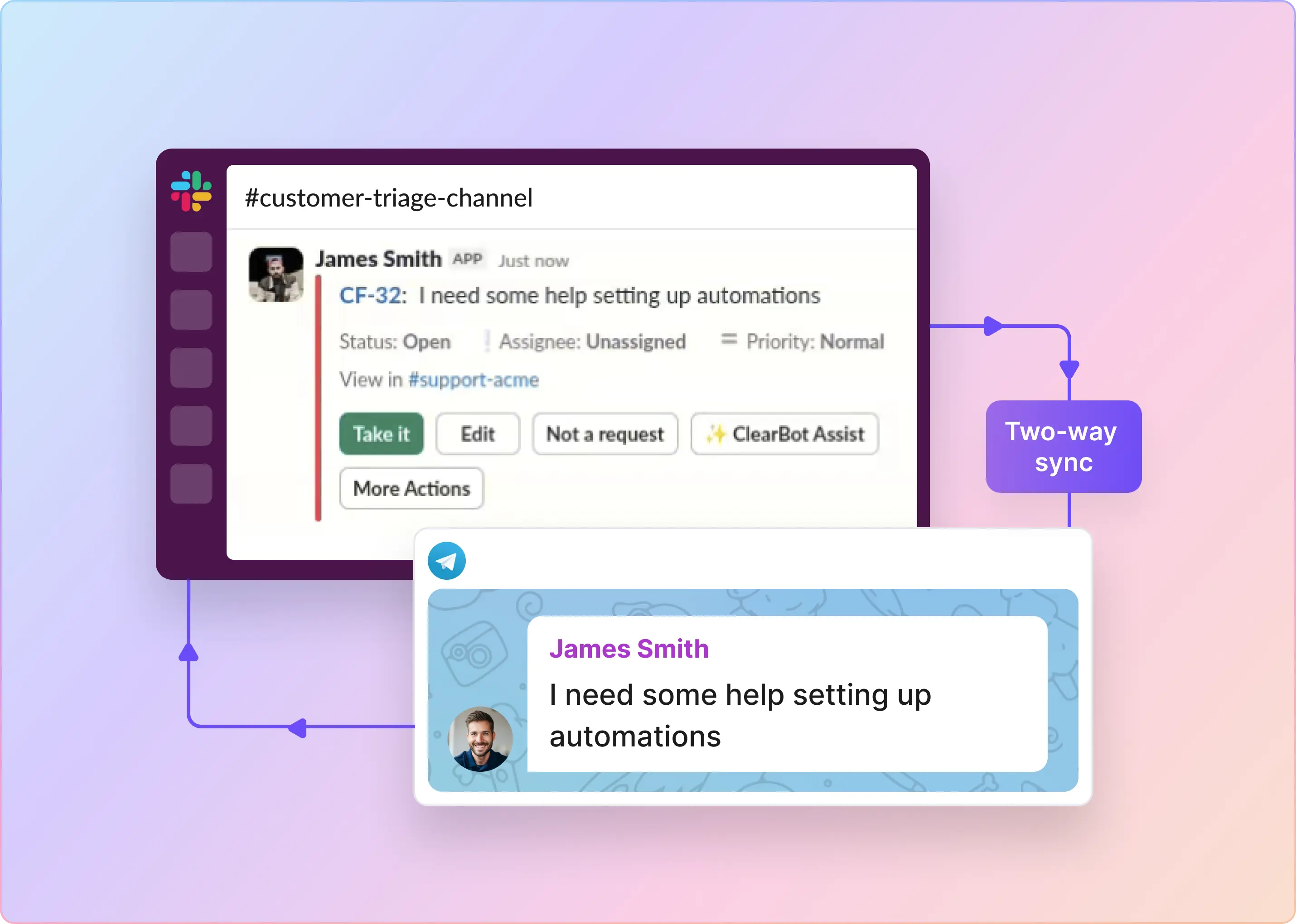
- Turns Slack messages into trackable work. Emoji reactions in the request channel do the heavy lifting: 👀 assigns the request to the reacting user, ✅ marks it solved, 🚨 escalates priority to Urgent, and a configurable :ticket: reaction creates a task or ticket. Slack context — attachments, thread history, user details — is carried into the request automatically, so nothing depends on someone "remembering the thread."
- Creates a unified queue inside Slack. A Triage Channel becomes the team's central command center. All requests from every monitored source flow into one Slack channel with buttons to assign, change status, edit fields, and file or link tasks in Jira, GitHub, Linear, or other external systems — no separate UI required.
- Reduces manual follow-ups. ClearFeed tracks First Response Time, Resolution Time, and One Touch Resolution against per-collection business hours and holidays. Automations, assignment rules, digests, and SLA breach alerts run in the background so open work surfaces on its own rather than through repeated "any update?" pings.
- Keeps internal collaboration and customer replies separate. Triage channels have a Comment Visibility setting. In public mode, all triage replies are pushed back to the requester except messages prefixed with 🔒. In private mode, no triage replies are pushed back except messages prefixed with 📢. Internal notes from Freshdesk (as private notes) and Zendesk (as internal comments) can also sync into the triage channel as private comments — useful for Slack Connect and shared-channel setups.
- Syncs with the systems you already run. ClearFeed keeps requests in sync with Jira, Linear, and ClickUp two ways — each can be configured either as a ticketing system (external tool owns SLAs) or as a task management system (ClearFeed owns SLAs and only selectively escalates). Asana is supported for filing and updating tasks from ClearFeed requests. Zendesk, Freshdesk, Intercom, HubSpot, Salesforce, Jira Service Management, and GitHub round out the ticketing and CRM side.
- Adds AI where it removes manual triage. System-defined AI fields tag each request with Auto-Category (Bug, Feature Request, How-to, Problem Report, Request), Auto-Emotion, and Auto-CSAT. Custom AI Fields let you define your own auto-populated fields — product area, urgency, order number — driven by natural-language instructions. AI-Summarization can turn a long Slack thread into a clean description on the linked Jira, Linear, or ClickUp ticket. The Insights Agent (beta) answers questions about your data in natural language rather than filters.
- Handles intake beyond Slack. Requests can originate from Slack, Slack Connect, MS Teams (including shared channels on the Professional plan), Discord (native ticketing only), Telegram (beta, Professional or Enterprise plans), Email, Web Chat, a customer portal, or the ClearFeed API — and land in the same triage channel and inbox.
- Reports on the work in one place. The web app Insights dashboard covers request volume, first response time, resolution time, SLA breach percentage, CSAT, and AI Agent deflection — with breakdowns by collection, channel, assignee, customer, and custom field.
Which Approach Should You Choose?
Slack can be as simple a task system as your team needs. For lightweight task management in Slack, built-ins like Lists and Later work well for personal and small-team follow-ups. Once you need shared ownership, predictable follow-through, and clear visibility across multiple channels and stakeholders, you'll end up on one of two paths:
- Use Slack task management integrations to connect Slack with tools like Asana, Jira, ClickUp, or Trello when your project board lives outside Slack.
- Use a Slack-native app when you want task management to run inside Slack like a structured queue — with triage, ownership, SLAs, and reporting.
If Slack task tracking is starting to feel like a support or ops queue, book a demo of ClearFeed to see how a Slack-native layer works end-to-end.
Frequently Asked Questions
1. Can Slack Actually Replace My Project Management Tool?
Slack can't fully replace project management tools. It works well for small teams with simple workflows and — with the right integrations — can cover a large share of day-to-day task capture and follow-up. For complex projects with dependencies, roadmaps, and resource planning, use Slack to connect your project tool rather than replace it.
2. What Are the Best Ways To Manage Tasks Inside Slack?
Manage tasks in Slack by using /remind for reminders, pinning action items, and using threads for follow-ups. Create task-specific channels and integrate bots that convert messages into tasks. Advanced teams use tools like ClearFeed to assign tasks and manage workflows directly inside Slack.
3. Should I Use Slack’s Built-In Reminders or Integrate With Another Tool?
Use Slack reminders for personal follow-ups. For recurring tasks or team accountability, integrate with tools such as Todoist, Trello, or ClearFeed that automate Slack updates.
4. What Slack Integrations Are Best for Task Management?
Use Slack task integrations like Trello, Asana, ClickUp, Jira, and ClearFeed. Each supports a different workflow complexity. ClearFeed stands out for turning Slack messages into tasks with owners, statuses, and SLAs.
5. How Do I Turn a Slack Message Into a Task or Ticket?
Turn Slack messages into tasks by using apps like ClearFeed. Instead of pinning or threading, a single emoji reaction (a configurable :ticket: reaction, for example) converts a message into a structured task with an assignee, status, and links back to the original Slack thread — all without leaving Slack.
6. How Do Support or Helpdesk Teams Manage Tasks in Slack?
Support teams manage tasks in Slack by using ClearFeed to detect requests, assign owners, prioritize by customer or channel, and enforce SLAs. Instead of relying on ad-hoc triage channels and tags, ClearFeed centralizes intake in a Triage Channel and syncs in two ways with help desks or task systems like Zendesk, Freshdesk, Jira, Linear, and ClickUp.
7. How Do I Improve Visibility on Ongoing Tasks in Slack?
Improve task visibility in Slack by using a unified task queue, shared status views, and automated follow-ups. Integrate with tools like Jira, ClickUp, or Asana for deeper tracking. Slack-native tools often outperform external project trackers in terms of in-channel visibility.
8. What’s the Best Slack-Native Task Management Solution?
If you want to track tasks without leaving Slack—and avoid tool-switching—look for platforms explicitly built for Slack. ClearFeed is one such solution that creates a structured task queue from Slack conversations and ensures nothing slips through the cracks.