Table of Contents

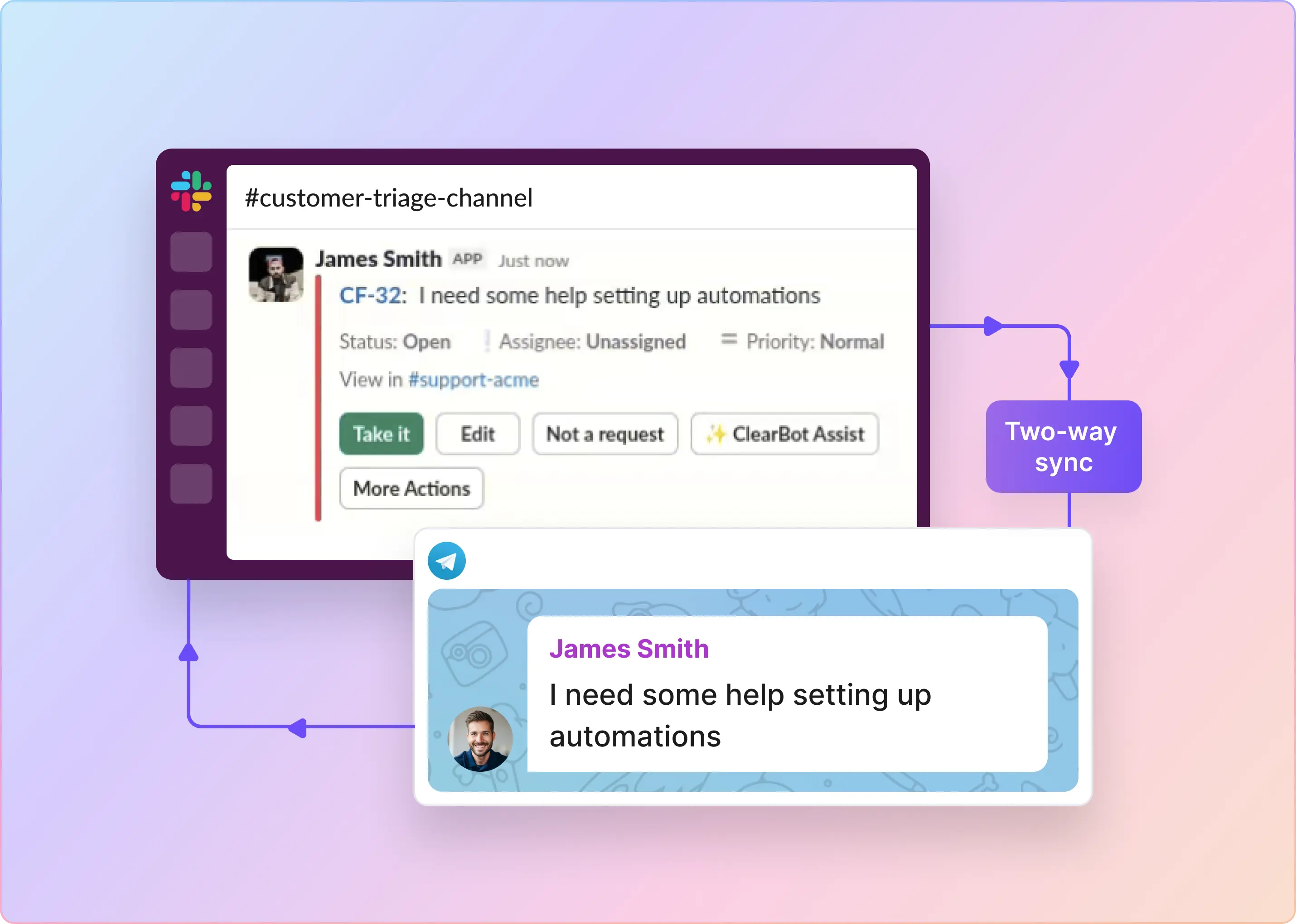
ClearFeed is a conversational support platform that turns collaboration tools like Slack and Microsoft Teams into a modern, AI-powered helpdesk. Instead of forcing users into traditional ticketing portals, ClearFeed enables support teams to manage customer and employee requests directly within the messaging channels where conversations already happen. It helps teams manage issues directly from chat, while using AI to automate triage, answer questions, and assist agents. In this blog, we dive a bit into how our system uses AI, and how we were able to find significant reductions (50 - 80%) in cost and latency by carefully calibrating our AI use cases.
AI - The Invisible Machinery of Conversational Ticketing
Conversational ticketing is fundamentally different from traditional ticketing. In a ticketing portal, users provide structured information through forms, priorities, and subject lines. In chat, requests often arrive as unstructured messages with little context. To build an effective ticketing system on top of chat, that structure must be inferred automatically—which makes AI a core part of the product. In ClearFeed, AI acts as the translation layer between unstructured chat and structured tickets and states. It runs quietly in the background, making sense of the noise.
Here are some concrete use cases where we rely on AI:
- Sense when a customer request is urgent and automatically bump its priority.
- Detect commitments - if a support agent says, "I'll look into this and get back to you," the AI needs to catch that intent and mark the ticket as pending on the support team.
- Figure out which queries can be answered by an automated RAG bot from our documentation
- Extracts customer sentiment, emotion and satisfaction on the fly and store as ticket fields
- Generates clean ticket titles from messy, multi-message threads.
And many other nifty ones - for example not re-opening a resolved ticket just because a customer replied with a simple "Thanks!"
History of AI in ClearFeed
Our history of tackling these problems goes back to when we started the company. Back then, our pipeline was built on BERT models. It was a grind - requiring hiring human data annotators and custom training runs. Then the GPT models arrived and changed our entire engineering trajectory.
Suddenly, tasks that required meticulously fine-tuned BERT models could be handled with simple, well-crafted prompts. We happily retired BERT. Over time, we leaned heavily on the GPT family—using models like GPT-4o-mini, GPT-4.1-mini, and GPT-4.1 depending on the task. Recently - for fast answer generation, we offered Groq as an option (using gpt-oss-120b), and we were blown away by the inference speed.
Life was good. But in the AI space, "good" usually lasts about six months.
The Cambrian Explosion in AI
In the last year or so, the number of available models has exploded. Even within the OpenAI family, you have over a dozen variants. Gemini has become a serious contender. Then there is the massive wave of open-source models—from DeepSeek, Qwen, Moonshot, Z.AI, and others—served up by a bevy of inference providers, each with different pricing and latency profiles. Keeping up with these wasn't just a matter of curiosity - it was a business necessity:
- Cost Matters: ClearFeed is growing rapidly, adding new customers every month. In our system, unless AI is explicitly toggled off, every single message undergoes intent classification. When you process that kind of volume, expensive AI starts counting.
- Latency and Quality drive UX: Conversely, slow AI destroys the user experience. If a ticket creation modal takes three seconds to render because an LLM is taking its sweet time generating a title, the user gets frustrated. If automated response bots lag, the magic of conversational support fades.
After riding the steady wave of the GPT-4 family for a while, we realized we needed to take a hard look at the "modelverse." We needed to know if we should switch, what we should switch to, and which models were objectively best for specific tasks inside ClearFeed.
Benchmarks Galore (and Why We Looked Beyond)
In theory, picking a new model should be easy. Sites like Artificial Analysis provide beautiful model cards cataloging quality, speed, and cost. However, in practice, generic benchmarks are almost useless for proprietary workloads. Knowing how a model scores on GPQA doesn’t tell me much about how it handles our specific RAG setup, or how it interprets our highly tuned intent-classification prompts. The proof is in the pudding, and the pudding is your own production data.
Furthermore, we realized there were virtually no good off-the-shelf tools to evaluate these models locally. Open-source benchmark suites seemed overly complex, tightly coupled to specific public datasets. If we wanted to test the modelverse against our own reality, we had to build the infrastructure to do it ourselves. Building with AI is also very easy.
Enter Project Statistix
Statistix started as a scrappy internal tool to pit two models against each other, but it quickly evolved into our dedicated evaluation framework. In a nutshell, Statistix allows us to define our exact ClearFeed workloads - intent classification, categorization, summarization, and RAG Q&A - and run them across any model and inference provider and create reports easily. We designed it to answer a simple question: How does Model X perform against Model Y on this exact prompt, using our test data?
More importantly, we made it frictionless for our engineering team. We wanted it to be trivially easy to add a new benchmark, tweak a prompt, or plug in a new model API endpoint. The goal was to remove the friction of testing so that our engineers could quickly validate ideas for new AI features without guessing about latency or accuracy.
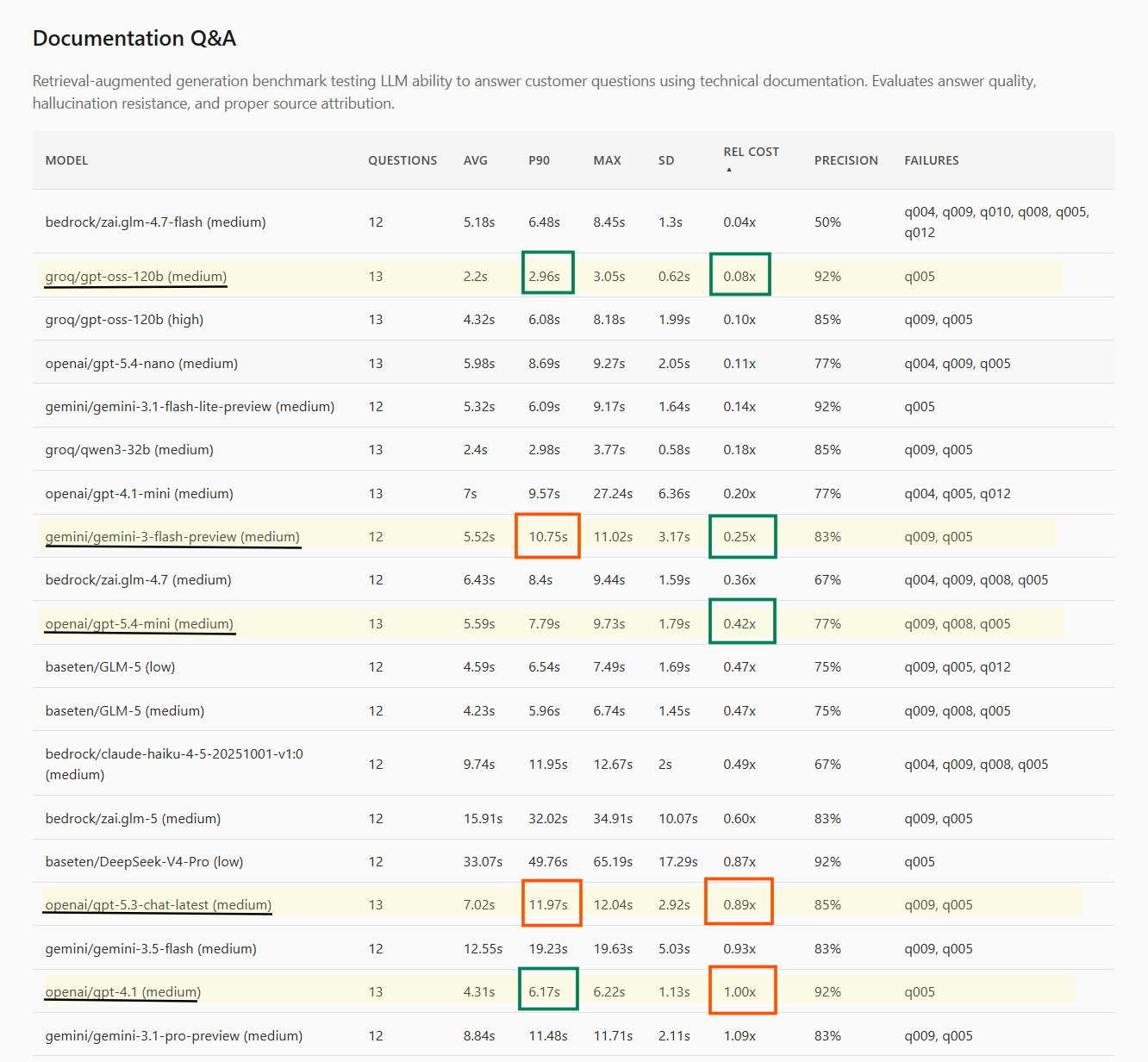
Here’s an example report that is now available from the Project Portal - this captures model runs on an internal Q&A benchmark running with a realistic RAG setup. Some models that stood out and wide variance of Speed and Cost metrics are highlighted. (Qualitative evaluation of model outputs is not captured here unfortunately).
What We Learned
Running Statistix across our workloads yielded a wealth of data. Here is what we found.
The Model Landscape has Shifted
If you are optimizing for the Pareto frontier of cost, speed, and accuracy, for our workloads - the landscape looks very different today than it did a year ago.
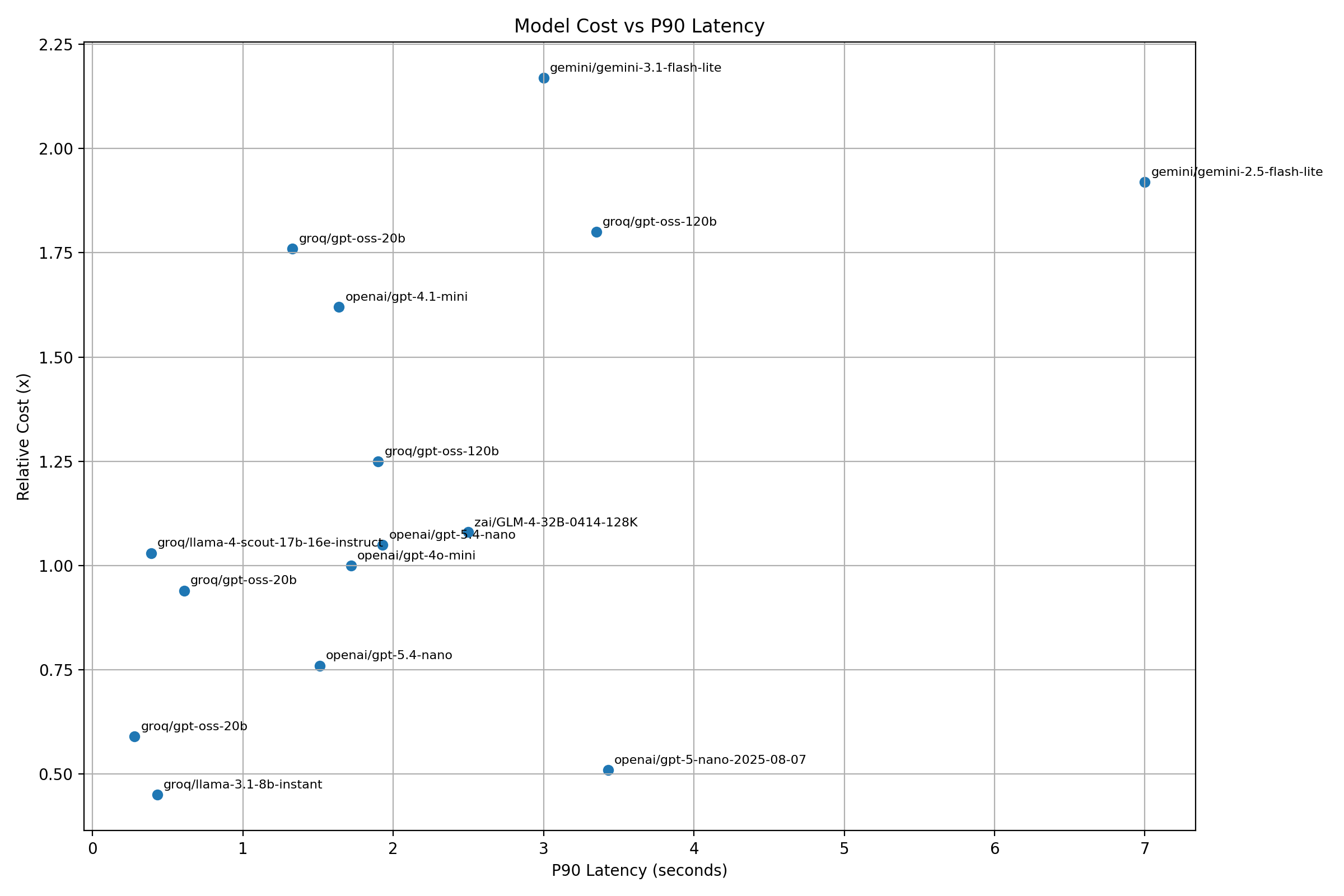
- The Fast & Cheap: gpt-oss-20B and gpt-oss-120B are incredibly useful for simple tasks. When routed through Groq, the speed and cost efficiency are currently very hard to beat.
- The Upgrades: gpt-5.4-nano and gpt-5.4-mini are excellent, highly effective upgrades if you are migrating off older GPT models. They trade blows competitively with Groq (while mini is a more powerful model in general).
- The Former Kings: Models like gpt-4.1, gpt-4.1-mini, and gpt-4o-mini are still very fast, but looking strictly at the cost-to-speed spectrum, they are often no longer the optimal choice for our specific workloads.
- Gemini: Google offers some undeniably great models - particularly gemini-3-Flash, but in our testing, they often missed Pareto optimal sweet spots for our cost/latency/quality tradeoffs.
- The Conversational Champion: For pure chatbot interactions, gpt-5.3-chat-latest stood out. It isn't the fastest model on the block, but its default conversational output is markedly superior to the rest. This is a qualitative, "vibe-based" metric that official benchmarks simply do not capture.
- Alternative Providers: While we didn’t have the time to try out all inferencing providers, Baseten stood out with its glm-5 offering. AWS Bedrock, largely, proved far too slow for our latency tolerance. Cohere and Z.AI similarly didn’t meet the Pareto frontier.
- To Think or not to Think: Model selection offers choice of selecting a smaller model in higher thinking mode, versus picking a larger model in lower thinking mode. A generic observation was that it’s usually better to step up to the higher model with lower/medium thinking (than step up the lower model to higher thinking),.
- Surprising Variances in same Provider: Different models of similar class within the same provider would often show markedly different performance. gpt-5-nano (and other gpt-5* models) for example were surprisingly slow. Similarly - DeepSeek-V4-Pro was surprisingly slow in BaseTen. Inference providers seem to be specializing in some models and latency is perhaps affected by infrastructure available to different model types.
The Accidental Benefit: Prompt Tuning
One of the most surprising outcomes of benchmarking had nothing to do with the models themselves. When we reviewed the test outputs, we found tricky edge cases where all the top models disagreed with what we had defined as the "ground truth." When we dug in, we realized the models weren't wrong—our ground truth was. Or, at the very least, our prompt was dangerously ambiguous.
Tabulating use cases, tracking prompts, and analyzing model disagreement acted as an automated stress-test for our AI applications. The benchmarking didn't just help us select better models; it helped improve the quality of our prompts.
Building for the Builders
Building a tool like Statistix is surprisingly fast today thanks to AI coding assistants. But the real challenge is figuring out the right abstractions to expose to your internal teams.
Since most of our engineers practically live inside tools like Claude, exposing Statistix via simple chat-like interfaces (/add-benchmark, /add-model, /update-report) felt entirely natural. We also moved away from generating markdown files for our evaluation reports. Instead, outputting static, single-page HTML files proved to be a vastly superior way to visually parse model comparisons - a strategy that has been gaining a lot of traction in the broader dev community lately. However, figuring out the optimal UX is still a work in progress.
What's Next
We are still in the early innings of setting up internal processes for model evaluation. For Statistix to be a long-term success, it can't be a one-off audit. It requires continuous effort from engineers to add new benchmarks as ClearFeed introduces new AI-driven features. We hope to open-source Project Statistix in the near future (simply as a better way to share ideas). One of the limitations right now is that our latency observations are limited to a specific time window when we have run the benchmark and not over a longer period of time.
The evaluation work we have done as a part of this exercise will not only reduce costs and improve latencies and end-user experience - but will also influence the choice of models we offer to customers for deployment in AI Agents and Chatbots. Please follow our handle on Twitter @clearfeedai or LinkedIn for updates.