
Introducing DocAssist in ClearFeed: An AI Agent for Automatically Updating Documentation & KBs from Support Conversations

Introducing DocAssist in ClearFeed: An AI Agent for Automatically Updating Documentation & KBs from Support Conversations

Shipra Sharma
Shipra Sharma
December 5, 2025

Introducing DocAssist in ClearFeed: An AI Agent for Automatically Updating Documentation & KBs from Support Conversations

WRITTEN BY
Shipra Sharma
Introducing DocAssist in ClearFeed: An AI Agent for Automatically Updating Documentation & KBs from Support Conversations

Support teams answer dozens of questions in Slack, email, and other channels. These conversations hold the most practical product knowledge, but that insight rarely finds its way into official documentation. This creates gaps like outdated instructions, or unaddressed scenarios which are hard to fix while managing ongoing support work.

Today, we’re excited to introduce DocAssist - the latest addition to ClearFeed’s suite of AI Agents. The DocAssist Agent analyses your support conversations and finds missing gaps or outdated documentation and compares the conversation against your existing knowledge base to generate clear, actionable suggestions for improvement.

Let’s take a closer look at how it works and what it can do!

‍

Getting Started with DocAssist

To begin with, DocAssist needs to understand the current state of Documentation & KBs available to the Support team. Users add knowledge sources (such as public documentation websites, KBs in existing systems like Zendesk, Google Docs, Notion, Confluence, Github repositories etc.) to ClearFeed and then tell DocAssist which specific knowledge sources it should try to improve. ClearFeed indexes these knowledge sources and stores them in a Search Database for easy access by DocAssist (and other AI Agents in ClearFeed) 

The screenshot below shows DocAssist deployed within ClearFeed with our public documentation website as a target.

DocAssist interface showing documentation update suggestions linked to ClearFeed’s public docs site.

‍

How DocAssist Works

DocAssist uses AI to review support conversations, check them against your connected knowledge sources, and suggest updates only when they’re truly needed. It fits naturally into your existing workflows and helps teams keep documentation accurate without any extra effort. Here’s how the AI Agent works. 

1. Analyzes Support Conversations

When DocAssist Agent is triggered, it reviews support conversations -  the customer’s question, the back-and-forth, and the final resolution - against the knowledge sources it is configured with. Its goal is to decide whether the conversation actually represents a gap in those knowledge sources. 

To avoid unnecessary changes, you can configure the agent to filter out conversations that shouldn’t lead to documentation updates, such as:

  • Bug reports or Operational issues that are resolved quickly.
  • Pricing conversations
  • Scheduling or non-support messages
  • Feature Requests that are in the process of being built.

If the conversation doesn’t warrant documentation work, DocAssist returns a clear explanation so teams can move on quickly. The below screenshot shows the prompt used internally within ClearFeed, right now, to configure the DocAssist Agent.
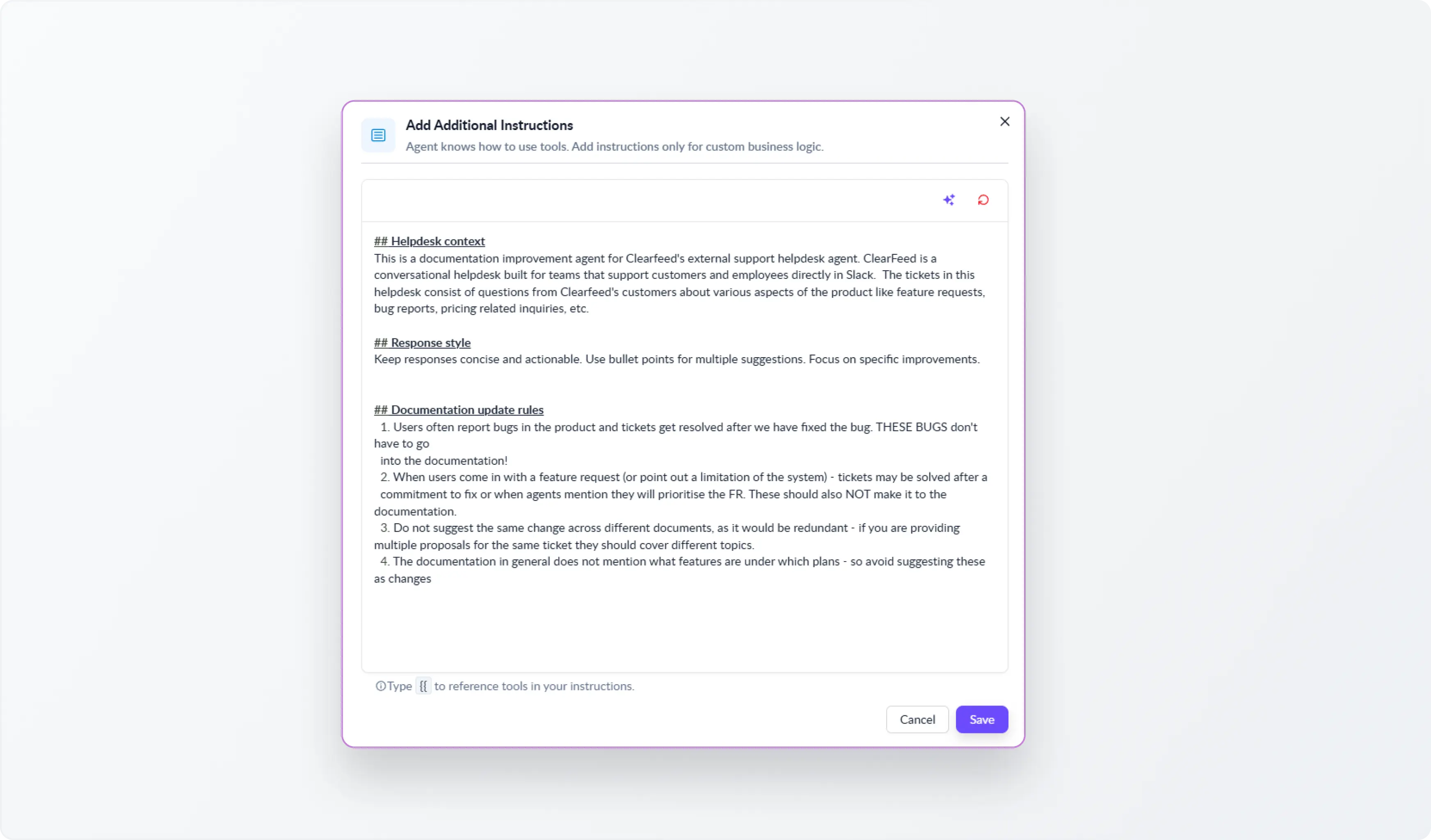
Prompt configuration screen for DocAssist Agent showing filters for excluding bugs, pricing queries, scheduling messages, and feature requests from documentation updates.

‍

2. Reviews Existing Documentation

If the request is relevant, DocAssist searches across the connected knowledge sources to understand the current state of documentation: 

  • Searches for related articles
  • Compares existing explanations with the customer’s question
  • Identifies whether the guidance is complete, accurate, and easy to follow

If the documentation already addresses the issue well, the agent returns:

  • A short reasoning statement
  • Relevant excerpts from existing articles
  • Links to the documentation pages

This gives teams immediate clarity without doing any manual searching.

‍

3. Suggests Improvements When Needed

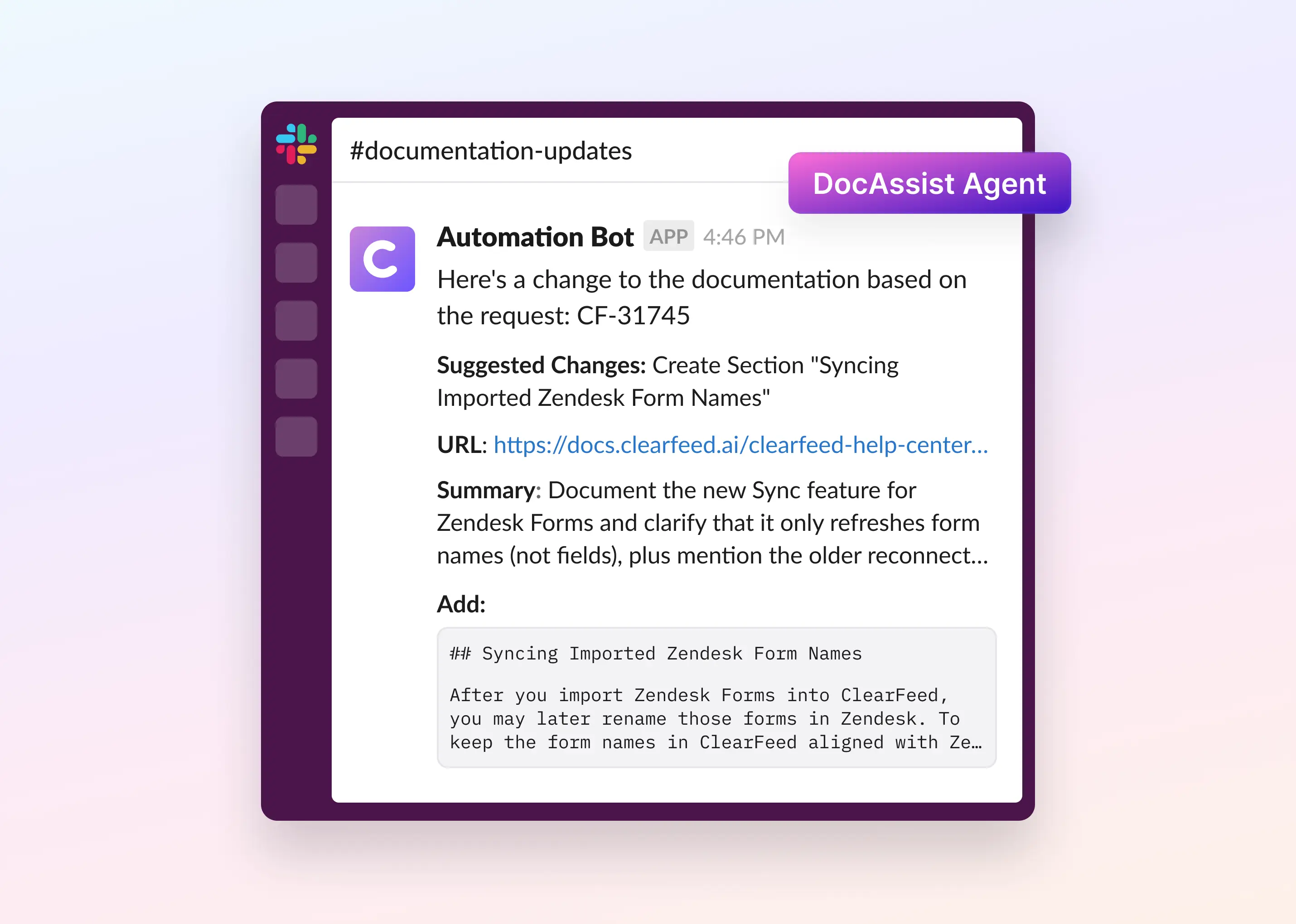
For every identified gap, DocAssist generates a targeted edit proposal. It specifies the location (url & section), provides the new content, and states the reason, enabling you to update documentation by reviewing clear recommendations instead of starting from a blank page.

DocAssist showing targeted edit suggestions with location, content, and reason for updating documentation.


Setting Up DocAssist Agent in ClearFeed 

DocAssist runs through ClearFeed Automations. As described before, Users have to first configure some knowledge sources, create a documentation agent against those knowledge sources and then trigger it from Automations.

  1. You define when the agent should evaluate a ticket, for example, when a ticket is closed, or when it is more than a certain age - or even use AI to categorize tickets - before invoking DocAssist.
  2. You can send the recommendations of DocAssist to a channel (and this can be used to create a ticket in ClearFeed automatically as well). Or send it to an external tool using webhooks.

The below screenshot shows how DocAssist is being used internally in ClearFeed - with Documentation update suggestions simply being posted to a channel.
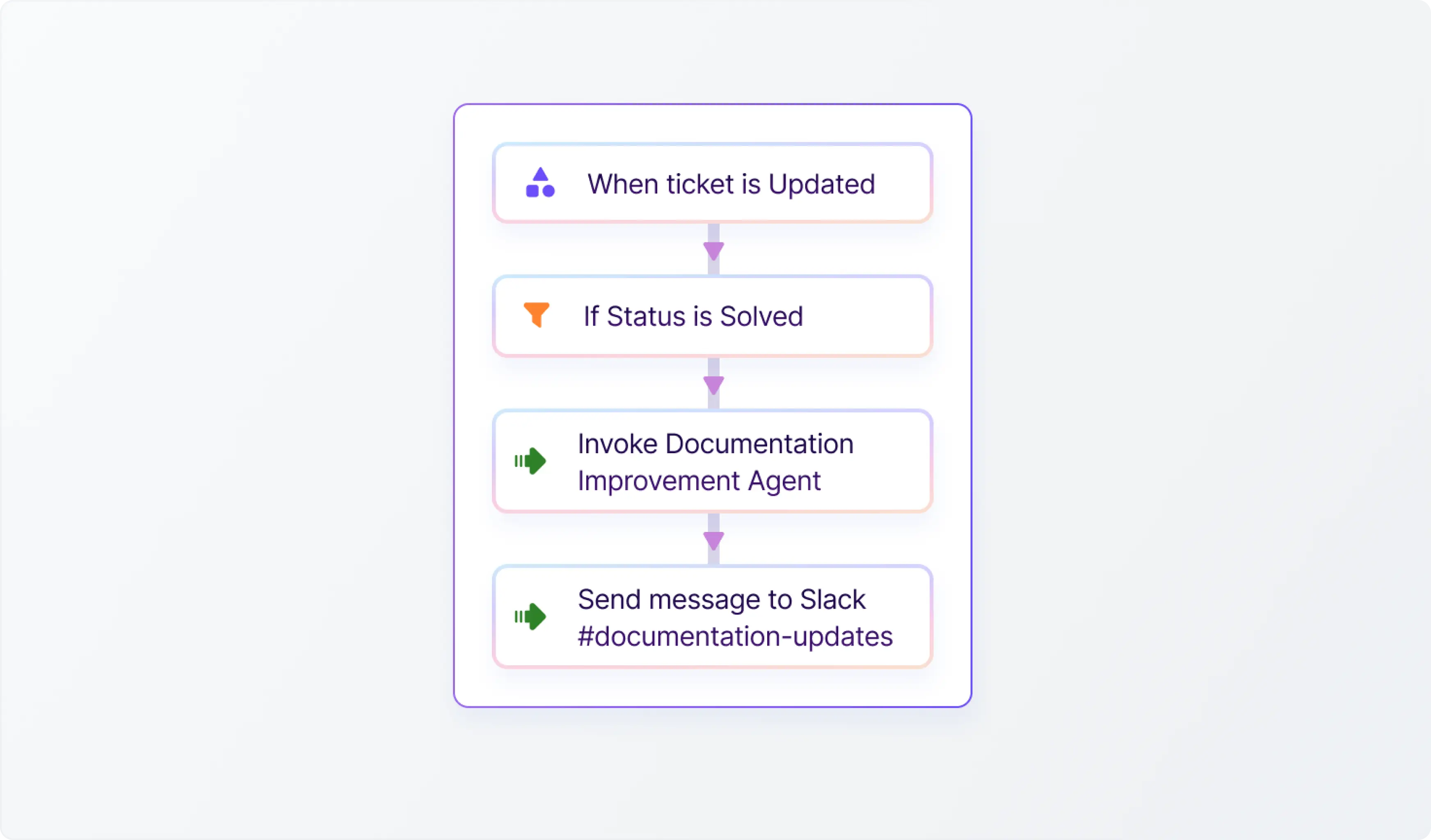
ClearFeed Slack channel showing DocAssist posting automatic documentation update suggestions

‍

Wrapping Up

DocAssist automates documentation upkeep and integrates it with the natural flow of your support work. By identifying meaningful conversations, checking them against your knowledge base, and generating clear, actionable suggestions, the agent helps you keep documentation accurate with minimal effort.

Note: Currently, DocAssist Agent is not enabled for all Accounts and requires an AI pack. If you’d like to activate this agent for your organization, please reach out to us and our team will be happy to enable it. If you’d like to learn more about the new release, you can reach out to us on Slack, email us at support@clearfeed.ai or book a free demo here.
Support teams answer dozens of questions in Slack, email, and other channels. These conversations hold the most practical product knowledge, but that insight rarely finds its way into official documentation. This creates gaps like outdated instructions, or unaddressed scenarios which are hard to fix while managing ongoing support work.

Today, we’re excited to introduce DocAssist - the latest addition to ClearFeed’s suite of AI Agents. The DocAssist Agent analyses your support conversations and finds missing gaps or outdated documentation and compares the conversation against your existing knowledge base to generate clear, actionable suggestions for improvement.

Let’s take a closer look at how it works and what it can do!

‍

Getting Started with DocAssist

To begin with, DocAssist needs to understand the current state of Documentation & KBs available to the Support team. Users add knowledge sources (such as public documentation websites, KBs in existing systems like Zendesk, Google Docs, Notion, Confluence, Github repositories etc.) to ClearFeed and then tell DocAssist which specific knowledge sources it should try to improve. ClearFeed indexes these knowledge sources and stores them in a Search Database for easy access by DocAssist (and other AI Agents in ClearFeed) 

The screenshot below shows DocAssist deployed within ClearFeed with our public documentation website as a target.

DocAssist interface showing documentation update suggestions linked to ClearFeed’s public docs site.

‍

How DocAssist Works

DocAssist uses AI to review support conversations, check them against your connected knowledge sources, and suggest updates only when they’re truly needed. It fits naturally into your existing workflows and helps teams keep documentation accurate without any extra effort. Here’s how the AI Agent works. 

1. Analyzes Support Conversations

When DocAssist Agent is triggered, it reviews support conversations -  the customer’s question, the back-and-forth, and the final resolution - against the knowledge sources it is configured with. Its goal is to decide whether the conversation actually represents a gap in those knowledge sources. 

To avoid unnecessary changes, you can configure the agent to filter out conversations that shouldn’t lead to documentation updates, such as:

  • Bug reports or Operational issues that are resolved quickly.
  • Pricing conversations
  • Scheduling or non-support messages
  • Feature Requests that are in the process of being built.

If the conversation doesn’t warrant documentation work, DocAssist returns a clear explanation so teams can move on quickly. The below screenshot shows the prompt used internally within ClearFeed, right now, to configure the DocAssist Agent.

Prompt configuration screen for DocAssist Agent showing filters for excluding bugs, pricing queries, scheduling messages, and feature requests from documentation updates.

‍

2. Reviews Existing Documentation

If the request is relevant, DocAssist searches across the connected knowledge sources to understand the current state of documentation: 

  • Searches for related articles
  • Compares existing explanations with the customer’s question
  • Identifies whether the guidance is complete, accurate, and easy to follow

If the documentation already addresses the issue well, the agent returns:

  • A short reasoning statement
  • Relevant excerpts from existing articles
  • Links to the documentation pages

This gives teams immediate clarity without doing any manual searching.

‍

3. Suggests Improvements When Needed

For every identified gap, DocAssist generates a targeted edit proposal. It specifies the location (url & section), provides the new content, and states the reason, enabling you to update documentation by reviewing clear recommendations instead of starting from a blank page.

DocAssist showing targeted edit suggestions with location, content, and reason for updating documentation.


Setting Up DocAssist Agent in ClearFeed 

DocAssist runs through ClearFeed Automations. As described before, Users have to first configure some knowledge sources, create a documentation agent against those knowledge sources and then trigger it from Automations.

  1. You define when the agent should evaluate a ticket, for example, when a ticket is closed, or when it is more than a certain age - or even use AI to categorize tickets - before invoking DocAssist.
  2. You can send the recommendations of DocAssist to a channel (and this can be used to create a ticket in ClearFeed automatically as well). Or send it to an external tool using webhooks.

The below screenshot shows how DocAssist is being used internally in ClearFeed - with Documentation update suggestions simply being posted to a channel.

ClearFeed Slack channel showing DocAssist posting automatic documentation update suggestions

‍

Wrapping Up

DocAssist automates documentation upkeep and integrates it with the natural flow of your support work. By identifying meaningful conversations, checking them against your knowledge base, and generating clear, actionable suggestions, the agent helps you keep documentation accurate with minimal effort.

Note: Currently, DocAssist Agent is not enabled for all Accounts and requires an AI pack. If you’d like to activate this agent for your organization, please reach out to us and our team will be happy to enable it. If you’d like to learn more about the new release, you can reach out to us on Slack, email us at support@clearfeed.ai or book a free demo here.

Related Blogs

See all Blog Posts
TOC heading
Text LinkText Link Active
Get a Free consultation with a Support Expert
Learn how fast growing companies like Teleport, Chronosphere and Acryl Data have scaled Support processes with ClearFeed
Thank you for contacting us. Our team will reach out to you shortly.
Oops! Something went wrong while submitting the form.