Slack Engagement Analytics: How to Detect Inactive Customer Channels at Scale

Slack Engagement Analytics: How to Detect Inactive Customer Channels at Scale

Joydeep Sen Sarma
Joydeep Sen Sarma
January 9, 2026

Slack Engagement Analytics: How to Detect Inactive Customer Channels at Scale

WRITTEN BY
Joydeep Sen Sarma
Slack Engagement Analytics: How to Detect Inactive Customer Channels at Scale
Table of Contents

Introduction

Slack has become a core channel for customer support and customer success in many SaaS companies. Teams use shared Slack channels to onboard customers, resolve issues, and maintain ongoing engagement. As adoption grows, so does the number of customer-facing Slack channels.

What starts with a few high-touch channels can quickly expand to dozens or hundreds. At that point, a new problem emerges: how do you measure Slack engagement at scale and identify which customer conversations are going quiet?

Inactive Slack channels are often early warning signals. They may indicate stalled implementations, disengaged users, unresolved issues, or accounts that simply need a proactive check-in. Slack itself doesn’t provide a built-in way to track this across many customer channels.

This post walks through a practical, open-source approach to Slack engagement analytics, based on real Slack activity data and implemented using ClearFeed’s APIs and Google Sheets. The full working solution is available on GitHub.

Why Measuring Slack Engagement Gets Hard at Scale

Slack works well for real-time communication, but it wasn’t designed to act as a customer engagement analytics platform. As customer Slack usage grows, customer success teams run into familiar problems:

  • No centralized view of activity across all customer Slack channels
  • No easy way to identify inactive or dormant channels
  • Manual channel-by-channel checks don’t scale past a few dozen customers
  • Engagement risks surface too late, often after churn conversations begin

Without structured Slack activity tracking, teams are forced to rely on intuition instead of data. While Slack provides some basis Analytics - those analytics do not contain data on last activity time per channel. Moreover - it is difficult from such reports to track customer channels specifically, or to gauge activity of customers specifically (and not just all participants).

Turning Slack Activity Into Engagement Signals

To measure customer engagement on Slack, you need more than message counts. You need contextual activity signals, such as:

  • When a customer last raised a request
  • Whether a channel has seen any customer-initiated activity in a given time window
  • How activity differs across customer segments or collections
  • The sentiment/emotion/satisfaction of conversations in different channels 

ClearFeed is an omnichannel Support platform that excels at managing customer Slack channels. It plugs into Slack Connect channels of your company and indexes every conversation and request across these channels. The goal of this project was to make that data usable outside the product, in tools customer success teams already rely on.

A Real Slack Activity Tracker: ClearFeed + Google Sheets

We built a lightweight integration that exports Slack activity data tracked in ClearFeed into Google Sheets. This allows CSMs to analyze Slack engagement without learning a new analytics tool. The implementation is fully open-source and documented here:

👉 GitHub: https://github.com/clearfeed/clearfeed-recipes/tree/main/integrations/google-sheets/active-channels

The script uses ClearFeed’s APIs to:

  • Fetch all customer Slack channels
  • Retrieve recent request activity per channel
  • Mark channels as active or inactive based on a configurable time window

The resulting spreadsheet acts as a simple but effective Slack activity tracker. The concept can be extended to also apply sentiment analysis and other AI based signals from customer channel activity. With data in Google sheets - many forms of rich analytics open up.

How the Inactive Channel Detection Works

The GitHub example assumes you already have ClearFeed installed on your Slack (if not - signup here, or book a demo call to learn about ClearFeed). It walks through the full setup, but conceptually the flow looks like this:

  1. Authenticate with ClearFeed: using an API token
  2. Define inactivity thresholds: for example, no customer requests in the last 14 days
  3. Fetch Conversational Activity data: over the inactivity threshold using ClearFeed APIs 
  4. Optionally filter by Collections: such as enterprise customers or by specific CSM.
  5. Generate a Google Sheet: showing activity status for every channel

Each channel gets a clear activity flag (for example, was_active_last_14_days = Yes/No), making it easy to sort, filter, and prioritize follow-ups. This is intentionally simple - the goal is visibility, not complex dashboards and to build a template for more advanced analysis.

Pushing Engagement Insights Back Into Slack

Since customer success teams live in Slack, the workflow doesn’t stop at a spreadsheet.

The same integration can post a summary of inactive channels directly into Slack using Google App Script Actions. Channels are grouped by collection, include direct links, and are split into multiple messages if needed to fit within Slack posting limitations.. Users can set up time based triggers in Google App Script to periodically refresh the data and post a report of the list of inactive channels into Slack channels.

This keeps Slack engagement analytics close to daily workflows, instead of buried in a reporting tool that gets checked once a month.
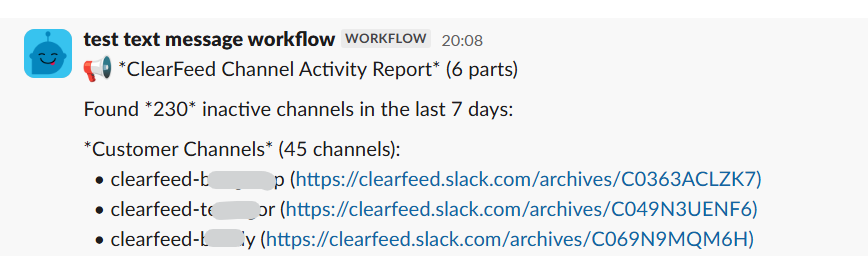
Example post of inactive channel report to a Slack channel

Slack Engagement Ideas Driven by Data

Once inactive channels are identified, teams can take clear, data-driven actions:

  • Proactive check-ins: Reach out to customers manually whose Slack channels have gone quiet with a lightweight message to re-open the conversation before issues escalate.
  • Targeted broadcasts at scale: Use ClearFeed’s broadcast capability to send a single message to dozens or hundreds of inactive channels simultaneously, without losing per-channel context.
  • Response tracking and triage: Any customer replies are automatically captured by ClearFeed and surfaced in dashboards and triage channels, ensuring responses don’t get lost and follow-ups happen reliably.

These engagement actions are driven by measured Slack activity, with ClearFeed continuing to track responses and manage conversations after outreach.

Are Slack Channels Effective for SaaS Customer Engagement?

Slack channels can be highly effective for SaaS customer engagement — but only if engagement is monitored. Without analytics:

  • Silence is easy to miss
  • Risk signals appear late
  • Customer success becomes reactive

With even basic Slack engagement analytics — like inactive channel detection — teams gain early visibility into accounts that may need attention.

Conclusion

Slack produces valuable customer engagement signals, but those signals are difficult to use without proper tracking. Detecting inactive customer channels is one of the most actionable ways to turn Slack activity into customer success insight. The open-source example shared in this post shows how:

  • Slack activity can be tracked systematically
  • Engagement gaps can be detected early
  • Customer success teams can prioritize outreach using data

Any tool used for customer engagement analytics on Slack should be able to answer a simple question: which customer channels have gone quiet, and for how long? This GitHub-based implementation using ClearFeed and Google Sheets is one practical way to get there. If you want to learn more about how ClearFeed can help your team, please Book a Demo - or email us at support@clearfeed.ai

‍

Introduction

Slack has become a core channel for customer support and customer success in many SaaS companies. Teams use shared Slack channels to onboard customers, resolve issues, and maintain ongoing engagement. As adoption grows, so does the number of customer-facing Slack channels.

What starts with a few high-touch channels can quickly expand to dozens or hundreds. At that point, a new problem emerges: how do you measure Slack engagement at scale and identify which customer conversations are going quiet?

Inactive Slack channels are often early warning signals. They may indicate stalled implementations, disengaged users, unresolved issues, or accounts that simply need a proactive check-in. Slack itself doesn’t provide a built-in way to track this across many customer channels.

This post walks through a practical, open-source approach to Slack engagement analytics, based on real Slack activity data and implemented using ClearFeed’s APIs and Google Sheets. The full working solution is available on GitHub.

Why Measuring Slack Engagement Gets Hard at Scale

Slack works well for real-time communication, but it wasn’t designed to act as a customer engagement analytics platform. As customer Slack usage grows, customer success teams run into familiar problems:

  • No centralized view of activity across all customer Slack channels
  • No easy way to identify inactive or dormant channels
  • Manual channel-by-channel checks don’t scale past a few dozen customers
  • Engagement risks surface too late, often after churn conversations begin

Without structured Slack activity tracking, teams are forced to rely on intuition instead of data. While Slack provides some basis Analytics - those analytics do not contain data on last activity time per channel. Moreover - it is difficult from such reports to track customer channels specifically, or to gauge activity of customers specifically (and not just all participants).

Turning Slack Activity Into Engagement Signals

To measure customer engagement on Slack, you need more than message counts. You need contextual activity signals, such as:

  • When a customer last raised a request
  • Whether a channel has seen any customer-initiated activity in a given time window
  • How activity differs across customer segments or collections
  • The sentiment/emotion/satisfaction of conversations in different channels 

ClearFeed is an omnichannel Support platform that excels at managing customer Slack channels. It plugs into Slack Connect channels of your company and indexes every conversation and request across these channels. The goal of this project was to make that data usable outside the product, in tools customer success teams already rely on.

A Real Slack Activity Tracker: ClearFeed + Google Sheets

We built a lightweight integration that exports Slack activity data tracked in ClearFeed into Google Sheets. This allows CSMs to analyze Slack engagement without learning a new analytics tool. The implementation is fully open-source and documented here:

👉 GitHub: https://github.com/clearfeed/clearfeed-recipes/tree/main/integrations/google-sheets/active-channels

The script uses ClearFeed’s APIs to:

  • Fetch all customer Slack channels
  • Retrieve recent request activity per channel
  • Mark channels as active or inactive based on a configurable time window

The resulting spreadsheet acts as a simple but effective Slack activity tracker. The concept can be extended to also apply sentiment analysis and other AI based signals from customer channel activity. With data in Google sheets - many forms of rich analytics open up.

How the Inactive Channel Detection Works

The GitHub example assumes you already have ClearFeed installed on your Slack (if not - signup here, or book a demo call to learn about ClearFeed). It walks through the full setup, but conceptually the flow looks like this:

  1. Authenticate with ClearFeed: using an API token
  2. Define inactivity thresholds: for example, no customer requests in the last 14 days
  3. Fetch Conversational Activity data: over the inactivity threshold using ClearFeed APIs 
  4. Optionally filter by Collections: such as enterprise customers or by specific CSM.
  5. Generate a Google Sheet: showing activity status for every channel

Each channel gets a clear activity flag (for example, was_active_last_14_days = Yes/No), making it easy to sort, filter, and prioritize follow-ups. This is intentionally simple - the goal is visibility, not complex dashboards and to build a template for more advanced analysis.

Pushing Engagement Insights Back Into Slack

Since customer success teams live in Slack, the workflow doesn’t stop at a spreadsheet.

The same integration can post a summary of inactive channels directly into Slack using Google App Script Actions. Channels are grouped by collection, include direct links, and are split into multiple messages if needed to fit within Slack posting limitations.. Users can set up time based triggers in Google App Script to periodically refresh the data and post a report of the list of inactive channels into Slack channels.

This keeps Slack engagement analytics close to daily workflows, instead of buried in a reporting tool that gets checked once a month.

Example post of inactive channel report to a Slack channel

Slack Engagement Ideas Driven by Data

Once inactive channels are identified, teams can take clear, data-driven actions:

  • Proactive check-ins: Reach out to customers manually whose Slack channels have gone quiet with a lightweight message to re-open the conversation before issues escalate.
  • Targeted broadcasts at scale: Use ClearFeed’s broadcast capability to send a single message to dozens or hundreds of inactive channels simultaneously, without losing per-channel context.
  • Response tracking and triage: Any customer replies are automatically captured by ClearFeed and surfaced in dashboards and triage channels, ensuring responses don’t get lost and follow-ups happen reliably.

These engagement actions are driven by measured Slack activity, with ClearFeed continuing to track responses and manage conversations after outreach.

Are Slack Channels Effective for SaaS Customer Engagement?

Slack channels can be highly effective for SaaS customer engagement — but only if engagement is monitored. Without analytics:

  • Silence is easy to miss
  • Risk signals appear late
  • Customer success becomes reactive

With even basic Slack engagement analytics — like inactive channel detection — teams gain early visibility into accounts that may need attention.

Conclusion

Slack produces valuable customer engagement signals, but those signals are difficult to use without proper tracking. Detecting inactive customer channels is one of the most actionable ways to turn Slack activity into customer success insight. The open-source example shared in this post shows how:

  • Slack activity can be tracked systematically
  • Engagement gaps can be detected early
  • Customer success teams can prioritize outreach using data

Any tool used for customer engagement analytics on Slack should be able to answer a simple question: which customer channels have gone quiet, and for how long? This GitHub-based implementation using ClearFeed and Google Sheets is one practical way to get there. If you want to learn more about how ClearFeed can help your team, please Book a Demo - or email us at support@clearfeed.ai

‍

Related Blogs

See all Blog Posts
TOC heading
Text LinkText Link Active
Get a Free consultation with a Support Expert
Learn how fast growing companies like Teleport, Chronosphere and Acryl Data have scaled Support processes with ClearFeed
Thank you for contacting us. Our team will reach out to you shortly.
Oops! Something went wrong while submitting the form.