Table of Contents

Imagine this. A critical system breaks at midnight. The alert lands in a channel, a few people jump in, and then the slow part starts: who owns this, who’s on call, who needs context, and when to pull in leadership?
A solid incident escalation matrix prevents that spiral. It’s a simple, shared reference that tells your team what happens next based on impact, urgency, and risk. Not just who to call, but how the escalation should move through the org: the right responders, the right timelines, and the right communication.
Think of it as the backbone of your incident escalation process. When it’s done well, nobody debates severity in the heat of the moment. You already have incident management severity levels, clear ownership at each tier, and explicit escalation triggers for when an issue must be escalated. And because incidents are as much about coordination as fixing, the matrix also supports an incident communication plan, so updates don’t get lost or improvised when the stakes are high.
In this guide, we’ll break down what an incident escalation matrix is, what it should contain, and how to implement one that actually works during real incidents.
TL;DR
An incident escalation matrix is a pre-built decision framework that tells your team who to involve, when to escalate, and how to communicate during an incident — so no one's debating severity at 2 a.m.
The gist
- Three distinct tools often get conflated: the severity matrix (how you classify), the escalation matrix (what happens after), and the communication matrix (who gets updates and when). Most teams only have one.
- A matrix needs five things: severity levels with crisp examples, time-based escalation triggers, tiered responder ownership, communication protocols by severity, and a visible escalation path (not just a contact list).
- Eight common failure modes include rigid paths, single-person bottlenecks, fuzzy severity definitions, static documentation, and a lack of post-incident feedback loop.
- The fix isn't a better spreadsheet. It's building escalation into the workspace where incidents actually play out, with automated routing, acknowledgment reminders, and bidirectional ticket sync.
- Start with 3-5 severity levels, assign roles (not names) to each tier, add time windows, and run one tabletop drill before you go live.
What Is an Incident Escalation Matrix?
An incident escalation matrix is a simple framework that removes guesswork during an incident. It tells your team how to escalate a problem based on severity and impact, who gets pulled in at each stage, and what “escalate” actually means in practice (notify, assign, page, loop in leadership, switch to a war room, and so on).
If you’ve ever seen a discussion stall at “who owns this?”, the matrix is the antidote. It makes incident management escalation predictable by defining the escalation path before things get tense. The goal isn’t to involve more people. It’s to involve the right people, fast, with clear accountability.
You’ll also hear it described as an escalation matrix, incident response escalation matrix, or even a support escalation matrix. In ITIL-style incident management, it sits alongside your incident response plan and translates policy into real, repeatable actions (especially in after-hours scenarios).
One important clarification: a matrix is not the same thing as severity definitions or comms templates. They work together, but they’re different tools.
- Incident severity matrix: how you classify the incident (severity levels, criteria, examples).
- Incident escalation matrix: what happens after classification (who is engaged, when, and how).
- Incident response communication matrix: who gets updates, at what cadence, and in which channel.
This distinction matters because most teams have one of these and assume they have all three. That’s usually where confusion creeps in during real incidents.
What Are the Core Components of an Incident Escalation Matrix?
A useful incident escalation matrix is built from a few fundamentals. If any of these is fuzzy, escalation turns into a debate rather than a decision.
- Incident management severity levels: Severity levels are the backbone. They help everyone classify incidents consistently, whether it’s a small, low-impact issue or a full-blown outage. Keep the definitions specific enough that two different responders won’t label the same incident differently. Add a quick example for each level so the classification doesn’t rely on interpretation.
- Escalation triggers (especially time-based): Clear escalation triggers prevent incidents from lingering in limbo. Define exactly when an incident must move to the next tier. Time-based triggers are the most common (“if unresolved in X minutes, escalate”), but you can also include threshold triggers (error rates, downtime minutes, number of affected customers, security risk).
- Responder tiers with ownership and scope: Most incident-escalation matrix example tables look simple on the surface, but the magic lies in ownership. Spell out who responds at each severity level, what they’re responsible for, and what they are not. This is where a lightweight incident response roles and responsibilities matrix helps, even if it’s just a few lines clarifying the roles and responsibilities of decision-makers, technical responders, comms owners, and escalation owners.
- Communication protocols that match the severity: Escalation isn’t only about who gets involved; it’s also about how updates flow. Your matrix should define when to post updates, who posts them, and where they go. This overlaps with your incident communication plan, and for many teams it’s easiest to express it as an incident response communication matrix: internal updates, stakeholder updates, customer updates, and the expected cadence for each severity level.
- The escalation path, not just the people: A strong matrix shows the sequence of what happens next: acknowledge, triage, engage responders, pull in a lead, start a dedicated incident channel or war room, and escalate to leadership when needed. This turns the matrix into a living part of your incident escalation process, not a static contact list.
What Are the Challenges Teams Face When Building an Incident Escalation Matrix?
An incident escalation matrix is supposed to reduce chaos. But teams often end up recreating the same chaos in a more “official” format, especially if the matrix becomes a static document instead of a living part of the incident escalation process.
- Rigid Escalation Paths: Fixed chains of command often fail to account for "weird" edge cases or partial outages. When paths are overly strict, teams hesitate to act, making predefined triggers feel unusable in real time.
- Hierarchical Bottlenecks: Depending on specific individuals for approval slows down critical work. A matrix that relies on a single person being online prevents momentum and creates single points of failure.
- Tool Gaps: Disconnection between documentation (such as spreadsheets) and active tools (such as Slack or PagerDuty) leads to manual work, copy-and-paste errors, and lost context.
- Fuzzy Severity Definitions: Unclear severity levels lead to either over-escalation (pulling in too many people) or under-escalation (leaving one person overwhelmed), both of which erode trust in the process.
- Static Documentation: Outdated or hard-to-find matrices fail during real incidents. Documentation must be accessible and understandable for new team members and cross-functional responders alike.
- Ignoring Human Factors: Stress and fatigue lead to poor judgment and sloppy handoffs. Without a simple communication plan, even the best responders struggle to keep stakeholders aligned under pressure.
- Cross-Functional Ownership Gaps: Incidents that span multiple departments (e.g., Security and Product) often lead to finger-pointing unless the matrix explicitly defines leaders versus supporters.
- Lack of Evolution: Without feedback loops or post-incident reviews, the same mistakes repeat. Escalation rules and ownership need to be refreshed regularly to sharpen the process over time.
How To Build an Effective Escalation Matrix the Right Way
1. Address rigid escalation structures with adaptive workflows
Rigid escalation paths break the moment the incident doesn’t match the “usual” pattern. Instead, treat your incident escalation matrix as the rulebook, and let the workflow adapt based on what’s happening in the incident itself: message signals, affected system, keywords, ownership, and severity.
In practice, this means you should be able to initiate escalation directly from where the incident is being discussed (usually an incident thread or a dedicated incident channel). From that single action, the workflow should:
Create the right ticket or incident record automatically, based on severity and type.
Sync context in both directions so nobody has to copy updates between tools.
Route the incident to the appropriate responder tier without forcing a single, brittle escalation chain.
That combination keeps your escalation protocol predictable, while still allowing flexibility when the incident is novel or cross-functional.
2. Eliminating Hierarchical Escalation Bottlenecks Through Intelligent Routing
Even with a clear incident escalation matrix, teams still lose time when escalation depends on a single person being online. That’s how a simple Sev-2 turns into a Sev-1: the issue sits idle, not because it’s hard, but because the escalation chain is too rigid.
The fix is to design your escalation hierarchy with a built-in plan for unavailability. For each severity level, define who should respond first, who is next in line, and what happens if no one acknowledges within your defined escalation triggers. This keeps the incident management escalation process moving without forcing someone to manually chase people across time zones.
Here’s what “intelligent routing” looks like in practice:
First, you escalate to the primary on-call responder for that service. If there’s no acknowledgment within the agreed-upon window, the incident automatically escalates to a backup responder or a senior engineer to unblock progress. And if it’s after hours, your escalation policies should follow the same logic, just mapped to your on-call schedule, so you’re not relying on whoever happens to be awake.
A responder group is only as good as its awareness of who is actually available. Route to a rotation rather than a person, and skip anyone whose calendar or Slack status marks them Out of Office, on holiday, or in a meeting. Round-robin distribution across the on-call rotation then keeps the load balanced, and a shared order across teams prevents the same engineer from receiving back-to-back incidents from unrelated queues.
The best part is that this approach doesn’t change your escalation path. It simply makes your escalation path example realistic, so the matrix still works when life happens, people are in meetings, or your incident hits at 2 a.m.
3. Preventing Over- and Under-Escalation with Smarter Prioritization
Over-escalation and under-escalation usually stem from the same root problem: inconsistent incident classification. When incident management severity levels are vague, one person treats a real outage as a minor issue, while another escalates a routine question as if it’s a crisis. Either way, your incident management escalation becomes noisy, expensive, and slower than it needs to be.
A reliable incident escalation matrix needs a stronger prioritization layer. That means defining clear escalation criteria and using them consistently during escalation triage. Instead of relying purely on instinct, teams can prioritize based on signals like customer impact, service criticality, error patterns, security risk, and time sensitivity.
In practice, you want a simple way to decide priority in the moment:
If the incident contains strong indicators such as “outage,” “data loss,” or “customer impact,” it should be moved to the appropriate high-severity tier immediately. Lower-urgency issues should stay at the right level, with clear escalation triggers if they stall. Over time, comparing new incidents against similar past incidents helps teams avoid repeat misclassification and makes prioritization more consistent across responders.
A concrete pattern that works well: run an AI classifier on the first message to detect signals like "outage," "data loss," or "500 errors," and use its output to set the ticket's priority and drive downstream actions — for example, calling PagerDuty's Events API automatically when the classifier returns critical. The human severity call still stands; the classifier just prevents the first-message miss.
This is also where lightweight automation can help. Whether it’s rules-based routing or AI-assisted suggestions, the goal is not to replace judgment. It’s to reduce preventable prioritization mistakes so the right effort goes to the right problems at the right time.
4. Reducing Human Fatigue with Automated Workflows
High-severity incidents are rarely hard only because of the technical problem. They’re hard because humans get stretched thin: constant pings, unclear ownership, repeated status checks, and the pressure to keep multiple stakeholders aligned at once.
This is where automation can quietly make your incident escalation matrix actually usable. Not by “taking over” escalation, but by handling the repetitive glue work that drains attention. For example, instead of someone manually checking whether an owner acknowledged an incident, your workflow can monitor acknowledgments against your escalation triggers, send reminders when deadlines slip, and keep the internal escalation process moving without someone chasing people across time zones. It can also reduce background noise by automatically updating incident status and keeping a single source of truth in sync across tools.
Automation helps most when it supports the things teams consistently forget under pressure:
- It nudges the right people when response windows are at risk, so incident management escalation doesn’t stall.
- It reduces manual reporting, so the team isn’t wasting cycles summarizing the same updates in multiple places.
- It supports the incident communication plan by making updates predictable and easier to publish, especially during long-running incidents.
You can also use AI-assisted workflows for the “small but constant” load that builds up during incidents, such as responding to common questions or surfacing past resolutions and playbooks, so human responders can stay focused on diagnosis and decision-making.
One pattern worth stealing: a recurring reminder that fires only when a critical ticket has gone silent. Configure a two-hour delay that resets whenever a responder posts, and post a private comment on the ticket ("Critical incident with no update in 2 hours — please share a status update") when the timer expires. The loop stops on its own when the priority drops or the ticket moves out of Open, so nobody has to remember to switch it off after the incident resolves.
5. Bridging Cross-Functional Gaps with Unified Workspaces
Most incidents don’t stay neatly inside one team. A customer reports an issue to support; engineering needs logs; someone has to decide whether to roll back; and leadership wants updates. If those conversations live in different places, your incident escalation matrix can be perfect on paper and still fail in practice, because the escalation stalls on context, not capability.
The fix is to make escalation collaboration-native. Your incident escalation process should run in the same workspace where people are already coordinating, with a single incident thread (or channel) that stays tied to the system of record. That way, escalation isn’t “go open another tool and summarize.” It’s “pull the right owners in, keep the evidence together, and keep the timeline clean.”
In a unified setup, a cross-functional escalation looks straightforward:
- A report comes in (support, sales, monitoring, anywhere).
- A ticket or incident record is created immediately with the key context.
- The right responders are notified based on incident management severity levels and escalation triggers.
- Updates flow both ways, so the escalation path stays transparent even as ownership shifts between teams.
This matters most when the incident spans engineering, support, and customer-facing teams. A shared workspace makes it easier to assign clear ownership, run quick handoffs, and keep stakeholders aligned with fewer “what’s the latest?” pings. It also makes your incident response communication matrix easier to follow because the update cadence and audience aren’t reinvented across three different tools during the same outage.
6. Closing Feedback Loops with Continuous Improvement
Most teams treat the incident escalation matrix as a one-time setup. The problem is, incidents change faster than documentation does. New failure modes emerge, systems evolve, team ownership shifts, and suddenly, your incident escalation process is running on assumptions that were true six months ago.
The simplest way to keep the matrix relevant is to treat it as a learning system. After an incident is resolved, capture what actually happened, compare it to what your matrix expected, and update the rules. That’s how you turn escalation from “we hope this works” into a process that gets sharper with every outage.
A lightweight review should give you escalation metrics that are easy to act on, like:
- MTTR (Mean Time to Resolve): how long the incident took end-to-end.
- Escalation accuracy: whether the right people were pulled in at the right time.
- Collaboration patterns: where handoffs worked, and where they slowed things down.
Instrument these before the next incident, not after. Track first response time, resolution time, and SLA breach rate broken down by assignee, collection, and severity, so the retrospective starts from data rather than memory. Aggregations like median and 90th percentile matter more than averages here — a single 6-hour incident will drag the mean, but the percentiles show you what "most" incidents actually feel like.
Over time, this is what keeps your incident management escalation from drifting into chaos. You’re not just documenting outcomes. You’re upgrading your escalation triggers, tightening ownership, and making the escalation path more predictable for the next incident.
How ClearFeed Operationalizes an Incident Escalation Matrix in Slack
If your team already coordinates incidents in Slack (or Microsoft Teams, Discord, Telegram, Email, Web Chat, or a customer portal), the matrix works best when it lives within that workspace rather than in a separate document. Here is how the pieces of a matrix map to ClearFeed:
- A single incident inbox across channels. Triage Channels consolidate requests from Slack, Microsoft Teams, Discord, Telegram, Email, Portal, Web Chat, and API into one Slack thread per incident, so responders coordinate in one place and private notes stay in sync with the connected ticketing system.
- Rotation-aware routing. Assignment Rules can auto-assign to the first responder, restrict first-responder assignment to a specific rotation, or distribute requests round-robin across an on-call rotation. Members whose Slack status matches any configured unavailability status (OOO, On Holiday, DND, or a custom value like "In a Meeting") are skipped. Round-Robin assignment and rotation-limited first-responder assignment are available on Professional and Enterprise plans.
- Time-based reminders wired to SLA. Configure SLA targets for First Response and Resolution Time, and pair them with Workflows that post an alert in the triage channel or DM the assignee when a response window is at risk. When the condition clears, the reminder is removed automatically, so triage doesn't accumulate stale alerts.
- Recurring updates during live incidents. A recurring automation can post a private-comment reminder every couple of hours while a ticket remains Critical or Urgent and Open, resetting the timer whenever a responder posts and canceling itself when the priority drops or the status leaves Open.
- PagerDuty paging from Slack. A Webhook action in ClearFeed automations can call PagerDuty's Events API v2 to automatically trigger an incident. Pair it with an AI classifier that inspects the first message and marks the ticket critical when the signals warrant it.
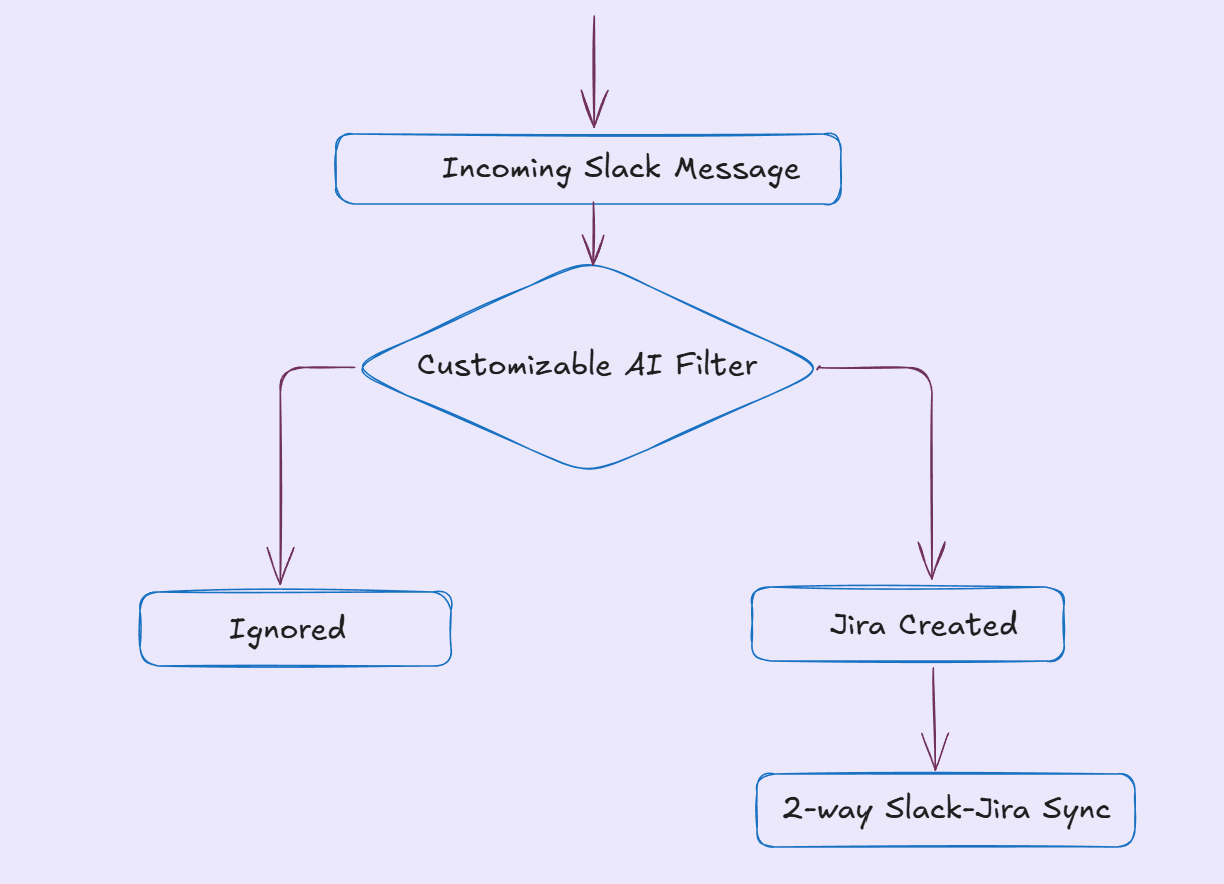
- Bidirectional Jira sync. When escalating to engineering, ClearFeed can file a Jira issue directly from the Slack thread. Replies, comments, and status changes sync both ways between Slack and Jira Cloud (Jira Software, Jira Service Management, and Jira Product Discovery). Self-hosted Jira Server and Data Center are not supported.
- AI drafts and knowledge lookup during triage. Agent Assistant drafts responses from your connected Knowledge Sources inside the triage channel so a responder can review and post; Virtual Agent replies directly in the request channel when the answer is a good fit. Interactive Agent Mode is available for Slack and Web Chat collections.
- Follow-through the team forgets. ClearFeed detects commitments in responder messages ("I'll check with the team and let you know") and queues a Slack reminder for the implied time, or 24 hours if no timeframe is stated — so pending updates surface even when the responder moves on.
- Post-incident analytics. The Insights dashboard reports First Response Time, Resolution Time, and SLA breach rate, with breakdowns by assignee, collection, priority, and custom field. The Insights Agent (currently in beta) answers questions like "what was our median first response time last week?" in natural language, using the same read-only data.
None of this replaces the matrix on the wiki — it just makes each row of the matrix executable inside the channel where the incident actually plays out.
Taking the First Step Toward Better Problem Solving
If you want to improve how your team handles outages, an incident escalation matrix is a great place to start. You don’t need a perfect system on day one. You need something clear enough that a tired human can follow it under pressure.
Start simple:
- Define 3 to 5 incident management severity levels, each with one crisp example. If two people would label the same incident differently, tighten the definition until they wouldn’t.
- Set the escalation tiers and owners. For each severity level, document the primary responder, backup, and decision-maker. This turns your incident escalation process into a predictable path instead of a scramble.
- Add time windows and escalation triggers. “No acknowledgment in X minutes” and “not mitigated in Y minutes” are usually enough to prevent silent stalls, especially after hours.
- Make communication part of the system. Pair the matrix with an incident communication plan, and keep it lightweight: who posts updates, where, and how often. If it helps, express it as an incident-response communication matrix so stakeholders aren’t left guessing what “good updates” look like.
- Run one tabletop scenario. You’ll find gaps immediately. Fix them, publish the updated matrix, and then keep refining after real incidents. Even a basic escalation matrix gets powerful when it evolves.
If your incidents already play out in Slack or Teams and you want the matrix to feel less like a document and more like a workflow, tools like ClearFeed can help operationalize escalation steps within the workspace while keeping systems of record in sync.
If your incidents already play out in Slack or Microsoft Teams, talk to ClearFeed about turning the rows of your matrix into workflows that live in the same channel your responders already use — with rotation-aware routing, SLA-driven reminders, bidirectional Jira sync, PagerDuty paging, and Insights reports to close the loop after every incident.
Frequently Asked Questions
What Does Escalation Protocol Mean?
An escalation protocol is the agreed set of rules for how escalation is executed in the moment. Not just “who to contact,” but how you escalate: what triggers it, who has decision rights at each stage, what information must be included, which channel to use, how handoffs happen, and how quickly each step needs to move. If your matrix is the map, the protocol is the set of driving rules that prevent people from improvising under stress.
What Does Escalation Procedure Mean, and How Is It Different From an Escalation Policy?
An escalation procedure is the step-by-step “do this, then that” playbook. It’s operational: acknowledge, classify, engage on-call, create the incident record, start the war room, notify stakeholders, escalate if no progress, and so on.
An escalation policy is higher-level and more durable. It defines the boundaries and principles: what “severity” means in your org, who is authorized to page leadership, what counts as after-hours escalation, what your response-time expectations are, and what must happen for regulated or security-sensitive incidents. Policies define intent and guardrails. Procedures define execution.
How Does Escalation Work in ITIL Incident Management vs Modern Incident Response?
In ITIL incident management, escalation is typically formalized around two tracks:
- Functional escalation: moving the incident to a more specialized support group (e.g., from a service desk to a resolver group).
- Hierarchical escalation: moving it up the management chain when authority, prioritization, or exceptional coordination is required.
It’s often process-heavy by design, with well-defined tiers, SLAs, and a strong “service desk as the front door” model.
Modern incident response (especially SRE/DevOps and chat-first operations) keeps the spirit but changes the mechanics. Escalation is faster, more dynamic, and often happens in real time inside a shared workspace. You’ll see an incident commander role, on-call rotations, automated paging, runbooks, rapid context sharing, and tighter coupling between detection, coordination, and resolution. The emphasis shifts from rigid handoffs to speed, clarity of ownership, and continuous learning.
How Should a Matrix Represent Escalation Levels (L1/L2, etc.)?
Make escalation levels explicit as “tiers of responsibility,” not job titles. A clean approach is:
- Define what L1, L2, and L3 mean in your context (first response, specialist triage, deep engineering, leadership).
- For each severity, specify the owner for each level (primary and backup), plus what “done” means at that level (acknowledged, mitigated, resolved, communicated).
- Include the time windows that move an incident from one level to the next.
If you want it to work in real life, avoid “L2 is John.” Instead, use roles or rotations: “Database on-call,” “Platform lead,” “Incident commander,” “Duty manager.”
When Should Command Be Escalated to the Next Level?
Escalate command (not just tasks) when the incident needs a different kind of leadership, not merely more hands. Common triggers:
- Impact expands: more users affected, core workflows down, data risk, security exposure.
- Coordination complexity rises: multiple teams, unclear ownership, conflicting priorities.
- Time-to-mitigate is slipping: no acknowledgment, no progress, repeated stalls against your time triggers.
- Authority is needed: to approve rollbacks, customer comms, spend, vendor escalation, or to reprioritize work across teams.
- External pressure increases: major customer escalation, public status impact, and regulatory reporting.
The practical rule: if the current lead can’t move the situation forward because they lack scope, authority, or bandwidth, the “command” should move up even if technical work continues in parallel.